Customer Ratings & Reviews





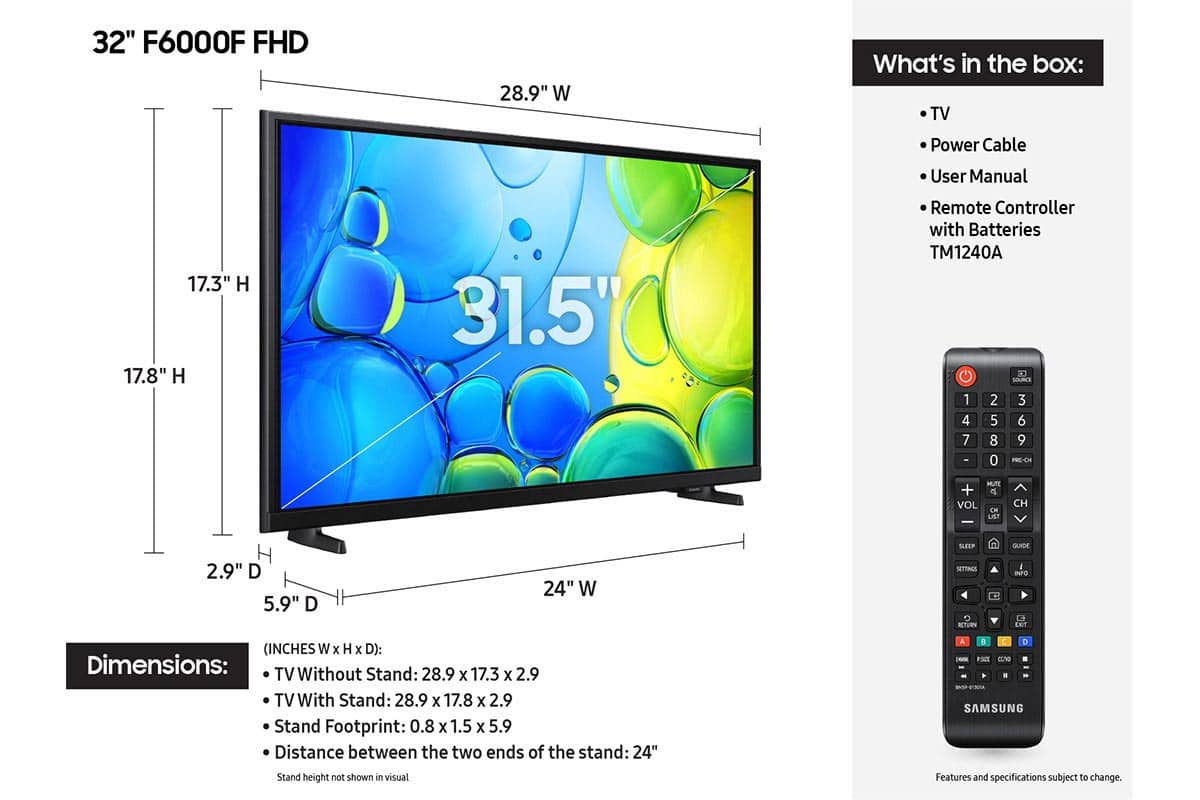






- Model:
- UN32F6000FFXZA
- SKU:
- 10187608
Rating by feature
- Picture Quality
Rating 4.8 out of 5 stars
- Sound Quality
Rating 4.5 out of 5 stars
- Brightness
Rating 4.8 out of 5 stars
Customers are saying
Customers have good things to say about the product's excellent picture quality, ease of setup, and convenient size. Its lightweight design is also appreciated by users. However, some customers have noted concerns regarding the TV's responsiveness, processor speed, and overall smart functionality, with apps occasionally freezing.
This summary was generated by AI based on customer reviews.
- Cons mentioned:Processor speed
Do not recommend. Slow TV
||Posted .This reviewer received promo considerations or sweepstakes entry for writing a review.The TV is very slow, processing-wise. It is slower than my same samsung TV from 3 years ago. Some of the apps would take 2 mins to load up and some would just crash without loading. do not recommend.
No, I would not recommend this to a friendBrand response from Samsung
Posted .Spencer,
We appreciate your feedback regarding response time. For optimal performance, please ensure your TV is running the latest firmware. You can check this by going to: Home > left directional key > Settings > Support > Software Update
To further optimize performance, try running Device Care, which checks memory, clears unused cached data, and closes background apps: Home > left directional key > Settings > Support > Device Care > Start Device Care
If issues continue, please reach Samsung Support at 1-800-SAMSUNG, available 8AM – 12AM EST, 7 days a week.
LiveChat is also available via the ‘Support’ link on our website.
~ Samsung Specialist
32 ‘ sam
||Posted .This reviewer received promo considerations or sweepstakes entry for writing a review.Great unit I like the fast pace to stream and connection to stream outlets
I would recommend this to a friendGreat tv
||Posted .This reviewer received promo considerations or sweepstakes entry for writing a review.Great. Best one I ever had and would highly recommend
I would recommend this to a friendGreat picture and good antenna for Wi-Fi signal.
||Posted . Owned for 1 month when reviewed.This reviewer received promo considerations or sweepstakes entry for writing a review.I purchased this for a replacement in our camper, it works very well and is easy to connect to a Wi-Fi signal. I am happy with my purchase.
I would recommend this to a friend- Cons mentioned:Responsiveness
Unacceptably Slow
||Posted . Owned for 1 week when reviewed.This reviewer received promo considerations or sweepstakes entry for writing a review.Waste of money and time. It’s going back to Best Buy. 2025 model, and the interface is painfully slow. It lags on every function and in every App. Really disappointed with Best Buy on this one - I specifically asked for a 32 inch tv with a quick interface and this is what the assocoate suggested, saying it was “snappy.” It was a small purchase so I didn’t research, but learned my lesson. First time Best Buy has steered me wrong in 20 years, will be more careful on next purchase.
No, I would not recommend this to a friendBrand response from Samsung
Posted .Hi Chris,
We appreciate your feedback regarding response time. For optimal performance, please ensure your F6000F TV is running the latest firmware. You can check this by going to: Home > left directional key > Settings > Support > Software Update
To further optimize performance, try running Device Care, which checks memory, clears unused cached data, and closes background apps: Home > left directional key > Settings > Support > Device Care > Start Device Care
If issues continue, please reach Samsung Support at 1-800-SAMSUNG, available 8AM – 12AM EST, 7 days a week.
LiveChat is also available via the ‘Support’ link on our website.
~ Samsung Advisor
Solid unit for a low price
||Posted . Owned for 1 week when reviewed.This reviewer received promo considerations or sweepstakes entry for writing a review.Does exactly what I needed for an outdoor TV. Can't expect the best picture quality at this price point.
I would recommend this to a friendTv review
||Posted . Owned for 2 weeks when reviewed.This reviewer received promo considerations or sweepstakes entry for writing a review.Bought for RV application. Connected to my samsung phone everything is great
I would recommend this to a friendPicture Quality
||Posted .This reviewer received promo considerations or sweepstakes entry for writing a review.It worked fine for a while, then picture became fuzzy. Called Samsung they reset the TV and it is fine till now.
I would recommend this to a friendBrand response from Samsung
Posted .Hi JyotiP,
We’re sorry to hear you’re experiencing issues with a distorted picture on your Samsung F600F TV. In some cases, compression in video content - particularly during fast-moving scenes in sports or action films - can result in visible distortions. To help resolve this, we suggest checking a few key connection points:
1. Power cycle your TV and cables: Unplug and reconnect the power and HDMI cables from both the TV and any connected devices, then plug the TV back into the wall outlet.
2. If using an external device (like a Blu-ray player or streaming box), make sure it supports UHD video and is connected with a certified 4K HDMI cable. For set-top boxes, double-check the appropriate cable connections.
3. Check your internet connection if streaming content. Weak or unstable signals may result in screen distortion. Try rebooting your router and ensure the TV is receiving a strong Wi-Fi or LAN connection.
4. If issues persist, review the video output settings on your external device and ensure they match a resolution and format supported by your TV.
We hope these steps help correct the issue. If you need further assistance, please don’t hesitate to reach out to Samsung Customer Support at 1-800-SAMSUNG (available daily from 8 AM to 12 AM EST) or connect with us via live chat at Samsung Support: https://www.samsung.com/us/support/contact/
~ Samsung Advisor
Great Gift
||Posted . Owned for 5 months when reviewed.This reviewer received promo considerations or sweepstakes entry for writing a review.It's a gift for my wife room and she been enjoying it
I would recommend this to a friendGREAT TV
||Posted .This reviewer received promo considerations or sweepstakes entry for writing a review.Great TV for its value. Loaded with Samsung TV Plus offering hundreds of great movies and other great features.
I would recommend this to a friendTV keep getting SMARTer
||Posted . Owned for 1 week when reviewed.This reviewer received promo considerations or sweepstakes entry for writing a review.Every you'd expect in a smart tv. Was a little complicated to set up the Spectrum app.
I would recommend this to a friendGreat gift
||Posted . Owned for 2 weeks when reviewed.This reviewer received promo considerations or sweepstakes entry for writing a review.I bought this for my niece as a gift. and she loves it.
I would recommend this to a friendNice low profile
||Posted .This reviewer received promo considerations or sweepstakes entry for writing a review.TV size was great with low profile to fit under a cabinet. Four stars because it takes a while for the Spectrum cable app to turn on.
I would recommend this to a friend- Cons mentioned:Responsiveness
WORST TV EVER!
||Posted .This reviewer received promo considerations or sweepstakes entry for writing a review.Don't even consider this piece of junk. This is the absolute worst TV I have ever owned. The Samsung interface is incredibly slow - push a button and wait 5 minutes for the TV to do something. The TV bombards you with ads for Samsung TV Plus WHILE you are trying to watch a program. So frustrating. I am so angry that I wasted my money on this junk.
No, I would not recommend this to a friendBrand response from Samsung
Posted .Hi ThomasM,
We appreciate your feedback regarding response time. For optimal performance, please ensure your F6000F TV is running the latest firmware. You can check this by going to: Home > left directional key > Settings > Support > Software Update
To further optimize performance, try running Device Care, which checks memory, clears unused cached data, and closes background apps: Home > left directional key > Settings > Support > Device Care > Start Device Care
If issues continue, please reach Samsung Support at 1-800-SAMSUNG, available 8AM – 12AM EST, 7 days a week.
LiveChat is also available via the ‘Support’ link on our website.
~Samsung Advisor
Value
||Posted .This reviewer received promo considerations or sweepstakes entry for writing a review.Outstanding value, perfect price....well worth buying.
I would recommend this to a friend32” Samsung TV
||Posted . Owned for 1 week when reviewed.This reviewer received promo considerations or sweepstakes entry for writing a review.This is my third open box Samsung TV. It’s a great TV for a guest bedroom. The picture resolution is absolutely amazing. Best Buy claims that the TV works like new and it has been tested and reset to factory settings by Geek Squad. But in reality, it was not reset. When I plugged in, it had all the apps. Even the previous owner’s account was active. I couldn’t reset the TV to factory settings because the PIN was changed by the previous owner. I managed to reset the PIN by going on the Internet. But, its a great TV for fraction of a price.
I would recommend this to a friendBrand response from Samsung
Posted .Vallu,
It appears your 2-star review for the Samsung F6000F TV is based on your experience with Best Buy, and we’re sorry to hear that. We recommend contacting the store directly to share your feedback.
If you need help with the TV itself, Samsung Support is available at 1-800-SAMSUNG, 8AM – 12AM EST, 7 days a week, or via LiveChat under the ‘Support’ section of our website.
~ Samsung Specialist
- Pros mentioned:Picture quality
My First Smart TV is Very Slow
||Posted .This reviewer received promo considerations or sweepstakes entry for writing a review.The picture is great. Moving in and out of apps takes a good amount of time. It goes on and off when I use my Chrome cast remote to turn a tv on or off. This tv is in a different room.
No, I would not recommend this to a friendBrand response from Samsung
Posted .Hi KyKiddTraveler,
We appreciate your feedback regarding response time. For optimal performance, please ensure your F6000F TV is running the latest firmware. You can check this by going to: Home > left directional key > Settings > Support > Software Update.
To further optimize performance, try running Device Care, which checks memory, clears unused cached data, and closes background apps: Home > left directional key > Settings > Support > Device Care > Start Device Care
If issues continue, please reach Samsung Support at 1-800-SAMSUNG, available 8AM – 12AM EST, 7 days a week.
LiveChat is also available via the ‘Support’ link on our website.
~ Samsung Advisor
Samsung tv
||Posted . Owned for 1 month when reviewed.This reviewer received promo considerations or sweepstakes entry for writing a review.Had to get my son to set it up. On occasion I am still having trouble my self.
I would recommend this to a friendMediocre Samsung tv
||Posted . Owned for 1 month when reviewed.This reviewer received promo considerations or sweepstakes entry for writing a review.This Samsung tv is slow to react to the remote. It’s slow to load, slow to mute, and more. We are not that excited about this purchase because of its slow reactions.
No, I would not recommend this to a friendBrand response from Samsung
Posted .Hi jenro89,
We appreciate your feedback regarding remote performance. If your F6000F TV is responding slowly or inconsistently to the remote, try the following steps:
1. Re-pair the remote – Stand within 1 foot of your TV and press Return and Play/Pause simultaneously for at least 5 seconds. A message should appear confirming it's connected.
2. Change the batteries
3. Update your TV’s firmware – Go to: Settings > Support > Software Update > Update Now
4. Run Device Care to clear memory and close background apps that may slow performance: Settings > Support > Device Care > Start Device Care
5. Wipe off the IR sensor on the remote.
If these steps don’t resolve the issue, please contact Samsung Support at 1-800-SAMSUNG, 8AM – 12AM EST, 7 days a week. LiveChat is also available through the ‘Support’ link on our website.
~ Samsung Advisor
Samsung TV
||Posted .This reviewer received promo considerations or sweepstakes entry for writing a review.Great tv for the price and great picture clarity. Would recommend to friends.
I would recommend this to a friend