Customer Ratings & Reviews





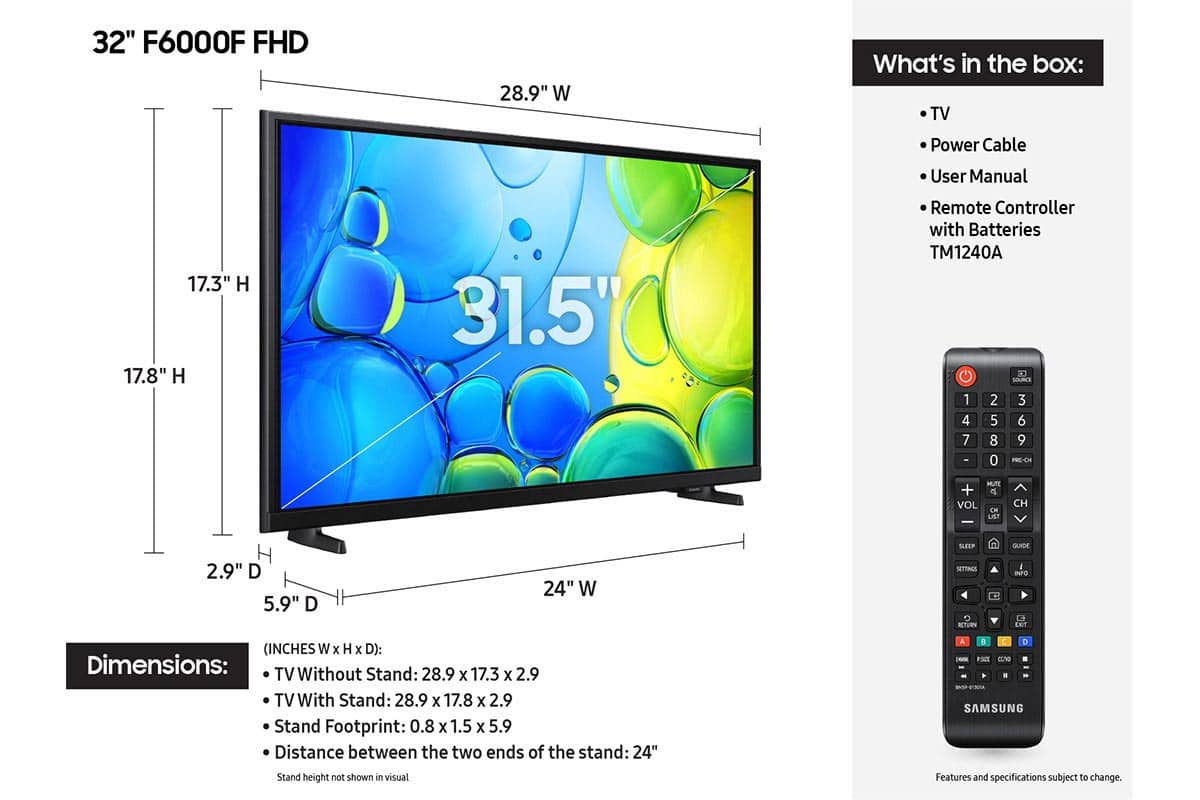






- Model:
- UN32F6000FFXZA
- SKU:
- 10187608
Rating by feature
- Picture Quality
Rating 4.8 out of 5 stars
- Sound Quality
Rating 4.5 out of 5 stars
- Brightness
Rating 4.8 out of 5 stars
Customers are saying
Customers have good things to say about the product's excellent picture quality, ease of setup, and convenient size. Its lightweight design is also appreciated by users. However, some customers have noted concerns regarding the TV's responsiveness, processor speed, and overall smart functionality, with apps occasionally freezing.
This summary was generated by AI based on customer reviews.
- Cons mentioned:Response time
Vaey bad TV
||Posted . Owned for 2 weeks when reviewed.This reviewer received promo considerations or sweepstakes entry for writing a review.This is a bad TV. The time it takes to respond to a remote control command is too long; more than 3 seconds. Also the sound is very annoying. The quality of the images is poor. I made a mistake purchasing this TV for the kitchen.=
No, I would not recommend this to a friendBrand response from Samsung
Posted .Hi CMLPXXIX,
Thank you for your feedback on the F6000F TV. We have a few recommendations that may improve your experience.
First, let's ensure you are running the latest Firmware Update. Go to Settings > Support > Software Update > Update Now.
Next, you may want to replace the batteries in your remote control and ensure nothing is blocking the IR sensor located below the Samsung Logo on the bottom of your TV and the remote control.
You can improve your viewing experience by switching to a softer picture mode: Settings > All Settings > Picture > Picture Mode – Try Movie or Filmmaker Mode for darker rooms.
For more control, adjust brightness, contrast, and sharpness under: Settings > All Settings > Picture > Expert Settings. You can also disable Contrast Enhancer for a softer image.
To improve your sound, try different Sound Modes (Standard, Optimized, Amplify), or fine-tune your setup in Expert Settings under: Settings > All Settings > Sound.
For further help adjusting your settings, feel free to reach Samsung Support at 1-800-SAMSUNG (8AM – 12AM EST, 7 days a week) or visit the Support link on our website.
~Samsung Advisor
Replacement TV for my son
||Posted . Owned for 1 month when reviewed.This reviewer received promo considerations or sweepstakes entry for writing a review.A replacement for my son, who accidentally damaged his other TV.
I would recommend this to a friendNot user friendly
||Posted . Owned for 1 month when reviewed.This reviewer received promo considerations or sweepstakes entry for writing a review.Home page apps are so small that you have to stand close to the tv to see. Remote is not user friendly. Will probably return for refund.
No, I would not recommend this to a friendBrand response from Samsung
Posted .LucyLoo,
Thank you for sharing your feedback with us. To help you get the most from your TV, you can download the full e-Manual and more by visiting Samsung’s website, then navigating to: Support > Manual & Software > TVs & Home Theater. From there, you can search for and select your TV model to view or download the available guides.
The e-Manual & User Guide are also conveniently built into your TV: Settings > Support > Tips and User Guides.
Your TV includes Learn Menu Screen, an accessibility feature that provides audio guidance for on-screen menus. When enabled, your TV will announce the name and function of each menu item as you scroll, without making any changes. This feature is particularly helpful for users who are visually impaired or new to Smart TV menus. To enable, go to: Settings > All Settings > General & Privacy > Accessibility > Learn Menu Screen. To exit, press the Return key twice.
If you’d like more assistance with this feature, please reach Samsung Support at 1-800-SAMSUNG, available 8AM – 12AM EST, 7 days a week. LiveChat agents are also available through the ‘Support’ link on our website.
~ Samsung Specialist
Samsung 32" TV
||Posted . Owned for 3 weeks when reviewed.This reviewer received promo considerations or sweepstakes entry for writing a review.I bought for Mother's Day for my mom. It's easy to use remote control, She loves it. Thank you and yes I would buy it again.
I would recommend this to a friendSamsung
||Posted . Owned for 3 weeks when reviewed.This reviewer received promo considerations or sweepstakes entry for writing a review.Love Samsung and the ability to transfer information between devices from my phone
I would recommend this to a friendNice extra TV
||Posted .This reviewer received promo considerations or sweepstakes entry for writing a review.Perfect TV for my kitchen. Also does not draw too much power from battery generator in a power outage.
I would recommend this to a friendAwesome smart TV
||Posted .This reviewer received promo considerations or sweepstakes entry for writing a review.Awesome tv for an extra in the basement. Fast processing and does what it says.
I would recommend this to a friendSamsung 32" F6000F
||Posted . Owned for 2 weeks when reviewed.This reviewer received promo considerations or sweepstakes entry for writing a review.It took a long time to get assistance. the salesman would not let me see the television or the remote. I was told I can only see it after I buy it. I purchased the 32" Samsung television, I am not satisfied with the television, sometimes it picks up the channels and sometimes it doesn't.this model will loose channels while watching a show,then unable to pick that channel up.the remote is set up to where you have to do multiple functions to get a channel. I would like a television that has a channel when I turn it on. now I have to bring it back . This could have been avoided if I saw the television in the store.
No, I would not recommend this to a friendBrand response from Samsung
Posted .Hi VincentS,
We appreciate your feedback and are sorry to hear that you are not satisfied with your purchase. If you have issues with your antenna, please try the following:
Check signal strength (for antenna users). If you're using an antenna, go to: Settings > Support > Device Care > Self Diagnosis > Broadcast Signal. Here you can view signal strength and adjust the antenna position if needed for better reception.
Run Auto Program (if not using a cable box). If your TV is connected directly to a wall cable outlet or antenna, try running Auto Program to scan for available channels: Settings > All Settings > Broadcasting > Auto Program
If you still need help, please call Samsung Support at 1-800-SAMSUNG (8AM - 12AM EST, 7 days a week). Our LiveChat agents are also available through the Support link on our website.
~Samsung Advisor
Lame for streaming
||Posted . Owned for 1 month when reviewed.This reviewer received promo considerations or sweepstakes entry for writing a review.I purchased this TV for a guest room and it and it is extremely underresourced. I understand it's a lower end modelv but it freezes quite often and doesn't seem to have enough memory to display the streaming apps. I would not recommend this TV.
No, I would not recommend this to a friendBrand response from Samsung
Posted .Hi Tk421,
We appreciate your feedback regarding response time. For optimal performance, please ensure your F6000F TV is running the latest firmware. You can check this by going to: Home > left directional key > Settings > Support > Software Update
To further optimize performance, try running Device Care, which checks memory, clears unused cached data, and closes background apps: Home > left directional key > Settings > Support > Device Care > Start Device Care
If issues continue, please reach Samsung Support at 1-800-SAMSUNG, available 8AM – 9PM EST Mon – Fri, 8AM – 6PM Sat – Sun. LiveChat is also available via the ‘Support’ link on our website.
~ Samsung Advisor
- Cons mentioned:Processor speed
Terrible. No price is worth this dinosaur.
||Posted . Owned for 1 month when reviewed.This reviewer received promo considerations or sweepstakes entry for writing a review.If you are old enough think about the old dial-up 14.4 internet connections … that’s about the speed of the processor in this thing. Buy it at your own risk…
No, I would not recommend this to a friendBrand response from Samsung
Posted .Hi STEVE,
We appreciate your feedback regarding response time. For optimal performance, please ensure your F6000F TV is running the latest firmware. You can check this by going to: Home > left directional key > Settings > Support > Software Update
To further optimize performance, try running Device Care, which checks memory, clears unused cached data, and closes background apps: Home > left directional key > Settings > Support > Device Care > Start Device Care
If issues continue, please reach Samsung Support at 1-800-SAMSUNG, available 8AM – 9PM EST Mon – Fri, 8AM – 6PM Sat – Sun. LiveChat is also available via the ‘Support’ link on our website.
~ Samsung Advisor
Good business
||Posted . Owned for 3 weeks when reviewed.This reviewer received promo considerations or sweepstakes entry for writing a review.I was in and of the store in less than 30 minutes satisfied with my purchase.
I would recommend this to a friendPerfect for bedroom
||Posted . Owned for 3 weeks when reviewed.This reviewer received promo considerations or sweepstakes entry for writing a review.Upgraded previous model from 2018, much better internet connectivity in this model
I would recommend this to a friendgreat TV
||Posted .This reviewer received promo considerations or sweepstakes entry for writing a review.easy to install. resolution is great Great TV fits into space wonderfully
I would recommend this to a friendVery Happy
||Posted .This reviewer received promo considerations or sweepstakes entry for writing a review.It's a great tv. We love all of the Samsung Channels too
I would recommend this to a friendGood little TV.
||Posted .This reviewer received promo considerations or sweepstakes entry for writing a review.Purchased for our RV, we use it to connect to Starlink…streaming works extremely well.
I would recommend this to a friend- Pros mentioned:Picture quality
Very poor TV
||Posted . Owned for 1 month when reviewed.This reviewer received promo considerations or sweepstakes entry for writing a review.While the picture is very clear, the settings options are extremely poor. It is very demeaning and seems to be set up for "ignorant" users. The updates are not available, It seems like these large companies are only interested in money. Look for another alternative!
No, I would not recommend this to a friendBrand response from Samsung
Posted .Hi Lulu,
Thank you for your feedback. If there are updates available, you will see them by going to Settings> Support> Software Update.
If you have any questions or need help customizing your TV, please do not hesitate to contact us at 1-800-SAMSUNG, 8AM – 12AM EST, 7 days a week. LiveChat is also available through the ‘Support’ link on our website.
~ Samsung Advisor
Open box shipping beware
||Posted . Owned for 3 weeks when reviewed.This reviewer received promo considerations or sweepstakes entry for writing a review.My review has nothing to do with the product. Bought open box and received tv broken from shipping. Best buy made it right.
I would recommend this to a friendBrand response from Samsung
Posted .Hi JeroB,
We appreciate your purchase and feedback on your open-box experience. If you ever have questions or need support, we’re here to help. Call us at 1-800-SAMSUNG, available from 8AM - 12AM EST, seven days a week. You can also connect with a LiveChat agent by clicking the ‘Support’ link on our website.
~ Samsung Advisor
32 " tv
||Posted . Owned for 3 weeks when reviewed.This reviewer received promo considerations or sweepstakes entry for writing a review.Very good quality. Easy to setup and install in my home office.
I would recommend this to a friendTv for the kitchen
||Posted .This reviewer received promo considerations or sweepstakes entry for writing a review.Very pleased with this product. Works perfectly in the space. Love the low profile on the wall.
I would recommend this to a friendGreat tv but no wall mount hardware
||Posted . Owned for 1 month when reviewed.This reviewer received promo considerations or sweepstakes entry for writing a review.Did not tell me I needed a separate wall mount kit
I would recommend this to a friend