Customer Ratings & Reviews





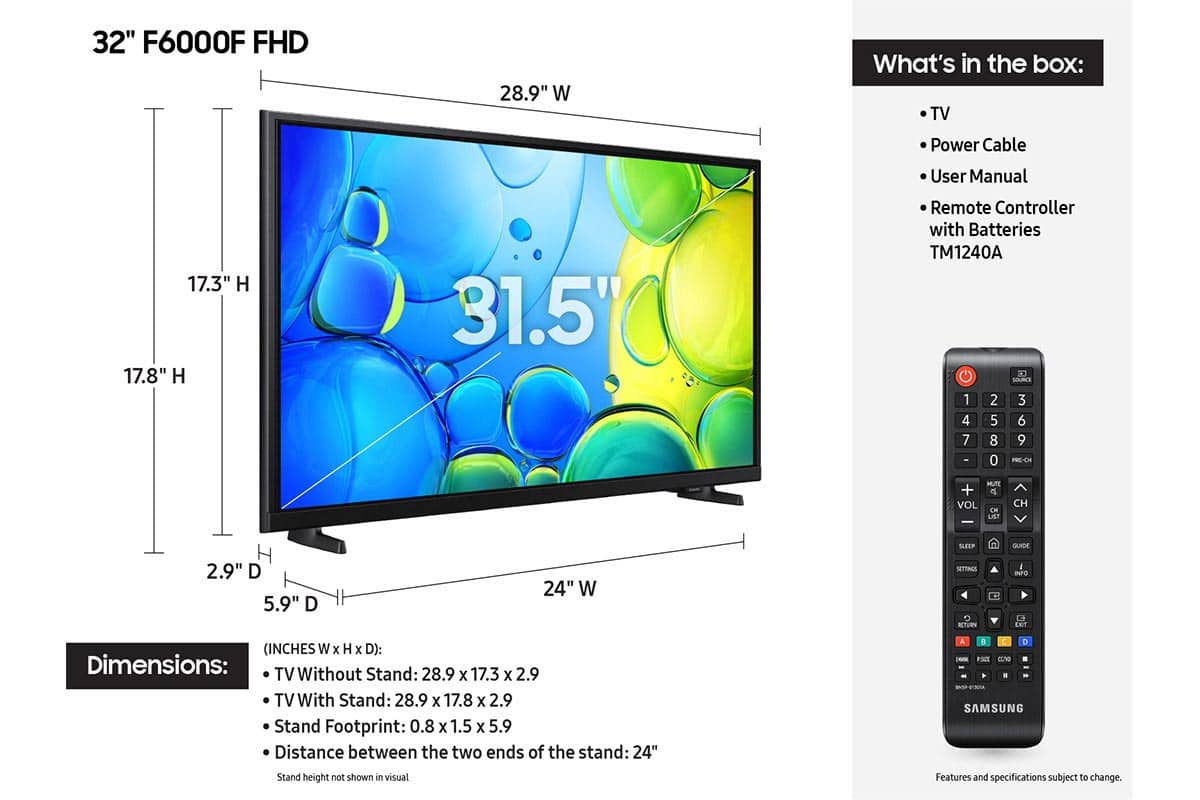






- Model:
- UN32F6000FFXZA
- |
- SKU:
- 10187608
Customer reviews
Rating 4.5 out of 5 stars with 783 reviews
(783 customer reviews)Rating by feature
- Picture Quality4.8
Rating 4.8 out of 5 stars
- Sound Quality4.5
Rating 4.5 out of 5 stars
- Brightness4.8
Rating 4.8 out of 5 stars
Customers are saying
Customers have good things to say about the product's excellent picture quality, ease of setup, and convenient size. Its lightweight design is also appreciated by users. However, some customers have noted concerns regarding the TV's responsiveness, processor speed, and overall smart functionality, with apps occasionally freezing.
This summary was generated by AI based on customer reviews.
- Pros mentioned:Picture quality, Size
Rated 5 out of 5 stars
Samsung 32" tv review
||Posted . Owned for 1 month when reviewed.This reviewer received promo considerations or sweepstakes entry for writing a review.Great little tv fit in corner perfectly. Picture is great. Paired with Samsung sound bar it works great. Easy set up.
This review is from Samsung - 32" Class F6000F Series LED Full HD Smart Tizen TV (2025)
I would recommend this to a friend - Pros mentioned:Picture qualityCons mentioned:Responsiveness
Rated 4 out of 5 stars
Great TV for a great price
||Posted .This reviewer received promo considerations or sweepstakes entry for writing a review.Great TV for a great price. The picture quality and sound are great. My ONLY issue is there is a lag from the remote button being pushed to the change happening on the TV. For example, when I try to switch apps, I move the cursor over and press enter, but there's a multi-second delay before it finally switches. For this reason, I wouldn't recommend this TV for gaming, but for regular use, I think it's fine.
This review is from Samsung - 32" Class F6000F Series LED Full HD Smart Tizen TV (2025)
I would recommend this to a friend - Pros mentioned:Picture qualityCons mentioned:Responsiveness
Rated 4 out of 5 stars
New TV for bedroom
||Posted . Owned for 3 weeks when reviewed.This reviewer received promo considerations or sweepstakes entry for writing a review.Very pleased with picture quality. It is a little slow to react at times, as noted by other reviews. Also, remote is disappointing - very small with no backlight option when it’s dark.
This review is from Samsung - 32" Class F6000F Series LED Full HD Smart Tizen TV (2025)
I would recommend this to a friend - Pros mentioned:Picture quality, Setup ease
Rated 5 out of 5 stars
Great TV
||Posted . Owned for 2 months when reviewed.This reviewer received promo considerations or sweepstakes entry for writing a review.Awesome tv works great for my kids room. Was easy to install
This review is from Samsung - 32" Class F6000F Series LED Full HD Smart Tizen TV (2025)
I would recommend this to a friend - Pros mentioned:Picture quality, Setup ease
Rated 5 out of 5 stars
Love it…
||Posted . Owned for 3 weeks when reviewed.This reviewer received promo considerations or sweepstakes entry for writing a review.Great little TV. Set-up was simple. Great color and sound.
This review is from Samsung - 32" Class F6000F Series LED Full HD Smart Tizen TV (2025)
I would recommend this to a friend - Pros mentioned:Picture quality, Setup ease
Rated 5 out of 5 stars
Samsung 32" TV
||Posted . Owned for 3 weeks when reviewed.This reviewer received promo considerations or sweepstakes entry for writing a review.Easy to install Great picture Everyone loves watching it.
This review is from Samsung - 32" Class F6000F Series LED Full HD Smart Tizen TV (2025)
I would recommend this to a friend - Pros mentioned:Picture quality
Rated 4 out of 5 stars
Great picture and interface
||Posted . Owned for 1 month when reviewed.This reviewer received promo considerations or sweepstakes entry for writing a review.I like the picture quality and the user interface, using it's remote control, operates smoothly with attached HDMI devices/components. I knocked one star because of the side viewing angle; it's more direct line-of-site... this TV is more suited for smaller rooms (must sit directly in front of the TV for best picture quality), the side viewing angle tends to get washed out.
This review is from Samsung - 32" Class F6000F Series LED Full HD Smart Tizen TV (2025)
I would recommend this to a friend - Pros mentioned:Picture quality, Setup ease
Rated 5 out of 5 stars
Samsung TV
||Posted .This reviewer received promo considerations or sweepstakes entry for writing a review.Great TV, I use it as my computer monitor. Easy set up and very clear picture, great deal for the price.
This review is from Samsung - 32" Class F6000F Series LED Full HD Smart Tizen TV (2025)
I would recommend this to a friend - Pros mentioned:Picture qualityCons mentioned:Responsiveness
Rated 4 out of 5 stars
Love the TV but not the remote.
||Posted .This reviewer received promo considerations or sweepstakes entry for writing a review.The picture quality is great, but the remote response time is extremely slow. I bought this for the garage gym so it’s not a dealbreaker, but I wouldn’t be able to deal if it was my primary TV.
This review is from Samsung - 32" Class F6000F Series LED Full HD Smart Tizen TV (2025)
I would recommend this to a friend - Pros mentioned:Picture quality
Rated 4 out of 5 stars
Nice picture on this TV
||Posted . Owned for 3 weeks when reviewed.This reviewer received promo considerations or sweepstakes entry for writing a review.I like my new Samsung TVs, mostly for the picture. My one complaint on this TV and many like it, is that the stand legs seem small for the size of the TV. Moving it a little makes me fear it will fall over.
This review is from Samsung - 32" Class F6000F Series LED Full HD Smart Tizen TV (2025)
I would recommend this to a friend - Pros mentioned:Size
Rated 5 out of 5 stars
Samsung 32 inch TB
||Posted . Owned for 1 month when reviewed.This reviewer received promo considerations or sweepstakes entry for writing a review.The 32” Samsung tv I bought I hung in my kitchen. While it was a 1040 pickle, the resolution is incredible. Additionally, it came with the streaming programs. The size is perfect interest kitchen, however, it is a good size for a small size bedroom. Also because it is a Samsung it is compatible with many other Internet applications. I paid a nominal $129 for the ultimate resolution. It was a very good buy.
This review is from Samsung - 32" Class F6000F Series LED Full HD Smart Tizen TV (2025)
I would recommend this to a friend - Pros mentioned:Picture quality, Size
Rated 5 out of 5 stars
Great options TV
||Posted . Owned for 3 weeks when reviewed.This reviewer received promo considerations or sweepstakes entry for writing a review.Perfect size TV, great picture and Internet, ready and good price.
This review is from Samsung - 32" Class F6000F Series LED Full HD Smart Tizen TV (2025)
I would recommend this to a friend - Pros mentioned:Picture quality, Setup ease
Rated 5 out of 5 stars
Grammys TV
||Posted . Owned for 1 month when reviewed.This reviewer received promo considerations or sweepstakes entry for writing a review.Extremely satisfied with this TV. The setup was easy and I was able to watch several channels that I am interested in. Great quality and I am glad I stayed with the Samsung brand
This review is from Samsung - 32" Class F6000F Series LED Full HD Smart Tizen TV (2025)
I would recommend this to a friend - Pros mentioned:Picture quality, Setup ease
Rated 5 out of 5 stars
Rick R
||Posted . Owned for 1 month when reviewed.This reviewer received promo considerations or sweepstakes entry for writing a review.Excellent picture and sound and so easy to set up. Also, a great Best Buy price.
This review is from Samsung - 32" Class F6000F Series LED Full HD Smart Tizen TV (2025)
I would recommend this to a friend - Pros mentioned:Picture quality
Rated 5 out of 5 stars
clear picture and channel tuner
||Posted . Owned for 2 weeks when reviewed.This reviewer received promo considerations or sweepstakes entry for writing a review.I was not expecting a clear and vivid picture at this price. It is great. Also, picking up more channels with the antenna. Wish I had bought this earlier. I like finding nice surprises in life.
This review is from Samsung - 32" Class F6000F Series LED Full HD Smart Tizen TV (2025)
I would recommend this to a friend - Pros mentioned:Size
Rated 5 out of 5 stars
Awesome
||Posted . Owned for 1 month when reviewed.This reviewer received promo considerations or sweepstakes entry for writing a review.Perfect size for RV easy to install on the extra Mount that I bought I really enjoy it thank youPerfect size for RV easy to install on the extra Mount that I bought I really enjoy it thank you
This review is from Samsung - 32" Class F6000F Series LED Full HD Smart Tizen TV (2025)
I would recommend this to a friend - Pros mentioned:Picture quality, Setup ease
Rated 5 out of 5 stars
Samsung
||Posted . Owned for 1 week when reviewed.This reviewer received promo considerations or sweepstakes entry for writing a review.Samsung tv was on time. It was good price on a budget. The picture quality is excellent. Tje brightness is also good quality. The volume is also excellent. Easy to set up.
This review is from Samsung - 32" Class F6000F Series LED Full HD Smart Tizen TV (2025)
I would recommend this to a friend - Pros mentioned:Setup ease, Size
Rated 5 out of 5 stars
Great tv for size and price!
||Posted . Owned for 1 month when reviewed.This reviewer received promo considerations or sweepstakes entry for writing a review.Really nice tv for the size and price! Really easy to move around as well nice n light!
This review is from Samsung - 32" Class F6000F Series LED Full HD Smart Tizen TV (2025)
I would recommend this to a friend - Pros mentioned:Picture quality
Rated 5 out of 5 stars
Great price for the TV
||Posted . Owned for 1 month when reviewed.This reviewer received promo considerations or sweepstakes entry for writing a review.Picture quality is great and fits perfect into cabnet, great for bedroom. Only thing if you download a app be sure to place on home screen because once you mis that you cant add later
This review is from Samsung - 32" Class F6000F Series LED Full HD Smart Tizen TV (2025)
I would recommend this to a friend - Pros mentioned:Picture quality, Setup ease
Rated 5 out of 5 stars
Great small TV
||Posted . Owned for 2 weeks when reviewed.This reviewer received promo considerations or sweepstakes entry for writing a review.Smart tv w great color and easy to set up and use. Perfect size for me.
This review is from Samsung - 32" Class F6000F Series LED Full HD Smart Tizen TV (2025)
I would recommend this to a friend