Customer Ratings & Reviews





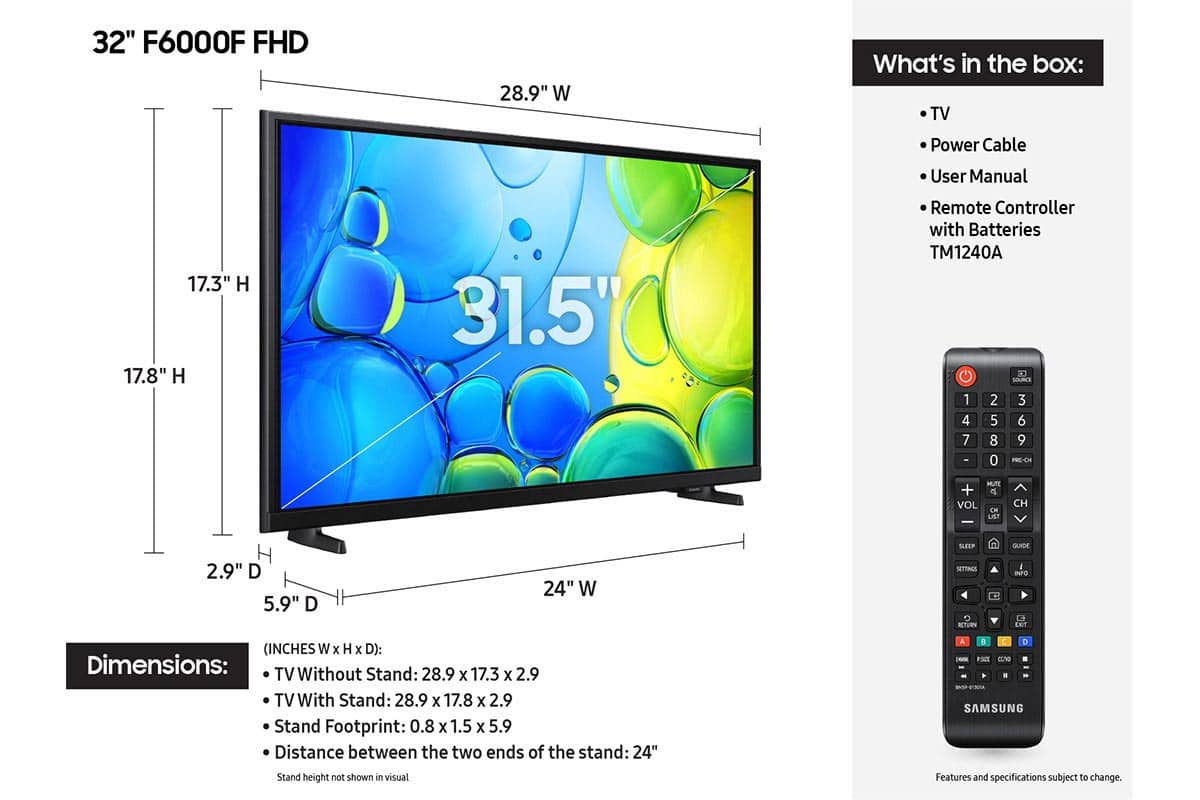






- Model:
- UN32F6000FFXZA
- SKU:
- 10214329
Rating by feature
- Picture Quality
Rating 4.8 out of 5 stars
- Sound Quality
Rating 4.5 out of 5 stars
- Brightness
Rating 4.8 out of 5 stars
Customers are saying
Customers are impressed with the excellent picture quality and the straightforward setup process of this product. Many users also appreciate its convenient size and lightweight design, which makes installation simple. However, some customers have noted concerns regarding the responsiveness of the remote and the overall speed of the processor. Additionally, a few users reported occasional difficulties with app performance and smart functionality.
This summary was generated by AI based on customer reviews.
- Pros mentioned:Picture quality, Size
Great Smart TV
||Posted . Owned for 3 weeks when reviewed.This reviewer received promo considerations or sweepstakes entry for writing a review.I am very happy with the size and quality. Plan on mounting it on my wall in the bedroom. Very reasonably priced.
I would recommend this to a friend - Pros mentioned:Setup ease
Pretty Good Lil TV
||Posted . Owned for 1 month when reviewed.This reviewer received promo considerations or sweepstakes entry for writing a review.Setup was easier if you already have a Samsung account. Some features I like, some I don't. Overall it's a good lil TV which I would buy again.
I would recommend this to a friend - Pros mentioned:Picture quality
Good service
||Posted . Owned for 1 month when reviewed.This reviewer received promo considerations or sweepstakes entry for writing a review.My searching for a TV couldn't had been from a better bestbuy store & Location. I had got the kindness help looked for when spending your money on anything, I got the support from the salesman. The sale person helped me chose my choice for my TV I purchased. So when you are looking & searching for a new T V this is th place to go & purchase your new TV.
I would recommend this to a friend - Pros mentioned:Setup ease
Ease of installing streaming channels
||Posted . Owned for 3 weeks when reviewed.This reviewer received promo considerations or sweepstakes entry for writing a review.Very easy to sign up for streaming channels. No excessive packing to deal with. Very happy with brand. Returned a Samsung for this Roku, and very happy that I did. Very easy.
I would recommend this to a friend - Pros mentioned:Picture quality, Setup ease
Great kitchen TV
||Posted . Owned for 1 month when reviewed.This reviewer received promo considerations or sweepstakes entry for writing a review.We got this tv for our kitchen. It works great and is movable.
I would recommend this to a friend - Pros mentioned:Picture quality
Great TV
||Posted . Owned for 1 month when reviewed.This reviewer received promo considerations or sweepstakes entry for writing a review.Perfect size for the bedroom, easy to set up and picture quality is great.
I would recommend this to a friend - Pros mentioned:Picture quality
Excellent
||Posted . Owned for 1 month when reviewed.This reviewer received promo considerations or sweepstakes entry for writing a review.Great value and perfect picture! I am going to put them in the rest of my house!
I would recommend this to a friend - Pros mentioned:Picture quality, Weight
Light and good picture
||Posted .This reviewer received promo considerations or sweepstakes entry for writing a review.Needed a solid TV for a smaller space, this one is light and has a good picture
I would recommend this to a friend - Pros mentioned:Picture quality, Weight
Samsung 32" Class F6000F Series
||Posted .This reviewer received promo considerations or sweepstakes entry for writing a review.Tv works great. Super lightweight so I can take it from room to room with me.
I would recommend this to a friend - Cons mentioned:Processor speed
Loading speed is slow, older Samsung is faster
||Posted . Owned for 1 month when reviewed.This reviewer received promo considerations or sweepstakes entry for writing a review.I like the tv for its bluetooth usage so I can connect my headphones but thats about it. It takes two times to connect anything: SmartThingsApp, Airplay, even on a Samsung phone it takes two times which is super dumb. How is it that my M4500 (older Samsung) doesnt have bluetooth and isnt even hardwired in to my router yet is still faster than this tv? And I dont mean buffering wise with tv shows. I mean loading wise. Why does it take 5 whole seconds for the tv to register that I clicked Hulu?
No, I would not recommend this to a friendBrand response from Samsung
Posted .Hi AYILAR,
We appreciate your feedback regarding response time. For optimal performance, please ensure your TV is running the latest firmware. You can check this by going to: Home > left directional key > Settings > Support > Software Update
To further optimize performance, try running Device Care, which checks memory, clears unused cached data, and closes background apps: Home > left directional key > Settings > Support > Device Care > Start Device Care
If issues continue, please reach Samsung Support at 1-800-SAMSUNG (8AM – 9PM EST Mon – Fri, 8AM – 6PM Sat – Sun). LiveChat is also available via the ‘Support’ link on our website.
~Samsung Advisor
- Pros mentioned:Picture quality, Setup ease
Great TV
||Posted .This reviewer received promo considerations or sweepstakes entry for writing a review.Great picture, easy to setup. Love the additional Samsung channels.
I would recommend this to a friend - Pros mentioned:Picture quality
Great picture
||Posted . Owned for 3 weeks when reviewed.This reviewer received promo considerations or sweepstakes entry for writing a review.The Samsung - 32 inch TV has a great picture and is easy to set up.
I would recommend this to a friend - Pros mentioned:Picture quality, Size
Great tv
||Posted .This reviewer received promo considerations or sweepstakes entry for writing a review.The tv was just the right size (midium) that we were looking for.the picture is a good and has great sound.
I would recommend this to a friend - Pros mentioned:Picture quality, Setup ease
Electronically Challenged
||Posted . Owned for 3 weeks when reviewed.This reviewer received promo considerations or sweepstakes entry for writing a review.TV is easy to use and has easy setup. Works great!
I would recommend this to a friend - Pros mentioned:Picture quality
Samsung tv
||Posted . Owned for 5 months when reviewed.This reviewer received promo considerations or sweepstakes entry for writing a review.The Samsung tv is great plenty of channels to watch. You don't need cable,Samsung plus provides entertainment to fit your needs. Clarity and color is phenomenal.
I would recommend this to a friend - Pros mentioned:Picture quality
Really nice TV at a really low price
||Posted .This reviewer received promo considerations or sweepstakes entry for writing a review.I really like this TV. It has a bright clear picture and almost all streaming apps. I got a digital antenna so I can watch my favorite TV shows. I would recommend it to anyone.
I would recommend this to a friend - Pros mentioned:Picture quality, Setup ease
Patricia
||Posted .This reviewer received promo considerations or sweepstakes entry for writing a review.Nice tv, easy to set-up. I only have it on a indoor antenna and wifi and the quality is still good.
I would recommend this to a friend - Pros mentioned:Picture quality
Good size for small room
||Posted . Owned for 3 weeks when reviewed.This reviewer received promo considerations or sweepstakes entry for writing a review.Good picture good price. Perfect for our small guest bedroom.
I would recommend this to a friend - Pros mentioned:Setup ease
Worth the price
||Posted . Owned for 2 weeks when reviewed.This reviewer received promo considerations or sweepstakes entry for writing a review.Not a bad tv. It is a bit slow, but not like some of the exaggerated reviews i read. Easy setup, but i recommend a magnetic screw driver to make installation of the stand/feet easier.
I would recommend this to a friend - Pros mentioned:Picture quality
Great set for office
||Posted . Owned for 1 month when reviewed.This reviewer received promo considerations or sweepstakes entry for writing a review.Sharp screen, user friendly remote. Right size for desk in office.
I would recommend this to a friend