Customer Ratings & Reviews





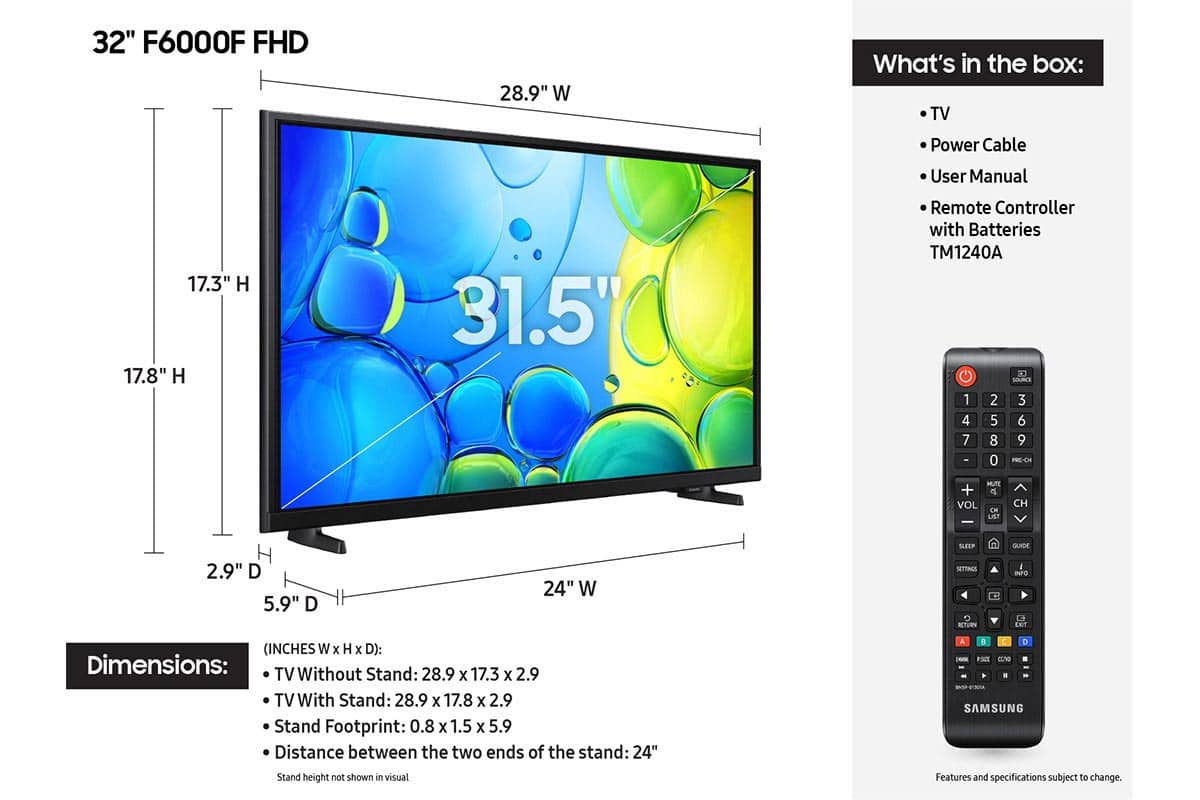






- Model:
- UN32F6000FFXZA
- SKU:
- 10214329
Rating by feature
- Picture Quality
Rating 4.8 out of 5 stars
- Sound Quality
Rating 4.5 out of 5 stars
- Brightness
Rating 4.8 out of 5 stars
Customers are saying
Customers are impressed with the excellent picture quality and the straightforward setup process of this product. Many users also appreciate its convenient size and lightweight design, which makes installation simple. However, some customers have noted concerns regarding the responsiveness of the remote and the overall speed of the processor. Additionally, a few users reported occasional difficulties with app performance and smart functionality.
This summary was generated by AI based on customer reviews.
- Pros mentioned:Picture quality, Setup ease
GOOD TV
||Posted .This reviewer received promo considerations or sweepstakes entry for writing a review.GOOD TV WORKS GREAT GREAT PIC WOULD BUY AGAIN EASY TO USE
I would recommend this to a friend - Pros mentioned:Picture qualityCons mentioned:App performance
Good TV at the right price
||Posted . Owned for 1 month when reviewed.This reviewer received promo considerations or sweepstakes entry for writing a review.Picture looks good but streaming isn't the best. Several apps freeze and close. I would recommend it if you get it at a good price. Mine was free with the purchase of a big screen TV.
I would recommend this to a friendBrand response from Samsung
Posted .Hi DanielK,
Thank you for your feedback regarding your F6000F TV’s response time. To help ensure optimal performance, please try the following steps:
1. Check for firmware updates – An outdated version can affect overall performance: Home > left directional key > Settings > Support > Software Update > Update Now
2. Run Device Care – This tool clears unused cached memory and closes background apps: Home > left directional key > Settings > Support > Device Care > Start Device Care
3. Cold boot your TV – With the TV on, press and hold the Power button on your remote for about 5 seconds until the TV turns off and back on. This refreshes the system.
4. Power cycle the TV and any connected external devices – Unplug them from the power outlet, wait 30 seconds, then plug them back in.
These steps often resolve issues with lag, freezing, or slow app performance. If the issue continues, please contact Samsung Support at 1-800-SAMSUNG, 8AM – 12AM EST, 7 days a week. LiveChat agents are also available through the ‘Support’ link on our website.
~ Samsung Advisor
- Cons mentioned:App performance
Set up easy
||Posted . Owned for 3 weeks when reviewed.This reviewer received promo considerations or sweepstakes entry for writing a review.but unable to add HBO to the home app listing, looked online, installed app but unable to find
I would recommend this to a friend - Pros mentioned:Picture quality
Nice TV
||Posted . Owned for 2 weeks when reviewed.This reviewer received promo considerations or sweepstakes entry for writing a review.Right size for bedroom and the picture is great. Only thing I don't like is the way the remote is set up. It needs to have more spacing between the buttons. Other than that, I'm pleased with it.
I would recommend this to a friend - Pros mentioned:Picture quality
Samsung 32 in 1080 p
||Posted . Owned for 3 weeks when reviewed.This reviewer received promo considerations or sweepstakes entry for writing a review.Great picture and loaded with apps. Definitely a smart tv. A great purchase
I would recommend this to a friend - Pros mentioned:Picture quality
Great TV for Price
||Posted . Owned for 3 months when reviewed.This reviewer received promo considerations or sweepstakes entry for writing a review.We like our Samsung 32" LED Smart TV. This is the first new TV that we have had in 23 years. The bigger screen and improved picture is great. Great for older eyes.
I would recommend this to a friend - Pros mentioned:Picture quality, Setup ease
Samsung
||Posted . Owned for 3 weeks when reviewed.This reviewer received promo considerations or sweepstakes entry for writing a review.It has a good picture and it was easy to set up alls good.
I would recommend this to a friend - Pros mentioned:Picture quality
Samsung F6000F 32" HD TV
||Posted . Owned for 1 month when reviewed.This reviewer received promo considerations or sweepstakes entry for writing a review.It serves the pupose. I preferred the old, 16-17 year old, Samsung 32" it replaced. The sound of the new unit is a bit tinny, unimpressive. I'd much prefer a TV with quality front firing speakers. That said I think the Samsung televisions are of good quality.
I would recommend this to a friend - Pros mentioned:Picture quality
Consistent Quality
||Posted . Owned for 3 weeks when reviewed.This reviewer received promo considerations or sweepstakes entry for writing a review.Samsung makes great TV's. Reliable, durable, replacing one that was 12+yrs old that still works, just needed a smart TV. Great pic, nice features, lots of apps.
I would recommend this to a friend - Pros mentioned:Picture quality
Samsung 32"
||Posted . Owned for 1 month when reviewed.This reviewer received promo considerations or sweepstakes entry for writing a review.I was a bit hesitant to purchase another Samsung product after my very expensive 75in 8K OLED television failed just after 1 year of use. But the smaller TV's appear to be a very good product thus far. The picture quality is great and compared to other 32" TV's being offered at the time this was the best choice for us.
I would recommend this to a friend - Pros mentioned:Picture quality, Size
I do not recommend to buy this TV
||Posted . Owned for 2 months when reviewed.This reviewer received promo considerations or sweepstakes entry for writing a review.It is too slow-slow-slow!!! Although picture quality is OK, no problem to set up, size is good for a bedroom.
No, I would not recommend this to a friendBrand response from Samsung
Posted .Hi Liliya,
We appreciate your feedback regarding response time. For optimal performance, please ensure your TV is running the latest firmware. You can check this by going to: Home > left directional key > Settings > Support > Software Update
To further optimize performance, try running Device Care, which checks memory, clears unused cached data, and closes background apps: Home > left directional key > Settings > Support > Device Care > Start Device Care
If issues continue, please reach Samsung Support at 1-800-SAMSUNG (8AM – 9PM EST Mon – Fri, 8AM – 6PM Sat – Sun). LiveChat is also available via the ‘Support’ link on our website.
~Samsung Advisor
- Pros mentioned:Picture qualityCons mentioned:App performance
Good tv
||Posted .This reviewer received promo considerations or sweepstakes entry for writing a review.Great picture and sound just a little bit slow when changing apps.
I would recommend this to a friend - Pros mentioned:Picture quality
Amazing TV For my little ones!
||Posted . Owned for 9 months when reviewed.This reviewer received promo considerations or sweepstakes entry for writing a review.Love the quality of this TV and has a loud sound system!
I would recommend this to a friend - Pros mentioned:Picture quality
Great TV
||Posted . Owned for 1 month when reviewed.This reviewer received promo considerations or sweepstakes entry for writing a review.We needed a new tv for our bedroom and this Samsung fit the bill. The price was pretty good, and the picture is pretty good as well
I would recommend this to a friend - Pros mentioned:Picture quality, Weight
Wonderful Picture!!
||Posted . Owned for 3 weeks when reviewed.This reviewer received promo considerations or sweepstakes entry for writing a review.The t.v has a very good picture and comes in veey clear with my digital antenna! It is also very light waight.
I would recommend this to a friend - Pros mentioned:Picture qualityCons mentioned:Responsiveness
Goodvtv, not so goodcremote
||Posted .This reviewer received promo considerations or sweepstakes entry for writing a review.Great picture, slow remote. Remote not user friendly
I would recommend this to a friend great picture!
||Posted . Owned for 3 weeks when reviewed.This reviewer received promo considerations or sweepstakes entry for writing a review.I am very pleased with my new Samsung tv. The picture is beautiful and hooking it up was, as promised, very simple! It's also the perfect size for my small apartment!
I would recommend this to a friend- Pros mentioned:Picture quality, Setup ease
Outstanding picture
||Posted . Owned for 2 weeks when reviewed.This reviewer received promo considerations or sweepstakes entry for writing a review.Easy set up. Outstanding picture. And sound. Remote easy to operate.
I would recommend this to a friend - Pros mentioned:Picture quality
Very good tv 100% recomended
||Posted . Owned for 3 months when reviewed.This reviewer received promo considerations or sweepstakes entry for writing a review.Tv is great nice colors volume ok a lot of apps is a good size for rooms
I would recommend this to a friend - Pros mentioned:Setup ease
Samsung Never Disappoints
||Posted . Owned for 1 month when reviewed.This reviewer received promo considerations or sweepstakes entry for writing a review.Exactly what I was looking for to replace my old-school bedroom TV/DVD player that finally gave out after 23+ years. Wanted a reliable, reasonably priced, easy to hook up HD smartTV that did not over power its space in the room. Great Black Friday price from Best Buy and super quick delivery.
I would recommend this to a friend