Customer Ratings & Reviews





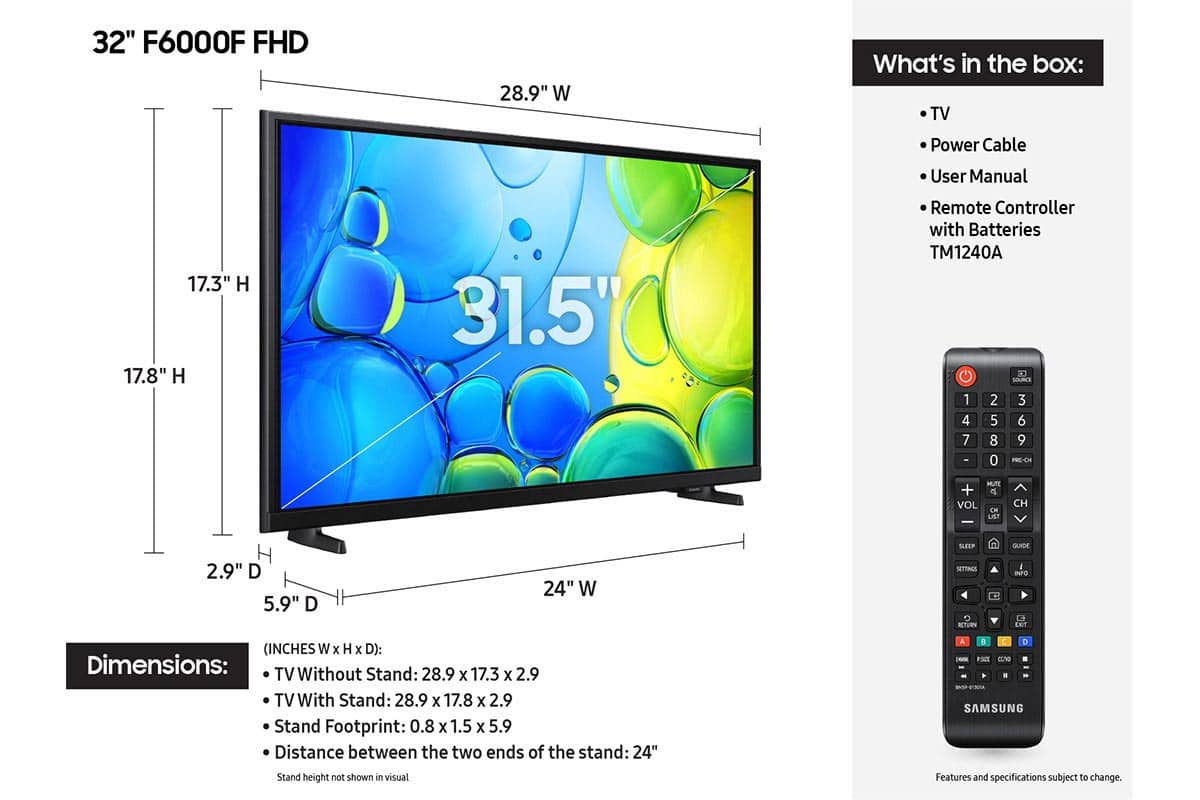






- Model:
- UN32F6000FFXZA
- SKU:
- 10214329
Rating by feature
- Picture Quality
Rating 4.8 out of 5 stars
- Sound Quality
Rating 4.5 out of 5 stars
- Brightness
Rating 4.8 out of 5 stars
Customers are saying
Customers are impressed with the excellent picture quality and the straightforward setup process of this product. Many users also appreciate its convenient size and lightweight design, which makes installation simple. However, some customers have noted concerns regarding the responsiveness of the remote and the overall speed of the processor. Additionally, a few users reported occasional difficulties with app performance and smart functionality.
This summary was generated by AI based on customer reviews.
- Pros mentioned:Picture quality, Setup ease
My Samsung
||Posted . Owned for 2 weeks when reviewed.This reviewer received promo considerations or sweepstakes entry for writing a review.So happy to have this Samsung TV. I had an Element and it gave up on me. The Samsung is very clear, vibrant colors and easy to navigate. I wont buy any other brand!
I would recommend this to a friend - Pros mentioned:Picture qualityCons mentioned:Responsiveness
Great TV for a great price
||Posted .This reviewer received promo considerations or sweepstakes entry for writing a review.Great TV for a great price. The picture quality and sound are great. My ONLY issue is there is a lag from the remote button being pushed to the change happening on the TV. For example, when I try to switch apps, I move the cursor over and press enter, but there's a multi-second delay before it finally switches. For this reason, I wouldn't recommend this TV for gaming, but for regular use, I think it's fine.
I would recommend this to a friend - Pros mentioned:Picture quality
Clear image with average sound quality
||Posted . Owned for 1 month when reviewed.This reviewer received promo considerations or sweepstakes entry for writing a review.This Samsung 32 inch TV is available in two different models. The F6000F is the model that has better reviews. It is easy to set up (just plug and play) and can be used right away without having to set up a account. Imagine quality is good sound quality is average. I was looking for the F6000F model because of the ratings. It is hard to find a smaller TV in this day and age, Best Buy had the model in stock. On the minus side the TV was used and then repackaged as new (dog hairs on TV with aftermarket remote control). On the plus side the TV works. Since I had such a hard time finding a smaller smart TV I decided to keep the TV. Just know that you are not getting a new unit from Best Buy, for this reason 3 stars.
I would recommend this to a friendBrand response from Samsung
Posted .Hi RRRC,
Please know you are leaving a review and a 3-star rating for the F6000F, but we are sorry to hear of your Best Buy experience, nonetheless. You may want to consider providing feedback directly to the Best Buy store where you made your purchase.
Should you have questions on the F6000F itself, Samsung is here for you. You can reach us at 1-800-SAMSUNG, Mon – Fri 8 AM – 9 PM EST, Sat & Sun 8 AM – 6 PM EST. Our Live Chat agents are also available by clicking on the ‘Support’ link on our website.
~ Samsung Solutions
- Pros mentioned:Picture quality, Setup ease
Easy setup
||Posted . Owned for 2 weeks when reviewed.This reviewer received promo considerations or sweepstakes entry for writing a review.It is easy to setup has a beautiful picture. The sound is great. I would buy another one when I need to.
I would recommend this to a friend - Pros mentioned:Picture qualityCons mentioned:Responsiveness
Worth it
||Posted . Owned for 1 month when reviewed.This reviewer received promo considerations or sweepstakes entry for writing a review.This tv is just what I wanted for a spare bedroom. As stated under reviews there is a slight delay with the remote but not a big issue for me. Overall completely happy with it.
I would recommend this to a friend - Pros mentioned:Picture quality, Setup ease
Great for wireless streaming .
||Posted . Owned for 1 month when reviewed.This reviewer received promo considerations or sweepstakes entry for writing a review.Very easy to set up and use. It has no problem receiving a wireless signal for streaming. Very good picture and sound.
I would recommend this to a friend - Pros mentioned:Picture quality, Setup ease
Amazing quality
||Posted . Owned for 2 weeks when reviewed.This reviewer received promo considerations or sweepstakes entry for writing a review.I love the picture quality and the easy use of the product.
I would recommend this to a friend - Pros mentioned:Picture quality
Samsung
||Posted . Owned for 1 week when reviewed.This reviewer received promo considerations or sweepstakes entry for writing a review.I love this tv, the High Def is remarkable, I didn’t realize how remarkable it was until I compared to my other 32 inch that’s not a Samsung, I will never buy anything for now on, but a Samsung, Awesome God we serve!
I would recommend this to a friend - Pros mentioned:Picture quality, Setup ease
Good quality
||Posted . Owned for 1 month when reviewed.This reviewer received promo considerations or sweepstakes entry for writing a review.TV has good picture, easy to set up. Would recommend.
I would recommend this to a friend Beautiful clear picture, but unsteady/crooked feet
||Posted . Owned for 2 weeks when reviewed.This reviewer received promo considerations or sweepstakes entry for writing a review.The tv was fairly easy to put together, however, the feet seemed cheaply made and were difficult to put on. We couldn't seem to get them tight and when we placed the tv on the table, it didn't stand perfectly straight. It was a little higher on one side. That aspect was disappointing but because inventory on this particular model was very low, we decided to keep it. Like other Samsung models (the only brand we will buy) the picture was very sharp and clear, and the color very good.
I would recommend this to a friend- Pros mentioned:Picture quality, Setup ease
Quick setup
||Posted . Owned for 1 week when reviewed.This reviewer received promo considerations or sweepstakes entry for writing a review.Fast and easy to use. Color is bright and sound is good.
I would recommend this to a friend - Pros mentioned:Picture quality, Size
Perfect Size
||Posted . Owned for 1 month when reviewed.This reviewer received promo considerations or sweepstakes entry for writing a review.Perfect size for a bedroom wall mount. Great picture and all you would need for a smart tv.
I would recommend this to a friend Amazing
||Posted . Owned for 2 weeks when reviewed.This reviewer received promo considerations or sweepstakes entry for writing a review.I wish I could have bought a larger television but there was only space in the bedroom for a 32". I tried another major brand and it was horrible!! This one is excellent. Nice bright crisp picture, decent features, easy setup, making it a really good buy. The only thing I'm not excited about is the speed, or lack thereof. It takes a minute to load each selection, whether from one HDMI to the other, one app to the other etc..but I can live with that, everything else is fine. Love it. It's a keeper.
I would recommend this to a friend- Pros mentioned:Picture quality, Setup ease
Good Basic HDTV
||Posted . Owned for 3 weeks when reviewed.This reviewer received promo considerations or sweepstakes entry for writing a review.Good basic HD tv, easy set up Real value when on sale
I would recommend this to a friend - Pros mentioned:Picture quality, Size
Samsung 32 inch tv
||Posted . Owned for less than 1 week when reviewed.This reviewer received promo considerations or sweepstakes entry for writing a review.Great tv, great quality, easy set up, big size, i would recommend
I would recommend this to a friend - Pros mentioned:Picture qualityCons mentioned:Responsiveness
New TV for bedroom
||Posted . Owned for 3 weeks when reviewed.This reviewer received promo considerations or sweepstakes entry for writing a review.Very pleased with picture quality. It is a little slow to react at times, as noted by other reviews. Also, remote is disappointing - very small with no backlight option when it’s dark.
I would recommend this to a friend - Pros mentioned:Picture qualityCons mentioned:Responsiveness
Nice picture
||Posted . Owned for 10 months when reviewed.This reviewer received promo considerations or sweepstakes entry for writing a review.Nice picture but is not as fast as I would like it. It is slower but when it’s gets you there the picture is nice
I would recommend this to a friend - Pros mentioned:Picture quality
Fantastic audio and visuals
||Posted . Owned for 11 months when reviewed.This reviewer received promo considerations or sweepstakes entry for writing a review.I was genuinely surprised at the quality of this television! The audio sound is fantastic and doesn't need any additional speakers and the visuals are so crisp and clear. Great price point and perfect for a bedroom/dorm
I would recommend this to a friend - Pros mentioned:Picture qualityCons mentioned:Responsiveness
Love the TV but not the remote.
||Posted .This reviewer received promo considerations or sweepstakes entry for writing a review.The picture quality is great, but the remote response time is extremely slow. I bought this for the garage gym so it’s not a dealbreaker, but I wouldn’t be able to deal if it was my primary TV.
I would recommend this to a friend - Pros mentioned:Picture quality, Size
Samsung 32" tv review
||Posted . Owned for 1 month when reviewed.This reviewer received promo considerations or sweepstakes entry for writing a review.Great little tv fit in corner perfectly. Picture is great. Paired with Samsung sound bar it works great. Easy set up.
I would recommend this to a friend