Customer Ratings & Reviews





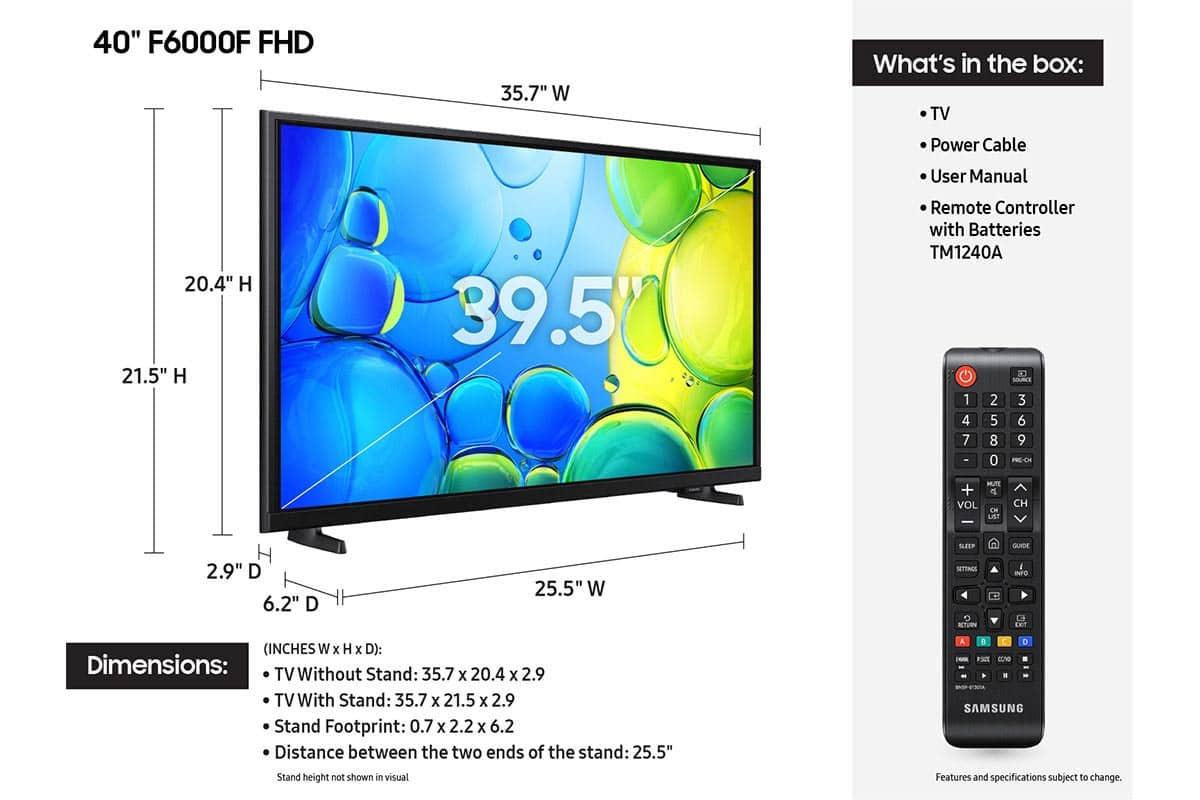






- Model:
- UN40F6000FFXZA
- SKU:
- 10187592
Rating by feature
- Picture Quality
Rating 4.8 out of 5 stars
- Sound Quality
Rating 4.6 out of 5 stars
- Brightness
Rating 4.7 out of 5 stars
Customers are saying
Customers enjoy the 40" Class F6000F Series LED Full HD Smart Tizen TV (2025), especially the great picture quality and ease of setup. Many also appreciate the size and lightweight design of the TV. However, some customers have noted concerns about the TV's responsiveness, the remote control, and the viewing angle.
This summary was generated by AI based on customer reviews.
- Cons mentioned:User interface
No reason UI should be this slow
||Posted . Owned for 2 months when reviewed.This reviewer received promo considerations or sweepstakes entry for writing a review.Ok picture for the price, but the biggest isue is how slow the UI repsonds when navigating. Frustrating and unnecessary in 2025. Do better Samsung
No, I would not recommend this to a friendBrand response from Samsung
Posted .Hi KingSB,
We appreciate your feedback regarding response time. For optimal performance, please ensure your F5000F TV is running the latest firmware. You can check this by going to: Home > left directional key > Settings > Support > Software Update.
To further optimize performance, try running Device Care, which checks memory, clears unused cached data, and closes background apps: Home > left directional key > Settings > Support > Device Care > Start Device Care.
If issues continue, please reach Samsung Support at 1-800-SAMSUNG, available 8AM – 12AM EST, 7 days a week.
LiveChat is also available via the ‘Support’ link on our website.
~ Samsung Advisor
- Cons mentioned:Responsiveness
Delay .
||Posted .This reviewer received promo considerations or sweepstakes entry for writing a review.It's very slow. Every time I want to switch apps, or simply change the channel or turn up the volume, it takes a very long time. There's a noticeable delay.
No, I would not recommend this to a friendBrand response from Samsung
Posted .Hi JaimeC,
We appreciate your feedback regarding response time. For optimal performance, please ensure your F6000F TV is running the latest firmware. You can check this by going to: Home > left directional key > Settings > Support > Software Update
To further optimize performance, try running Device Care, which checks memory, clears unused cached data, and closes background apps: Home > left directional key > Settings > Support > Device Care > Start Device Care
If issues continue, please reach Samsung Support at 1-800-SAMSUNG, available 8AM – 12AM EST, 7 days a week.
LiveChat is also available via the ‘Support’ link on our website.
~ Samsung Advisor
- Cons mentioned:Responsiveness
Ery slow
||Posted . Owned for 1 month when reviewed.This reviewer received promo considerations or sweepstakes entry for writing a review.Nothing its slow we have to wait several seconds for it to change the apps
No, I would not recommend this to a friendBrand response from Samsung
Posted .Hi HeavyD,
We appreciate your feedback regarding response time. For optimal performance, please ensure your xxx TV is running the latest firmware. You can check this by going to: Home > left directional key > Settings > Support > Software Update
To further optimize performance, try running Device Care, which checks memory, clears unused cached data, and closes background apps: Home > left directional key > Settings > Support > Device Care > Start Device Care
If issues continue, please reach Samsung Support at 1-800-SAMSUNG, available 8AM – 12AM EST, 7 days a week.
LiveChat is also available via the ‘Support’ link on our website.
~ Samsung Advisor
- Cons mentioned:Responsiveness
sluggish response
||Posted .This reviewer received promo considerations or sweepstakes entry for writing a review.after a week weeks of use, the TV is sluggish and not very responsive. One would say that it may be the internet connection but i have this hard wired to the router. I have run the diagnostics multiple times and says its good, cleared cache but still slow. brand new batteries as well
No, I would not recommend this to a friendBrand response from Samsung
Posted .Hi FrancisF,
We appreciate your feedback regarding response time. For optimal performance, please ensure your F6000F TV is running the latest firmware. You can check this by going to: Home > left directional key > Settings > Support > Software Update
To further optimize performance, try running Device Care, which checks memory, clears unused cached data, and closes background apps: Home > left directional key > Settings > Support > Device Care > Start Device Care
If issues continue, please reach Samsung Support at 1-800-SAMSUNG, available 8AM – 12AM EST, 7 days a week.
LiveChat is also available via the ‘Support’ link on our website.
~ Samsung Advisor
Don’t do it
||Posted .This reviewer received promo considerations or sweepstakes entry for writing a review.Do not recommend this tv, it drives me insane!!! There is an issue with the HDMI port or something because every single time I turn it on it says it’s not connected and I have to go through the settings, it will also disconnect while I am watching something! Very frustrating! Cannot get it to connect to airplay either. Have only had it for 4 months and I absolutely hate it. Don’t buy it.
No, I would not recommend this to a friendBrand response from Samsung
Posted .LaurenK,
We appreciate you taking the time to let us know about your experience with your F6000F TV. So that we can better troubleshoot this issue and provide steps towards a solution, please contact Samsung Support at 1-800-SAMSUNG, 8AM – 12AM EST, 7 days a week, or visit our website for LiveChat.
~ Samsung Specialist
Samsung 1080p
||Posted . Owned for 3 weeks when reviewed.This reviewer received promo considerations or sweepstakes entry for writing a review.Ok tv. Not worth the money. It would be worth the niney if but it was a 4k
No, I would not recommend this to a friendBrand response from Samsung
Posted .Hi AlexR,
We appreciate your feedback on the picture quality of Samsung’s F6000F TV. If the image doesn’t quite match your preferences, there are several adjustments you can make to better suit your viewing environment and content type.
First, please ensure your TV is running the latest firmware, as updates may include important picture quality enhancements. Go to: Home > Left directional button > Settings > Support > Software Update > Update Now
To explore picture mode options, navigate to: Home > Left directional button > Settings > All Settings > Picture > Picture Mode. Options include:
• Standard – Ideal for general viewing
• Dynamic – Brighter and more vibrant for well-lit spaces
• Eco – Optimized for energy efficiency
• Movie – Best for viewing in low light
You can further customize your image by going to: Settings > All Settings > Picture > Expert Settings, where you can adjust Brightness, Contrast, Color Tone, Sharpness, Contrast Enhancer and more.
If you’d like help finding the best picture settings for your preferences, please don’t hesitate to contact Samsung Support at 1-800-SAMSUNG, available 8AM – 12AM EST, 7 days a week. You can also LiveChat with an agent or explore additional resources on our website by clicking the ‘Support’ link.
~ Samsung Advisor
Defective TV
||Posted .This reviewer received promo considerations or sweepstakes entry for writing a review.This is the worst television I've ever purchased. It automatically comes up to the Samsung TV app, then I press Home so I can go to YouTube TV, and sometimes it goes there, but usually flips back to Samsung TV. I've even gotten so far as to select a recorded program, it goes there for 5 seconds, then flips back to Samsung TV. Since the window for return has closed, I'll probably end up giving it away. I deserves zero stars!
No, I would not recommend this to a friendBrand response from Samsung
Posted .Patricia,
Thank you for your review. While your TV may currently default to Samsung TV Plus when powered on, you can customize what your TV does at startup by adjusting the Start Screen Options.
To do this, navigate to: Settings > All Settings > Advanced Features > Start Screen Option and choose from the following:
1. Start with Smart Hub Home – Automatically launches Smart Hub when the TV is turned on. You can enable or disable this option based on your preference.
2. Autorun Multi View Casting – If you cast YouTube content from your mobile device, the TV will automatically display the content using Multi View.
3. Autorun Multi View Mirroring – When you screen mirror your mobile device, Multi View will automatically open to show your device’s screen.
If you need help adjusting these settings or have any other questions, please contact Samsung Support at 1-800-SAMSUNG, 8AM – 12AM EST, 7 days a week. LiveChat agents are also available by clicking on the ‘Support’ link on our website.
~ Samsung Specialist
Best Buyer Beware
||Posted . Owned for 2 weeks when reviewed.This reviewer received promo considerations or sweepstakes entry for writing a review.Purchased the product - broke out of the box. Clearly was a low quality product. Requested a refund which Best Buy wouldn't provide - only an exchange. Exchanged for this low quality product. It took 10 days - product is broken. Now I'm out of luck. Thanks Best Buy. If you buy something and it's broken - the Return Policy changes. Buyer beware.
No, I would not recommend this to a friendBrand response from Samsung
Posted .Hi JasonM,
Thank you for sharing your experience with us. We recommend getting in touch with Best Buy to let them know your replacement product is non-functional. If there’s anything we can assist with, please don’t hesitate to call us at 1-800-SAMSUNG, available daily from 8AM - 12AM EST. You can also visit the Samsung website and click on ‘Support’ for:
• Live Chat
• Manuals, Software, & Warranty Info
~ Samsung Advisor
Meg
||Posted .This reviewer received promo considerations or sweepstakes entry for writing a review.Not easy to navigate. Pick up was harder than it should have been
I would recommend this to a friendBrand response from Samsung
Posted .Hi Bpres,
Thank you for sharing your purchase and pickup experience with us. I'm very sorry that it was not a smooth process.
Learn TV Remote is a feature designed to help users become familiar with the layout and function of each button on the Samsung remote. When enabled, pressing any button (except the Power button, which will still turn off the TV) will prompt the TV to announce the button’s name and its purpose – without affecting TV operation.
This teaching mode is especially useful for users who are visually impaired or new to Samsung remotes. To enable this feature, go to: Settings > All Settings > General & Privacy > Accessibility > Learn TV Remote. To exit, simply press the Return key twice.
If you’d like more assistance with this feature, please reach Samsung Support at 1-800-SAMSUNG, available daily from 8AM - 12AM EST. You can also visit the Samsung website and click on ‘Support’ for:
• Live Chat
• Manuals, Software, & Warranty Info
~ Samsung Advisor
Poor sound bar hook up
||Posted .This reviewer received promo considerations or sweepstakes entry for writing a review.Nice TV, except no way to hook up a sound bar except via bluetooth
No, I would not recommend this to a friendBrand response from Samsung
Posted .Hi AndrewG,
Thank you for reaching out. Please know you can connect an external soundbar via HDMI as well as Bluetooth.
Should you ever have questions or need help, Samsung is here for you. Just give us a call at 1-800-SAMSUNG, 8AM - 12AM EST, 7 days a week. Our LiveChat agents are also available by clicking on the ‘Support’ link on our website.
~Samsung Advisor
Samsung 40" F6000F Series LED Full HD Smart TV
||Posted . Owned for 1 month when reviewed.This reviewer received promo considerations or sweepstakes entry for writing a review.I returned 2 of these because the screws did not fit for attaching the feet. The TVs looked very nice but, I could not even set them up so I cannot comment on the quality of the picture or sound.
No, I would not recommend this to a friendBrand response from Samsung
Posted .Hi there,
We're sorry to hear that your experience with the F6000F TV led to a return. Your feedback matters to us and will be shared with our product team.
If you decide to explore Samsung TVs again in the future, we’re always here to support you - whether it’s setup, features, or troubleshooting. Reach us anytime at 1-800-SAMSUNG (8AM – 12AM EST, 7 days a week), or visit the ‘Support’ section of our website for LiveChat, manuals, and more.
~ Samsung Specialist
Review
||Posted . Owned for 3 weeks when reviewed.This reviewer received promo considerations or sweepstakes entry for writing a review.Called support three times. It would have helped to have a manual or link to one. Twice since having it had to cold boot to return to settings.
No, I would not recommend this to a friendBrand response from Samsung
Posted .Hi RuthM,
We appreciate you sharing your user experience. To help you get the most from your TV, you can download the full e-Manual and more by visiting Samsung’s website then navigating to: Support > Manual & Software > TVs & Home Theater. From there, you can search for and select your F6000F TV model to view or download the available guides.
The e-Manual and Remote Control Guide are also conveniently built into your TV: Settings > Support > Tips and User Guides
If you need additional help, please contact Samsung Support at 1-800-SAMSUNG, 8AM – 12AM EST, 7 days a week. LiveChat agents are also available through the ‘Support’ link on our website.
~ Samsung Advisor
DO NOT PURCHASE THIS SAMSUNG TV!!!
||Posted .This reviewer received promo considerations or sweepstakes entry for writing a review.Do not purchase this TV!! It i a 2025 television, but can you believe it - It has NO VOICE CONTROL on either the remote OR the TV!! after purchase a week ago I spent at least 2 1/2 hours on the phone with Samsung and they had NO resolution or mitigation of my problem whatsoever. I first contacted customer service and they shared this was their latest technology and an update would be coming for the TV and a new remote is being worked on to make the Voice commands work. After another call with customer service again today including at the supervisor level - there is nothing they can do. There will NOT be any new updates and there are no solutions. What a joke! Save your money buy anything BUT Samsung!!! Who in this 2025 world has products without voice command capability!!
No, I would not recommend this to a friendBrand response from Samsung
Posted .Hi SLOW,
I'm very sorry for any confusion or miscommunication. You are correct, the F6000F series does not offer built-in voice assistants or remote voice control. These features begin with our U8000F Series and above.
If you ever have questions or need help, Samsung is here for you! Give us a call at 1-800-SAMSUNG, 8 AM - 12 AM EST, seven days a week. Our LiveChat agents are also available by clicking on the ‘Support’ link on our website.
~Samsung Advisor
Disappointment
||Posted . Owned for 1 month when reviewed.This reviewer received promo considerations or sweepstakes entry for writing a review.Start up screen won't turn off when not using wifi. We don't have wifi for our TVs. We have to wait for about 20-30 seconds for the screen to go to a channel. Also the sound went off a few days ago and I had to unplug it to reset. If that happens again, I'm going to retirn it.
No, I would not recommend this to a friendBrand response from Samsung
Posted .Hi KeithN,
We appreciate your feedback regarding response time. For optimal performance, please ensure your F6000F TV is running the latest firmware. You can check this by going to: Home > left directional key > Settings > Support > Software Update
To further optimize performance, try running Device Care, which checks memory, clears unused cached data, and closes background apps: Home > left directional key > Settings > Support > Device Care > Start Device Care
If issues continue, please reach Samsung Support at 1-800-SAMSUNG, available 8AM – 12AM EST, 7 days a week. LiveChat is also available via the ‘Support’ link on our website.
~Samsung Advisor
Slow responsiveness
||Posted . Owned for 3 weeks when reviewed.This reviewer received promo considerations or sweepstakes entry for writing a review.It takes 3min to open apps like Hulu, Amazon Prime. For Paramount plus, it tries at lease 3 times, fails, then finally open (each takes 3-5min). My Fios has 900Mbps.
No, I would not recommend this to a friendBrand response from Samsung
Posted .Hi KennL,
We appreciate your feedback regarding your F6000F TV’s performance. If you're experiencing freezing or lag in general response time, please try the following steps:
1. Check for firmware updates – Keeping your TV up to date can resolve many performance issues: Home > left directional key > Settings > Support > Software Update > Update Now
2. Run Device Care – This tool checks system memory, frees up cached data, and closes background apps that could be slowing things down: Home > left directional key > Settings > Support > Device Care > Start Device Care
3. Cold boot your TV – With the TV powered on, press and hold the Power button on your remote for 5+ seconds until the TV restarts. This helps refresh the system.
If you're still noticing performance snags after these steps, please contact Samsung Support at 1-800-SAMSUNG, 8AM – 12AM EST, 7 days a week. You can also connect with a LiveChat agent via the ‘Support’ link on our website.
~Samsung Advisor
Take good money,and don't even back up there serv.
||Posted . Owned for 1 month when reviewed.This reviewer received promo considerations or sweepstakes entry for writing a review.I got two tv .within a month . took two back .then when ask what I want to do I ask for my money back. I was charge $50.00 and only give me a store card for the rest . I told them I did not want that because there severs suck! Then they call cops and refused to speck to me or my wife
No, I would not recommend this to a friendBrand response from Samsung
Posted .Hi Unhappy,
We appreciate your feedback on your in-store experience. If you have any questions or need help, we’re always here. Call 1-800-SAMSUNG from 8AM - 12AM EST, seven days a week, or connect with a LiveChat agent anytime by selecting ‘Support’ on our website.
~ Samsung Advisor
Living room tv
||Posted . Owned for 2 weeks when reviewed.This reviewer received promo considerations or sweepstakes entry for writing a review.Hard to get apps added, can't move most used apps to where they are first in row. Just not as user friendly as other brands we have had. Enlarged cable picture to where it fit screen but now channels and descriptions of shows are out of sight.
No, I would not recommend this to a friendBrand response from Samsung
Posted .Hi MaryH,
Thank you for sharing your experience. Please know that you can customize your Home screens by installing, removing or adding your favorite apps to Apps Home and/or For You Home screen. Here's how:
Searching for & Installing Apps
1. From the Home screen, press left on the remote’s directional pad.
2. Navigate to and select Search.
3. Using the search bar, enter the content or app you’d like to find.
4. Navigate to and select the app you’d like to install, then select Install.
Note: Previously installed apps can be accessed on the Settings screen.
Adding & Managing Apps on Home Screen
1. Go to App Settings (these can be found at the bottom of the Apps screen) and select the app you want to move. The following options will be available:
a. Add to Home: Move the app to your desired location on the Home screen.
b. Delete: Delete app.
c. Lock/Unlock: Lock the app with a PIN so only you can use it. When the app is selected again, you will be prompted to enter the PIN to unlock it.
d. Reinstall: Reinstall the app.
e. View Details: View the app’s information and details.
If there’s anything we can assist with, please don’t hesitate to call us at 1-800-SAMSUNG, available daily from 8AM - 12AM EST. You can also visit the Samsung website and click on ‘Support’ for:
• Live Chat
• Manuals, Software, & Warranty Info
~ Samsung Advisor
The +and - does not inform which level actually is
||Posted . Owned for 1 month when reviewed.This reviewer received promo considerations or sweepstakes entry for writing a review.Don’t like not seeing the sound level. Dislike……..
No, I would not recommend this to a friendBrand response from Samsung
Posted .Hi Joeknows1187,
Thank you for your review of the F600F. If the volume indicator is not appearing, please try cold booting your TV by pressing the power button for 5 seconds until the TV turns off and back on.
If you continue to have issues, please call us at 1-800-SAMSUNG, available 8AM – 12AM EST, 7 days a week. LiveChat is also available via the ‘Support’ link on our website.
~ Samsung Advisor
Very Slow apps, randomly stops and freeze
||Posted . Owned for less than 1 week when reviewed.This reviewer received promo considerations or sweepstakes entry for writing a review.I have many samsung products including older TV’s with way better performance. Maybe at this pricepoint any of the no names work better
No, I would not recommend this to a friendBrand response from Samsung
Posted .Hi TheWiringGuy,
We appreciate your feedback regarding response time. For optimal performance, please ensure your TV is running the latest firmware. You can check this by going to: Home > left directional key > Settings > Support > Software Update
To further optimize performance, try running Device Care, which checks memory, clears unused cached data, and closes background apps: Home > left directional key > Settings > Support > Device Care > Start Device Care
If issues continue, please reach Samsung Support at 1-800-SAMSUNG, available 8AM – 12AM EST, 7 days a week.
LiveChat is also available via the ‘Support’ link on our website.
~ Samsung Advisor
Samsung
||Posted . Owned for 1 month when reviewed.This reviewer received promo considerations or sweepstakes entry for writing a review.Connection issues would drop several times a day and restart alson cosmetic issues around the screen poor design.
No, I would not recommend this to a friendBrand response from Samsung
Posted .Hi ChrisR,
Thank you for sharing your experience with the internet connection on your Samsung F6000F TV. Whether you're using Wi-Fi or a wired (LAN) connection, there are a few steps you can take to help resolve the issue:
1. Power Cycle Your Equipment. Unplug both your TV and router/modem from the wall outlet. Wait at least 30 seconds, then plug them back in and allow both devices to fully restart.
2. Check the Network Status. On your TV, go to: Home > left directional key > Settings > All Settings > Connection > Network > Network Status. This will help determine if the issue lies with the network or the TV.
3. Try a Different Connection Type. If you're using Wi-Fi, try connecting an Ethernet (LAN) cable directly from your router to the TV to test the connection. If you're using a wired connection, try switching to Wi-Fi to see if the issue persists.
4. Reestablish the Network Connection. Go to: Settings > All Settings > Connection > Network > Open Network Settings, and follow the prompts to reconnect to your Wi-Fi or wired network.
5. Update Firmware. Software updates can often resolve network bugs. To check for the latest version: Settings > Support > Software Update > Update Now
If these steps don't resolve the issue, we’d be happy to provide further assistance. Please call Samsung Support at 1-800-SAMSUNG, 8AM - 12AM EST, 7 days a week. LiveChat is also available at the ‘Support’ link on our website.
~Samsung Advisor