Customer Ratings & Reviews





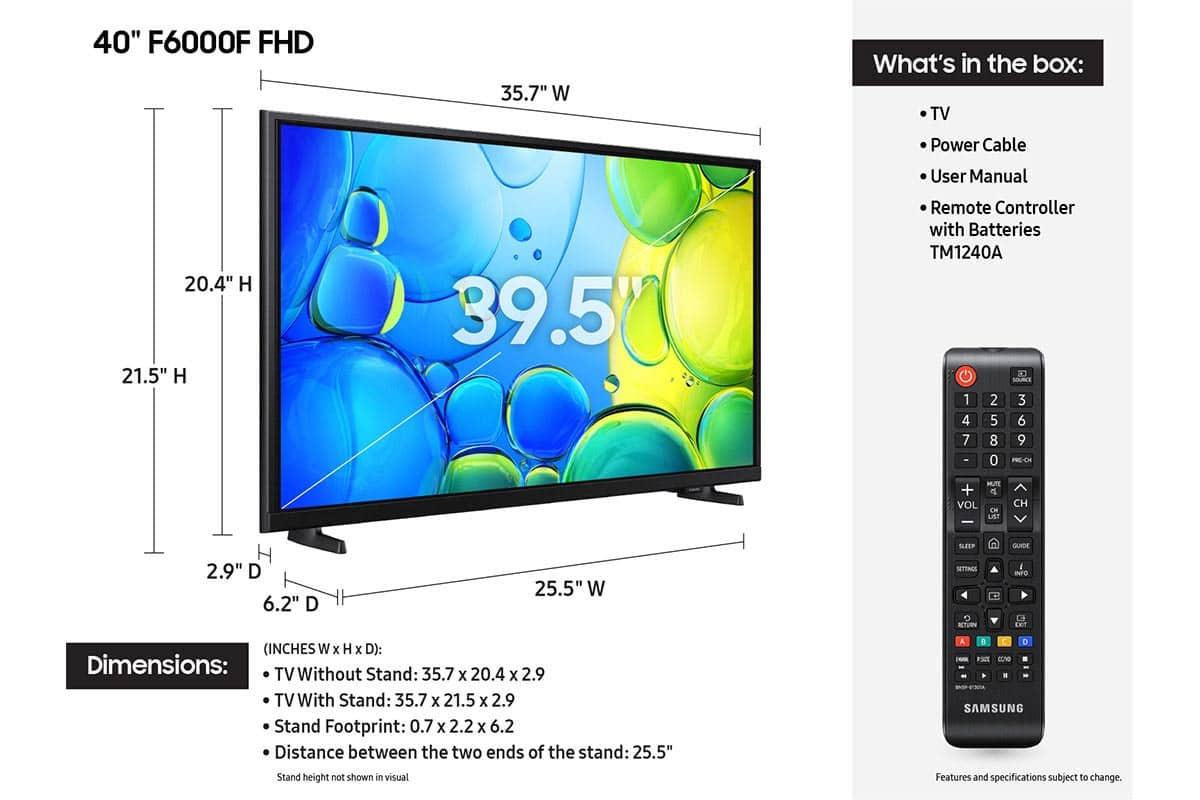






- Model:
- UN40F6000FFXZA
- SKU:
- 10214365
Rating by feature
- Picture Quality
Rating 4.7 out of 5 stars
- Sound Quality
Rating 4.5 out of 5 stars
- Brightness
Rating 4.7 out of 5 stars
Customers are saying
Customers are delighted by the excellent picture quality, easy setup, and convenient size and weight of the product. However, some users have expressed frustration with the slow responsiveness of the remote and the overall user interface, finding it less intuitive than other brands. Additionally, the menu button layout can be difficult to navigate, and the viewing experience is best when viewed straight on.
This summary was generated by AI based on customer reviews.
- Cons mentioned:Remote control
remote
||Posted . Owned for 2 months when reviewed.This reviewer received promo considerations or sweepstakes entry for writing a review.poor slow and no speak button remote not user friendly
No, I would not recommend this to a friendBrand response from Samsung
Posted .Hi connie,
We appreciate your feedback regarding response time. For optimal performance, please ensure your F6000F TV is running the latest firmware. You can check this by going to: Home > left directional key > Settings > Support > Software Update
To further optimize performance, try running Device Care, which checks memory, clears unused cached data, and closes background apps: Home > left directional key > Settings > Support > Device Care > Start Device Care
If issues continue, please reach Samsung Support at 1-800-SAMSUNG, available 8AM – 12AM EST, 7 days a week. LiveChat is also available via the ‘Support’ link on our website.
~ Samsung Advisor
- Cons mentioned:Responsiveness, User interface
Stay away from this model!
||Posted . Owned for 3 weeks when reviewed.This reviewer received promo considerations or sweepstakes entry for writing a review.The TV is VERY slow. The interface is wonky. I would never buy this TV again. I’m only sorry that it’s past the return date. Don’t buy it!
No, I would not recommend this to a friendBrand response from Samsung
Posted .Hi JohnK,
We appreciate your feedback on the response time, and for optimal performance, we ask that you please ensure you've got the latest firmware version installed on your F6000F TV. You can check this by going to Home > Menu > Settings > Support > Software Update.
You may also want to further optimize performance with the self-diagnostic tool, which checks memory, frees up unused cached memory, and closes background apps. Go to: Home > Menu > Settings > Support > Device Care > Start Device Care.
If you need further assistance, we would be happy to help! Please feel free to contact Samsung Support at 1-800-SAMSUNG, available from 8 AM to 12 AM EST, seven days a week. You can also chat with us on Samsung.com for immediate assistance.
~Samsung Advisor
Spend the extra money and avoid this headache
||Posted .This reviewer received promo considerations or sweepstakes entry for writing a review.I want to start with the disclaimer - I only buy Samsung TVs because I have had great experiences with them. Until I purchased this one. This TV is incredibly slow. At times it gives you the same frustration of dealing with a laggy old computer. Samsung suggests "freeing up space and updating firmware" but this thing has been laggy right out of the box. I definitely regret not trying this thing out sooner after I bought it. Had I still been in the return window, this thing would for sure be going back. Spend the extra $100 and avoid this thing. Theres no reason a brand new 2025 model TV should be this slow. It feels like a punishment for buying the entry level model.
No, I would not recommend this to a friendBrand response from Samsung
Posted .Hi ToMM,
We appreciate your feedback on the F6000F TV. Please keep an eye out for firmware updates that may improve performance. We recommend enabling Auto Updates. To do so, go to Settings> Support> Software Update> Auto Update.
You may also want to run a cold boot on your TV. With the TV powered on, press and hold the Power button on your remote for 5+ seconds until the TV restarts. This helps refresh the system.
I hope these suggestions help. If you have any other questions, feel free to call us at 1-800-SAMSUNG between 8AM - 12AM EST, any day of the week. You can also reach our LiveChat team by selecting the ‘Support’ link on our website.
~ Samsung Advisor
Perfect
||Posted . Owned for 2 weeks when reviewed.This reviewer received promo considerations or sweepstakes entry for writing a review.I needed a television for my guest bedroom. This is the perfect size.
I would recommend this to a friendSamsung TV review
||Posted . Owned for 3 weeks when reviewed.This reviewer received promo considerations or sweepstakes entry for writing a review.Great television for the garage! Ability to cast and easy streaming.
I would recommend this to a friendSame picture as a 15 year old model
||Posted .This reviewer received promo considerations or sweepstakes entry for writing a review.I have been a Samsung customer for years. This Samsung is hugely disappointing as the picture is not crisp. I was replacing a bedroom Samsung that was over 15 years old and would take up to 15 minutes to turn on. The pictures quality is the same as the new one. It's not that there is an issue, its just not a great picture like you would expect from a new TV. Also on this TV i have to have the volume on 50 to hear it.
No, I would not recommend this to a friendBrand response from Samsung
Posted .Hi SheriC,
We appreciate your feedback on the picture quality of Samsung’s F6000F TV. If the image doesn’t quite match your preferences, there are several adjustments you can make to better suit your viewing environment and content type.
First, please ensure your TV is running the latest firmware, as updates may include important picture quality enhancements. Go to: Home > Left directional button > Settings > Support > Software Update > Update Now
To explore picture mode options, navigate to: Home > Left directional button > Settings > All Settings > Picture > Picture Mode. Options include:
• Standard – Ideal for general viewing
• Dynamic – Brighter and more vibrant for well-lit spaces
• Eco – Optimized for energy efficiency
• Movie – Best for viewing in low light
You can further customize your image by going to: Settings > All Settings > Picture > Expert Settings, where you can adjust Brightness, Contrast, Color Tone, Sharpness, Contrast Enhancer and more.
If you’d like help finding the best picture settings for your preferences, please don’t hesitate to contact Samsung Support at 1-800-SAMSUNG, available 8AM – 12AM EST, 7 days a week. You can also LiveChat with an agent or explore additional resources on our website by clicking the ‘Support’ link.
~Samsung Advisor
The smart feature is why I purchased
||Posted . Owned for 3 weeks when reviewed.This reviewer received promo considerations or sweepstakes entry for writing a review.Looks and works great for my needs, fits perfectly in my bedroom in my RV
I would recommend this to a friend- Cons mentioned:User interface
Sucker tv
||Posted . Owned for 3 weeks when reviewed.This reviewer received promo considerations or sweepstakes entry for writing a review.This TV home page sucks you can't change it to your liking the text option is a joke give me a lesser known brand.
No, I would not recommend this to a friendBrand response from Samsung
Posted .Hi AnthonyN,
While your F6000F TV may default to Samsung TV Plus at startup, you can customize what happens when the TV powers on. Go to: Settings > All Settings > Advanced Features > Start Screen Option, then enable or disable:
• Start with Smart Hub Home
• Autorun Multi View Casting
• Autorun Multi View Mirroring
If you need help adjusting these options, feel free to reach out to Samsung Support at 1-800-SAMSUNG, 8AM – 12AM EST, 7 days a week. LiveChat agents are also available on our website under ‘Support’.
~ Samsung Advisor
Open box with excellent rating missing power cord
||Posted .This reviewer received promo considerations or sweepstakes entry for writing a review.The TV is a 5 star, but I was not happy with Best Buy. We bought an open box item that was shipped to us rated in excellent condition. When we received it the power cord was missing and the only option Best Buy gave us was to return it and purchase a new TV (no extra discount). These are cords that can be bought. I don't understand why they would not have offered a gift card or something, We ended up buying a cord.
I would recommend this to a friendBrand response from Samsung
Posted .Hi RoxanneT,
We appreciate your feedback on purchasing an open-box TV. Should you ever have questions or need help, Samsung is here for you. Just give us a call at 1-800-SAMSUNG, 8AM - 12AM EST, 7 days a week. Our LiveChat agents are also available by clicking on the ‘Support’ link on our website.
~Samsung Advisor
Voice quality is bad
||Posted .This reviewer received promo considerations or sweepstakes entry for writing a review.Tv is fine other than the voice quality needs majoy improvement , thinking of returning and going through the hassle
No, I would not recommend this to a friendBrand response from Samsung
Posted .Hi MichelleS,
Thank you for purchasing Samsung’s F6000F TV and for sharing your feedback on the sound quality. To ensure you’re experiencing the best possible audio, we first recommend checking that your TV is running the latest firmware. To do this, navigate to: Home > left directional key > Settings > Support > Software Update
If the sound still doesn’t meet your expectations, there are a few settings you can try adjusting:
Go to: Settings > All Settings > Sound > Sound Mode
• Standard: Balanced sound without emphasis on any one range
• Optimized: Enhanced effects and spacious sound
• Amplify: Boosts mid and high tones to make dialogue clearer
You can also explore Expert Settings to fine-tune options such as Balance, Equalizer, Auto Volume, and more to match your personal preferences.
If you're considering expanding your setup, Samsung’s Q- and S-Series Soundbars (like the HW-xxx) support Q-Symphony, a feature that synchronizes your TV and soundbar speakers for an immersive 3D audio experience.
For further help adjusting your sound settings or finding the right soundbar for your space, feel free to reach Samsung Support at 1-800-SAMSUNG (8AM – 12AM EST, 7 days a week) or visit the Support link on our website for:
• LiveChat
• Manuals, Software, & Warranty Info
~Samsung Advisor
Samsung 40" Class-F6000F.
||Posted .This reviewer received promo considerations or sweepstakes entry for writing a review.For the money, Samsung is absolutely the BEST-BUY!
I would recommend this to a friendWork out TV
||Posted .This reviewer received promo considerations or sweepstakes entry for writing a review.Good smart qualities. Works well for stationary bike watching
I would recommend this to a friendLOVE Samsung
||Posted .This reviewer received promo considerations or sweepstakes entry for writing a review.Love it. Connected right to my other samsung devices.
I would recommend this to a friend- Cons mentioned:Remote control
Too slow
||Posted .This reviewer received promo considerations or sweepstakes entry for writing a review.It isn't what I thought it seems cheap remote sucks
No, I would not recommend this to a friendBrand response from Samsung
Posted .Moose,
We appreciate your feedback regarding response time. For optimal performance, please ensure your TV is running the latest firmware. You can check this by going to: Home > left directional key > Settings > Support > Software Update
To further optimize performance, try running Device Care, which checks memory, clears unused cached data, and closes background apps: Home > left directional key > Settings > Support > Device Care > Start Device Care
If issues continue, please reach Samsung Support at 1-800-SAMSUNG, available 8AM – 12AM EST, 7 days a week.
LiveChat is also available via the ‘Support’ link on our website.
~ Samsung Specialist
Last time purchase
||Posted .This reviewer received promo considerations or sweepstakes entry for writing a review.The tv has issues with color and staying off when you turn it off. I scheduled a service appointment with Geek Squad. They canceled the appointment with no explanation.
No, I would not recommend this to a friendBrand response from Samsung
Posted .Hi PaulaL,
Thanks for sharing your experience. If your TV is powering on by itself, there are a few settings and external triggers to review:
1. Power On with Mobile – Your TV may be connected to the SmartThings app or other networked devices. To stop wake signals, turn this feature off: Settings > All Settings > Connection > Network > Expert Settings > Power On with Mobile = Off
2. Check for Active Timers – Go to Settings > All Settings > General & Privacy > System Manager > Time > Timer Settings, then disable any On Timers or Sleep Timers
3. Anynet+ (HDMI-CEC) – If your TV is connected to external HDMI devices, one of them may be triggering power-on behavior. To disable this feature: Settings > All Settings > General & Privacy > External Device Manager > Anynet+ (HDMI-CEC) = Off
4. Software Update – Make sure your TV is up to date: Settings > Support > Software Update > Update Now
If you’ve ruled out all the above and your TV still powers on unexpectedly, try unplugging it for 30 seconds. Should the issue continue, please call Samsung Support at 1-800-SAMSUNG, 8AM – 12AM EST, 7 days a week. LiveChat agents are also available by clicking the ‘Support’ link on our website.
~ Samsung Advisor
Aweful tv
||Posted .This reviewer received promo considerations or sweepstakes entry for writing a review.Absolutely awful TV!! Takes longer to hook up to my Amazon Prime account than it does for me to finish my 40 minute workout I would’ve been better off not to have even purchased a TV for my workout room because it makes me so angry even thinking about the darn thing, I’m even less likely to work out!!! my Internet is great speedy shows. It’s connected authorized on my Amazon account for a device and every time I click the auto fast button on the remote after the smile it returns to the Samsung TV Plus screen…..awesome piece of junk.
No, I would not recommend this to a friendBrand response from Samsung
Posted .Hi Pissedoff,
We appreciate your feedback regarding response time. For optimal performance, please ensure your F6000F TV is running the latest firmware. You can check this by going to: Home > left directional key > Settings > Support > Software Update.
To further optimize performance, try running Device Care, which checks memory, clears unused cached data, and closes background apps: Home > left directional key > Settings > Support > Device Care > Start Device Care.
If issues continue, please reach Samsung Support at 1-800-SAMSUNG, available 8AM – 12AM EST, 7 days a week. LiveChat is also available via the ‘Support’ link on our website.
~Samsung Advisor
Remote design is a pain.
||Posted . Owned for 1 month when reviewed.This reviewer received promo considerations or sweepstakes entry for writing a review.The remote control will drive you crazy. It is not your standard Samsung remote. Maybe it’s an old design???
No, I would not recommend this to a friendBrand response from Samsung
Posted .Hi Happy,
We appreciate you sharing your experience. To help you get the most from your TV and remote functions, you can download the full e-Manual and more by visiting Samsung’s website then navigating to: Support > Manual & Software > TVs & Home Theater. From there, you can search for and select your F6000F TV model to view or download the available guides.
The e-Manual & Remote Control Guide are also conveniently built into your TV: Settings > Support > Open User guide.
For additional guidance, your TV also includes Accessibility features designed to assist with navigation and remote use.
• Learn Menu Screen provides audio guidance for on-screen menus by announcing the name and function of each item as you scroll – without making any changes. This is especially helpful for users who are visually impaired or new to Smart TV menus. Enable via: Settings > All Settings > General & Privacy > Accessibility > Learn Menu Screen. To exit, press the Return key twice.
• Learn TV Remote helps users become familiar with the layout and function of each button on the Samsung remote. Pressing a button (other than Power) will prompt the TV to announce its name and purpose, again without affecting TV operation. Enable via: Settings > All Settings > General & Privacy > Accessibility > Learn TV Remote. To exit, press the Return key twice.
If you’d like more assistance with these features, please reach Samsung Support at 1-800-SAMSUNG, available 8AM – 12AM EST, 7 days a week. LiveChat agents are also available through the ‘Support’ link on our website.
~ Samsung Specialist
Missing screws, otherwise good for budget
||Posted .This reviewer received promo considerations or sweepstakes entry for writing a review.Didn't come with screws for the stands. Sent an email to customer service and haven't heard back for two weeks. Very slow when I turn it on, otherwise a good budget tv
I would recommend this to a friendBrand response from Samsung
Posted .Hi user462830,
Thank you for your purchase. To better assist you, please give us a call at 1-800-SAMSUNG between 8AM - 12AM EST, any day of the week. You can also chat with us online by visiting the ‘Support’ section of our website.
~ Samsung Advisor
- Cons mentioned:Responsiveness
Disappointed in Samsung
||Posted . Owned for 2 weeks when reviewed.This reviewer received promo considerations or sweepstakes entry for writing a review.Picture is fine response to time on the remote incredibly slow
No, I would not recommend this to a friendBrand response from Samsung
Posted .Hi ScottS,
We appreciate your feedback regarding response time. For optimal performance, please ensure your F6000F TV is running the latest firmware. You can check this by going to: Home > left directional key > Settings > Support > Software Update
To further optimize performance, try running Device Care, which checks memory, clears unused cached data, and closes background apps: Home > left directional key > Settings > Support > Device Care > Start Device Care
If issues continue, please reach Samsung Support at 1-800-SAMSUNG, available 8AM – 12AM EST, 7 days a week.
LiveChat is also available via the ‘Support’ link on our website.
~ Samsung Advisor
- Cons mentioned:User interface
Living room tv
||Posted . Owned for 2 weeks when reviewed.This reviewer received promo considerations or sweepstakes entry for writing a review.Hard to get apps added, can't move most used apps to where they are first in row. Just not as user friendly as other brands we have had. Enlarged cable picture to where it fit screen but now channels and descriptions of shows are out of sight.
No, I would not recommend this to a friendBrand response from Samsung
Posted .Hi MaryH,
Thank you for sharing your experience. Please know that you can customize your Home screens by installing, removing or adding your favorite apps to Apps Home and/or For You Home screen. Here's how:
Searching for & Installing Apps
1. From the Home screen, press left on the remote’s directional pad.
2. Navigate to and select Search.
3. Using the search bar, enter the content or app you’d like to find.
4. Navigate to and select the app you’d like to install, then select Install.
Note: Previously installed apps can be accessed on the Settings screen.
Adding & Managing Apps on Home Screen
1. Go to App Settings (these can be found at the bottom of the Apps screen) and select the app you want to move. The following options will be available:
a. Add to Home: Move the app to your desired location on the Home screen.
b. Delete: Delete app.
c. Lock/Unlock: Lock the app with a PIN so only you can use it. When the app is selected again, you will be prompted to enter the PIN to unlock it.
d. Reinstall: Reinstall the app.
e. View Details: View the app’s information and details.
If there’s anything we can assist with, please don’t hesitate to call us at 1-800-SAMSUNG, available daily from 8AM - 12AM EST. You can also visit the Samsung website and click on ‘Support’ for:
• Live Chat
• Manuals, Software, & Warranty Info
~ Samsung Advisor