Customer Ratings & Reviews





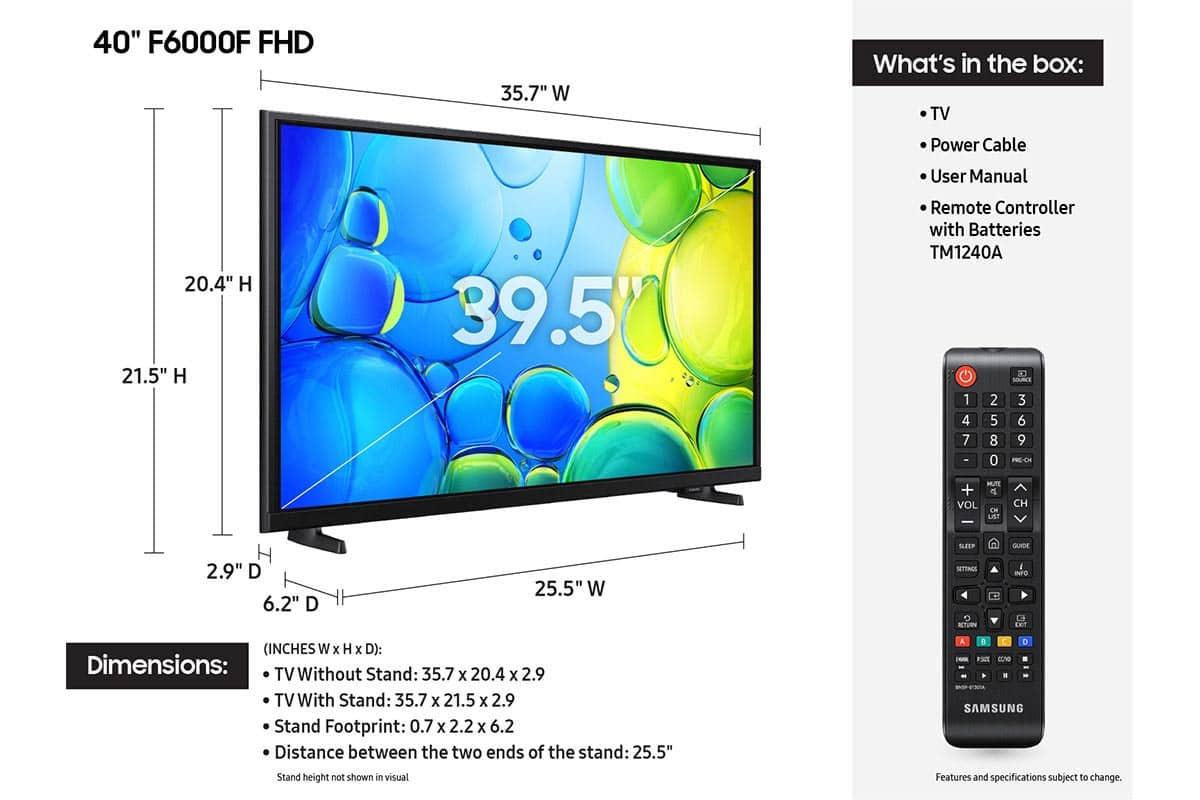






- Model:
- UN40F6000FFXZA
- SKU:
- 6617415
Rating by feature
- Picture Quality
Rating 4.7 out of 5 stars
- Sound Quality
Rating 4.5 out of 5 stars
- Brightness
Rating 4.7 out of 5 stars
Customers are saying
Customers enjoy the 40" Class F6000F Series LED Full HD Smart Tizen TV (2025), especially the great picture quality and ease of setup. Many also appreciate the size and lightweight design of the TV. However, some customers have noted concerns about the TV's responsiveness, the remote control, and the viewing angle.
This summary was generated by AI based on customer reviews.
Poor Picture
||Posted . Owned for 1 week when reviewed.This reviewer received promo considerations or sweepstakes entry for writing a review.Picture quality is poor on this Samsung. I will be returning this TV. From now on, I'm sticking with only Sony or LG, both of which I have in my home and the picture quality is very good on both.
No, I would not recommend this to a friendBrand response from Samsung
Posted .Hi nothing,
We appreciate your feedback on the picture quality of Samsung’s F6000F TV. If the image doesn’t quite match your preferences, there are several adjustments you can make to better suit your viewing environment and content type.
First, please ensure your TV is running the latest firmware, as updates may include important picture quality enhancements. Go to: Home > Left directional button > Settings > Support > Software Update > Update Now
To explore picture mode options, navigate to: Home > Left directional button > Settings > All Settings > Picture > Picture Mode. Options include:
• Standard – Ideal for general viewing
• Dynamic – Brighter and more vibrant for well-lit spaces
• Eco – Optimized for energy efficiency
• Movie – Best for viewing in low light
• Filmmaker Mode – Preserves the content creator’s intent and disables motion smoothing for supported content
You can further customize your image by going to: Settings > All Settings > Picture > Expert Settings, where you can adjust Brightness, Contrast, Color Tone, Sharpness, Contrast Enhancer and more.
If you’d like help finding the best picture settings for your preferences, please don’t hesitate to contact Samsung Support at 1-800-SAMSUNG, available 8AM – 12AM EST, 7 days a week. You can also LiveChat with an agent or explore additional resources on our website by clicking the ‘Support’ link.
~ Samsung Advisor
Very disappointed in this tv.
||Posted . Owned for less than 1 week when reviewed.This reviewer received promo considerations or sweepstakes entry for writing a review.Not sure what samsung was thinking. First off the tv is maybe 4 or 5 inches thick reminds me of an led from 15years sgo. Its heavy also. The picture is dark and dull with very limited options. We had the older version of this tv for years and it was so much better. Will be returning this.
No, I would not recommend this to a friendBrand response from Samsung
Posted .Hi Chris,
Thank you for your feedback on the Samsung F6000F TV. It's unfortunate to hear that you are not satisfied with its design and picture quality. However, there are a few settings you can adjust that may improve your experience.
To change the picture on your TV, go to Settings > All Settings > Picture > Picture Mode – try Dynamic, Movie, or Filmmaker Mode.
You also may want to consider upgrading to one of our LED TVs, which offers a thinner and lighter design as well as a vivid picture, with lifelike colors and sharp 4K upscaling. I recommend checking out the U8000F TV Series at Best Buy: https://www.bestbuy.com/site/samsung-43-class-crystal-uhd-u8000f-4k-smart-tv/6619439.p?skuId=6619439
If there’s anything we can ever help with such as optimizing settings, please reach Samsung Support at 1-800-SAMSUNG, 8AM - 12AM EST, 7 days a week. Or visit us on the Samsung website and click on the ‘Support’ link for:
• LiveChat with an agent
• Manuals, Software, & Warranty Info
• Product Registration: For easy access to support, promos and offers, and more
~ Samsung Advisor
dissatisfied
||Posted . Owned for 1 month when reviewed.This reviewer received promo considerations or sweepstakes entry for writing a review.substandard, I have requested several times that I would like to return to upgrade. Very displeased. I went in the hospital unable to return with the the 14 days. I seldom watch.
No, I would not recommend this to a friendBrand response from Samsung
Posted .Hi LaverneC,
Thank you for sharing your purchase experience with Best Buy. If there’s anything we can assist with, please don’t hesitate to call us at 1-800-SAMSUNG, available daily from 8AM - 12AM EST. You can also visit the Samsung website and click on ‘Support’ for:
• Live Chat
• Manuals, Software, & Warranty Info
~ Samsung Advisor
Slow as a 90’s computer
||Posted . Owned for 3 weeks when reviewed.This reviewer received promo considerations or sweepstakes entry for writing a review.The tv is the slowest tv I’ve ever owned. I know it’s a cheap tv and only using it as a second monitor or to watch hockey. Takes a couple of minutes to power on and get into sling.
No, I would not recommend this to a friendBrand response from Samsung
Posted .Hi thereview,
We appreciate your feedback on the response time, and for optimal performance, we ask that you please ensure you've got the latest firmware version installed on your F6000F TV. You can check this by going to Home > Menu > Settings > Support > Software Update.
You may also want to further optimize performance with the self-diagnostic tool, which checks memory, frees up unused cached memory, and closes background apps. Go to: Home > Menu > Settings > Support > Device Care > Start Device Care.
If you have any questions or need help, we’re always here. Call 1-800-SAMSUNG from 8AM - 12AM EST, seven days a week, or connect with a LiveChat agent anytime by selecting ‘Support’ on our website.
~ Samsung Advisor
Didn’t really like it much
||Posted . Owned for 2 weeks when reviewed.This reviewer received promo considerations or sweepstakes entry for writing a review.The graphics didn’t look so good. Returned it because it wasn’t connecting to the Xbox S. And I didn’t like the size.
No, I would not recommend this to a friendBrand response from Samsung
Posted .Hi SalvadorL,
We appreciate your feedback. Please know we are always available and may have been able to assist you with connecting to your XBOX.
Should you ever decide to give Samsung TVs another try and have questions or need help with settings, setup, or features, please know we’re here to help. Call us at 1-800-SAMSUNG, 8AM - 12AM EST, 7 days a week.
LiveChat with an agent as well as manuals, software, and warranty info can be found at the ‘Support’ link on our Samsung website.
We hope to regain you as a customer in the future.
~ Samsung Advisor
Tv stopped working
||Posted . Owned for 3 weeks when reviewed.This reviewer received promo considerations or sweepstakes entry for writing a review.Stopped working within a month now taking back. Will let you know after return and exchange .
No, I would not recommend this to a friendBrand response from Samsung
Posted .Hi BethD,
It’s unfortunate to hear about your experience with Samsung’s F6000F TV. We’re committed to delivering quality, value, and the best possible product experience. This TV is backed by a 1-year limited manufacturer’s warranty, which includes authorized repair for eligible defects when purchased brand-new from an authorized retailer. To review full warranty terms, you can enter your model number here: https://www.samsung.com/us/support/warranty/
We’d appreciate the opportunity to assist further. Please contact Samsung Customer Support at 1-800-SAMSUNG (8AM – 12AM EST, 7 days a week), or connect with a LiveChat agent by clicking the ‘Support’ link on our website.
~ Samsung Advisor
Samsung Done
||Posted . Owned for 1 week when reviewed.This reviewer received promo considerations or sweepstakes entry for writing a review.This is the second Samsung television we have purchased and definitely the last. Both models have ongoing issues with the HDMI loosing connection. Never buy Samsung.
No, I would not recommend this to a friendBrand response from Samsung
Posted .Hi Martin,
We regret to hear about your experience with the Samsung F6000F TV. Samsung stands behind the quality and performance of our products and offers a 1-year limited warranty covering manufacturer defects when purchased new from an authorized seller. You can enter your model number to review the full terms here: https://www.samsung.com/us/support/warranty/
If you haven’t already, please contact Samsung Customer Support at 1-800-SAMSUNG (available 8AM – 12AM EST daily) or via LiveChat on our website under the ‘Support’ section. We’d welcome the chance to assist.
~ Samsung Advisor
Samsung Smart TV
||Posted . Owned for less than 1 week when reviewed.This reviewer received promo considerations or sweepstakes entry for writing a review.I returned this TV. Samsung does not allow you to add any apps to the TV.
No, I would not recommend this to a friendBrand response from Samsung
Posted .Hi BZY63,
Please know you can absolutely add apps to the F6000F TV from our built-in app store. To do so, please follow the below instructions:
1. From the Home screen, navigate to Apps and then select the desired app.
2. You can also select Search on the left side of the screen to search for a specific app if you can’t find the app you want. Enter the name of the app you’d like to search for, then select it when it appears.
3. Select Install. When the installation is complete, the Open menu appears.
4. Select Open to run the app immediately.
I hope this tip helps. If you have any questions, please don’t hesitate to reach us at 1-800-SAMSUNG (8AM – 12AM EST, 7 days a week). You’ll also find LiveChat, manuals, software, and warranty details under the ‘Support’ section of our website.
~ Samsung Advisor
THE BEST TV!
Posted .This reviewer received promo considerations or sweepstakes entry for writing a review.The TVs color is sharp, clear, and wonderful. We are very happy we choose Samsung. Also, Daniel, the installing tech, was superb! He was engaging, respectful, detailed, knowledgeable, professional, and treated our home like it was his own. He performed magnificently detaching the wires and old TV, masterfully assembled and set-up the new TV, and took the extra time to clearly walk us through the new TV’s operational capabilities and settings. Heck, he probably saved our marriage!! Give him a pay raise ASAP!
I would recommend this to a friendOpen box purchase
Posted .This reviewer received promo considerations or sweepstakes entry for writing a review.We love a TV the quality is clear the remote works really wonderful although it's not the right remote but you know it works with the TV and for open box product it was pretty good so you could try to open box products at Best Buy
I would recommend this to a friend- Pros mentioned:Picture quality
New TV
Posted .This reviewer received promo considerations or sweepstakes entry for writing a review.TV fine - Service somewhat slow to receive when needed
I would recommend this to a friend Another good Samsung product
Posted .This reviewer received promo considerations or sweepstakes entry for writing a review.I’m enjoying the TV. My only complaint is the number of menu steps I have to wade through to get to my YouTube TV app.
I would recommend this to a friendGreat for the most part
Posted .This reviewer received promo considerations or sweepstakes entry for writing a review.It’s a good tv but when moving through the menu to go to a streaming app it’s just a little slow. The movements are delayed but when I’m playing on the Xbox everything is perfectly fine, it’s just with the remote when you click an arrow it’s so delayed. I would expect more since it’s a 2025 tbh.
I would recommend this to a friend- Pros mentioned:Picture quality
Chuck
Posted .This reviewer received promo considerations or sweepstakes entry for writing a review.Overall the product was much better than expected, although y our Sales clerk was not very helpful.
I would recommend this to a friend Ms. Annis
Posted .This reviewer received promo considerations or sweepstakes entry for writing a review.Excellent. On time; stated I'd get a refund for items not needed. Great work.
I would recommend this to a friendTV installation !
Posted .This reviewer received promo considerations or sweepstakes entry for writing a review.Excellent work ! I am thoroughly satisfied with installation work !
I would recommend this to a friendGreat Tv
Posted .This reviewer received promo considerations or sweepstakes entry for writing a review.Nice picture, not to big, overall very happy with quality
I would recommend this to a friendsamsung tv GREAT
Posted .This reviewer received promo considerations or sweepstakes entry for writing a review.very pleased with my choice of this tv great color and easy to use
I would recommend this to a friendNot bad, not great.
Posted .This reviewer received promo considerations or sweepstakes entry for writing a review.Good size. Perfect for the room. Fairly easy to operate. Despite adjustments the picture is a little dark. Okay for the price.
I would recommend this to a friendBrand response from Samsung
Posted .Hi Sheds58,
We’re sorry to hear you’re not fully satisfied with the picture quality on your Samsung TV. If the image appears too dark, we suggest disabling certain energy-saving features, which can automatically adjust brightness and affect how the screen looks.
Go to: Settings > All Settings > General & Privacy > Power and Energy Saving, then turn off Brightness Optimization, Energy Saving Solution, Motion Lighting, and/or Contrast Enhancer.
You can also adjust the Picture Mode to better suit your environment: Settings > All Settings > Picture > Picture Mode
• Standard – Default mode for general viewing
• Dynamic – Brighter and clearer, ideal for well-lit rooms
• Movie – Best for dark room viewing
• Eco – Energy-saving mode
• Filmmaker Mode – Preserves content as intended by creators
To fine-tune brightness, go to: Home > left directional key > Settings > All Settings > Picture > Expert Settings, then adjust the Brightness level (0–50) to your preference.
Lastly, please make sure your TV is running the latest firmware: Home > Home > left directional key > Settings > Support > Software Update > Update Now
We hope these tips help improve your viewing experience. If you need further support, feel free to contact us at 1-800-SAMSUNG, 8AM – 9PM EST Mon – Fri, 8AM – 6PM Sat – Sun LiveChat is also available via the ‘Support’ link on our website.
~ Samsung Advisor
- Cons mentioned:Responsiveness
Very slow TV
Posted .This reviewer received promo considerations or sweepstakes entry for writing a review.I don't know if this TV was designed to be exceptionally slow when switching between apps or If it is defective. We have bought several new TV 's in the past 24 months and have never experienced this type of delay. ????
No, I would not recommend this to a friendBrand response from Samsung
Posted .Hi LarryR,
We appreciate your feedback regarding response time. For optimal performance, please ensure your F6000F TV is running the latest firmware. You can check this by going to: Home > left directional key > Settings > Support > Software Update.
To further optimize performance, try running Device Care, which checks memory, clears unused cached data, and closes background apps: Home > left directional key > Settings > Support > Device Care > Start Device Care.
If issues continue, please reach Samsung Support at 1-800-SAMSUNG, available 8AM – 12AM EST, 7 days a week. LiveChat is also available via the ‘Support’ link on our website.
~ Samsung Advisor