Customer Ratings & Reviews











- Model:
- UN43AU8000FXZA
- SKU:
- 6452966
Rating by feature
- Picture Quality
Rating 4.8 out of 5 stars
- Sound Quality
Rating 4.1 out of 5 stars
- Brightness
Rating 4.7 out of 5 stars
Customers are saying
Customers are delighted by the picture quality and ease of use of the 43" Class 8000 Series LED 4K UHD Smart Tizen TV. Many also appreciate the smart TV features, the price point, and the sleek design. However, some users have expressed concerns regarding the remote control's ergonomics and the volume control's range. A few customers also mentioned that the operating system and user interface could be improved for a smoother experience.
This summary was generated by AI based on customer reviews.
- Pros mentioned:Picture qualityCons mentioned:Remote control
Samsung ASU8000 TV
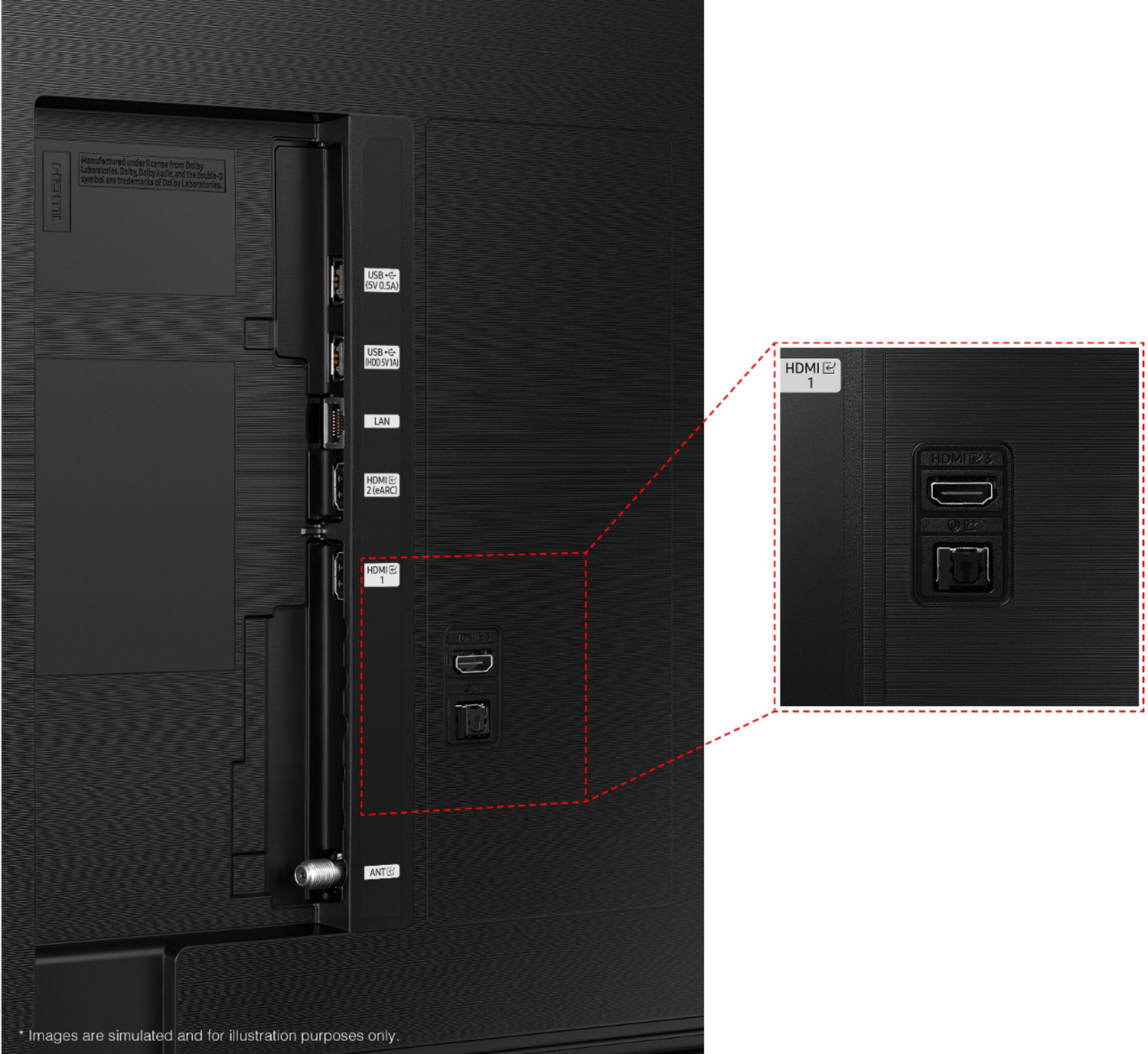
Posted .This reviewer received promo considerations or sweepstakes entry for writing a review.Beautiful picture, sound is ok despite nevative reviews. It doesn't have a RCA CONNECTION which is a big deal for me as i now have to buy bluetooth headphones or some type of adapter...which one I'm not sure of or if it would even work with my new wireless headphones which arent bluetooth. Also the remote is about 2" x 6" x 3/4". Good luck not losing that! The remote is also mostly voice activated with no numbers which someone in my household is unable to use. Maybe the lack of RCA connections and itsy bitsy remotes is standard for the industry. I don't know. I feel I would have made a better TV purchase if I would have shopped in person for my new TV rather than buying one on line. Live and learn and I learned a lot with this purchase. All in all, I'm happy with the TV. It just came with some new ideas and the need to put out more money for bluetooth headphones.
I would recommend this to a friend Terrible speackers and picture not sharp
||Posted . Owned for less than 1 week when reviewed.This reviewer received promo considerations or sweepstakes entry for writing a review.After conducting several adjustments the sound is terrible. So set aside a budget for a sound bar. The picture is not as sharp as it should be. Faces are washed out
No, I would not recommend this to a friendBrand response from Samsung
Posted .Hi JACDRT,
Thank you for your purchase and review of the AU8000 TV. Please know we are here to help you. You may want to try adjusting the settings to improve your picture and sound.
Go to Home > Settings > Picture > Picture Mode and select the mode that best fits your usage:
1) Standard: Default mode suitable for general viewing environments.
2) Natural: Reduces eye strain for a comfortable viewing experience.
3) Movie: Most suitable for watching TV or movies in a dark room.
4) Dynamic: Makes the picture brighter and clearer in bright viewing environments.
5) Filmmaker Mode: You can watch the source content (e.g., movie) as it is. If the image is defined as Filmmaker Mode, it will automatically switch to Filmmaker Mode while watching.
You can also go to Settings > Picture > Expert Settings and configure the image settings to your taste with additional functions.
Additionally, you can adjust several sound settings to suit your personal sound preferences. Change the Sound Mode by going to Settings > Sound > Sound Mode.
You can also customize the sound with Expert Settings by going to Settings > Sound > Expert Settings
I hope this helps you enjoy your experience.
If you need more help, please call us at 1-800-SAMSUNG, 8 AM - 12 AM EST, seven days a week. Our LiveChat agents are also available by clicking on the ‘Support’ link on our website.
~ Samsung Advisor
- Pros mentioned:Picture quality
Samsung - 43" Class 8000 Series LED 4K UHD Smart T
||Posted . Owned for 3 weeks when reviewed.This reviewer received promo considerations or sweepstakes entry for writing a review.Picture is good. Sound is horrible! I do not recommend this unless you are connecting it to a sound system or speakers of some sort.
No, I would not recommend this to a friendBrand response from Samsung
Posted .Hi Samsung8000Series,
Thank you for sharing your thoughts regarding the AU8000 TV’s sound quality. Please know we are here to help you!
You may want to try adjusting several sound settings to tune the sound. You can change the Sound Mode by going to Settings > Sound > Sound Mode
You can customize the sound with Expert Settings by going to Settings > Sound > Expert Settings.
To assist you with possible sound settings adjustments for a better audio experience or choosing a Samsung Soundbar to complement your viewing enjoyment, please reach out to us at 1-800-SAMSUNG, 8 AM - 12 AM EST, seven days a week. LiveChat with an agent, as well as manuals, software, and warranty info, can be found at the ‘Support’ link on our Samsung website.
~ Samsung Advisor
Very disappointed!!
||Posted . Owned for 3 weeks when reviewed.This reviewer received promo considerations or sweepstakes entry for writing a review.This Samsung tv is very disappointing. The picture is not up to my expectations. Even more disappointing is the sound, it sounds like they are talking inside a can…very tinny sounding.
No, I would not recommend this to a friendBrand response from Samsung
Posted .Hi KenV,
We appreciate you sharing your experience with the AU8000 TV. Your details regarding the image and sound quality of your TV are important to us and will be shared with our internal teams. You may want to try adjusting the settings to improve your picture and sound.
Your TV has several Picture Modes to choose from allowing you to enjoy content in optimal conditions. Go to Home > Settings > Picture > Picture Mode
1) Standard: Is the default mode suitable for general viewing environments.
2) Natural: Reduces eye strain for a comfortable viewing experience.
3) Movie: Is suitable for watching TV or movies in a dark room.
4) Dynamic: Makes the picture brighter and clearer in bright viewing environments.
5) Filmmaker Mode: You can watch the source content (e.g., movie) as it is. If the image is defined as Filmmaker Mode, it will automatically switch to Filmmaker Mode while watching.
You can also go to: Settings > Picture > Expert Settings and configure the TV settings to your taste with additional functions.
Additionally, there are several sound settings you can adjust to suit your personal sound preferences. Change the Sound Mode by going to: Settings > Sound > Sound Mode
You can also customize the sound with Expert Settings by going to: Settings > Sound > Expert Settings
I hope this helps you enjoy the experience provided by your new Samsung Crystal UHD TV. Should you ever have questions or need help, please call us at 1-800-SAMSUNG (ask for TVs), available 8AM - 12AM EST, 7 days a week.
For additional support resources, visit us on the Samsung website and click on the ‘Support’ link in the upper right corner of the homepage for:
1) Chat with Us/Product Help: To begin a chat or find solutions, choose ‘TVs & Home Theater’ and select your model & topic.
2) Manuals & Software
3) Warranty Info
4) Register a Product: For access to easy warranty support, convenient opt-in to special promos and offers, faster troubleshooting and service, and quick notification of system updates
5) Contact Us
~ Samsung Solutions
Stay away from this Samsung TV
||Posted . Owned for 1 month when reviewed.This reviewer received promo considerations or sweepstakes entry for writing a review.This was the worst Samsung TV I have ever purchased. The audio sounded as if it were coming through a tin can. I did everything I could to adjust it as dictated to me by a Samsung representative. It was still nails on a chalkboard. I returned it and got the Sony equivalent which is just such a pleasure. Stay away from this Samsung!
No, I would not recommend this to a friendBrand response from Samsung
Posted .Hi Darla!
Thank you for sharing your review of the Samsung AU8000 TV. Your details regarding your audio experience are appreciated and will be shared with our internal teams.
Should you ever decide to give Samsung TVs another try and experience issues, or need assistance with usage, please know we are always here to help. We hope to regain you as a customer in the future.
1-800-SAMSUNG (ask for TVs), available 8AM -12AM EST, 7 days a week. Or text HELP to 62913.
For additional support resources, visit us on the Samsung website and click on the ‘Support’ link in the upper right corner of the homepage for:
1) More ‘Contact Us’ options – LiveChat, Facebook, Twitter, Samsung Community, Samsung Members app
2) Manuals & Software
3) Warranty Info
~ Samsung Solutions
Not what we expected
||Posted . Owned for 2 weeks when reviewed.This reviewer received promo considerations or sweepstakes entry for writing a review.Sound was cheesy and when using the apps, the tv was slow to respond and took a few seconds to select or preview. We were not a fan of this tv, ended up returning it.
No, I would not recommend this to a friendBrand response from Samsung
Posted .Hi MonicaF,
Thank you for your review of the Samsung 43" AU8000 Crystal UHD TV and for sharing the issues that have caused you to return your unit. Your experience is very important to us and will be shared with our product teams.
It is possible that your unit needed minor troubleshooting, a firmware update, or adjustments in settings.
Should you ever decide to give Samsung TVs another try and have questions or need assistance with settings, setup, or features, please know we are always here to help. Call us at 1-800-SAMSUNG (ask for TVs), available 8AM - 12AM EST, 7 days a week.
For additional support resources, visit us on the Samsung website and click on the ‘Support’ link in the upper right corner of the homepage for:
1) Chat with Us/Product Help: To begin a chat or find solutions, choose ‘TVs & Home Theater’ and select your model & topic.
2) Manuals, Software, & Warranty Info
We hope to regain you as a customer in the future.
~ Samsung Solutions
Disappointed
||Posted . Owned for 3 weeks when reviewed.This reviewer received promo considerations or sweepstakes entry for writing a review.I was disappointed with the quality of the picture. It was not that crisp and clear. I returned it and bought the Samsung QLED which had a much better picture.
No, I would not recommend this to a friendBrand response from Samsung
Posted .Hi FRIDAY,
Thank you for sharing your review of the Samsung 43" AU8000 and for sharing your experience with this TV and detailing the reasons you have decided to replace it with a different model. We appreciate you being a loyal Samsung customer.
Your feedback regarding this model is important to us and will be shared with our internal teams.
Should you need assistance or have questions regarding your new QLED TV, please call us at 1-800-SAMSUNG (ask for TVs), available 8AM - 12AM EST, 7 days a week.
For additional support resources, visit us on the Samsung website and click on the ‘Support’ link in the upper right corner of the homepage for:
1) Chat with Us/Product Help: To begin a chat or find solutions, choose ‘TVs & Home Theater’ and select your model & topic.
2) Register a Product: For access to easy warranty support, convenient opt-in to special promos and offers, faster troubleshooting and service, and quick notification of system updates.
3) Manuals & Software
4) Warranty Info
5) Contact Us
~ Samsung Solutions
- Cons mentioned:Volume
down volume and voice quality
||Posted . Owned for 2 months when reviewed.This reviewer received promo considerations or sweepstakes entry for writing a review.I m not satisfied about volume and voice quality is down down whatever I want to listen minimum 60 to 65
No, I would not recommend this to a friendBrand response from Samsung
Posted .Downvolume,
Thank you for purchasing the Samsung AU8000 Crystal UHD TV and for your review. One possible cause for the low volume is the source. Some sources have their own volume control which might be set too low.
Please check the volume control of the external device (cable box or satellite box, DVD, Blu-ray, etc.) connected to your TV. Also, check the cable connection between an external device and the TV and then try cable connection again.
We recommend you try a Sound Test under Support > Self Diagnosis > Start Sound Test. Another way to check the source volume is to test an internal streaming source like Netflix or YouTube to compare.
You may also want to select from several Sound Modes and advanced settings to meet your personal preferences. Press the Home button on your remote, and then navigate to Settings > Sound > Sound Mode
I hope this helps improve your audio experience. Should you need further assistance or have any questions, please contact Samsung Customer Support at 1-800-SAMSUNG, 8AM - 12AM EST, 7 days a week. Our LiveChat agents are also available by clicking on the ‘Support’ link on our website.
~ Samsung Specialist
Poor sound quality
||Posted . Owned for 2 weeks when reviewed.This reviewer received promo considerations or sweepstakes entry for writing a review.I have idea why Samsung TVs are so overrated. This one has very poor sound quality. It also does not support certain apps.
No, I would not recommend this to a friendBrand response from Samsung
Posted .Hi Jacq,
We value your feedback and regret to hear that you aren't completely satisfied with the AU8000 TV’s sound quality. Please know that we are always here to help and have a few recommendations that may improve your experience.
We recommend adjusting the Sound Settings to improve your experience. You can change the Sound Mode by going to Settings > Sound > Sound Mode.
You can also customize the sound with Expert Settings by going to Settings > Sound > Expert Settings.
To assist you with possible sound settings adjustments for a better audio experience or choosing a Samsung Soundbar to complement your viewing enjoyment, please reach out to us at 1-800-SAMSUNG, 8 AM - 12 AM EST, seven days a week. Our LiveChat agents are also available by clicking on the ‘Support’ link on our website.
~ Samsung Advisor
Doesn't work with DVD Player
||Posted . Owned for 1 month when reviewed.This reviewer received promo considerations or sweepstakes entry for writing a review.This works fine as long as you don't have a DVD player attached via a HDMI port. After hooking up a DVD player, the tv would lock up on occasion and have to be rebooted.
No, I would not recommend this to a friendBrand response from Samsung
Posted .Hi Jerry,
Thank you for choosing Samsung's AU8000 TV and for your review. We appreciate you sharing your feedback regarding the issues you are experiencing with connecting your DVD Player to your TV.
Please go to the Connection Guide for details: Source > Connection Guide.
Make sure that your external device is connected securely and turned on. Move to Sources to switch to other input sources: Source > Sources
Using HDMI Troubleshooting, you can check the connection to HDMI cable and external devices (takes approx. 2 minutes) Source > Connection Guide > Video Device > HDMI Troubleshooting
Also, check that the broadcast signals or the network that is connected to your cable box.
Please also be sure you are running the latest firmware. You can check to see what software version your TV is using and if there is an available update through the settings on your TV. Go to: Settings > Support > Software Update.
For further assistance, please contact Samsung TV Support at 1-800-SAMSUNG (ask for TVs), available 8AM -12AM EST, 7 days a week. Or text HELP to 62913.
For additional support resources, visit us on the Samsung website and click on the ‘Support’ link in the upper right corner of the homepage for:
1) More ‘Contact Us’ options – LiveChat, Facebook, Twitter, Samsung Community, Samsung Members app
2) Manuals & Software
3) Warranty Info
4) Product Registration: For access to easy warranty support, convenient opt-in to special promos and offers, faster troubleshooting and service, and quick notification of system updates.
We hope to hear from you.
~ Samsung Specialist
Overall a decent product
||Posted . Owned for less than 1 week when reviewed.This reviewer received promo considerations or sweepstakes entry for writing a review.Overall is a decent product. Get used with Samsung TV’s manufacturing/ software issues over time and learned how to handle them. Features of the tv are ok, the most bothering and downsize is the sound. The speakers and the sound of this product real sucks. Without using a good quality sound bar or a home cinema sound system, the viewing became a poor experience.
No, I would not recommend this to a friendBrand response from Samsung
Posted .Hi Teddy,
We appreciate you sharing your thoughts regarding the sound quality on your new Samsung AU8000. To tune the sound to your liking, you may want to try adjusting the several sound settings to suit your personal sound preferences. You can change the Sound Mode by going to: Settings > Sound > Sound Mode
You can also customize the sound with Expert Settings by going to: Settings > Sound > Expert Settings
To assist you with possible sound settings adjustments for a better audio experience, or choosing a Samsung Soundbar to complement your viewing enjoyment, please reach out to us at 1-800-SAMSUNG (ask for TVs), available 8AM - 12AM EST, 7 days a week.
For additional support resources, visit us on the Samsung website and click on the ‘Support’ link in the upper right corner of the homepage for:
1) Chat with Us/Product Help: To begin a chat or find solutions, choose ‘TVs & Home Theater’ and select your model & topic.
2) Register a Product: For access to easy warranty support, convenient opt-in to special promos and offers, faster troubleshooting and service, and quick notification of system updates.
3) Manuals & Software
4) Warranty Info
5) Contact Us
~ Samsung Solutions
Worst TV I have ever owned
||Posted . Owned for 1 month when reviewed.This reviewer received promo considerations or sweepstakes entry for writing a review.Not happy very hard to operate NOT easy to run.. Much play too many Samsung games. Next time I will go back to Sony
No, I would not recommend this to a friendBrand response from Samsung
Posted .Hi BruceB,
It's unfortunate to hear that your experience with the AU8000 TV has not been up to our high standards.
To assist you in learning the various features, functions, and settings of the TV and Remote, you can download the User Manual and Remote Guide directly from Samsung’s website under ‘Support’ (top right corner) > Manuals & Software > TVs & Home Theater. From there, you can select the AU8000 under Crystal UHD TVs > A Model Lineup.
If you’d like more help with settings, please know we’re here to help! Call us at 1-800-SAMSUNG, 8 AM - 12 AM EST, seven days a week. Or visit us on the Samsung website and click on the ‘Support’ link for:
1) LiveChat
2) Manuals, Software, & Warranty Info
~ Samsung Advisor
SadToshiba
||Posted . Owned for 1 month when reviewed.This reviewer received promo considerations or sweepstakes entry for writing a review.Picture dark, not up to Toshiba quality. Adjusted color, brightness, and type of picture mode still not a good picture quality. Way too dark
No, I would not recommend this to a friendBrand response from Samsung
Posted .Hi,
We appreciate you sharing your experience with the AU8000 TV. Your details regarding the image quality of your TV are important to us and will be shared with our internal teams. You may want to try adjusting image settings to improve your picture.
Your TV has several Picture Modes to choose from allowing you to enjoy content in optimal conditions. Go to Home > Settings > Picture > Picture Mode
1) Standard: Is the default mode suitable for general viewing environments.
2) Natural: Reduces eye strain for a comfortable viewing experience.
3) Movie: Is suitable for watching TV or movies in a dark room.
4) Dynamic: Makes the picture brighter and clearer in bright viewing environments.
5) Filmmaker Mode: You can watch the source content (e.g., movie) as it is. If the image is defined as Filmmaker Mode, it will automatically switch to Filmmaker Mode while watching.
You can also go to: Settings > Picture > Expert Settings and configure the TV settings to your taste with additional functions.
Should you ever have questions or need help, please call us at 1-800-SAMSUNG (ask for TVs), available 8AM - 12AM EST, 7 days a week.
For additional support resources, visit us on the Samsung website and click on the ‘Support’ link in the upper right corner of the homepage for:
1) Chat with Us/Product Help: To begin a chat or find solutions, choose ‘TVs & Home Theater’ and select your model & topic.
2) Register a Product: For access to easy warranty support, convenient opt-in to special promos and offers, faster troubleshooting and service, and quick notification of system updates.
3) Manuals & Software
4) Warranty Info
5) Contact Us
~ Samsung Solutions
Samsung takes freedom away
||Posted . Owned for less than 1 week when reviewed.This reviewer received promo considerations or sweepstakes entry for writing a review.Samsung denies your freedom by not allowing one to remove all their needless apps they think are needed.
No, I would not recommend this to a friendBrand response from Samsung
Posted .Hi nofreedom,
Thank you for sharing your review of the AU8000 TV. We value your feedback regarding the pre-installed apps and will share it with our teams.
Although some apps cannot be deleted, please know you can customize the Smart Hub (which launches at the bottom of your TV screen) by removing apps from the home screen.
To remove an app from the TV's Smart Hub, navigate to the app you want to remove. Then, press and hold the ‘Enter’ button in the middle your remote’s directional button pad and select Remove. Select Remove again to confirm. You can also move an app to another location by selecting Move.
Should you ever have questions or need help, please call us at 1-800-SAMSUNG (ask for TVs), available 8AM - 12AM EST, 7 days a week.
For additional support resources, visit us on the Samsung website and click on the ‘Support’ link in the upper right corner of the homepage for:
1) Contact Us: For additional Chat & Text options, choose ‘TVs & Home Theater’ and select your model & topic.
2) Manuals, Software, & Warranty Info
~ Samsung Specialist
Do not buy Samsung
||Posted . Owned for 3 weeks when reviewed.This reviewer received promo considerations or sweepstakes entry for writing a review.Tv is not user friendly, I really like the simplicity of the Sony product line. I will never buy another Samsung.
No, I would not recommend this to a friendBrand response from Samsung
Posted .Hi Purpuraj2,
We appreciate your feedback on the AU8000 TV's User Interface; please know your feedback will be shared with our internal product teams.
If you need more assistance learning the various features, functions, and settings of the TV and Remote, you can download the User Manual and Remote Guide directly from Samsung’s website under ‘Support’ (top right corner) > Manuals & Software > TVs & Home Theater. From there, you can select the AU8000 under Crystal UHD TVs > A Model Lineup.
If there’s anything we can help with, please call us at 1-800-SAMSUNG, 8 AM - 12 AM EST, seven days a week. LiveChat with an agent, as well as manuals, software, and warranty info, can be found at the ‘Support’ link on our Samsung website.
~ Samsung Advisor
2 strikes
||Posted .This reviewer received promo considerations or sweepstakes entry for writing a review.Purchased and returned 2 of these TV’s. The first one had a shadow on about half of the screen on every channel and every show.(exchanged for replacement). Second one would go black randomly for 10-15 seconds with no audio. Happened on every channel and at random times. (Exchanges for different model.
No, I would not recommend this to a friendBrand response from Samsung
Posted .Hi BBTVpchser,
We appreciate you sharing your experience with Samsung’s AU8000 TV and detailing the reasons you have decided to replace it with a different model. Thank you for being a loyal Samsung customer.
Your feedback regarding this model is important to us and will be shared with our internal teams.
Should you have questions or need assistance with settings, setup, or features with your new Samsung TV, please know we are always here to help. Please call us at 1-800-SAMSUNG, 8 AM - 12 AM EST, seven days a week. Our LiveChat agents are also available by clicking on the ‘Support’ link on our website.
~ Samsung Advisor
worst sound ever
||Posted . Owned for 1 month when reviewed.This reviewer received promo considerations or sweepstakes entry for writing a review.The picture is fine but the sound is tinny and very irritating. I'd return it but it's a real hassle.
No, I would not recommend this to a friendBrand response from Samsung
Posted .unhappybuyer,
Thank you for purchasing the Samsung 43" AU8000 Crystal UHD TV and for sharing your thoughts regarding the sound quality. To tune the sound to your liking, you may want to try adjusting the several sound settings to suit your personal sound preferences. You can change the Sound Mode by going to: Settings > Sound > Sound Mode
You can also customize the sound with Expert Settings by going to: Settings > Sound > Expert Settings
To assist you with possible sound settings adjustments for a better audio experience, or choosing a Samsung Soundbar to complement your viewing enjoyment, please reach out to us at 1-800-SAMSUNG, 8AM - 12AM EST, 7 days a week. Our LiveChat agents are also available by clicking on the ‘Support’ link on our website.
~ Samsung Specialist
Sound
||Posted . Owned for 3 weeks when reviewed.This reviewer received promo considerations or sweepstakes entry for writing a review.Poor sound quality. This is the first tv I've purchased that requires a sound bar!
No, I would not recommend this to a friendBrand response from Samsung
Posted .Hi Ar01,
Thank you for sharing your thoughts regarding the AU8000 TV’s sound quality. We recommend adjusting the Sound Settings to improve your experience. You can change the Sound Mode by going to Settings > Sound > Sound Mode.
You can also customize the sound with Expert Settings by going to Settings > Sound > Expert Settings.
To assist you with possible sound settings adjustments for a better audio experience or choosing a Samsung Soundbar to complement your viewing enjoyment, please reach out to us at 1-800-SAMSUNG, 8 AM - 12 AM EST, seven days a week. Our LiveChat agents are also available by clicking on the ‘Support’ link on our website.
~ Samsung Advisor
lazy store manager
||Posted . Owned for less than 1 week when reviewed.This reviewer received promo considerations or sweepstakes entry for writing a review.Had to purchase the 2-class 8000 due to cancelling the 2-class 7000 that best buy couldn't obtain from nearby store stock
No, I would not recommend this to a friendBrand response from Samsung
Posted .Hi Dave!
Thank you for purchasing the Samsung AU8000 TV and sharing your review. I hope setup went smoothly with your new TV, and you are now enjoying the picture brought to you by the Dual LED backlight technology.
We appreciate you sharing your in-store purchase experience with us. You may want to consider providing feedback directly to the Best Buy store where you made your purchase.
If you should ever have questions on setup, features or operation, Samsung is ready to help you with enjoying your new TV. You can reach Samsung Support at:
1-800-SAMSUNG (ask for TVs), available 8AM -12AM EST M-F (9AM – 6PM EST Sat). Or text HELP to 62913.
For additional support resources, visit us on the Samsung website and click on the ‘Support’ link in the upper right corner of the homepage for:
1) More ‘Contact Us’ options – LiveChat, Facebook, Twitter, Samsung Community, Samsung Members app
2) Manuals & Software
3) Warranty Info
4) Product Registration: For access to easy warranty support, convenient opt-in to special promos and offers, faster troubleshooting and service, and quick notification of system updates.
~ Samsung Solutions
Stay away
||Posted . Owned for 1 month when reviewed.This reviewer received promo considerations or sweepstakes entry for writing a review.Poor quality of sound, Samsung is really forcing you to buy a sound bar
No, I would not recommend this to a friendBrand response from Samsung
Posted .Hi Jose,
We greatly value the details you provided in your review regarding the sound quality of your new AU8000 Crystal UHD TV. Your TV features Object Tracking Sound Lite which tracks the action with strategically placed dynamic speakers and Adaptive Sound which automatically adjusts audio to enhance everything from dialogue to music and sports.
You can select a sound mode that you prefer for a content type or your listening environment. Go to: Settings > Sound > Sound Mode
You can also customize sound with Expert Settings. Go to: Settings > Sound > Expert Settings
Should you ever have questions or need help, please call us at 1-800-SAMSUNG (ask for TVs), available 8AM - 12AM EST, 7 days a week.
For additional support resources, visit us on the Samsung website and click on the ‘Support’ link in the upper right corner of the homepage for:
1) Contact Us: For additional Chat & Text options, choose ‘TVs & Home Theater’ and select your model & topic.
2) Manuals & Software
3) Warranty Info
4) Register a Product: For access to easy warranty support, convenient opt-in to special promos and offers, faster troubleshooting and service, and quick notification of system updates.
~ Samsung Solutions