Customer Ratings & Reviews












- Model:
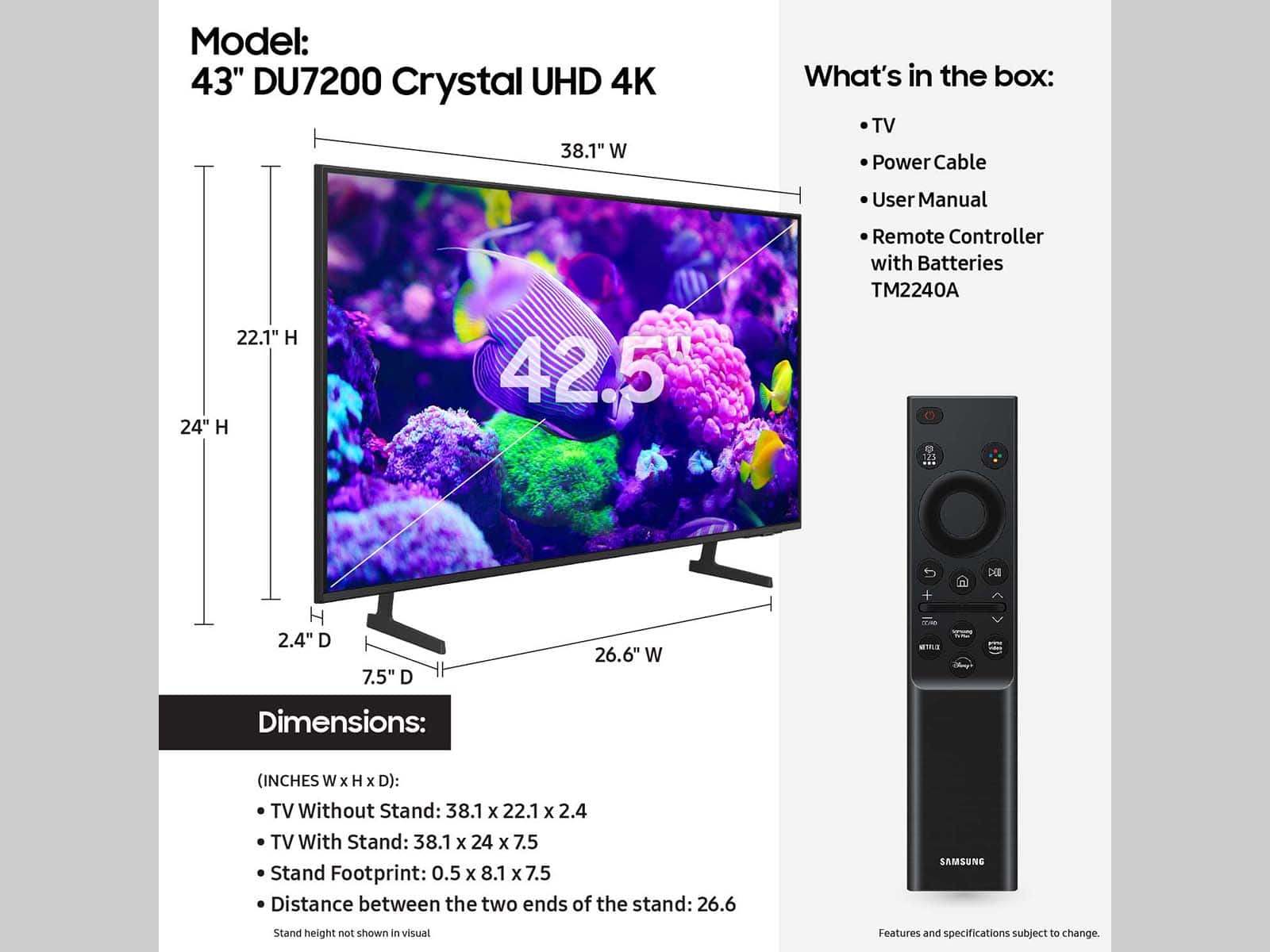
- UN43DU7200FXZA
- SKU:
- 6576342
Rating by feature
- Picture Quality
Rating 4.8 out of 5 stars
- Sound Quality
Rating 4.5 out of 5 stars
- Brightness
Rating 4.8 out of 5 stars
Customers are saying
Customers are delighted by the excellent picture quality, ease of use, and reasonable price of the 43” Class DU7200 Series Crystal UHD 4K Smart Tizen TV (2024). Many find the setup process simple and appreciate the TV's size, color clarity, and lightweight design. However, some customers have expressed concerns regarding the remote control and certain connectivity aspects.
This summary was generated by AI based on customer reviews.
Mrs JM
||Posted . Owned for 3 weeks when reviewed.This reviewer received promo considerations or sweepstakes entry for writing a review.Haven’t had to buy. New TV for many years. Very pleased with the Samsung we bought. We have two other Samsung TV and are very satisfied with the product
I would recommend this to a friendSamsung
||Posted . Owned for 3 weeks when reviewed.This reviewer received promo considerations or sweepstakes entry for writing a review.The purchase was effortless. I am very happy with the product performance but had difficulty setting it up and had to pay to have it done. The Geek squad worker was great. He was friendly, polite and very efficien.
I would recommend this to a friendSamsung tv
||Posted . Owned for 3 weeks when reviewed.This reviewer received promo considerations or sweepstakes entry for writing a review.It’s a good tv Samsung is a reliable brand Sound quality and volume could be better ,you have to increase volume a lot to be able to hear it good especially if someone is taking
I would recommend this to a friendGreat TV for the price!
||Posted . Owned for 1 month when reviewed.This reviewer received promo considerations or sweepstakes entry for writing a review.Replaced my 10 year old Samsung and this is so much better! A lot of customization settings and features. Cancelled my cable and YouTube TV and Netflix work great over wi-fi, saving me a bundle!
I would recommend this to a friend- Pros mentioned:Picture quality
Crystal Clear
||Posted . Owned for 1 month when reviewed.This reviewer received promo considerations or sweepstakes entry for writing a review.Crystal Clear. Thank you for the upgrade! Love it!
I would recommend this to a friend Samsung scores again
||Posted .This reviewer received promo considerations or sweepstakes entry for writing a review.I’ll buy nothing but Samsung and this new set just solidifies that thought. Purchased for the patio to watch the Guardians and it’s perfect.
I would recommend this to a friendSamsung Crystal Hd Tv
||Posted .This reviewer received promo considerations or sweepstakes entry for writing a review.The Tv is great, very high quality and beautiful display. Very clear!!
I would recommend this to a friendTelevision
||Posted .This reviewer received promo considerations or sweepstakes entry for writing a review.Arrived ontime and I really enjoy my TV. I recommend it to everyone
I would recommend this to a friend- Cons mentioned:Remote control
Unacceptable remote control
||Posted . Owned for 3 weeks when reviewed.This reviewer received promo considerations or sweepstakes entry for writing a review.Never took item from box. I bought this tv because I have several samsung tv's and a 65" Crystal smart TV that I like. This 43" comes with a smart only remote. The other one has a remote with numbers, so no scrolling needed to tune to a specific channel. I watch OTA mostly and need that capability. When I opened the box I found the smart only remote. I expected the same remote as the 65" Crystal I have. Returned this one.
No, I would not recommend this to a friendBrand response from Samsung
Posted .Hi RonB,
We appreciate your loyalty to the Samsung brand and for your feedback on the DU7200 remote. Samsung remotes are designed to be convenient and useful, but we understand if you’d prefer to use a third-party remote, whether it’s a universal remote, a game controller, or something else! Whether you are replacing a lost remote or using an alternative remote to help reduce clutter, a third-party remote is a great option to use to control your Samsung TV.
If you ever have questions or need help, Samsung is here for you! Give us a call at 1-800-SAMSUNG, 8 AM - 12 AM EST, seven days a week. Our LiveChat agents are also available by clicking on the ‘Support’ link on our website.
Thanks for being a part of the Samsung family!
~ Samsung Advisor
Samsung 43" Crystal UHD 4K Smart Tv
||Posted .This reviewer received promo considerations or sweepstakes entry for writing a review.It's a great TV the only complaint that I'll say I have is if you play video games for a long time sometimes the TV will go in a black screen thinking it's not in game mode even though game mode is on.
I would recommend this to a friendSamsung tv
||Posted .This reviewer received promo considerations or sweepstakes entry for writing a review.Love my tv. Equipped with all channels. Streaming, live tv plus
I would recommend this to a friendGreat Samsung TV Product!
||Posted .This reviewer received promo considerations or sweepstakes entry for writing a review.Great quality television set! We got this for our daughter and it works superbly. Outstanding quality!
I would recommend this to a friend- Pros mentioned:Picture quality
Crystal uhd
||Posted . Owned for 3 weeks when reviewed.This reviewer received promo considerations or sweepstakes entry for writing a review.Good little tv for bedroom it does everything you need a tv to do!
I would recommend this to a friend Great buy
||Posted .This reviewer received promo considerations or sweepstakes entry for writing a review.I bought it for my spare room and it’s working out perfectly
I would recommend this to a friendSamsung Tv plus
||Posted . Owned for 8 months when reviewed.This reviewer received promo considerations or sweepstakes entry for writing a review.My third Samsung smart tv purchase in 5 years. Lots of channels on the Samsung tv plus channel. No need to purchase cable tv.
I would recommend this to a friendNo complaints so far
||Posted . Owned for 3 weeks when reviewed.This reviewer received promo considerations or sweepstakes entry for writing a review.No complaints so far. Bought the bestbuy warranty just in case, as my prior Samsung that I bought from here died after 2 years. Regret not getting warranty on that but got it on this and hopeful that this tv will last longer than the old one
I would recommend this to a friend- Pros mentioned:Picture quality
Recommend
||Posted . Owned for 3 weeks when reviewed.This reviewer received promo considerations or sweepstakes entry for writing a review.My son loves his brand new Samsung tv. Amazing picture quality!
I would recommend this to a friend Satisfied customer
||Posted .This reviewer received promo considerations or sweepstakes entry for writing a review.Needed a new TV for the master bedroom and this one is the perfect fit. All the TV's in are home are Samsungs purchased from Best Buy. We are always happy with the service and quality.
I would recommend this to a friendPoor remote
||Posted . Owned for 3 weeks when reviewed.This reviewer received promo considerations or sweepstakes entry for writing a review.The TV clarity is fine but my issue is with the remote. The buttons on it are very small and I distinct and it is difficult to find the right buttons
No, I would not recommend this to a friend- Pros mentioned:Picture quality
frances
||Posted . Owned for 1 month when reviewed.This reviewer received promo considerations or sweepstakes entry for writing a review.picture is great--but the volume needs to be set very high!!
I would recommend this to a friend