Customer Ratings & Reviews
















- Model:
- QN43Q7FAAFXZA
- SKU:
- 6619443
Rating by feature
- Picture Quality
Rating 4.8 out of 5 stars
- Sound Quality
Rating 4.6 out of 5 stars
- Brightness
Rating 4.8 out of 5 stars
Customers are saying
Customers are pleased with the excellent picture quality of the 43” Class Q7F Series QLED 4K UHD SamsungVision AI Smart Tizen TV (2025). Many also appreciate how easy it is to install and setup, as well as its perfect size and light weight. The only notable drawback mentioned by some customers is the remote control.
This summary was generated by AI based on customer reviews.
- Cons mentioned:Remote control
Wish it was bigger
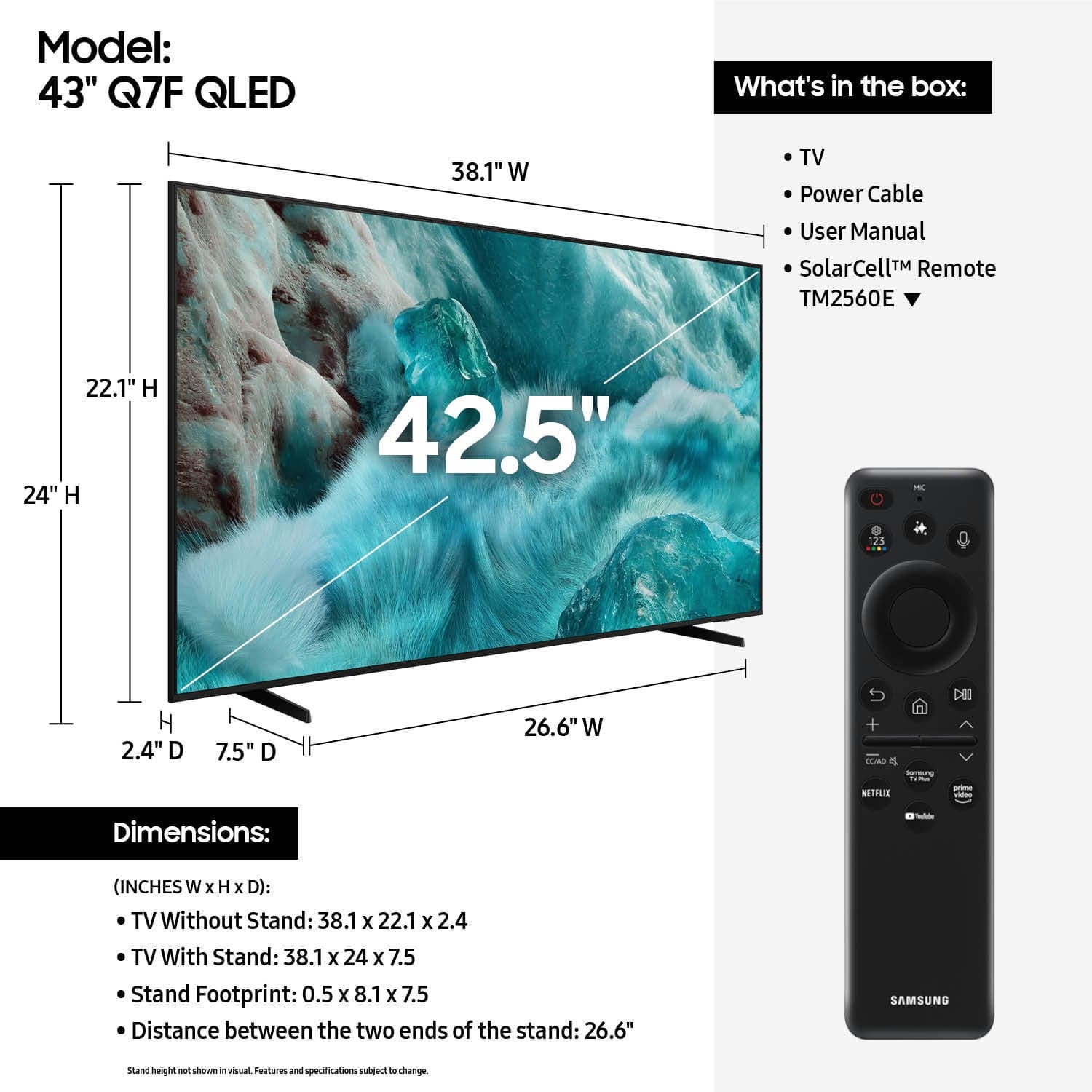
||Posted . Owned for 3 weeks when reviewed.This reviewer received promo considerations or sweepstakes entry for writing a review.The tv Iis good ,we have it in our sunroom. The remote is so small I have a hard time holding it and using it. Also wish we had gotten a little larger screen. Using the remote to look for different channels s a little difficulate between the small remote and and at times the writing on the screen is small. We paid to have it installed and the Geek Squad member did a great job on the installation.
No, I would not recommend this to a friendBrand response from Samsung
Posted .TOOPUPS,
Thank you for sharing your thoughts on the remote. While the Solar Cell Remote may appear minimal, many buttons offer multiple or long-press functions to help simplify the design without sacrificing functionality. For example:
• Settings/Number/Color: Allows you to easily access your TV's Quick Settings and input channel numbers.
• Volume rocker: Push up/down to adjust volume. Press and release quickly to mute.
• Long-press Volume button: Hold for more than 1 second to open Accessibility Shortcuts.
• RETURN button: Press to go back to the previous menu or screen. While watching TV, it takes you back to the previous channel.
These functions allow for a more streamlined experience without adding extra buttons.
Learn TV Remote is a feature designed to help users become familiar with the layout and function of each button on the Samsung remote. When enabled, pressing any button (except the Power button, which will still turn off the TV) will prompt the TV to announce the button’s name and its purpose – without affecting TV operation.
This teaching mode is especially useful for users who are visually impaired or new to Samsung remotes. To enable this feature, go to: Settings > All Settings > General & Privacy > Accessibility > Learn TV Remote. To exit, simply press the Return key twice.
If you’d like more assistance with this feature, please reach Samsung Support at 1-800-SAMSUNG, available 8AM – 12AM EST, 7 days a week. LiveChat agents are also available through the ‘Support’ link on our website.
~ Samsung Specialist
- Pros mentioned:Picture quality
Great TV
||Posted .This reviewer received promo considerations or sweepstakes entry for writing a review.Great TV. Usual great quality from Samsung. Home or office.
I would recommend this to a friend Perfect for a Bedroom
||Posted . Owned for 5 months when reviewed.This reviewer received promo considerations or sweepstakes entry for writing a review.I bought this TV for my bedroom and it was exactly what I wanted. Looks great and was a great value for the price.
I would recommend this to a friend- Pros mentioned:Picture quality
Samsung 43" QLED
||Posted .This reviewer received promo considerations or sweepstakes entry for writing a review.Great value and quality. Store staff were helpful and friendly
I would recommend this to a friend Great TV - Good value!
||Posted .This reviewer received promo considerations or sweepstakes entry for writing a review.Bought to replace a similar but much older TV from Samsung. Set up instructions in the box were clear and I was able to finish in time to watch my show. I am ver happy with this TV.
I would recommend this to a friend- Pros mentioned:Picture quality
tv
||Posted . Owned for 1 month when reviewed.This reviewer received promo considerations or sweepstakes entry for writing a review.working good like it need a good tv had two of thim
I would recommend this to a friend - Pros mentioned:Picture quality
Nice TV
||Posted . Owned for 1 month when reviewed.This reviewer received promo considerations or sweepstakes entry for writing a review.Clear picture, easy to install, would have liked better manual explaining features and hookup options.
I would recommend this to a friendBrand response from Samsung
Posted .JamesW,
We appreciate you sharing your user experience. To help you get the most from your TV, you can download the full e-Manual and more by visiting Samsung’s website then navigating to: Support > Manual & Software > TVs & Home Theater. From there, you can search for and select your Q7F TV model to view or download the available guides.
The e-Manual and Remote Control Guide are also conveniently built into your TV: Settings > Support > Tips and User Guides
If you need additional help, please contact Samsung Support at 1-800-SAMSUNG, 8AM – 12AM EST, 7 days a week. LiveChat agents are also available through the ‘Support’ link on our website.
~ Samsung Specialist
- Pros mentioned:Picture quality
Good TV
||Posted . Owned for 3 weeks when reviewed.This reviewer received promo considerations or sweepstakes entry for writing a review.Perfect size for what I need. Nice picture and reception.
I would recommend this to a friend - Pros mentioned:Picture quality
Samsung TV
||Posted .This reviewer received promo considerations or sweepstakes entry for writing a review.Perfect size TV for my needs. I only purchase Samsung TV's.
I would recommend this to a friend - Pros mentioned:Picture quality
Best TV I got so far
||Posted .This reviewer received promo considerations or sweepstakes entry for writing a review.Very nice TV. Fast response time compared to many brands I have purchased. Nice picture quality.
I would recommend this to a friend - Pros mentioned:Picture quality
Mom gift
||Posted .This reviewer received promo considerations or sweepstakes entry for writing a review.Enjoying the TV, my mother watch it every single day
I would recommend this to a friend Awesome Samsung TV!
||Posted . Owned for 3 weeks when reviewed.This reviewer received promo considerations or sweepstakes entry for writing a review.I think best buy always has great prices! Compare before you buy elsewhere!
I would recommend this to a friendElectronics
||Posted .This reviewer received promo considerations or sweepstakes entry for writing a review.This television is a great assistant to my house hold.
I would recommend this to a friendI'd buy again
||Posted . Owned for 1 month when reviewed.This reviewer received promo considerations or sweepstakes entry for writing a review.Bought 55" and 43" Samsung at same time. Both are high quality. I received technical help when I was there to research and buy. Good pricing. No pressure to buy. Found both slightly cheaper elsewhere but went back to buy from BestBuy because of great customer service.
I would recommend this to a friendTv purchase
||Posted . Owned for 2 weeks when reviewed.This reviewer received promo considerations or sweepstakes entry for writing a review.Friendly staff very knowledgeable. Gave me good information about other deals available.
I would recommend this to a friend- Pros mentioned:Picture quality
Samsung 43
||Posted .This reviewer received promo considerations or sweepstakes entry for writing a review.Great picture quality, just a little too much back light.
I would recommend this to a friendBrand response from Samsung
Posted .Txrpn,
Thank you for your review of Samsung's Q7F. If the image feels overly harsh - especially in darker rooms - there are several settings you can adjust to improve your viewing experience.
Start by changing the Picture Mode: Settings > All Settings > Picture > Picture Mode
We recommend trying one of the following:
• Movie – Softer contrast and lower brightness, ideal for dark room viewing
• Standard – Balanced for general everyday use
• Filmmaker Mode – Provides a more natural, accurate picture as intended by content creators
To further fine-tune, go to: Settings > All Settings > Picture > Expert Settings. Here, you can manually adjust Brightness, Contrast, Sharpness, and Contrast Enhancer (consider turning this off for a softer image).
You may also want to review your TV’s energy-saving features, which can automatically affect brightness based on your environment: Settings > All Settings > General & Privacy > Power and Energy Saving
Lastly, ensure your TV has the latest firmware installed, as updates can improve picture performance: Settings > Support > Software Update > Update Now
We hope these tips help make your viewing experience more comfortable. If you'd like help walking through any of these adjustments, Samsung Customer Support is available at 1-800-SAMSUNG (8AM – 12AM EST, 7 days a week). You can also LiveChat with an agent through the ‘Support’ link on our website.
~ Samsung Specialist
- Pros mentioned:Picture quality
43 inch tv
||Posted .This reviewer received promo considerations or sweepstakes entry for writing a review.Can be moved from room to room. Good picture quality.
I would recommend this to a friend High Quality TV
||Posted . Owned for 3 weeks when reviewed.This reviewer received promo considerations or sweepstakes entry for writing a review.Turned out to be of higher quality than my previous Samsung smart TV; love it!
I would recommend this to a friendAI ..."Arthritic Intelligence":-)
||Posted . Owned for 3 weeks when reviewed.This reviewer received promo considerations or sweepstakes entry for writing a review.All good, being 71 I had a little trouble with set up but all turned out ok as I am just not tech savvy so the TV was smarter than me!
I would recommend this to a friendCustomer
||Posted . Owned for 2 weeks when reviewed.This reviewer received promo considerations or sweepstakes entry for writing a review.Your sales person treated me like it was his business thank you and keep up the good work
I would recommend this to a friend