Customer Ratings & Reviews





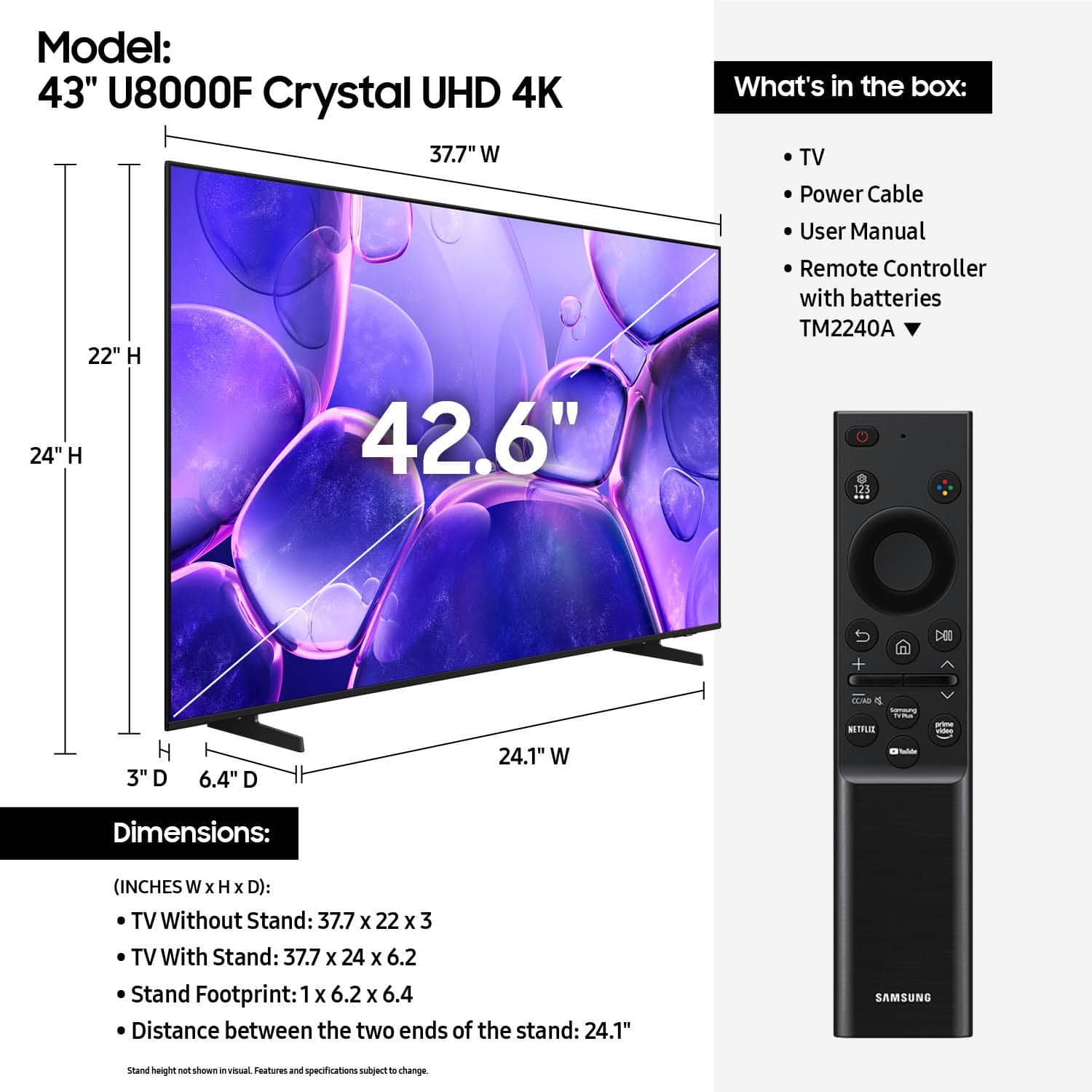












- Model:
- UN43U8000FFXZA
- |
- SKU:
- 10187654
Customer reviews
Rating 4.6 out of 5 stars with 944 reviews
(944 customer reviews)Rating by feature
- Picture Quality4.8
Rating 4.8 out of 5 stars
- Sound Quality4.6
Rating 4.6 out of 5 stars
- Brightness4.7
Rating 4.7 out of 5 stars
Rated 5 out of 5 stars
Samsung 43 inch
||Posted . Owned for 1 month when reviewed.This reviewer received promo considerations or sweepstakes entry for writing a review.Great tv and the pickup at Best Buy went smoothly thanks
This review is from Samsung - 43” Class U8000F Series Crystal UHD 4K Smart Tizen TV (2025)
I would recommend this to a friend- Pros mentioned:Picture quality
Rated 5 out of 5 stars
Another great product from Samsung
||Posted . Owned for 3 weeks when reviewed.This reviewer received promo considerations or sweepstakes entry for writing a review.Great picture and cost!!! Very easy to unpack and setup. Less than 30 minutes to start up and enjoy
This review is from Samsung - 43” Class U8000F Series Crystal UHD 4K Smart Tizen TV (2025)
I would recommend this to a friend Rated 5 out of 5 stars
Great TV
||Posted . Owned for 3 weeks when reviewed.This reviewer received promo considerations or sweepstakes entry for writing a review.Excellent. Good quality and great service. The service from Best Buy is the best. I got the Best Buy!
This review is from Samsung - 43” Class U8000F Series Crystal UHD 4K Smart Tizen TV (2025)
I would recommend this to a friendRated 5 out of 5 stars
Samsung tv
||Posted . Owned for 1 week when reviewed.This reviewer received promo considerations or sweepstakes entry for writing a review.Another replacement. Remote takes some getting used to, however the tv is great
This review is from Samsung - 43” Class U8000F Series Crystal UHD 4K Smart Tizen TV (2025)
I would recommend this to a friendRated 5 out of 5 stars
Great tv for the price
||Posted . Owned for 3 weeks when reviewed.This reviewer received promo considerations or sweepstakes entry for writing a review.The setup was easy. Picture and sound are crystal clear. I am extremely happy with this purchase.
This review is from Samsung - 43” Class U8000F Series Crystal UHD 4K Smart Tizen TV (2025)
I would recommend this to a friend- Pros mentioned:Picture quality
Rated 5 out of 5 stars
43 Crystal HD
||Posted . Owned for 1 week when reviewed.This reviewer received promo considerations or sweepstakes entry for writing a review.A Great Clear Picture!! I love it. Easy to setup!!
This review is from Samsung - 43” Class U8000F Series Crystal UHD 4K Smart Tizen TV (2025)
I would recommend this to a friend - Pros mentioned:Picture quality
Rated 5 out of 5 stars
Christmas Surprise
||Posted .This reviewer received promo considerations or sweepstakes entry for writing a review.Great picture quality, color is so clear and beautiful !!
This review is from Samsung - 43” Class U8000F Series Crystal UHD 4K Smart Tizen TV (2025)
I would recommend this to a friend - Pros mentioned:Picture quality
Rated 5 out of 5 stars
Samsung 43” QLED TV.
||Posted . Owned for 3 weeks when reviewed.This reviewer received promo considerations or sweepstakes entry for writing a review.Great QLED TV. Couldn’t be more pleased. Picture and audio are awesome.
This review is from Samsung - 43” Class U8000F Series Crystal UHD 4K Smart Tizen TV (2025)
I would recommend this to a friend - Pros mentioned:Picture quality
Rated 5 out of 5 stars
Samsung 43" Class U8000F Series
||Posted . Owned for 2 months when reviewed.This reviewer received promo considerations or sweepstakes entry for writing a review.Great TV for the price. Awesome picture. Would buy another one in a heart beat.
This review is from Samsung - 43” Class U8000F Series Crystal UHD 4K Smart Tizen TV (2025)
I would recommend this to a friend - Pros mentioned:Picture quality
Rated 5 out of 5 stars
Samsung TV
||Posted . Owned for 3 weeks when reviewed.This reviewer received promo considerations or sweepstakes entry for writing a review.New Samsung TV installed in minutes and working as expected. Great picture and sound in small St Pete Beach condo.
This review is from Samsung - 43” Class U8000F Series Crystal UHD 4K Smart Tizen TV (2025)
I would recommend this to a friend Rated 5 out of 5 stars
Small business owner
||Posted . Owned for 3 weeks when reviewed.This reviewer received promo considerations or sweepstakes entry for writing a review.Great product and great service. We always buy from best buy when possible for the great options and service
This review is from Samsung - 43” Class U8000F Series Crystal UHD 4K Smart Tizen TV (2025)
I would recommend this to a friend- Pros mentioned:Picture quality
Rated 5 out of 5 stars
Great replacement for our Sunroom
||Posted .This reviewer received promo considerations or sweepstakes entry for writing a review.Works great. I updated a 12 year old Samsung and love the new Samsung TV Channels that are available
This review is from Samsung - 43” Class U8000F Series Crystal UHD 4K Smart Tizen TV (2025)
I would recommend this to a friend Rated 5 out of 5 stars
New TV
||Posted . Owned for 5 months when reviewed.This reviewer received promo considerations or sweepstakes entry for writing a review.Clear image and sound. Sleek look. Samsumg TVs last forever
This review is from Samsung - 43” Class U8000F Series Crystal UHD 4K Smart Tizen TV (2025)
I would recommend this to a friend- Pros mentioned:Picture quality
Rated 5 out of 5 stars
Great TV
||Posted . Owned for 3 weeks when reviewed.This reviewer received promo considerations or sweepstakes entry for writing a review.It's a great product, I really believe that this is one of the best TV. I would recommend it to anyone!
This review is from Samsung - 43” Class U8000F Series Crystal UHD 4K Smart Tizen TV (2025)
I would recommend this to a friend - Pros mentioned:Picture quality
Rated 5 out of 5 stars
Great service in shopping and installation
||Posted . Owned for 3 weeks when reviewed.This reviewer received promo considerations or sweepstakes entry for writing a review.Great service and installation. very pleased- plan to come back Sunday and buy two more TVs.
This review is from Samsung - 43” Class U8000F Series Crystal UHD 4K Smart Tizen TV (2025)
I would recommend this to a friend - Pros mentioned:Picture quality
Rated 4 out of 5 stars
Clear sharp picture.
||Posted . Owned for 3 weeks when reviewed.This reviewer received promo considerations or sweepstakes entry for writing a review.Good picture and fare sound quality. Customer service very good.
This review is from Samsung - 43” Class U8000F Series Crystal UHD 4K Smart Tizen TV (2025)
I would recommend this to a friend - Pros mentioned:Picture quality
Rated 5 out of 5 stars
Perfect TV
||Posted . Owned for 1 month when reviewed.This reviewer received promo considerations or sweepstakes entry for writing a review.I love that Samsung TV's connect with my phone and come with free tv channels. Best tv ever!!
This review is from Samsung - 43” Class U8000F Series Crystal UHD 4K Smart Tizen TV (2025)
I would recommend this to a friend Rated 5 out of 5 stars
Love the Samsung TV’s
||Posted . Owned for 1 month when reviewed.This reviewer received promo considerations or sweepstakes entry for writing a review.I love the Samsung TV’s, they are the only brand of TV’s that I will buy.
This review is from Samsung - 43” Class U8000F Series Crystal UHD 4K Smart Tizen TV (2025)
I would recommend this to a friendRated 5 out of 5 stars
New Brand in my house!!!
||Posted . Owned for 3 weeks when reviewed.This reviewer received promo considerations or sweepstakes entry for writing a review.Love the features the most. Picture quality is great, but the features are what won me over...
This review is from Samsung - 43” Class U8000F Series Crystal UHD 4K Smart Tizen TV (2025)
I would recommend this to a friend- Pros mentioned:Picture quality
Rated 5 out of 5 stars
who new
||Posted . Owned for 2 weeks when reviewed.This reviewer received promo considerations or sweepstakes entry for writing a review.Graet tv I enjoy the picture color and how well it was to use with the guide.
This review is from Samsung - 43” Class U8000F Series Crystal UHD 4K Smart Tizen TV (2025)
I would recommend this to a friend