Customer Ratings & Reviews





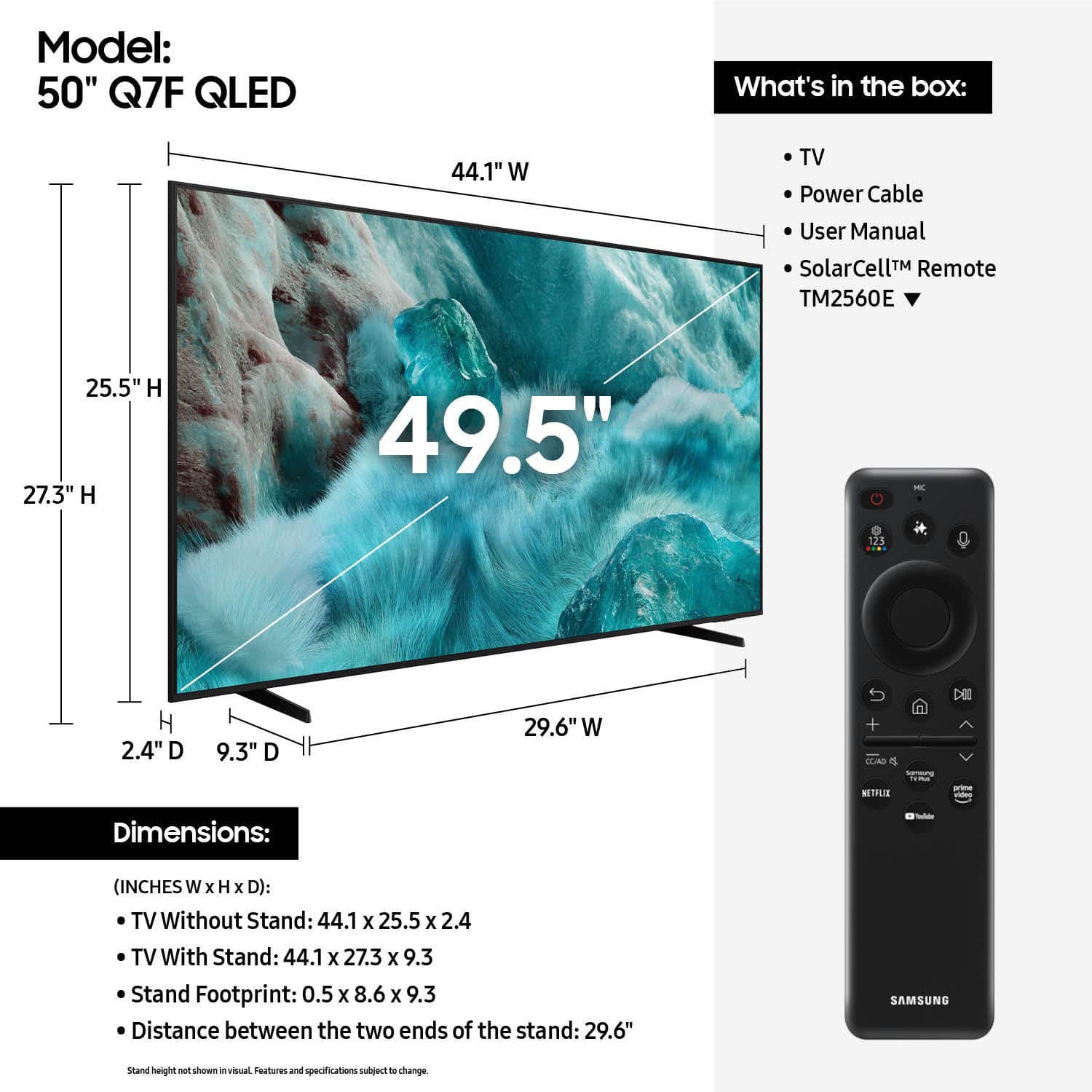











- Model:
- QN50Q7FAAFXZA
- |
- SKU:
- 6619441
Customer reviews
Rating 4.7 out of 5 stars with 578 reviews
(578 customer reviews)Rating by feature
- Picture Quality4.8
Rating 4.8 out of 5 stars
- Sound Quality4.6
Rating 4.6 out of 5 stars
- Brightness4.8
Rating 4.8 out of 5 stars
Customers are saying
Customers find value in the 50” Class Q7F Series QLED 4K UHD SamsungVision AI Smart Tizen TV (2025)'s picture quality, ease of use, and overall performance. The setup is easy and the size is suitable for many rooms. However, some customers have expressed concerns about the remote control, connectivity options, and brightness.
This summary was generated by AI based on customer reviews.
Rated 5 out of 5 stars
Samsung 50” QLED TV
||Posted .This reviewer received promo considerations or sweepstakes entry for writing a review.We love this tv. It was a great upgrade from our Insignia 43inch LCD. It has a great color display and very small besils. I would definitely recommend.
I would recommend this to a friend- Pros mentioned:Picture quality
Rated 5 out of 5 stars
QLED TV 50 inch
||Posted . Owned for 2 weeks when reviewed.This reviewer received promo considerations or sweepstakes entry for writing a review.Great TV for the price! Unbeatable performance, highly recommended!
I would recommend this to a friend Rated 5 out of 5 stars
Perfect TV
||Posted . Owned for 1 month when reviewed.This reviewer received promo considerations or sweepstakes entry for writing a review.This tv is perfect for an average size bedroom like mine. The quality is amazing. The sound is a bit weak, so i recommend getting the matching samsung soundbar and subwoofer.
I would recommend this to a friend- Pros mentioned:Picture quality
Rated 5 out of 5 stars
Samsung is best
||Posted .This reviewer received promo considerations or sweepstakes entry for writing a review.I love this tv its honestly the best thing ive bought.
I would recommend this to a friend - Pros mentioned:Picture quality
Rated 5 out of 5 stars
a Christmas gift for us!
||Posted .This reviewer received promo considerations or sweepstakes entry for writing a review.I like my Tv , great sound and excellent color. pictures look very neat.
I would recommend this to a friend Rated 4 out of 5 stars
Samsung 50”
||Posted .This reviewer received promo considerations or sweepstakes entry for writing a review.Good picture but sound was hard to figure out. Finally got there but reduce loud sounds feature seemed opposite of what intuition would suggest. Turned out to be user error. But hey!
I would recommend this to a friend- Pros mentioned:Picture quality
Rated 5 out of 5 stars
SAMSUNG 50" TV
||Posted . Owned for 3 weeks when reviewed.This reviewer received promo considerations or sweepstakes entry for writing a review.This TV was purchased for my mother who has macular degeneration and cannot see well. She wanted to get a larger TV to replace her 39". This has been a big improvement for her. The colors are vibrant.
I would recommend this to a friend Rated 5 out of 5 stars
Works great!
||Posted . Owned for 1 month when reviewed.This reviewer received promo considerations or sweepstakes entry for writing a review.Grandson set up tv & it works great. Purchase was quick & easy. Sale person in electronics took care of it.
I would recommend this to a friend- Pros mentioned:Picture quality
Rated 4 out of 5 stars
Samsung Smart TV
||Posted . Owned for 6 months when reviewed.This reviewer received promo considerations or sweepstakes entry for writing a review.Great picture very clear. Only issue is that it is not compatible with Verizon Fios App.
I would recommend this to a friend - Pros mentioned:Picture quality
Rated 5 out of 5 stars
Samsung TV
||Posted . Owned for 1 month when reviewed.This reviewer received promo considerations or sweepstakes entry for writing a review.I am pleased with the color and sound of the Samsung TV.
I would recommend this to a friend - Pros mentioned:Picture quality
Rated 5 out of 5 stars
Great Quality
||Posted .This reviewer received promo considerations or sweepstakes entry for writing a review.Perfect TV for my office and bought at a great price.
I would recommend this to a friend - Pros mentioned:Picture quality
Rated 5 out of 5 stars
New television from Best Buy - Highland Village, T
||Posted . Owned for 2 weeks when reviewed.This reviewer received promo considerations or sweepstakes entry for writing a review.Excellent value! Good sound quality even without a sound bar!
I would recommend this to a friend Rated 5 out of 5 stars
Samsung TV
||Posted . Owned for 1 month when reviewed.This reviewer received promo considerations or sweepstakes entry for writing a review.Very good picture in a brightly lit room!!! And the remote is easy to use.
I would recommend this to a friend- Pros mentioned:Picture quality
Rated 5 out of 5 stars
Tv purchase
||Posted . Owned for 1 week when reviewed.This reviewer received promo considerations or sweepstakes entry for writing a review.This 50" Samsung QLED Q7K tv has been a great purchase for the price point.
I would recommend this to a friend - Pros mentioned:Picture quality
Rated 5 out of 5 stars
Samsung 50
||Posted . Owned for 2 weeks when reviewed.This reviewer received promo considerations or sweepstakes entry for writing a review.Love it It is more than I had hoped for. So many channels!
I would recommend this to a friend - Cons mentioned:Remote control
Rated 4 out of 5 stars
Samsung 50 inch
||Posted . Owned for 1 month when reviewed.This reviewer received promo considerations or sweepstakes entry for writing a review.I gave it a 4 star because I do not like the remote. It's too small & touchy when changing the channel & volume.
I would recommend this to a friend - Pros mentioned:Picture quality
Rated 5 out of 5 stars
Great TV
||Posted .This reviewer received promo considerations or sweepstakes entry for writing a review.Great TV for a screen in both daylight and no-light. Picture quality is fantastic.
I would recommend this to a friend Rated 5 out of 5 stars
Samsung TV
||Posted .This reviewer received promo considerations or sweepstakes entry for writing a review.Clear picture quality and good sound make a huge difference in enjoying a TV purchase.
I would recommend this to a friendRated 5 out of 5 stars
TV is good
||Posted .This reviewer received promo considerations or sweepstakes entry for writing a review.The product itself is good. The issue i have is being told it would deliver on a specific date then getting a message it was delayed and would be another 3 weeks and then it showing up the day after it was supposed to origenially supposed. the fact that when you call customer service or the store itself your call goes out of the country to someone you cant understand and they cant understand you and really have no good answers for you. Bring you customer service back to the USA and deliver product when you say you are going to
I would recommend this to a friend- Pros mentioned:Picture quality
Rated 5 out of 5 stars
Samsung 50" TV
||Posted . Owned for 1 month when reviewed.This reviewer received promo considerations or sweepstakes entry for writing a review.I am very happy with the product that I bought. The picture is good and the sound is great.
I would recommend this to a friend