Customer Ratings & Reviews





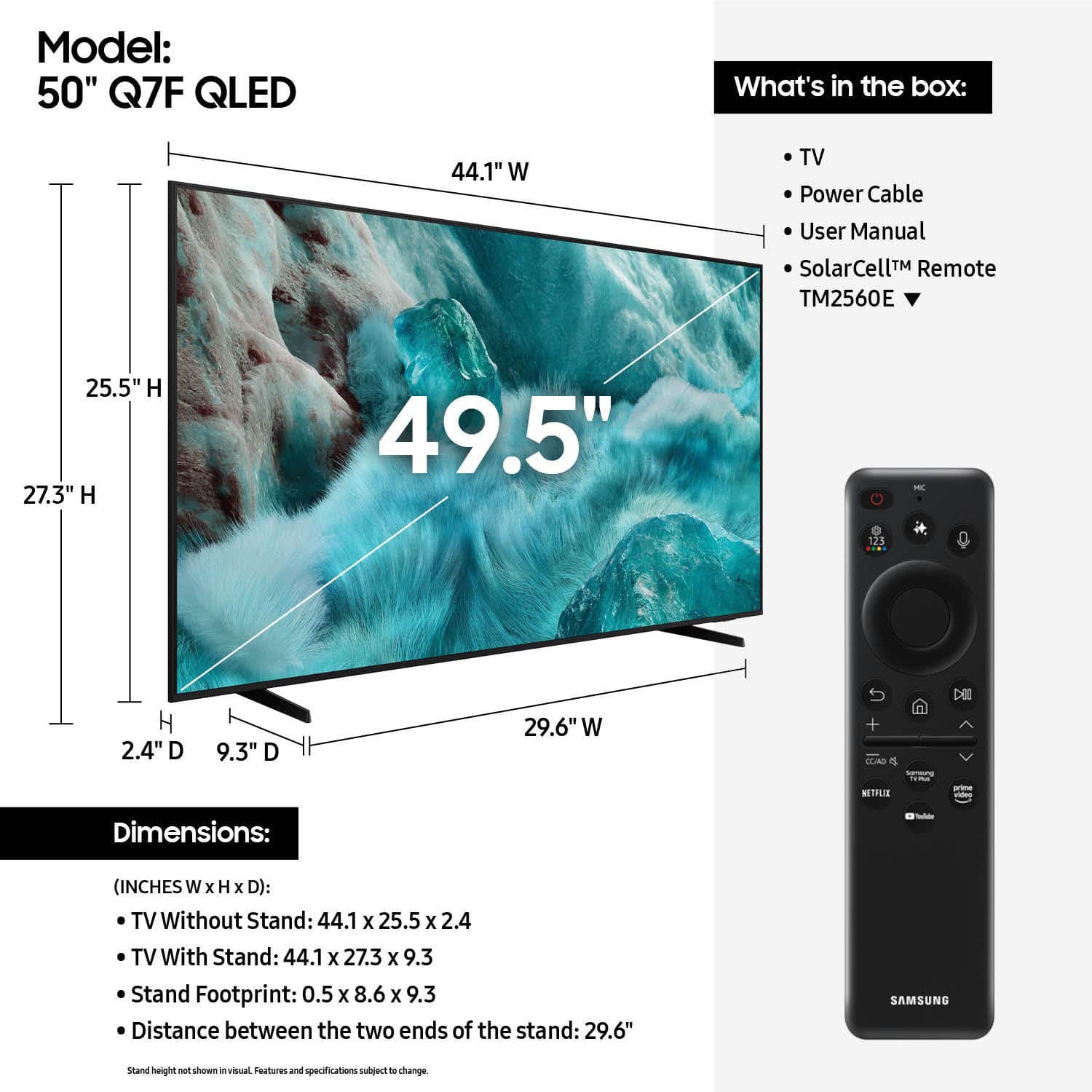











- Model:
- QN50Q7FAAFXZA
- SKU:
- 6619441
Rating by feature
- Picture Quality
Rating 4.8 out of 5 stars
- Sound Quality
Rating 4.6 out of 5 stars
- Brightness
Rating 4.8 out of 5 stars
Customers are saying
Customers find value in the 50” Class Q7F Series QLED 4K UHD SamsungVision AI Smart Tizen TV (2025)'s picture quality, ease of use, and overall performance. The setup is easy and the size is suitable for many rooms. However, some customers have expressed concerns about the remote control, connectivity options, and brightness.
This summary was generated by AI based on customer reviews.
- Pros mentioned:Picture quality
Grandma
||Posted . Owned for 3 weeks when reviewed.This reviewer received promo considerations or sweepstakes entry for writing a review.Its my second samsung tv and I would buy another again
I would recommend this to a friend - Pros mentioned:Picture quality
Samsung tv
||Posted . Owned for 1 week when reviewed.This reviewer received promo considerations or sweepstakes entry for writing a review.Nice tv for the price jsjsjejjsjsjsjsjjsjsjsjsjsjsjs
I would recommend this to a friend - Pros mentioned:Picture quality
Samsung 50in
||Posted . Owned for 3 weeks when reviewed.This reviewer received promo considerations or sweepstakes entry for writing a review.So far the quality is good. Picture is clear an sound quality is good
I would recommend this to a friend Samsung TV
||Posted . Owned for 3 weeks when reviewed.This reviewer received promo considerations or sweepstakes entry for writing a review.Excellent service, and attention to our questions. The unit is great, has beautiful clarity.
I would recommend this to a friendNice for the price
||Posted . Owned for 2 weeks when reviewed.This reviewer received promo considerations or sweepstakes entry for writing a review.Couldn’t be happier for the price! We needed to upgrade to a smart tv. We also went bigger as we had a 40” before. Nice features. The smart tv service is missing a few services, but overall it’s good.
I would recommend this to a friendTV review
||Posted . Owned for 3 months when reviewed.This reviewer received promo considerations or sweepstakes entry for writing a review.Amazing TV and a great deal. I liked that this product has a great software and it allows to switch between apps smoothly. This TV has really improved my experience watching sports and shows due it’s high quality.
I would recommend this to a friendGreat purchase
||Posted . Owned for 1 month when reviewed.This reviewer received promo considerations or sweepstakes entry for writing a review.We’re very happy . Loaded all our apps and get local channels. There are cheaper out there, but looking for a long term purchase. Our last Samsung is 10-15 years and still going strong.
I would recommend this to a friendBest review
||Posted .This reviewer received promo considerations or sweepstakes entry for writing a review.A great product I would love to buy again for my home
I would recommend this to a friend- Pros mentioned:Picture quality
Easy Setup
||Posted . Owned for 1 month when reviewed.This reviewer received promo considerations or sweepstakes entry for writing a review.The tv works great, and the apps are easy to install and use.
I would recommend this to a friend - Pros mentioned:Picture quality
Samsung tv qled
||Posted . Owned for 3 weeks when reviewed.This reviewer received promo considerations or sweepstakes entry for writing a review.I like the tv is nice and clear picture the speakers are loud enough it’s not bad I recommend buying a Samsung tv
I would recommend this to a friendBrand response from Samsung
Posted .Hamood,
Thank you for purchasing Samsung’s Q7F TV and for sharing your feedback regarding low volume. To start, we recommend making sure your TV is running the latest firmware, as updates can include improvements to sound performance: Home > left directional key > Settings > Support > Software Update
If volume levels still seem too low, you can improve sound performance by adjusting a few key settings:
Sound Mode: Navigate to: Settings > All Settings > Sound > Sound Mode
• Standard: Balanced for everyday viewing
• Optimized: Enhances effects and creates a more spacious sound
• Amplify: Boosts mid and high tones, especially helpful if dialogue is difficult to hear
Auto Volume: This feature helps maintain consistent volume levels across content and input sources. Turn it on under: Settings > All Settings > Sound > Expert Settings > Auto Volume = On
You can also explore Expert Settings to fine-tune sound output with adjustments for Balance, Equalizer, and more.
If you’re considering enhancing your setup, Samsung’s Q- and S-Series Soundbars (like the HW-Q800F) feature Q-Symphony, which syncs your TV and soundbar speakers for a fuller, more immersive sound experience.
For personalized support with these settings or selecting a soundbar to complement your setup, contact Samsung Support at 1-800-SAMSUNG (8AM – 12AM EST, 7 days a week) or use LiveChat via the ‘Support’ link on our website.
~ Samsung Specialist
Samsung 50-in TV
||Posted . Owned for 1 week when reviewed.This reviewer received promo considerations or sweepstakes entry for writing a review.TVs is great, Samsung you get thousands of channels, very easy to download.
I would recommend this to a friendSenior citizen
||Posted . Owned for 2 weeks when reviewed.This reviewer received promo considerations or sweepstakes entry for writing a review.Very happy with my new tv. Salesperson was very helpful. She explained everything I needed to help me with my purchase.
I would recommend this to a friend- Cons mentioned:Brightness
Dark edges
Posted .This reviewer received promo considerations or sweepstakes entry for writing a review.We have five Samsung Q7 and Q6 TVs we've become used to using (from 49 to 85 inches), so when I broke the screen on one of them, this was the obvious choice. Very surprised and disappointed to have dark edges. I think this is called vignetting, and seems to happen with bad lens design or light pathway errors. We tried two replacements--so three different TVs--all the same.
No, I would not recommend this to a friendBrand response from Samsung
Posted .JimC,
We appreciate your feedback on the picture quality of Samsung’s Q7F TV. If the image doesn’t quite match your preferences, there are several adjustments you can make to better suit your viewing environment and content type.
First, please ensure your TV is running the latest firmware, as updates may include important picture quality enhancements. Go to: Home > Left directional button > Settings > Support > Software Update > Update Now
To explore picture mode options, navigate to: Home > Left directional button > Settings > All Settings > Picture > Picture Mode. Options include:
• Standard – Ideal for general viewing
• Dynamic – Brighter and more vibrant for well-lit spaces
• Eco – Optimized for energy efficiency
• Movie – Best for viewing in low light
• Filmmaker Mode – Preserves the content creator’s intent and disables motion smoothing for supported content
You can further customize your image by going to: Settings > All Settings > Picture > Expert Settings, where you can adjust Brightness, Contrast, Color Tone, Sharpness, Contrast Enhancer and more.
If you’d like help finding the best picture settings for your preferences, please don’t hesitate to contact Samsung Support at 1-800-SAMSUNG, available 8AM – 12AM EST, 7 days a week. You can also LiveChat with an agent or explore additional resources on our website by clicking the ‘Support’ link.
~ Samsung Specialist
Great tv.
||Posted . Owned for 2 weeks when reviewed.This reviewer received promo considerations or sweepstakes entry for writing a review.Really like this tv. It’s very quick to load apps and has very nice screen clarity.
I would recommend this to a friendA Gift
||Posted . Owned for 2 weeks when reviewed.This reviewer received promo considerations or sweepstakes entry for writing a review.This was a gift for a family member and I know they are excited.
I would recommend this to a friendSamsung tv
||Posted . Owned for 3 weeks when reviewed.This reviewer received promo considerations or sweepstakes entry for writing a review.Tv is nice, however the tv was hung with the bracket that was there. Best Buy the returned unused bracket has not been refunded to me.
I would recommend this to a friendGreat!
||Posted . Owned for 1 month when reviewed.This reviewer received promo considerations or sweepstakes entry for writing a review.Its great! I like everything about it the process is fast and easy.
I would recommend this to a friendSamung
||Posted . Owned for 5 months when reviewed.This reviewer received promo considerations or sweepstakes entry for writing a review.Excellent, I love Samsung products. I always recommend them to my friends.
I would recommend this to a friend- Pros mentioned:Picture quality
Disappointed
||Posted . Owned for 1 month when reviewed.This reviewer received promo considerations or sweepstakes entry for writing a review.I am a long time Samsung tv owner. I may give this new tv a 3.5 rating as a hand full of the channels have a 4.5 star picture. I also have 8 year old and a 10 year old Samsung tvs. I would rate them at 4.0 and 4.5. The dynamic picture feature doesn't seem to make as much of a difference on this new tv. Wish I tried OLED instead.
No, I would not recommend this to a friendBrand response from Samsung
Posted .WilliamN,
We appreciate your feedback on the picture quality of Samsung’s Q7F TV. If the image doesn’t quite match your preferences, there are several adjustments you can make to better suit your viewing environment and content type.
First, please ensure your TV is running the latest firmware, as updates may include important picture quality enhancements. Go to: Home > Left directional button > Settings > Support > Software Update > Update Now
To explore picture mode options, navigate to: Home > Left directional button > Settings > All Settings > Picture > Picture Mode. Options include:
• Standard – Ideal for general viewing
• Dynamic – Brighter and more vibrant for well-lit spaces
• Eco – Optimized for energy efficiency
• Movie – Best for viewing in low light
• Filmmaker Mode – Preserves the content creator’s intent and disables motion smoothing for supported content
You can further customize your image by going to: Settings > All Settings > Picture > Expert Settings, where you can adjust Brightness, Contrast, Color Tone, Sharpness, Contrast Enhancer and more.
If you’d like help finding the best picture settings for your preferences, please don’t hesitate to contact Samsung Support at 1-800-SAMSUNG, available 8AM – 12AM EST, 7 days a week. You can also LiveChat with an agent or explore additional resources on our website by clicking the ‘Support’ link.
~ Samsung Specialist
- Cons mentioned:Brightness
Not as bright
||Posted . Owned for 1 month when reviewed.This reviewer received promo considerations or sweepstakes entry for writing a review.Returned the TV for different make and model. Once home the picture was not near as bright as in the story.
No, I would not recommend this to a friendBrand response from Samsung
Posted .Hawkman,
We appreciate your feedback on the picture quality of Samsung’s Q7F TV. If the image doesn’t quite match your preferences, there are several adjustments you can make to better suit your viewing environment and content type.
First, please ensure your TV is running the latest firmware, as updates may include important picture quality enhancements. Go to: Home > Left directional button > Settings > Support > Software Update > Update Now
To explore picture mode options, navigate to: Home > Left directional button > Settings > All Settings > Picture > Picture Mode. Options include:
• Standard – Ideal for general viewing
• Dynamic – Brighter and more vibrant for well-lit spaces
• Eco – Optimized for energy efficiency
• Movie – Best for viewing in low light
• Filmmaker Mode – Preserves the content creator’s intent and disables motion smoothing for supported content
You can further customize your image by going to: Settings > All Settings > Picture > Expert Settings, where you can adjust Brightness, Contrast, Color Tone, Sharpness, Contrast Enhancer and more.
If you’d like help finding the best picture settings for your preferences, please don’t hesitate to contact Samsung Support at 1-800-SAMSUNG, available 8AM – 12AM EST, 7 days a week. You can also LiveChat with an agent or explore additional resources on our website by clicking the ‘Support’ link.
~ Samsung Specialist