Customer Ratings & Reviews





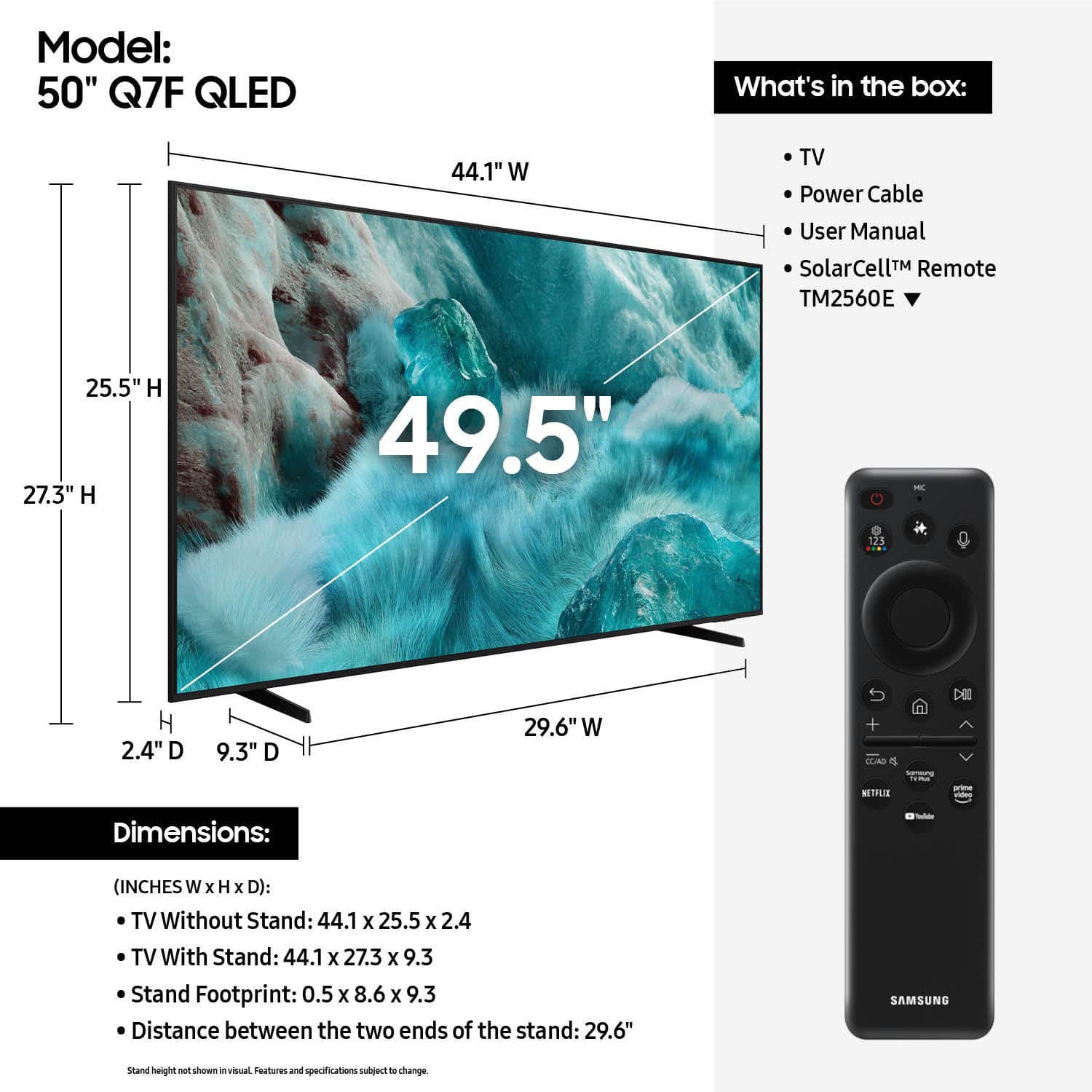











- Model:
- QN50Q7FAAFXZA
- SKU:
- 6619441
Rating by feature
- Picture Quality
Rating 4.8 out of 5 stars
- Sound Quality
Rating 4.6 out of 5 stars
- Brightness
Rating 4.8 out of 5 stars
Customers are saying
Customers find value in the 50” Class Q7F Series QLED 4K UHD SamsungVision AI Smart Tizen TV (2025)'s picture quality, ease of use, and overall performance. The setup is easy and the size is suitable for many rooms. However, some customers have expressed concerns about the remote control, connectivity options, and brightness.
This summary was generated by AI based on customer reviews.
Jans Samsung 50" review
||Posted . Owned for 1 week when reviewed.This reviewer received promo considerations or sweepstakes entry for writing a review.Love that I can sync it to my Samsung phone to see pictures on tv screen. Was concerned about the very small remote, but it works really well. Its been easy to add apps.
I would recommend this to a friend- Pros mentioned:Picture quality
Samsung tv
||Posted . Owned for 1 month when reviewed.This reviewer received promo considerations or sweepstakes entry for writing a review.Nice and sharp pictures and brilliant bright colors
I would recommend this to a friend Nice TV
||Posted .This reviewer received promo considerations or sweepstakes entry for writing a review.I liked the tv but needed different technology so returned for a different one
I would recommend this to a friend- Pros mentioned:Picture quality
Works great
||Posted . Owned for 3 weeks when reviewed.This reviewer received promo considerations or sweepstakes entry for writing a review.Out of the box TV works great, clear picture and very user friendly
I would recommend this to a friend Samsung
||Posted . Owned for 1 month when reviewed.This reviewer received promo considerations or sweepstakes entry for writing a review.This was a great purchase since Samsung products are excellent.
I would recommend this to a friendBuyer
||Posted . Owned for 1 week when reviewed.This reviewer received promo considerations or sweepstakes entry for writing a review.High quality and many channels come pre installed.
I would recommend this to a friendIt’s a Samsung, best tv ever.
||Posted . Owned for 1 month when reviewed.This reviewer received promo considerations or sweepstakes entry for writing a review.TV is fine, price good. The only thing I don’t like is that every night I have to set the timer. My previous Samsung I did not have to.
I would recommend this to a friendDelivery & Installation
||Posted . Owned for 3 weeks when reviewed.This reviewer received promo considerations or sweepstakes entry for writing a review.As a Senior citizen, I'm so glad I opted to have our new TV delivered & hooked up. Very courteous & knowledgeable technicians made the delivery a success.
I would recommend this to a friendGreat product. Bad delivery.
||Posted .This reviewer received promo considerations or sweepstakes entry for writing a review.I love the clarity in the screen. The only issue I have is the delivery. The person didn't deliver to the correct building. I met him in the parking lot a half block away. Instead of bringing it to my building he handed it off to me and I carried it back.
I would recommend this to a friendmy tv set up
||Posted . Owned for 3 weeks when reviewed.This reviewer received promo considerations or sweepstakes entry for writing a review.easy to install and price so low that I'm so satisfied.
I would recommend this to a friendHappy with the TV
||Posted .This reviewer received promo considerations or sweepstakes entry for writing a review.Gift for my daughter. She is happy with it so I'm happy.
I would recommend this to a friendSamsung
||Posted . Owned for 2 weeks when reviewed.This reviewer received promo considerations or sweepstakes entry for writing a review.Very good service and very nice TV Enjoying the whole experience
I would recommend this to a friendRemote poor...bought universal remote to replace
||Posted . Owned for 3 weeks when reviewed.This reviewer received promo considerations or sweepstakes entry for writing a review.Very difficult to navigate for senior Mom we bought it for...
I would recommend this to a friend- Cons mentioned:Button layout
Samsung QF7
||Posted .This reviewer received promo considerations or sweepstakes entry for writing a review.Lacks source button and is not as user friendly as my other Samsung TV
No, I would not recommend this to a friendBrand response from Samsung
Posted .BruceC,
Thank you for sharing your experience. Please know you can easily access your Samsung TV’s Quick Settings by pressing the Settings/Number/Color button located just below the power button on your remote.
Each time you press this button, it will toggle between:
• Quick Settings menu
• Virtual number pad
• Color pad options
To use Quick Settings:
1. Press the Settings/Number/Color button on your remote
2. When the Quick Settings menu appears, you can adjust commonly used options quickly
3. For more advanced adjustments, scroll to and select All Settings
This shortcut helps you access essential features without navigating through the full menu.
I hope this helps. For further assistance, please contact Samsung Customer Support at 1-800-SAMSUNG, 8AM – 12AM EST, 7 days a week. LiveChat and additional support resources are also available through the Support link on our website.
~ Samsung Specialist
- Pros mentioned:Picture qualityCons mentioned:Connectivity
Not good
||Posted . Owned for 3 weeks when reviewed.This reviewer received promo considerations or sweepstakes entry for writing a review.Great picture but there is no audio connection on the tv. I’ve looked everywhere including the booklet that came with it. Don’t waste your money
No, I would not recommend this to a friendBrand response from Samsung
Posted .diane,
Thank you for sharing your thoughts on the available inputs for the Q7F. If an Optical port is a crucial part of your setup needs, you’ll find that connection starting with our Q8F Series and above.
For future purchases, we recommend double-checking the product specs on Best Buy’s site to ensure the model you choose has the ports you need. You’ll find the full list under the “Specifications” tab (just beneath the Highlights section): https://www.bestbuy.com/site/samsung-50-class-q7f-series-qled-4k-uhd-samsungvision-ai-smart-tizen-tv-2025/6619441.p?skuId=6619441
Should you ever need assistance with your TV, Samsung is here for you. Reach out by calling 1-800-SAMSUNG between 8AM - 12AM EST, any day of the week. You can also chat with us online by visiting the ‘Support’ section of our website.
~ Samsung Specialist
Awesome TV
||Posted .This reviewer received promo considerations or sweepstakes entry for writing a review.Excellent quality and excellent price at Best Buy!
I would recommend this to a friendQuality TV at a special holiday price
||Posted . Owned for 1 month when reviewed.This reviewer received promo considerations or sweepstakes entry for writing a review.The QLED technology makes all the difference combined with AI touches
I would recommend this to a friendGreat
||Posted .This reviewer received promo considerations or sweepstakes entry for writing a review.Great tv with an awesome interface connects to all samsung phones
I would recommend this to a friendNew smart tv
||Posted .This reviewer received promo considerations or sweepstakes entry for writing a review.The purchase was easy and delivery was on time. I always get my electronics at Best Buy.
I would recommend this to a friendSamsun TV
||Posted . Owned for 1 month when reviewed.This reviewer received promo considerations or sweepstakes entry for writing a review.This tv is awsome and it was great for the price I paid.
I would recommend this to a friend