Customer Ratings & Reviews





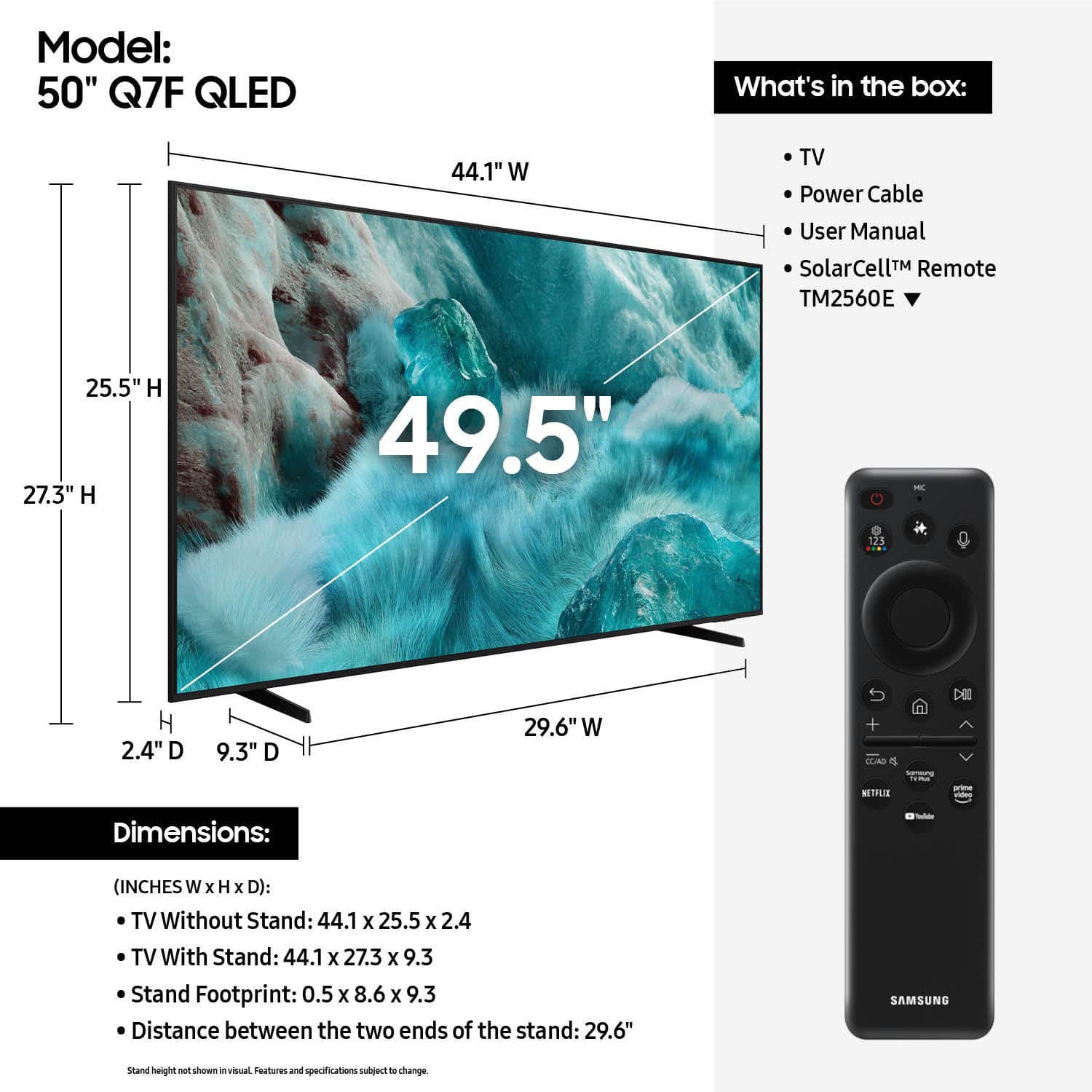











- Model:
- QN50Q7FAAFXZA
- SKU:
- 6619441
Rating by feature
- Picture Quality
Rating 4.8 out of 5 stars
- Sound Quality
Rating 4.6 out of 5 stars
- Brightness
Rating 4.8 out of 5 stars
Customers are saying
Customers find value in the 50” Class Q7F Series QLED 4K UHD SamsungVision AI Smart Tizen TV (2025)'s picture quality, ease of use, and overall performance. The setup is easy and the size is suitable for many rooms. However, some customers have expressed concerns about the remote control, connectivity options, and brightness.
This summary was generated by AI based on customer reviews.
Easy purchase
||Posted . Owned for 3 weeks when reviewed.This reviewer received promo considerations or sweepstakes entry for writing a review.Great TV and sales help in figuring out the TV I needed. Glad I got a Samsung.
I would recommend this to a friendNew TV
||Posted . Owned for 3 weeks when reviewed.This reviewer received promo considerations or sweepstakes entry for writing a review.Difficult to set up, but once done the TV is fine.
I would recommend this to a friendGreat Buy -- Horrible Customer Service!
||Posted . Owned for 2 weeks when reviewed.This reviewer received promo considerations or sweepstakes entry for writing a review.The sales person in the store was wonderful -- I love what I purchased! However, when it comes to customer service regarding delivery, I would never, ever purchase anything from you again. There was a mix up in the appointment with the Geek Squad and I have never been spoken to so rudely in my 80 years on this planet!!!!!!!!
I would recommend this to a friendBrand response from Samsung
Posted .JillF,
It appears your 3-star review for the Samsung Q7F TV is based on your experience with Best Buy, and we’re sorry to hear that. We recommend contacting the store directly to share your feedback.
If you need help with the TV itself, Samsung Support is available at 1-800-SAMSUNG, 8AM – 12AM EST, 7 days a week, or via LiveChat under the ‘Support’ section of our website.
~ Samsung Specialist
Samsung
||Posted . Owned for 3 weeks when reviewed.This reviewer received promo considerations or sweepstakes entry for writing a review.Delivery service and TV is great! I will recommend Best Buy.
I would recommend this to a friendTv is good but remote is too small and sensitive!
||Posted .This reviewer received promo considerations or sweepstakes entry for writing a review.Tv is really nice and smooth. Only thing I don’t like it the remote. It’s too small and sensitive. If you just take the remote most of the time it changes something.
I would recommend this to a friendClear picture
||Posted . Owned for 2 months when reviewed.This reviewer received promo considerations or sweepstakes entry for writing a review.I like that in movie mode it will only apply if applicable in my experience
I would recommend this to a friend- Cons mentioned:Brightness
Exchanged for outdoor tv
||Posted . Owned for 1 month when reviewed.This reviewer received promo considerations or sweepstakes entry for writing a review.Was not a bright enough picture for use on our patio. Exchanged it for an outdoor tv.
No, I would not recommend this to a friendBrand response from Samsung
Posted .Hi VictorM,
Thank you for your purchase and feedback on the brightness of the Q7F TV. If you have any questions or need help, we’re always here. Call 1-800-SAMSUNG from 8AM - 12AM EST, seven days a week, or connect with a LiveChat agent anytime by selecting ‘Support’ on our website.
~ Samsung Advisor
Happy customer
||Posted .This reviewer received promo considerations or sweepstakes entry for writing a review.Delivered on time. Needed tech service so one was scheduled immediately by Joann in Tech Services.
I would recommend this to a friendSalesman
||Posted . Owned for 1 month when reviewed.This reviewer received promo considerations or sweepstakes entry for writing a review.Great service Great salesman. Extremely helpful.
I would recommend this to a friendVery good tv.
||Posted . Owned for 2 weeks when reviewed.This reviewer received promo considerations or sweepstakes entry for writing a review.Quality product for the price. Works very well with all of the Smart features.
I would recommend this to a friendLimited app store
||Posted . Owned for 1 week when reviewed.This reviewer received promo considerations or sweepstakes entry for writing a review.Great picture and stays connected to wi-fi. Disappointed in small amount of available apps.
I would recommend this to a friendGood TV for the value
||Posted . Owned for 3 weeks when reviewed.This reviewer received promo considerations or sweepstakes entry for writing a review.Solid TV. Same volume issues as my old Samsung TV. The company just wants to upsell its soundbars which is disappointing.
I would recommend this to a friendBob Habel
||Posted . Owned for 1 month when reviewed.This reviewer received promo considerations or sweepstakes entry for writing a review.The staff was VERY helpful considering I have no clue about electronics. They were great.
I would recommend this to a friendDefinitely a great product
||Posted . Owned for 3 weeks when reviewed.This reviewer received promo considerations or sweepstakes entry for writing a review.Great product with a reasonable price for the quality. Food cooks evenly despite having a crummy electric stove.
I would recommend this to a friendSamsung
||Posted .This reviewer received promo considerations or sweepstakes entry for writing a review.I am enjoying my 50 inch Samsung tv. I am a big fan of Samsung.
I would recommend this to a friendGreat color; not very easy to initiate.
||Posted . Owned for 1 week when reviewed.This reviewer received promo considerations or sweepstakes entry for writing a review.So far, so good. I needed Geek Squad assistance to get all of the associated items to work together.
No, I would not recommend this to a friendBest 2025 Frame Picture TV
||Posted . Owned for 1 month when reviewed.This reviewer received promo considerations or sweepstakes entry for writing a review.Best TV 2025 Picture frame - the picture frame option is amazing
I would recommend this to a friendGood but mid sound
||Posted .This reviewer received promo considerations or sweepstakes entry for writing a review.Great tv wish I would have got a bigger size compared to the old model of the same tv I had the sound is low have to turn it up to about 30 before it actual kinda loud
I would recommend this to a friendalmost happy
||Posted .This reviewer received promo considerations or sweepstakes entry for writing a review.I am disappointed that there is no way to plug in my sound box after the salesperson in Best Buy said that there would be.
I would recommend this to a friend- Cons mentioned:Remote control
Not satisfied
||Posted . Owned for 2 weeks when reviewed.This reviewer received promo considerations or sweepstakes entry for writing a review.I find the Samsung hard to navigate. It’s not an easy one to do. I have problems getting local channels. I think the remote is a little confusing for me and as far as the picture goes, it’s OK.
No, I would not recommend this to a friendBrand response from Samsung
Posted .Hi Fish,
We appreciate you sharing your user experience. To help you get the most from your TV, you can download the full e-Manual and more by visiting Samsung’s website then navigating to: Support > Manual & Software > TVs & Home Theater. From there, you can search for and select your Q7F TV model to view or download the available guides.
The e-Manual and Remote Control Guide are also conveniently built into your TV: Settings > Support > Tips and User Guides.
If your TV isn’t receiving all available channels, first check that your coaxial cable is securely connected. Then, try running Auto Program by going to: Home > left directional key > Settings > All Settings > General & Privacy > Broadcasting > Auto Program.
If the issue persists, a factory reset may help: Home > left directional key > Settings > All Settings > General & Privacy > Factory Data Reset.
Please also note:
• Broadcasting settings are only accessible when your source is set to TV.
• These settings are not available when watching TV via a cable or satellite box.
If you continue to experience issues, please don’t hesitate to contact Samsung Customer Support at 1-800-SAMSUNG, available 8AM – 12AM EST, 7 days a week. LiveChat agents and additional resources are also available through the ‘Support’ link on our Samsung website.
~ Samsung Advisor