Customer Ratings & Reviews





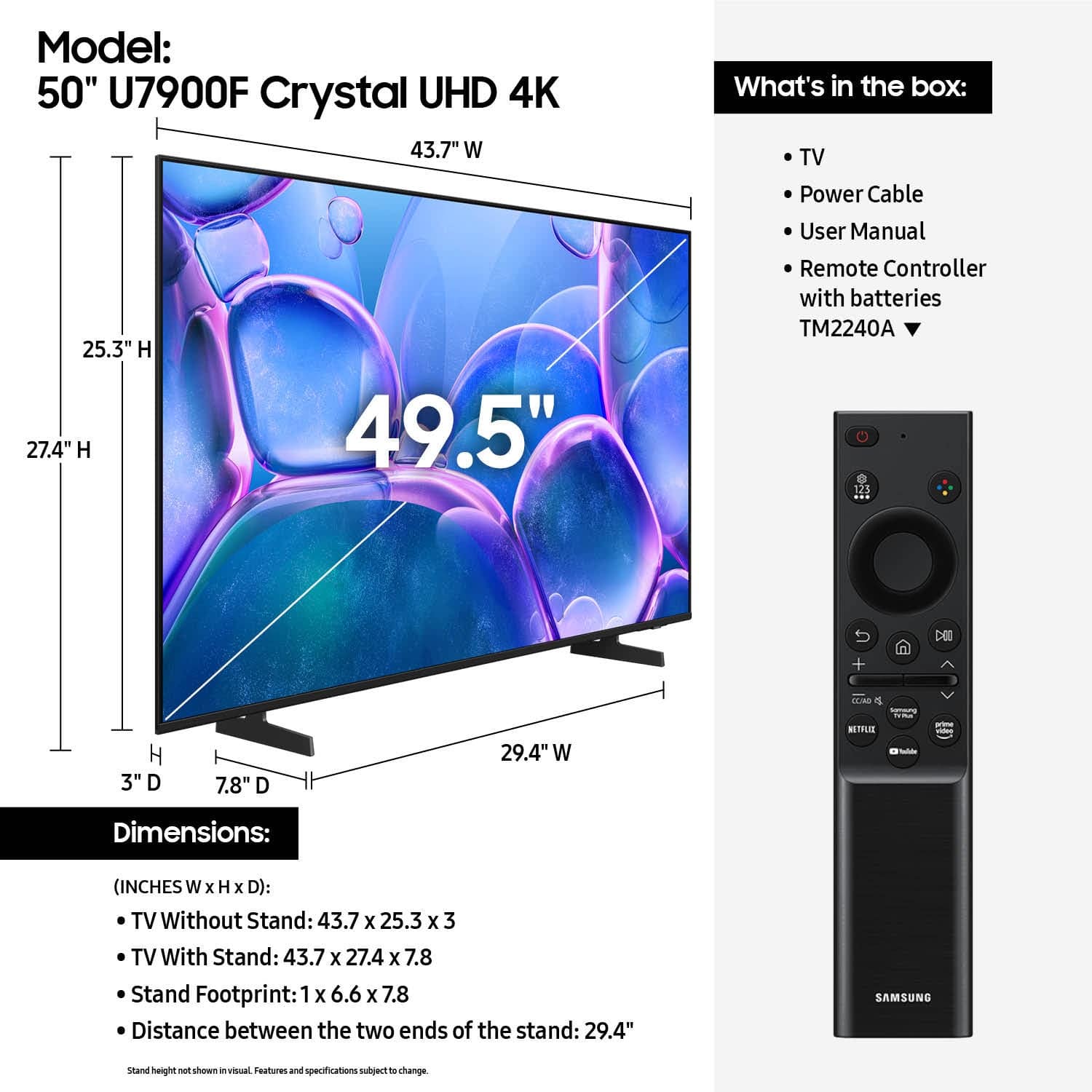






- Model:
- UN50U7900FFXZA
- SKU:
- 10362571
Rating by feature
- Picture Quality
Rating 4.8 out of 5 stars
- Sound Quality
Rating 4.7 out of 5 stars
- Brightness
Rating 4.8 out of 5 stars
to a friend
Nice tv for the price
Posted .This reviewer received promo considerations or sweepstakes entry for writing a review.Nice tv for what we are using it for (basement use)
I would recommend this to a friendDoes it all!
Posted .This reviewer received promo considerations or sweepstakes entry for writing a review.Great picture and a remote that does just about everything! I don't need to use your separate sound remote!
I would recommend this to a friendGreat deal for 250
Posted .This reviewer received promo considerations or sweepstakes entry for writing a review.Amazing picture at a good price. Sound is good and the voice control is pretty cool
I would recommend this to a friendSamsung tv
Posted .This reviewer received promo considerations or sweepstakes entry for writing a review.The tv is worth the price , great picture and sound . Please check for damages before leaving store.
I would recommend this to a friendTv set
Posted .This reviewer received promo considerations or sweepstakes entry for writing a review.Great tv picture quality is good . Would recommend
I would recommend this to a friendGreat little tv
Posted .This reviewer received promo considerations or sweepstakes entry for writing a review.Exactly what we needed for our guest room. Happy with Samsung TVs overall.
I would recommend this to a friendSamsung U7900
Posted .This reviewer received promo considerations or sweepstakes entry for writing a review.So far so good. Product seems to be functioning well since we purchased it.
I would recommend this to a friendSamsung 50 inch TV
Posted .This reviewer received promo considerations or sweepstakes entry for writing a review.Great tv . Looks good , has a good picture and great sound .
I would recommend this to a friendUnexpected purchase
Posted .This reviewer received promo considerations or sweepstakes entry for writing a review.Quality merchandise reasonable price.fast friendly service.
I would recommend this to a friendAverage Tv
Posted .This reviewer received promo considerations or sweepstakes entry for writing a review.I love Samsung tv's but this one I was not impressed with. The picture quality is average. I had an older Samsung tv that had a much better picture quality than this one. It is okay for kids or in a guess bedroom.
I would recommend this to a friendBrand response from Samsung
Posted .Hi ShirleyM,
We appreciate your feedback on the picture quality of Samsung’s U7900 TV. If the image doesn’t quite match your preferences, there are several adjustments you can make to better suit your viewing environment and content type.
First, please ensure your TV is running the latest firmware, as updates may include important picture quality enhancements. Go to: Home > Left directional button > Settings > Support > Software Update > Update Now
To explore picture mode options, navigate to: Home > Left directional button > Settings > All Settings > Picture > Picture Mode. Options include:
• Standard – Ideal for general viewing
• Dynamic – Brighter and more vibrant for well-lit spaces
• Eco – Optimized for energy efficiency
• Movie – Best for viewing in low light
• Filmmaker Mode – Preserves the content creator’s intent and disables motion smoothing for supported content
You can further customize your image by going to: Settings > All Settings > Picture > Expert Settings, where you can adjust Brightness, Contrast, Color Tone, Sharpness, Contrast Enhancer and more.
If you’d like help finding the best picture settings for your preferences, please don’t hesitate to contact Samsung Support at 1-800-SAMSUNG, available 8AM – 12AM EST, 7 days a week. You can also LiveChat with an agent or explore additional resources on our website by clicking the ‘Support’ link.
~Samsung Advisor
Poor Service
Posted .This reviewer received promo considerations or sweepstakes entry for writing a review.Poor sound… there is an echo back. And picture issues with motion. Don’t buy this without a warranty. Went through 2 of these Samsungs- first after a year and a half, second after one week. I would not buy this again. Delivery issues as well. Very poor customer service. I was given a $25 gift card, but not worth the stress and hassle.
No, I would not recommend this to a friendBrand response from Samsung
Posted .Hi Mjd7,
Thank you for sharing your experience with us. We recommend running a sound test. These tests help determine if the issue lies with the TV or the connected device. Go to: Home > left directional key > Settings > Support > Device Care > Self Diagnosis > Sound Test.
. If the picture appears blurry or unnatural during high-speed scenes, there are several settings you can adjust to improve motion clarity.
Go to: Home > left directional key > Settings > All Settings > Picture > Expert Settings, and review these key settings:
Picture Clarity Settings
• Off: Disables all motion enhancement
• Auto: Automatically adjusts motion clarity based on content
• Custom: Enables manual control of:
o Judder Reduction: Smooths motion in film-based content
o LED Clear Motion: Increases sharpness during fast movement
o Noise Reduction: Helps reduce distortion in lower-quality sources
Additional Picture Controls
• Brightness – Adjust overall image brightness
• Contrast – Controls the difference between light and dark areas
• Sharpness – Enhances the definition of object edges
• Color – Adjusts color intensity for more natural or vivid tones
We hope these settings help improve your viewing experience, especially with fast-moving content. If you'd like further assistance, feel free to reach out to Samsung Support at 1-800-SAMSUNG, 8AM – 12AM EST, 7 days a week. LiveChat is also available via the ‘Support’ link on our website.
~Samsung Advisor
TV Review
Posted .This reviewer received promo considerations or sweepstakes entry for writing a review.Not a huge fan of purchasing this from Best Buy...
No, I would not recommend this to a friendBrand response from Samsung
Posted .Hi user599356,
We're sorry to hear that you did not have a quality purchase experience. You may want to reach out to Best Buy to assist you.
If there’s anything we can assist with, please don’t hesitate to call us at 1-800-SAMSUNG, available daily from 8AM - 12AM EST. You can also visit the Samsung website and click on ‘Support’ for:
• Live Chat
• Manuals, Software, & Warranty Info
~ Samsung Advisor