Customer Ratings & Reviews

- Model:
- UN50U7900FFXZA
- |
- SKU:
- 6632320
Customer reviews
Rating 4.7 out of 5 stars with 513 reviews
(513 customer reviews)Rating by feature
- Picture Quality4.8
Rating 4.8 out of 5 stars
- Sound Quality4.6
Rating 4.6 out of 5 stars
- Brightness4.8
Rating 4.8 out of 5 stars
Customers are saying
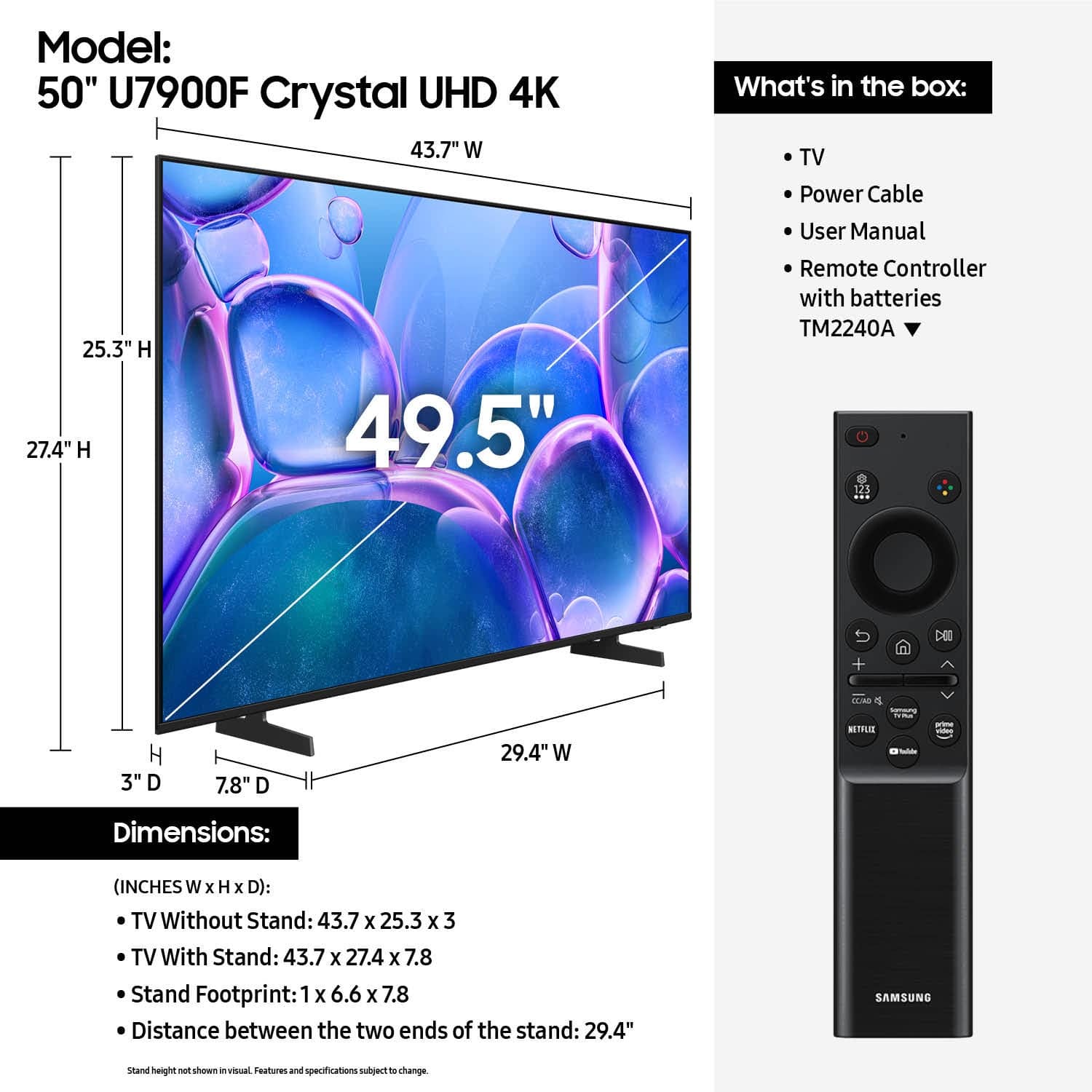
Customers consistently note the excellent picture quality of the 50" Class U7900 Series UHD 4K Smart Tizen TV (2025), along with its ease of setup. Positive feedback also highlights the TV's impressive feature set. However, some users express concerns about the simplicity of the remote control.
This summary was generated by AI based on customer reviews.
Rated 5 out of 5 stars
Samsung 50” TV
||Posted . Owned for 3 weeks when reviewed.This reviewer received promo considerations or sweepstakes entry for writing a review.We have enjoyed the new Samsung TV. The 50” picture is really good.
I would recommend this to a friendRated 3 out of 5 stars
Average at Best
||Posted . Owned for 1 month when reviewed.This reviewer received promo considerations or sweepstakes entry for writing a review.Very hard to set up with your programs. I still can't get Prime on it. Good picture. Sound is good. Much better with surround sound that I did purchase and glad that I did.
No, I would not recommend this to a friendBrand response from Samsung
Posted .RICH,
We appreciate you sharing your user experience. To help you get the most from your TV, you can download the full e-Manual and more by visiting Samsung’s website then navigating to: Support > Manual & Software > TVs & Home Theater. From there, you can search for and select your U7900F TV model to view or download the available guides.
The e-Manual and Remote Control Guide are also conveniently built into your TV: Settings > Support > Tips and User Guides
If you need additional help, please contact Samsung Support at 1-800-SAMSUNG, 8AM – 12AM EST, 7 days a week. LiveChat agents are also available through the ‘Support’ link on our website.
~ Samsung Specialist
Rated 5 out of 5 stars
Replacement tv
||Posted . Owned for 1 month when reviewed.This reviewer received promo considerations or sweepstakes entry for writing a review.I love a Samsung products i haven't use this tv yet
I would recommend this to a friendRated 1 out of 5 stars
Constant Image Twitching Ruins the Experience
||Posted .This reviewer received promo considerations or sweepstakes entry for writing a review.I really wanted to like this TV, but the constant image twitching makes it almost unusable. At first, I thought it was my cables or streaming apps, but the issue happens across every input—HDMI, built-in apps, even the home screen. The picture will randomly flicker or “twitch” every few seconds, almost like the screen is trying to recalibrate itself. It’s distracting, especially during darker scenes or fast motion, and it ruins movies and shows because your eyes keep getting pulled away from what’s happening.When the picture is stable, the colors and brightness are actually pretty good, which makes the problem even more frustrating. But a TV that can’t hold a steady image just isn’t worth keeping. For the price, I expected reliability, not constant flickering and glitching.
No, I would not recommend this to a friendBrand response from Samsung
Posted .Hi MaegeraldineS,
We appreciate you sharing details about the flickering you’ve noticed on your Samsung U7900 TV. This behavior may be related to energy-saving features or dynamic picture settings that adjust the screen brightness automatically.
Please try disabling the following features: Settings > All Settings > General & Privacy > Power and Energy Saving
• Brightness Optimization
• Energy Saving Solution
• Motion Lighting
If these are already off, check if Contrast Enhancer is enabled, which can also cause brightness to shift depending on content: Settings > All Settings > Picture > Expert Settings > Contrast Enhancer
To ensure optimal performance, please also confirm your TV is running the latest firmware: Settings > Support > Software Update > Update Now
We hope these steps help stabilize your screen brightness. If you continue to experience issues, please don’t hesitate to contact Samsung Customer Support at 1-800-SAMSUNG, 8AM – 12AM EST, 7 days a week. LiveChat is also available via the ‘Support’ link on our website.
~ Samsung Advisor
Rated 4 out of 5 stars
An affordable TV of quality
||Posted .This reviewer received promo considerations or sweepstakes entry for writing a review.A great TV for it's price, and I got it quick and easy.
I would recommend this to a friendRated 5 out of 5 stars
Top Tier TV for Mid Tier TV price
||Posted . Owned for 1 month when reviewed.This reviewer received promo considerations or sweepstakes entry for writing a review.Very glad Samsung stepped in and made an affordable TV
I would recommend this to a friend- Cons mentioned:Port quantity
Rated 3 out of 5 stars
television
||Posted . Owned for 1 month when reviewed.This reviewer received promo considerations or sweepstakes entry for writing a review.good tv , needs more ports on set................................
I would recommend this to a friendBrand response from Samsung
Posted .Hi snoopy,
Thank you for your feedback. If you ever have questions or need support, we’re here to help. Call us at 1-800-SAMSUNG, available from 8AM - 12AM EST, seven days a week. You can also connect with a LiveChat agent by clicking the ‘Support’ link on our website.
~ Samsung Advisor
Rated 4 out of 5 stars
Good tv
||Posted .This reviewer received promo considerations or sweepstakes entry for writing a review.Good tv for the price, does what it is suppose to.
I would recommend this to a friendRated 4 out of 5 stars
Samsung tv
||Posted . Owned for 3 weeks when reviewed.This reviewer received promo considerations or sweepstakes entry for writing a review.Solid tv for the price have a few of these no issues as of yet.
I would recommend this to a friendRated 3 out of 5 stars
Samsung budget tv not worth it
||Posted .This reviewer received promo considerations or sweepstakes entry for writing a review.This is the bottom line of Samsung tv. No voice command, only enough storage for 8 apps. Picture quality just ok. My fire tv i purchased from best buy blows this one away.. if youre going to go Samsung route, its best to purchase th$1200-$1700 version
No, I would not recommend this to a friendBrand response from Samsung
Posted .Hi user109630,
Thank you for sharing your experience with us. If your U7900 TV's internal memory is insufficient, you can install some specific apps on a USB device. You can also remove select apps you no longer want and free up memory space on your TV.
We also recommend running a Cold boot on the TV. With the TV on, press and hold the power button on your Samsung remote for about 5 seconds, until the TV powers off and back on again. This clears the cache.
If the image doesn’t quite match your preferences, there are several adjustments you can make to better suit your viewing environment and content type.
First, please ensure your TV is running the latest firmware, as updates may include important picture quality enhancements. Go to: Home > Left directional button > Settings > Support > Software Update > Update Now
To explore picture mode options, navigate to: Home > Left directional button > Settings > All Settings > Picture > Picture Mode. Options include:
• Standard – Ideal for general viewing
• Dynamic – Brighter and more vibrant for well-lit spaces
• Eco – Optimized for energy efficiency
• Movie – Best for viewing in low light
• Filmmaker Mode – Preserves the content creator’s intent and disables motion smoothing for supported content
You can further customize your image by going to: Settings > All Settings > Picture > Expert Settings, where you can adjust Brightness, Contrast, Color Tone, Sharpness, Contrast Enhancer and more.
If you’d like help finding the best picture settings for your preferences, please don’t hesitate to contact Samsung Support at 1-800-SAMSUNG, available 8AM – 12AM EST, 7 days a week. You can also LiveChat with an agent or explore additional resources on our website by clicking the ‘Support’ link.
~ Samsung Advisor
Rated 3 out of 5 stars
Its ok
||Posted .This reviewer received promo considerations or sweepstakes entry for writing a review.I dont know if its the tv or netflix but every time i try to watch something it glitches. Every. Single. Time.
No, I would not recommend this to a friendBrand response from Samsung
Posted .user888317,
Thank you for sharing your experience with the Netflix app. If the app is freezing, not loading, or crashing, we recommend trying the following steps:
1. Cold boot the TV by holding down the power button on your remote for 5+ seconds until the TV turns off and back on.
2. Delete and reinstall the app to clear out any potential corrupted data.
3. Reset Smart Hub to remove any app conflicts (Settings > Support > Device Care > Reset Smart Hub).
Please also make sure your TV has the latest firmware installed: Settings > Support > Software Update > Update Now.
If the issue continues, please reach Samsung Support at 1-800-SAMSUNG, 8AM – 12AM EST, 7 days a week. LiveChat and additional resources are available through the ‘Support’ link on our website.
~ Samsung Specialist
Rated 4 out of 5 stars
Good tv for the price.
||Posted . Owned for 1 month when reviewed.This reviewer received promo considerations or sweepstakes entry for writing a review.We wanted a tv for a small room. This is a good tv for the price.
I would recommend this to a friendRated 5 out of 5 stars
Great value
||Posted .This reviewer received promo considerations or sweepstakes entry for writing a review.great tv for the price, would recommend for anyone in the market
I would recommend this to a friendRated 1 out of 5 stars
Would not recommend
||Posted .This reviewer received promo considerations or sweepstakes entry for writing a review.Very disappointed with this TV. I spent numerous hours simply trying to get it connected to my wifi so that i could run the setup. It never worked with my Wifi. To summarize, if i connected the TV to my iphone hotspot (as suggested) everything worked as expected. When connecting to my Wifi it would connect, but the setup failed. Note: if you switch internet connection it forces you to setup again. No idea why. Hours talking with customer support could not resolve why and eventually they told me to contact my ISP. More hours talking with them also could not resolve this. No other devices on the same Wifi have an issue. I eventually gave up on the Samsung OS an got a Roku. Setup completed in 10 mins or less.
No, I would not recommend this to a friendBrand response from Samsung
Posted .Hi Maurice,
We're very sorry to hear that you experienced issues connecting to your Wi-Fi. The issue you’re encountering may be related to network strength or stability. We recommend the following steps:
1. Connect to a 5GHz Wi-Fi network, if available
2. Use a wired LAN connection for increased stability
3. Reposition your router to reduce obstacles between the TV and the router
Please also check that your TV is running the latest firmware by going to: Settings > Support > Software Update. From there, you can also enable Auto Update for added convenience.
For improved app performance, we recommend running Device Care, which can help by clearing memory and closing background apps. To access it: Settings > Support > Device Care
We hope these steps improve your streaming experience. If the issue continues, please reach out to us at 1-800-SAMSUNG, available daily from 8AM - 12AM EST. You can also visit the Samsung website and click on ‘Support’ for:
• Live Chat
• Manuals, Software, & Warranty Info
~ Samsung Advisor
Rated 3 out of 5 stars
Shoulda coulda
||Posted .This reviewer received promo considerations or sweepstakes entry for writing a review.Good price but picture has defect in it.. I should have returned it.
No, I would not recommend this to a friendBrand response from Samsung
Posted .Hi RichardR,
To best assist you, please call us at 1-800-SAMSUNG, available daily from 8AM - 12AM EST. You can also visit the Samsung website and click on ‘Support’ for:
• Live Chat
• Manuals, Software, & Warranty Info
~ Samsung Advisor
Rated 2 out of 5 stars
What tv?
||Posted .This reviewer received promo considerations or sweepstakes entry for writing a review.Tv was never delivered after payment. No reason given. I got a refund however, but no customer service. Won't buy online from them again.
No, I would not recommend this to a friendBrand response from Samsung
Posted .Hi Bose,
We're sorry to hear about your experience. If there’s anything we can assist with, please don’t hesitate to call us at 1-800-SAMSUNG, available daily from 8AM - 12AM EST. You can also visit the Samsung website and click on ‘Support’ for:
• Live Chat
• Manuals, Software, & Warranty Info
~ Samsung Advisor
Rated 1 out of 5 stars
Awful service and no product to review
||Posted .This reviewer received promo considerations or sweepstakes entry for writing a review.I would love to review this but you cancelled the delivery and I never got my item. I got a text it was to be delivered, got one it had been loaded on the truck. Got one to lock up dogs and make sure the area was well lit. Then after 30 minutes I got a text that the delivery was cancelled. I called and the phone person could give me no information and offered a refund within 7-10 days. Awful service with no follow up except to review an item I never got. I’m sure I’ll get a quick response to this. Done with you guys and that’s from a guy that has shopped there 20+ years
No, I would not recommend this to a friendBrand response from Samsung
Posted .Hi GregoryD,
We're very sorry to hear about your TV delivery experience at Best Buy. You may want to reach out to them directly for more assistance. If there’s anything we can assist with, please don’t hesitate to call us at 1-800-SAMSUNG, available daily from 8AM - 12AM EST. You can also visit the Samsung website and click on ‘Support’ for:
• Live Chat
• Manuals, Software, & Warranty Info
~ Samsung Advisor
Rated 3 out of 5 stars
Replacement
||Posted .This reviewer received promo considerations or sweepstakes entry for writing a review.Daughter is enjoying it her TV went up good replacement for her
I would recommend this to a friendBrand response from Samsung
Posted .Hi GusC,
We appreciate your feedback on the U7900 TV. If you ever have questions or need support, we’re here to help. Call us at 1-800-SAMSUNG, available from 8AM - 12AM EST, seven days a week. You can also connect with a LiveChat agent by clicking the ‘Support’ link on our website.
~ Samsung Advisor
Rated 3 out of 5 stars
TV picture
||Posted . Owned for 3 weeks when reviewed.This reviewer received promo considerations or sweepstakes entry for writing a review.Love the tv, but picture resolution is very light and cannot change it.
No, I would not recommend this to a friendBrand response from Samsung
Posted .Hi JimB,
We’re sorry to hear that the picture on your Samsung U7900 TV appears too bright. If the image feels overly harsh—especially in darker rooms - there are several settings you can adjust to improve your viewing experience.
Start by changing the Picture Mode: Settings > All Settings > Picture > Picture Mode
We recommend trying one of the following:
• Movie – Softer contrast and lower brightness, ideal for dark room viewing
• Standard – Balanced for general everyday use
• Filmmaker Mode – Provides a more natural, accurate picture as intended by content creators
To further fine-tune, go to: Settings > All Settings > Picture > Expert Settings. Here, you can manually adjust Brightness, Contrast, Sharpness, and Contrast Enhancer (consider turning this off for a softer image).
You may also want to review your TV’s energy-saving features, which can automatically affect brightness based on your environment: Settings > All Settings > General & Privacy > Power and Energy Saving
Lastly, ensure your TV has the latest firmware installed, as updates can improve picture performance: Settings > Support > Software Update > Update Now
We hope these tips help make your viewing experience more comfortable. If you'd like help walking through any of these adjustments, Samsung Customer Support is available at 1-800-SAMSUNG (8AM – 12AM EST, 7 days a week). You can also LiveChat with an agent through the ‘Support’ link on our website.
~ Samsung Advisor
Rated 1 out of 5 stars
Not worth the price
||Posted . Owned for 1 month when reviewed.This reviewer received promo considerations or sweepstakes entry for writing a review.This Tv was very difficult to set up, if I could I would take it back and buy a Toshiba , does not have have enough USB ports to set up additional equipment, if i knew this would had never purchased, volume is terrible, picture quality is normally, nothing special, my cheaper tv is better quality then this purchase.
No, I would not recommend this to a friendBrand response from Samsung
Posted .Hi Copakid,
Thank you for sharing your experience with us regarding the U7900 TV design, user experience, and volume. Please know your opinion is important to us and will be shared with our internal teams.
If the volume on your Samsung TV seems too low, we recommend checking for firmware updates: Settings > Support > Software Update > Update Now.
Then, go to: Settings > All Settings > Sound > Sound Mode and try Amplify to boost dialogue and upper tones.
To maintain consistent volume across channels and apps, enable Auto Volume under: Settings > All Settings > Sound > Expert Settings > Auto Volume = On.
Samsung Q- and S-Series Soundbars with Q-Symphony can also enhance your sound experience. For further help, please contact Samsung Support at 1-800-SAMSUNG (8AM – 12AM EST, 7 days a week) or use LiveChat via the ‘Support’ link on our website.
~Samsung Advisor