Customer Ratings & Reviews





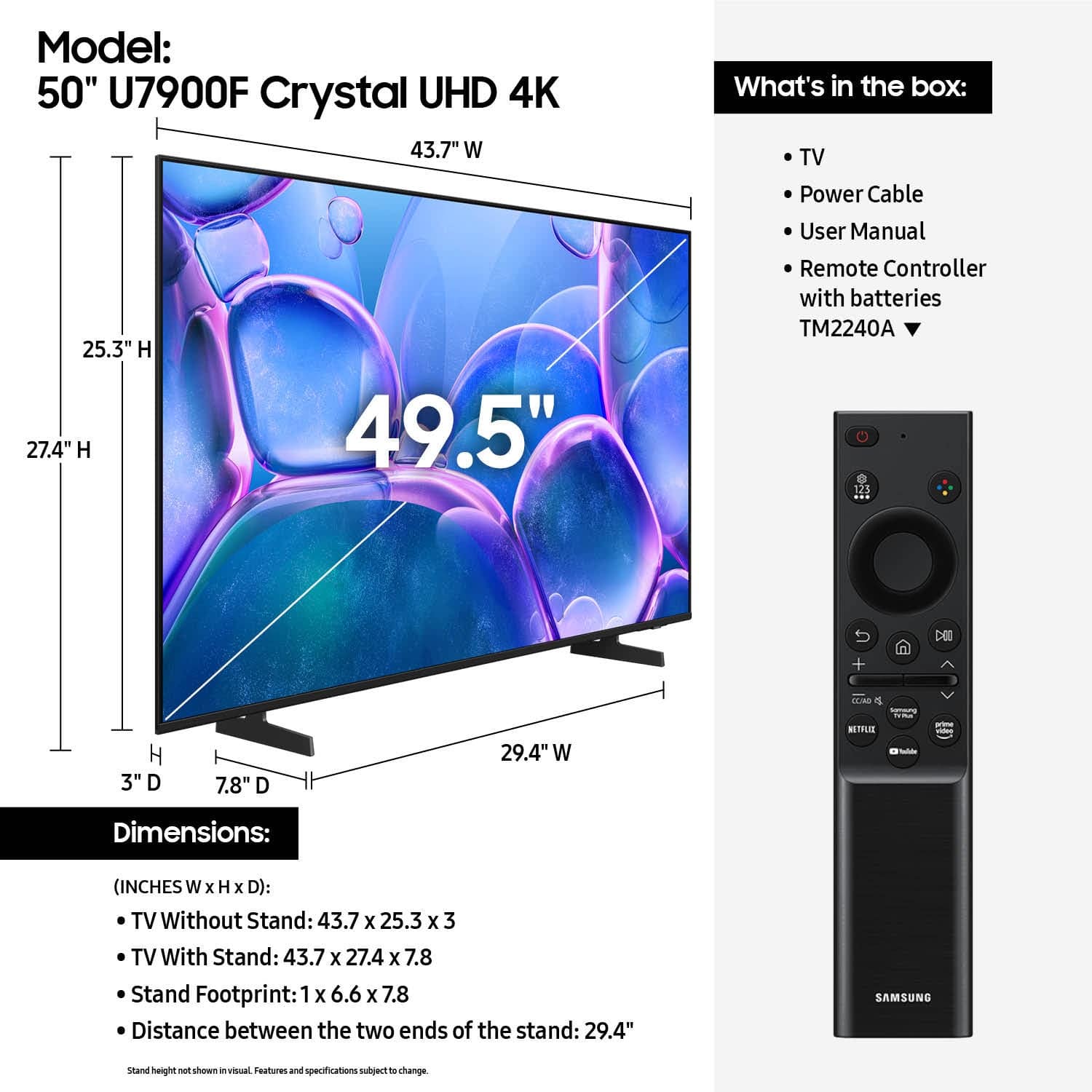






- Model:
- UN50U7900FFXZA
- SKU:
- 6632320
Rating by feature
- Picture Quality
Rating 4.8 out of 5 stars
- Sound Quality
Rating 4.7 out of 5 stars
- Brightness
Rating 4.8 out of 5 stars
Customers are saying
Customers enjoy the excellent picture quality of this television, which is frequently highlighted as a standout feature. Users also appreciate the straightforward setup process, the ideal size for their living spaces, and the lightweight design. While the overall experience is positive, some customers have noted limitations regarding the number of available input ports and the user-friendliness of the remote control. Additionally, a few users mentioned that the interface can occasionally be slow when launching applications.
This summary was generated by AI based on customer reviews.
Tv review
||Posted . Owned for 1 month when reviewed.This reviewer received promo considerations or sweepstakes entry for writing a review.The Tv works great … the staff was wonderful and friendly .
I would recommend this to a friendBest buy
||Posted . Owned for 3 weeks when reviewed.This reviewer received promo considerations or sweepstakes entry for writing a review.Best buy is the best option to buy good products love you
I would recommend this to a friendGreat TV
||Posted .This reviewer received promo considerations or sweepstakes entry for writing a review.I like Samsung products, this is the second TV I have in my home
I would recommend this to a friendAnd another one
||Posted .This reviewer received promo considerations or sweepstakes entry for writing a review.Samsung customer for life! Easy set up straight from the box.
I would recommend this to a friendGreat tv
||Posted . Owned for 3 weeks when reviewed.This reviewer received promo considerations or sweepstakes entry for writing a review.Great tv and grandma loves it. Got for her because she has a small tv
I would recommend this to a friendcheck
||Posted . Owned for 3 weeks when reviewed.This reviewer received promo considerations or sweepstakes entry for writing a review.on time...very good and careful delivery...set-up is a mis -nomer its a plug in!
I would recommend this to a friendTop Tier TV for Mid Tier TV price
||Posted . Owned for 1 month when reviewed.This reviewer received promo considerations or sweepstakes entry for writing a review.Very glad Samsung stepped in and made an affordable TV
I would recommend this to a friendRemote
||Posted .This reviewer received promo considerations or sweepstakes entry for writing a review.I’m having a hard time with the volume. I’m using my old Samsung remote other than that I’m not having any other problems.
I would recommend this to a friendComplicated remote usage
||Posted . Owned for 1 month when reviewed.This reviewer received promo considerations or sweepstakes entry for writing a review.I don’t like the new remotes to complicated. I am older though
I would recommend this to a friendGhanu
||Posted .This reviewer received promo considerations or sweepstakes entry for writing a review.All things are good. One annoyance is opening HDMI ports is somewhat clumsy.
I would recommend this to a friendVery nice
||Posted .This reviewer received promo considerations or sweepstakes entry for writing a review.Very nice, my father loves it. I will buy another one for my kids
I would recommend this to a friendI love this Tv
||Posted .This reviewer received promo considerations or sweepstakes entry for writing a review.Love the tv and the connectivity with my other Samsung device
I would recommend this to a friend- Cons mentioned:Connectivity
Would not recommend
||Posted .This reviewer received promo considerations or sweepstakes entry for writing a review.Very disappointed with this TV. I spent numerous hours simply trying to get it connected to my wifi so that i could run the setup. It never worked with my Wifi. To summarize, if i connected the TV to my iphone hotspot (as suggested) everything worked as expected. When connecting to my Wifi it would connect, but the setup failed. Note: if you switch internet connection it forces you to setup again. No idea why. Hours talking with customer support could not resolve why and eventually they told me to contact my ISP. More hours talking with them also could not resolve this. No other devices on the same Wifi have an issue. I eventually gave up on the Samsung OS an got a Roku. Setup completed in 10 mins or less.
No, I would not recommend this to a friendBrand response from Samsung
Posted .Hi Maurice,
We're very sorry to hear that you experienced issues connecting to your Wi-Fi. The issue you’re encountering may be related to network strength or stability. We recommend the following steps:
1. Connect to a 5GHz Wi-Fi network, if available
2. Use a wired LAN connection for increased stability
3. Reposition your router to reduce obstacles between the TV and the router
Please also check that your TV is running the latest firmware by going to: Settings > Support > Software Update. From there, you can also enable Auto Update for added convenience.
For improved app performance, we recommend running Device Care, which can help by clearing memory and closing background apps. To access it: Settings > Support > Device Care
We hope these steps improve your streaming experience. If the issue continues, please reach out to us at 1-800-SAMSUNG, available daily from 8AM - 12AM EST. You can also visit the Samsung website and click on ‘Support’ for:
• Live Chat
• Manuals, Software, & Warranty Info
~ Samsung Advisor
Amanda tv
||Posted .This reviewer received promo considerations or sweepstakes entry for writing a review.Was with the price i paid if not more. Daughter was well pleased
I would recommend this to a friendReplacement tv
||Posted . Owned for 1 month when reviewed.This reviewer received promo considerations or sweepstakes entry for writing a review.I love a Samsung products i haven't use this tv yet
I would recommend this to a friendSamsung TV review
||Posted . Owned for 3 weeks when reviewed.This reviewer received promo considerations or sweepstakes entry for writing a review.Was looking for a temporary TV and found this. Totally worth the money I paid.
I would recommend this to a friend- Pros mentioned:Picture quality
Sub Par
||Posted . Owned for 5 months when reviewed.This reviewer received promo considerations or sweepstakes entry for writing a review.Picture was good how ever the sound was not good .
No, I would not recommend this to a friendBrand response from Samsung
Posted .Hi BrianB,
Thank you for purchasing Samsung’s U7900F TV and for sharing your feedback regarding low volume. To start, we recommend making sure your TV is running the latest firmware, as updates can include improvements to sound performance: Home > left directional key > Settings > Support > Software Update
If volume levels still seem too low, you can improve sound performance by adjusting a few key settings:
Sound Mode: Navigate to: Settings > All Settings > Sound > Sound Mode
• Standard: Balanced for everyday viewing
• Optimized: Enhances effects and creates a more spacious sound
• Amplify: Boosts mid and high tones, especially helpful if dialogue is difficult to hear
Auto Volume: This feature helps maintain consistent volume levels across content and input sources. Turn it on under: Settings > All Settings > Sound > Expert Settings > Auto Volume = On
You can also explore Expert Settings to fine-tune sound output with adjustments for Balance, Equalizer, and more.
If you’re considering enhancing your setup, Samsung’s Q- and S-Series Soundbars feature Q-Symphony, which syncs your TV and soundbar speakers for a fuller, more immersive sound experience.
For personalized support with these settings or selecting a soundbar to complement your setup, contact Samsung Support at 1-800-SAMSUNG (8AM – 9PM EST Mon – Fri, 8AM – 6PM Sat – Sun) or use LiveChat via the ‘Support’ link on our website.
~Samsung Advisor
- Cons mentioned:Connectivity
Don't waste your money
||Posted .This reviewer received promo considerations or sweepstakes entry for writing a review.Only had for just over two months and already will not stay connected to wifi. It is very difficult to use a smart TV when it will not stay connected to wifi. It is only the TV that has issues but this is a known issue with Samsung TVs. Even after trying all the recommended troubleshooting techniques it still will not stay connected. Don't waste yoyr money.
No, I would not recommend this to a friendBrand response from Samsung
Posted .Hi AmandaH,
We're sorry you are experiencing issues with your U7900F TV. Please give us a call so we can best assist you. Reach out by calling 1-800-SAMSUNG between 8AM - 12AM EST, any day of the week. You can also chat with us online by visiting the ‘Support’ section of our website.
~ Samsung Advisor
Ok, but qled & mini qled blows it away
||Posted .This reviewer received promo considerations or sweepstakes entry for writing a review.Good but not when compared to my. TCL TV. The direct array TV's are far superior
I would recommend this to a friendGood Value
||Posted .This reviewer received promo considerations or sweepstakes entry for writing a review.Very good for price. Picture quality is good. The sound is the only complaint I have.
I would recommend this to a friend