Customer Ratings & Reviews





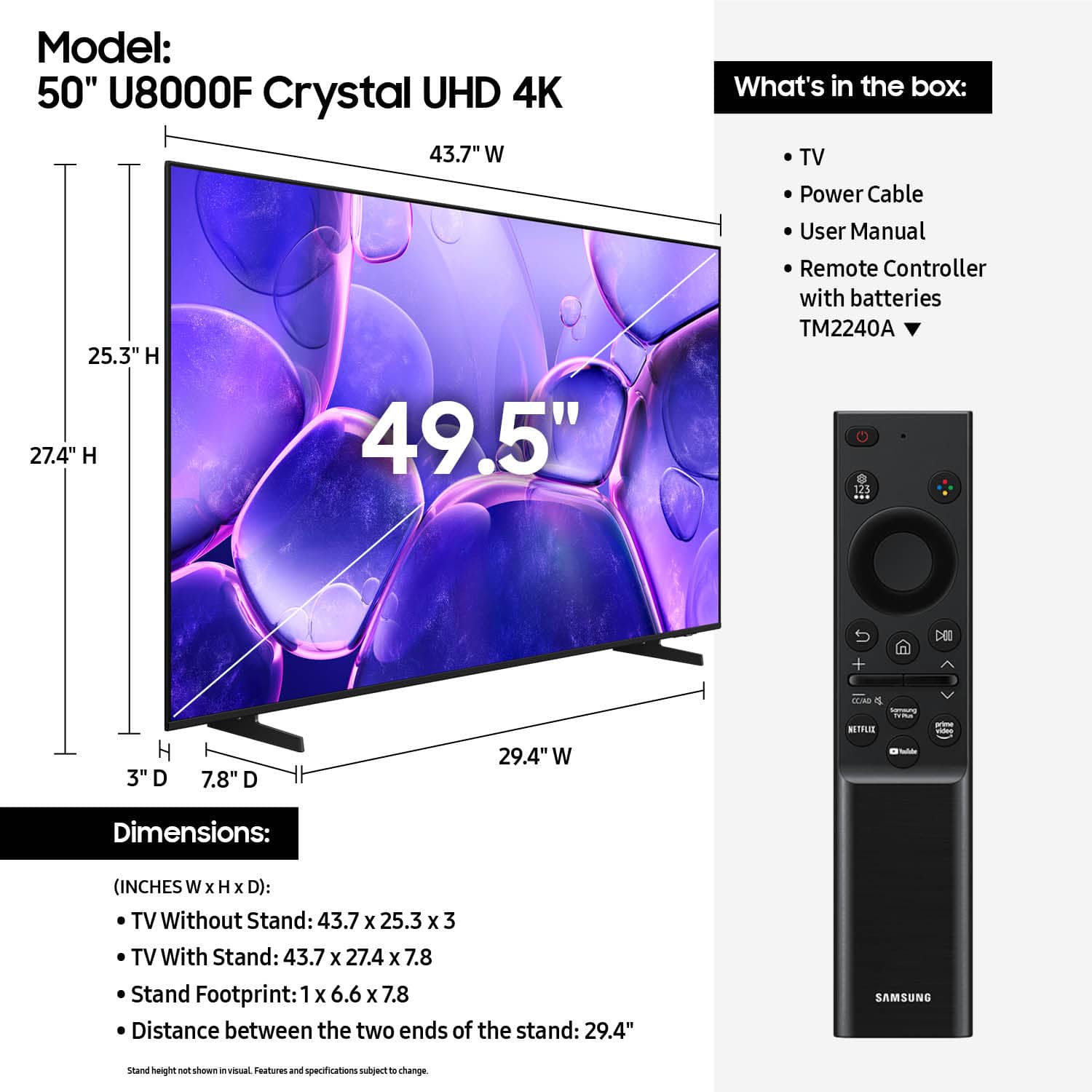












- Model:
- UN50U8000FFXZA
- SKU:
- 10758134
Rating by feature
- Picture Quality
Rating 4.7 out of 5 stars
- Sound Quality
Rating 4.5 out of 5 stars
- Brightness
Rating 4.7 out of 5 stars
to a friend
missing parts
||Posted .This reviewer received promo considerations or sweepstakes entry for writing a review.order arrived incomplete, i tried to contact costumer service but they didn't help me.
No, I would not recommend this to a friendBrand response from Samsung
Posted .Hi JersonA,
We appreciate your feedback regarding parts missing from your U8000F TV. If purchased brand-new and unopened, please contact Samsung Customer Support and a representative will gladly help you. If purchased in open-box condition, we recommend contacting Best Buy directly for assistance. We hope your issue is resolved in a timely manner.
Should you have questions or concerns on usage or setup of your TV once your issue has been resolved, please call us at 1-800-SAMSUNG, available daily from 8AM - 12AM EST. You can also visit the Samsung website and click on ‘Support’ for:
• Live Chat
• Manuals, Software, & Warranty Info
~Samsung Advisor
YOU IDIOTS
||Posted . Owned for 2 weeks when reviewed.This reviewer received promo considerations or sweepstakes entry for writing a review.What kind of idiot pastes a sticker ON THE TV SCREEN that is impossible to remove???
No, I would not recommend this to a friendBrand response from Samsung
Posted .Hi TickedOff,
Thank you for sharing your experience, and we're sorry for any confusion surrounding the screen on your Samsung TV. We understand it may look like the barcode sticker is applied directly to the display, but it’s actually attached to a protective film covering the screen.
When a screen film is included, it’s usually marked with an orange pull tab in one of the corners, along with a small illustration showing how to remove it safely. In some cases, the film may not have a tab - but you’ll still find a barcode sticker applied to it.
To remove the film, place a piece of tape on one corner, press firmly, and gently lift. The protective layer should begin to peel away with the sticker still attached.
We hope this clears things up! If you need more help, please don’t hesitate to reach out - Samsung Support is here for you at 1-800-SAMSUNG (8AM – 12AM EST, 7 days a week) or via LiveChat at the ‘Support’ link on our website.
~Samsung Advisor
I wouldn’t buy another!
||Posted . Owned for 1 month when reviewed.This reviewer received promo considerations or sweepstakes entry for writing a review.Flimsy piece of junk. Even Best Buy doesn’t stand behind it. Less than 90 days old and the remote control doesn’t interact with tv. No user guide to help reset. Terrible!!
No, I would not recommend this to a friendBrand response from Samsung
Posted .Hi KarenJ,
We appreciate your feedback and are sorry to hear your remote isn’t controlling your external device. Please try the following:
1. Check the Remote’s Batteries: If you haven’t already, try replacing the batteries with new ones and confirm they’re inserted correctly.
2. Check IR Functionality: Use your phone’s camera to look for a flashing light at the front of the remote when pressing a button. If you see it, the IR signal is working.
3. Enable Anynet+ (HDMI-CEC): If the connected device supports HDMI-CEC, the TV remote can control it. To enable Anynet+: Settings > All Settings > General & Privacy > External Device Manager > Anynet+ (HDMI-CEC) = On
4. Set Up Universal Remote (if needed): If your external device doesn’t support HDMI-CEC, go to: Home > left directional key > Connected Devices > Universal Remote Setup, and follow the on-screen instructions.
If none of the above resolves your issue, feel free to call Samsung Support at 1-800-SAMSUNG, 8AM – 12AM EST, 7 days a week. Our LiveChat agents are also available by clicking the ‘Support’ link on our website.
~ Samsung Advisor
Delivery issue
||Posted . Owned for 2 weeks when reviewed.This reviewer received promo considerations or sweepstakes entry for writing a review.Item was received with dented body and cracked screen.
I would recommend this to a friendBrand response from Samsung
Posted .Hi GaryC,
We’re sorry to hear that your Samsung TV arrived damaged, and we appreciate you letting us know. Since delivery-related concerns are handled by the retailer, we recommend contacting Best Buy directly for assistance with correcting the issue.
If you have questions about using or setting up your TV once the matter is resolved, please reach out to Samsung Support at 1-800-SAMSUNG, 8AM – 12AM EST, 7 days a week, or visit our website for LiveChat.
~ Samsung Advisor
Broken
||Posted . Owned for 1 month when reviewed.This reviewer received promo considerations or sweepstakes entry for writing a review.Screen was shattered in the box. Which worked out cuz I bit the bullet and got the Bravia 8. Waaaay better.
No, I would not recommend this to a friendBrand response from Samsung
Posted .Hi Gage,
Thank you for your feedback. I'm sorry to hear you received a broken U8000F TV.
We hope you’ll consider Samsung again in the future. If you do, we’re always here to help with setup and support. Reach us at 1-800-SAMSUNG (8AM – 12AM EST, 7 days a week), or visit our website to chat live and access manuals or software.
~Samsung Advisor
Tv sound
||Posted . Owned for 3 weeks when reviewed.This reviewer received promo considerations or sweepstakes entry for writing a review.The sound quality is very poor there is no bass or treble to change it.
No, I would not recommend this to a friendBrand response from Samsung
Posted .Hi JenniferP,
Thank you for purchasing Samsung’s U8000F TV and for sharing your feedback on the sound quality. To ensure you’re experiencing the best possible audio, we first recommend checking that your TV is running the latest firmware. To do this, navigate to: Home > left directional key > Settings > Support > Software Update.
If the sound still doesn’t meet your expectations, there are a few settings you can try adjusting:
Go to: Settings > All Settings > Sound > Sound Mode
• Standard: Balanced sound without emphasis on any one range
• Optimized: Enhanced effects and spacious sound
• Amplify: Boosts mid and high tones to make dialogue clearer
You can also explore Expert Settings to fine-tune options such as Balance, Equalizer, Auto Volume, and more to match your personal preferences.
For further help adjusting your sound settings or finding the right soundbar for your space, feel free to reach Samsung Support at 1-800-SAMSUNG (8AM – 12AM EST, 7 days a week) or visit the Support link on our website for:
• LiveChat
• Manuals, Software, & Warranty Info
~ Samsung Advisor
Poor Delivery Service
||Posted .This reviewer received promo considerations or sweepstakes entry for writing a review.Can’t review it because it was misdelivered and never retrieved.
I would recommend this to a friendBrand response from Samsung
Posted .Hi JosephP,
I'm very sorry to hear about your delivery experience. I recommend reaching out to Best Buy to assist you with a replacement.
If there’s anything we can assist with, please don’t hesitate to call us at 1-800-SAMSUNG, available daily from 8AM - 12AM EST. You can also visit the Samsung website and click on ‘Support’ for:
• Live Chat
• Manuals, Software, & Warranty Info
~ Samsung Advisor
Compromised software
||Posted . Owned for 3 weeks when reviewed.This reviewer received promo considerations or sweepstakes entry for writing a review.more than one feature within the browser does not work
No, I would not recommend this to a friendBrand response from Samsung
Posted .Hi NicholasK,
Thank you for reaching out to us. Please give us a chance to assist you by calling us at 1-800-SAMSUNG (8AM – 12AM EST, 7 days a week) or use LiveChat via the ‘Support’ link on our website.
~ Samsung Advisor
Excellent TV
Posted .This reviewer received promo considerations or sweepstakes entry for writing a review.Excellent picture, easy setup and worth the money. The remote is fine just takes a little while to get used to. There's a tutorial in the settings on how to use the remote if you're having issues. TV sound is also top notch. Love this TV, great deal and totally worth it. I got the 50 inch which is perfect for my bedroom. Hope this helps people.
I would recommend this to a friendAwesome TV, excellent customer service!
Posted .This reviewer received promo considerations or sweepstakes entry for writing a review.My first smart tv and it's been great! I purchased it during cyber Monday and got a great deal on the 50-inch. I also got excellent customer service at Best Buy on Harrison, SF, when the first box I got, was a damaged tv. The staff member who helped me exchange it did an amazing job, I hope she gets a much deserved raise!
I would recommend this to a friendGreat value.
Posted .This reviewer received promo considerations or sweepstakes entry for writing a review.This is a great tv for the money. I bought this for a spare bedroom, and it is fine. The colors are vibrant and strong. It does just what I wanted it to do, and I'm glad that I made this purchase.
I would recommend this to a friendChristmas Eve Miracle
Posted .This reviewer received promo considerations or sweepstakes entry for writing a review.My old TV decided to go out on Christmas Eve!!!! What a disaster!! I called Best Buy and within 2 hours I had purchased the Samsung Smart TV, which I absolutely love love love, and it was delivered to my house my Best Buy!!! These guys were MY CHRISTMAS MIRACLE!!! I want to thank everyone who was involved in helping me with my purchase, my delivery and my set up!!! And they did this ALL ON CHRISTMAS EVE!!! BEST BUY WAS THE BEST GUY TO HELP CONTINUE TO MAKE OUR CHRISTMAS MEMORIES... (CANNOT HAVE CHRISTMAS IN OUR HOUSE WITHOUT WATCHING FOOTBALL!) THANKS AGAIN AND HAPPY NEW YEAR!! I WILL MOST DEFINITELY USE BEST BUY AGAIN!!!
I would recommend this to a friendGreat Buy
Posted .This reviewer received promo considerations or sweepstakes entry for writing a review.Good picture and sound. Great buy. Enjoying it very much.
I would recommend this to a friendSamsung 50" TV
Posted .This reviewer received promo considerations or sweepstakes entry for writing a review.Love my new Samsung 50" TV. Great picture & quality.
I would recommend this to a friendThe crystal is CRYSTAL clear!
Posted .This reviewer received promo considerations or sweepstakes entry for writing a review.TV is crystal clear, excellent user experience. Great upgrade from my last TV, glad I decided to buy it.
I would recommend this to a friendSamsung everywhere !!
Posted .This reviewer received promo considerations or sweepstakes entry for writing a review.Like I said before. Everything in my house is basically Samsung. TVs. Fridge. Washer dryer. Dishwasher. I can’t stress enough how great Samsung products are!
I would recommend this to a friendTitle of what?
Posted .This reviewer received promo considerations or sweepstakes entry for writing a review.Bluetooth sound and tv sound won't sync making this tv useless for my Bluetooth hearing aids. I'm sorry I ever purchased this tv. The tv won't accommodate the tv link I got with my hearing aids. I'm very disappointed with this tv.
No, I would not recommend this to a friendBrand response from Samsung
Posted .Hi William,
Thank you for your feedback on the lip sync issues you're experiencing with your Samsung U8000F TV. Here are a few settings that may help:
1. Adjust Digital Audio Delay. You can manually increase the audio delay to better match the video: Settings > All Settings > Sound > Expert Settings > Digital Output Audio Delay
2. Enable Audio Pass-Through. Samsung TVs include an audio pass-through option, which sends the audio signal directly to your connected soundbar or receiver without additional processing by the TV. This can reduce delay when using external audio devices: Settings > All Settings > Sound > Expert Settings > Digital Audio Output Format > Pass-Through
3. Check for Firmware Updates. Ensure your TV is running the latest software, which may include performance improvements related to sound or sync: Home > left directional key > Settings > Support > Software Update > Update Now
If the issue continues after these steps, please contact Samsung Support for additional troubleshooting or assistance. We’re here to help at 1-800-SAMSUNG, 8AM – 12AM EST, 7 days a week. LiveChat and additional support resources are also available through the Support link on our website.
~ Samsung Advisor