Customer Ratings & Reviews





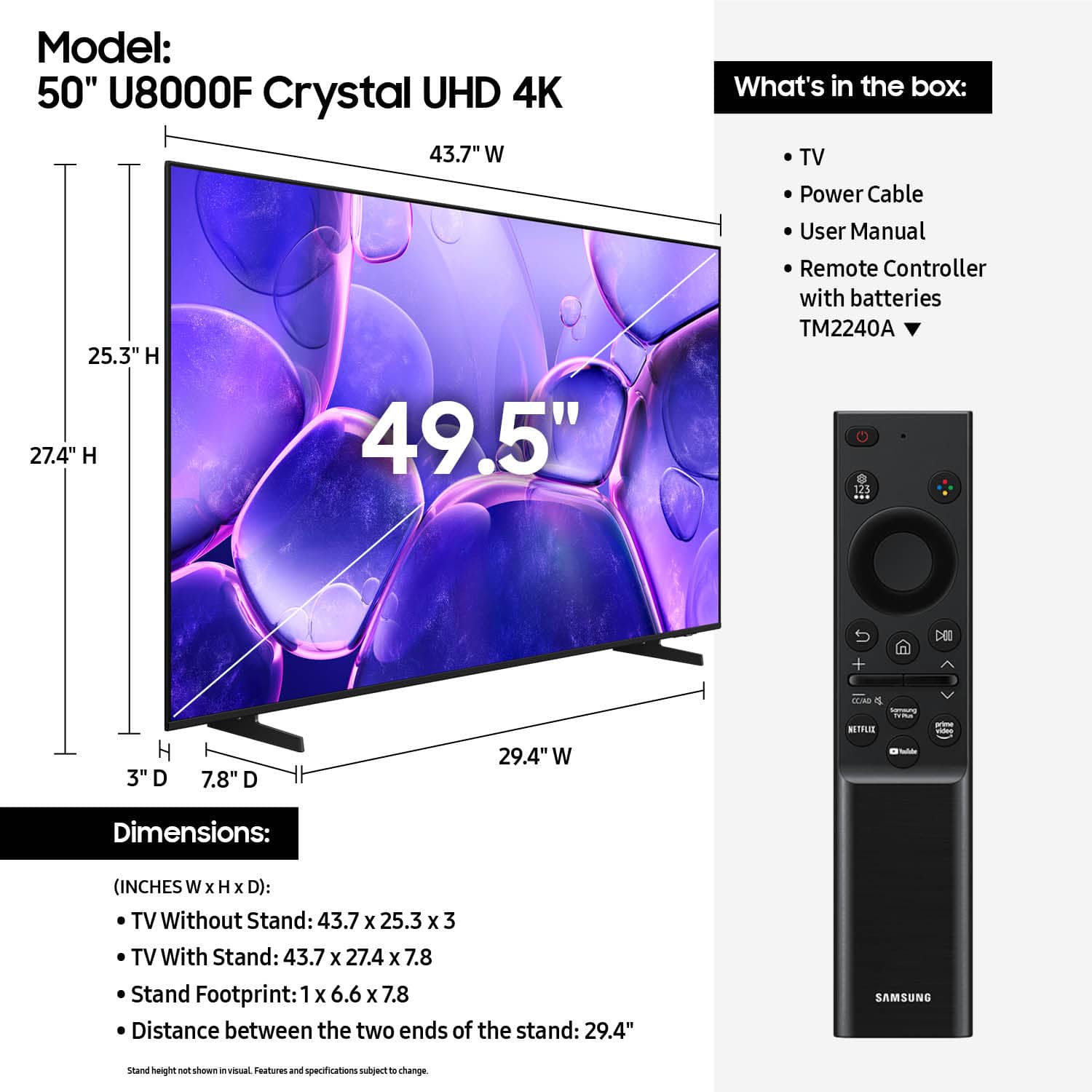












- Model:
- UN50U8000FFXZA
- SKU:
- 6619440
Rating by feature
- Picture Quality
Rating 4.7 out of 5 stars
- Sound Quality
Rating 4.5 out of 5 stars
- Brightness
Rating 4.7 out of 5 stars
Customers are saying
Customers enjoy the excellent picture quality of the 50” Class U8000F Series Crystal UHD 4K Smart Tizen TV (2025), and find it easy to install and setup. The size and weight are also appreciated, with users finding it suitable for any room. Some customers have noted that the remote control could be improved.
This summary was generated by AI based on customer reviews.
Excellent choice
||Posted . Owned for 3 weeks when reviewed.This reviewer received promo considerations or sweepstakes entry for writing a review.For the price it is a very good choice nice looking Brite and clear view of any program.
I would recommend this to a friendGood quality picture
||Posted . Owned for less than 1 week when reviewed.This reviewer received promo considerations or sweepstakes entry for writing a review.Happy with my new TV, have it in my bedroom and enjoying every minute of it
I would recommend this to a friendSamsung for the Win!!
||Posted . Owned for 2 weeks when reviewed.This reviewer received promo considerations or sweepstakes entry for writing a review.I bought tv for my son and he loves it. So far so good.
I would recommend this to a friendJoe’s review
||Posted . Owned for 1 month when reviewed.This reviewer received promo considerations or sweepstakes entry for writing a review.Friendly and knowledgeable associates. Geek squad were great as well
I would recommend this to a friendNeeds owners manual
||Posted .This reviewer received promo considerations or sweepstakes entry for writing a review.Really nice TV but it would have been better if it came with an owners manual.
I would recommend this to a friendLove it
||Posted . Owned for 1 month when reviewed.This reviewer received promo considerations or sweepstakes entry for writing a review.Perfect size great screen quality and best of all easy set up . Love it!
I would recommend this to a friendEasy to setup and picture quality is an upgrade
||Posted . Owned for 3 weeks when reviewed.This reviewer received promo considerations or sweepstakes entry for writing a review.Replaced previously purchased 43" as that was smaller and this 59" fits great
I would recommend this to a friendGreat investment
||Posted .This reviewer received promo considerations or sweepstakes entry for writing a review.Excellent display and easy to set-up and use! Perfect for all ages.
I would recommend this to a friendGreat service
||Posted . Owned for 1 month when reviewed.This reviewer received promo considerations or sweepstakes entry for writing a review.Good TV Great service. I was in and out in 15 minutes.
I would recommend this to a friendDisappointed
||Posted . Owned for 1 month when reviewed.This reviewer received promo considerations or sweepstakes entry for writing a review.Im not sure what is causing this issue, but the sound portion is not with the person talking. It's awful.... Can't watch it because the mouth is not with the words. Please advise.
No, I would not recommend this to a friendBrand response from Samsung
Posted .EugeniaA,
We appreciate your review of Samsung’s U8000F TV. So we can better understand the issues you’re experiencing and provide you with troubleshooting assistance, please reach out to Samsung Customer Support at 1-800-SAMSUNG, available daily from 8AM - 12AM EST. You can also chat with a LiveChat agent by clicking the ‘Support’ link on our website for:
• Live Chat
• Manuals, Software, & Warranty Info
• Creating a Service ticket
~ Samsung Specialist
Great tv
||Posted .This reviewer received promo considerations or sweepstakes entry for writing a review.Great TV. My experience hasn't been stellar but decent for what I paid. Really unfortunate there is no Multiview for this model. Also have a hiccup where my samsung remote turns on/off both my tv and monitor.
I would recommend this to a friendBrand response from Samsung
Posted .Hi Alex,
Thank you for your feedback. We are sorry for any confusion about the specs of your TV. If you are looking for a TV with the multi-view feature, we recommend starting with our Q7F TV Series and above.
If you ever have questions or need support, we’re here to help. Call us at 1-800-SAMSUNG, available from 8AM - 12AM EST, seven days a week. You can also connect with a LiveChat agent by clicking the ‘Support’ link on our website.
~ Samsung Advisor
Meh. I wouldn’t.
||Posted . Owned for 3 weeks when reviewed.This reviewer received promo considerations or sweepstakes entry for writing a review.Slow interface, poor user experience on menu and settings, decent picture but overall disappointed in the TV, tried to return but too late. I have a TCL around the same price and I highly prefer that one.
No, I would not recommend this to a friendBrand response from Samsung
Posted .Hi DeanoMachino,
We appreciate your feedback regarding response time. For optimal performance, please ensure your U8000F TV is running the latest firmware. You can check this by going to: Home > left directional key > Settings > Support > Software Update
To further optimize performance, try running Device Care, which checks memory, clears unused cached data, and closes background apps: Home > left directional key > Settings > Support > Device Care > Start Device Care
If issues continue, please reach Samsung Support at 1-800-SAMSUNG, available 8AM – 9PM EST Mon – Fri, 8AM – 6PM Sat – Sun. LiveChat is also available via the ‘Support’ link on our website.
~ Samsung Advisor
For better or worse.
||Posted .This reviewer received promo considerations or sweepstakes entry for writing a review.Has a cheap smart remote. Not cable friendly. Does not have the standard remote, as the specs stated. Streaming ok . Tuner is cable ready with clear QAM. Last years model with the standard remote was great for cable or streaming.
No, I would not recommend this to a friendBrand response from Samsung
Posted .Hi ThomasTV,
Thank you for sharing your experience. Samsung remotes are designed to offer convenient control, but we understand if you’d prefer to use a universal remote. Many third-party remotes work well with Samsung TVs, though setup steps may vary by brand and model.
To get started, we recommend checking the manufacturer’s instructions for programming codes and pairing methods. If you run into any trouble or have compatibility questions, Samsung Support is happy to help. You can reach us at 1-800-SAMSUNG, 8AM – 12AM EST, 7 days a week. LiveChat agents are also available at the ‘Support’ link on our website.
~ Samsung Advisor
- Cons mentioned:Connectivity
DON’T BUY THIS JUNK!
||Posted .This reviewer received promo considerations or sweepstakes entry for writing a review.“You get what you pay for” applies to this TV. I’m very disappointed as I expected way more from a Samsung TV, even a lower model. However, this TV is an, absolute piece of junk. The audio sounds like mono from 1970. The color is awful. The WiFi never works. I wish I could return it.
No, I would not recommend this to a friendBrand response from Samsung
Posted .Hi JohnV,
Thank you for your feedback on the sound quality of your Samsung U8000F TV. First, ensure your TV is running the latest firmware: Home > Settings > Support > Software Update
To improve your sound, try different Sound Modes (Standard, Optimized, Amplify), or fine-tune your setup in Expert Settings under: Settings > All Settings > Sound.
For further help adjusting your sound settings or finding the right soundbar for your space, feel free to reach Samsung Support at 1-800-SAMSUNG (8AM – 12AM EST, 7 days a week) or visit the Support link on our website.
~Samsung Advisor
Bad picture
||Posted . Owned for 1 month when reviewed.This reviewer received promo considerations or sweepstakes entry for writing a review.Got some picture bubbles after while need a new one now
No, I would not recommend this to a friendBrand response from Samsung
Posted .Hi Polo,
Thank you for your feedback regarding the screen abnormalities you're seeing on your TV. To help determine if the issue is related to the panel itself, we recommend starting with a Picture Test, which displays a high-definition image you can examine for flaws: Settings > Support > Device Care > Self Diagnosis > Picture Test
If the issue appears during the test and across all sources (built-in apps, HDMI devices, etc.), it may indicate a panel-related concern.
You can also try displaying solid-color test videos (red, green, blue, black, white) from a USB drive or YouTube. This can help you identify whether any pixels are stuck or not functioning properly.
In some cases, unplugging the TV for a few minutes and rebooting it can help resolve stuck pixels caused by temporary display behavior.
If the problem persists after these steps, the TV may require service. To set up a service appointment, please contact Samsung Support at 1-800-SAMSUNG, 8AM – 12AM EST, 7 days a week. LiveChat and additional support resources are also available through the Support link on our website.
~ Samsung Advisor
Watch out for shipping problems
||Posted . Owned for 2 weeks when reviewed.This reviewer received promo considerations or sweepstakes entry for writing a review.I really can’t tell you anything about this TV. It had to be shipped to me twice. And each time the screen was cracked and I had to return it to the store.
No, I would not recommend this to a friendBrand response from Samsung
Posted .Hi MaryO,
We're very sorry to hear about your experience. If there’s anything we can assist with, please don’t hesitate to call us at 1-800-SAMSUNG, available daily from 8AM – 9PM EST Mon – Fri, 8AM – 6PM Sat – Sun. You can also visit the Samsung website and click on ‘Support’ for:
• Live Chat
• Manuals, Software, & Warranty Info
~ Samsung Advisor
Damage
||Posted . Owned for 3 weeks when reviewed.This reviewer received promo considerations or sweepstakes entry for writing a review.I technically had to buy this product 3 times. The first one I bought was damaged. I went to the store to return the item as I bought a damaged TV, I was accused of damaging it myself. After about 30 mins I was defeated and said I would purchase another TV and call corporate another day as it was almost closing time but insisted they check the TV before I took it home. The manager stated I needed to pay before they even checked it, which I did. That TV was also damaged! Only then did the manager agree to return the original TV and exchange the second. Thankfully the third TV was not damaged and I was able to leave with the TV after being at the store for over an hour and being embarrassed by the manager.
No, I would not recommend this to a friendBrand response from Samsung
Posted .TinaG,
We appreciate you sharing your delivery experience and are sorry to hear that your TV arrived damaged. For issues related to shipping or delivery, we recommend reaching out to Best Buy directly so they can assist in resolving the situation.
Once your issue is resolved, if you have any questions about setup, usage, or features, please don’t hesitate to contact Samsung Support at 1-800-SAMSUNG (8AM – 12AM EST, 7 days a week), or connect with a LiveChat agent via the ‘Support’ link on our website.
~ Samsung Specialist
SLOW and airplay sucks
||Posted . Owned for 2 weeks when reviewed.This reviewer received promo considerations or sweepstakes entry for writing a review.AIRPLAY and the apps are SLOW. Apps are slow to load. ALso the airplay is terrible. it freezes and stuters while the laptop is smooth. wifi is strong but still happens
No, I would not recommend this to a friendBrand response from Samsung
Posted .Hi Naissbshs,
We appreciate your feedback regarding response time. For optimal performance, please ensure your U8000F TV is running the latest firmware. You can check this by going to: Home > left directional key > Settings > Support > Software Update
To further optimize performance, try running Device Care, which checks memory, clears unused cached data, and closes background apps: Home > left directional key > Settings > Support > Device Care > Start Device Care
If issues continue, please reach Samsung Support at 1-800-SAMSUNG, available 8AM – 9PM EST Mon – Fri, 8AM – 6PM Sat – Sun. LiveChat is also available via the ‘Support’ link on our website.
~ Samsung Advisor
- Cons mentioned:Connectivity
Review
||Posted . Owned for 1 week when reviewed.This reviewer received promo considerations or sweepstakes entry for writing a review.Husband did not like at all and the sound bar plugs we had wouldn’t connect to the plug in back
No, I would not recommend this to a friendBrand response from Samsung
Posted .Hi DeborahB,
Thank you for your feedback. If there’s anything we can assist with, please don’t hesitate to call us at 1-800-SAMSUNG, available daily from 8AM - 12AM EST. You can also visit the Samsung website and click on ‘Support’ for:
• Live Chat
• Manuals, Software, & Warranty Info
~ Samsung Advisor
Not really a good picture for a newer samsung
||Posted . Owned for 3 weeks when reviewed.This reviewer received promo considerations or sweepstakes entry for writing a review.Missing the remote in the box, picture not that impressive. Apps are a bit laggy as well. Great price was the highlight.
No, I would not recommend this to a friendBrand response from Samsung
Posted .Hi JNice,
We appreciate your feedback regarding the missing parts from your Samsung U8000F TV. As your unit was purchased in open-box condition, we recommend contacting Best Buy directly for assistance with resolving this matter.
Once resolved, please know we’re happy to help with setup or any product-related questions. You can reach us at 1-800-SAMSUNG, 8AM – 12AM EST, 7 days a week, or via LiveChat on our website under the ‘Support’ section.
~ Samsung Advisor