Customer Ratings & Reviews











- Model:
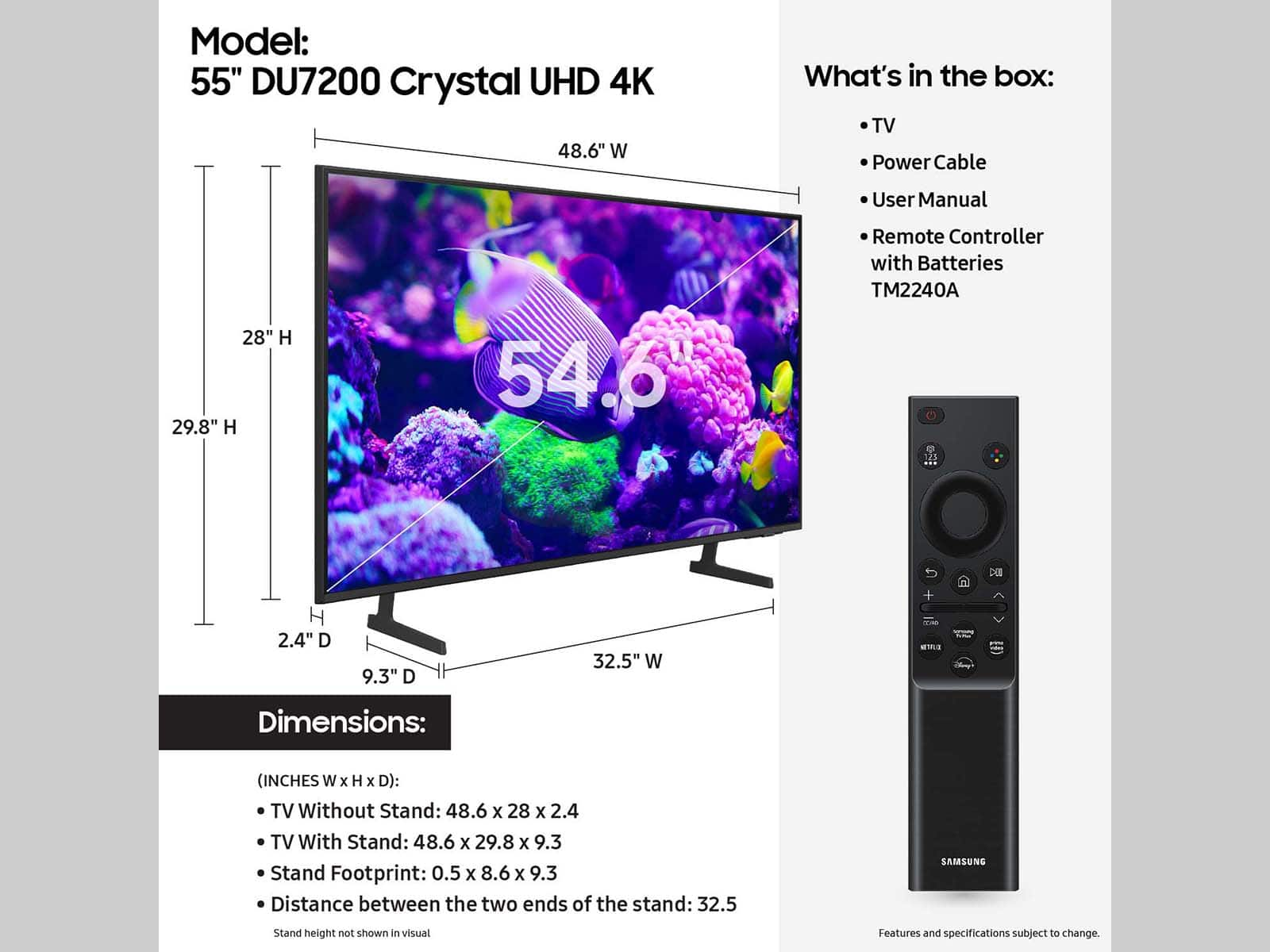
- UN55DU7200FXZA
- SKU:
- 10513587
Rating by feature
- Picture Quality
Rating 4.8 out of 5 stars
- Sound Quality
Rating 4.6 out of 5 stars
- Brightness
Rating 4.7 out of 5 stars
to a friend
Lacking ability to be helpful or curtious
||Posted . Owned for 1 month when reviewed.This reviewer received promo considerations or sweepstakes entry for writing a review.Purchased my Samsung TV and Sound Bar. Set it up and purchase Geek Squad plan. Have issue with turning on system. Told noy covered, only if product is broken. NEVER told this prior to purchased. Went to Framingham Store to ask Geek Squad for possible instructions. Treated BADLY, and told it would cost to have someone come out to set up TV. Not a happy customer.
I would recommend this to a friendBrand response from Samsung
Posted .Hi Retired,
We appreciate your feedback on the Geek Squad protection plan. We understand sometimes there is a learning curve when you get a new TV! This is why we created step-by-step guides, to make it easier for you. To learn about your TV go to https://www.samsung.com/us/support/answer/ANS00062199/.
If you would like assistance setting up your TV, please know that Samsung Customer Service is available by phone or chat, and we would be happy to assist you. You can call us at 1-800-SAMSUNG, 8 AM - 12 AM EST, seven days a week. Our LiveChat agents are also available by clicking on the ‘Support’ link on our website.
~ Samsung Advisor
Lacking
||Posted . Owned for 1 month when reviewed.This reviewer received promo considerations or sweepstakes entry for writing a review.Remote has few features and no manual. Apparently cannot submit review unless it’s 5 star
No, I would not recommend this to a friendBrand response from Samsung
Posted .LynnD,
We appreciate you sharing your experience. To assist you in learning the various features, functions, and settings of your DU7200 TV and remote, you can download your TV's User Manual, e-Manual, Remote Control Leaflet, and Quick Setup Guide on Samsung's website under ‘Support’ (top right corner) > Manuals & Software > TVs & Home Theater. From there, you can search for select the DU7200 TV to download the guides you would like.
The e-Manual and Remote Guide are both also embedded into your TV itself under Menu > Settings > Support
If you need more help, Samsung is here for you. Please call us at 1-800-SAMSUNG, 8AM - 12AM EST, 7 days a week. Our LiveChat agents are also available by clicking on the ‘Support’ link on our website.
~ Samsung Specialist
Open-Box is a scam
||Posted .This reviewer received promo considerations or sweepstakes entry for writing a review.TV is nice, but I bought it from Best Buy as an open-box in good condition. Which apparently means scratches on the screen, no power cord, no stand, and no remote. At the amount they charged for this TV I could have bought new and received everything in better condition, and after purchasing the missing parts it came out to the same price. When I called to complain I was told this is normal for "Good" condition.
I would recommend this to a friendBrand response from Samsung
Posted .Michael:
We appreciate you sharing your experience. We recommend you contact Best Buy Customer Support or your local Best Buy store directly for assistance in correcting this situation. We hope your issue is resolved in a timely manner.
Should you have questions or concerns regarding the usage or setup of your DU7200 once your issue has been resolved, please know Samsung is here for you. Please call us at 1-800-SAMSUNG, 8AM - 12AM EST, 7 days a week. Our LiveChat agents are also available by clicking on the ‘Support’ link on our website.
~ Samsung Ambassador
Disposable TV
||Posted .This reviewer received promo considerations or sweepstakes entry for writing a review.TV broke immediately after warranty. Wouldn't turn on, red light blinking indicating a power board fault. Convenience 2 months after the 1 year warranty ended. Never buying Samsung again. At least not from Best Buy.
No, I would not recommend this to a friendBrand response from Samsung
Posted .MatthewS:
I’m sorry to hear of the issues you’re experiencing with Samsung’s DU7200 TV. If your TV is out of the 1-year Manufacturer's Warranty, you can locate a service center in your area by following this link: https://www.samsung.com/us/support/service/locations/
For further help with warranty service, please contact Samsung Customer Support at 1-800-SAMSUNG, 8AM - 12AM EST, 7 days a week. Our LiveChat agents are also available by clicking on the ‘Support’ link on our website.
~ Samsung Ambassador
Flimsy TV
||Posted . Owned for 1 week when reviewed.This reviewer received promo considerations or sweepstakes entry for writing a review.TV was very flimsy and felt like it would break if anything had touched it. Returned and will buy a better quality TV later.
No, I would not recommend this to a friendBrand response from Samsung
Posted .Hi Abnodes,
Thank you for your feedback on the DU7200 TV. So we can better understand why you made your return, we would love to hear from you. Please call us at 1-800-SAMSUNG, 8AM - 12AM EST, 7 days a week. Or visit us on the Samsung website and click on the ‘Support’ link for:
• LiveChat
• Manuals, Software, & Warranty Info
~Samsung Advisor
Samsung
||Posted . Owned for 3 weeks when reviewed.This reviewer received promo considerations or sweepstakes entry for writing a review.No different than any other brand of tvs at this size
I would recommend this to a friendBrand response from Samsung
Posted .Hi CrystalS,
Thank you for your purchase and for your feedback on the DU7200 TV. If you ever have questions or need help, Samsung is here for you! Give us a call at 1-800-SAMSUNG, 8 AM - 12 AM EST, seven days a week. Our LiveChat agents are also available by clicking on the ‘Support’ link on our website.
Thanks for being a part of the Samsung family!
~ Samsung Advisor
Samsung UHD
||Posted . Owned for 1 month when reviewed.This reviewer received promo considerations or sweepstakes entry for writing a review.Decent tv but I should have bought LG. It received better reviews.
No, I would not recommend this to a friendBrand response from Samsung
Posted .GiuliaG,
Thank you for sharing your experience. If there is anything we can help with, please reach Samsung Support at 1-800-SAMSUNG, 8AM - 12AM EST, 7 days a week. Or visit us on the Samsung website and click on the ‘Support’ link for:
• LiveChat
• Manuals, Software, & Warranty Info
Crap tv
||Posted . Owned for 5 months when reviewed.This reviewer received promo considerations or sweepstakes entry for writing a review.Bought this tv back in october and now in march the wifi stopped working also tv will not turn on tired a different cord with ny other samsung tv and no its trash at this point
No, I would not recommend this to a friendBrand response from Samsung
Posted .Hi Deadpool79mwam,
We appreciate your feedback on the Samsung DU7200 TV. We are very sorry to hear the wi-fi and power are not functioning properly. Please know that we back this Samsung TV with a 1-year limited manufacturer's warranty, including authorized repair for manufacturer defect, if purchased brand-new directly from an authorized seller.
Please give us the chance to make this right by contacting Samsung Customer Support at 1-800-SAMSUNG, 8 AM - 12 AM EST, seven days a week. Our LiveChat agents are also available by clicking on the ‘Support’ link on our website.
~Samsung Advisor
The worst store ever! Best Buy is trash !
||Posted . Owned for less than 1 week when reviewed.This reviewer received promo considerations or sweepstakes entry for writing a review.If I could give no stars I would. I completely disgusted with Best Buy I purchase my brand new TV took it out the box and the TV is not turning on. I contact Best Buy to let them know and they said no problem we will send someone to take your TV down and bring you the new one. Not only did they drivers contact me less then 30 minutes to tell me there coming but they tell me my TV has to come down off the wall. These information was not said to me when I scheduled my appointment. My TV was sent back to the store and they didn’t even schedule me a new appointment. Customer service is trash and the store is even more trash for selling me a broken TV. Nobody trying to compensate the time I waited or the time I took off work to have this appointment.
No, I would not recommend this to a friendBrand response from Samsung
Posted .Hi EmmanuelaG,
I'm very sorry to hear of your return experience. You may want to reach out to your local store to provide the same feedback if you have not already done so.
If there’s anything we can ever help with, please call us at 1-800-SAMSUNG, 8 AM - 12 AM EST, seven days a week. Or visit us on the Samsung website and click on the ‘Support’ link for:
1) LiveChat
2) Manuals, Software, & Warranty Info
~ Samsung Advisor
Samsung is not what it used to be
||Posted . Owned for 3 weeks when reviewed.This reviewer received promo considerations or sweepstakes entry for writing a review.This TV died on me within a couple of weeks and about 20 minutes of viewing. I didn't even get past the setup screens before it turned black. A quick internet search revealed that this is a problem with Samsung TVs. My old Samsung from 2012 still works, but this one didn't make it past the endless setup menus. After having it professionally installed, I'm now forced to take the mounting apart and haul it back to Best Buy. I would not buy new Samsung TVs again.
No, I would not recommend this to a friendBrand response from Samsung
Posted .Hi Allen,
Thank you for reaching out to us. I'm very sorry your new TV is having issues with a blank screen. Please try the below troubleshooting steps to resolve this issue:
1. Press the Home button on the remote.
If the menu appears, the TV is powered on but is either not on the correct source or not receiving a signal. If the menu does not appear, the TV may be having power issues.
Check the red standby light, a little red light at the edge of the TV that you aim the remote at. In normal use, the red standby light is on when the TV is off (indicating the TV is on standby), and the red standby light is off when the TV is in use (or doesn't have power).
2. Confirm that the TV is set to the same source as the external device.
For instance, if your cable box is connected to HDMI 1, set the TV source to HDMI 1.
If the TV is set to the correct source, but there is still no image, unplug and reconnect the AV connections one cable at a time from both ends of each cable. If there's any damage to the cable, it will need to be replaced.
After reconnecting the external device, please turn it off and back on.
3. Test the HDMI cable.
The test is designed for HDMI cords less than 6 feet long and may not give accurate results on longer cords.
To perform the test, make sure the TV's source is still on the HDMI setting for the cable you want to test, and then navigate to Settings > Support > Self Diagnosis > Signal Information > HDMI Cable Test > Start Test. If the test says the cable is bad, replace the cable. Service is not required.
4. Test different external devices.
The final thing to rule out is the external device you're using. Try connecting a different device or using a different source port.
If the TV can display a picture in any other setup, then you've ruled the TV out as the cause of the issue. Keep trying various setups until you identify the device or cable that is not working and troubleshoot or replace it.
The TV will need service if the issue persists after these steps. Please contact us so we can better investigate your issue and assist you with a solution or replacement. You can call us at 1-800-SAMSUNG, 8 AM - 12 AM EST, seven days a week. Our LiveChat agents are also available by clicking on the ‘Support’ link on our website.
~ Samsung Advisor
15 days old and the speakers are blown
||Posted . Owned for 2 weeks when reviewed.This reviewer received promo considerations or sweepstakes entry for writing a review.This tv is 15 days old exactly with light use and the tv speakers just blew on me. Average tv volume has been 20 and apparently thats loud enough to blow the speakers and now its 1 day out of the return window.
No, I would not recommend this to a friendBrand response from Samsung
Posted .Hi Raee,
Samsung stands behind the quality and performance of our TVs with a limited 1-year manufacturer’s warranty when purchased brand-new from an authorized dealer.
Please give us the chance to make this right by contacting Samsung Customer Support at 1-800-SAMSUNG, 8 AM - 12 AM EST, seven days a week. Our LiveChat agents are also available by clicking on the ‘Support’ link on our website.
~Samsung Advisor
Tv
||Posted . Owned for 2 weeks when reviewed.This reviewer received promo considerations or sweepstakes entry for writing a review.I purchased the tv off the display, when I got home the controller wasn’t wrapped in bubble wrap & I got no power cable to it. The power button on the controller doesn’t work as well.
No, I would not recommend this to a friendBrand response from Samsung
Posted .Hi JonathanO,
We appreciate your feedback regarding the parts missing from your DU7200 TV. If purchased brand-new and unopened, please contact Samsung Customer Support, and a representative will gladly help you. If purchased in open-box condition, we recommend contacting Best Buy directly for assistance. We hope your issue is resolved in a timely manner.
Should you have questions or concerns about usage or setup of your TV once your issue has been resolved, please call us at 1-800-SAMSUNG, 8 AM - 12 AM EST, seven days a week. Our LiveChat agents are also available by clicking on the ‘Support’ link on our website.
~ Samsung Advisor
Better Luck Next Time!
||Posted . Owned for 3 weeks when reviewed.This reviewer received promo considerations or sweepstakes entry for writing a review.The Samsung TV was mostly fine except it wouldn't do what the salesperson said would do...ie get DishAnywhere application. I asked specifically, he specifically said it would but it doesn't. Hence, I returned the TV. Kind of a hassle but I bought it in Roseville, returned it no problem in Carson City.
No, I would not recommend this to a friendBrand response from Samsung
Posted .Hi BrianM,
Thank you for your feedback on the app selection available on our DU7200 Series TV. Please know your opinion is important and will be shared with our internal teams.
Should you ever decide to give Samsung TVs another try and have questions or need help with settings, setup, or features, we would be happy to help. Call us at 1-800-SAMSUNG, 8 AM – 12 AM EST, seven days a week. LiveChat with an agent, as well as manuals, software, and warranty info, can be found at the ‘Support’ link on our Samsung website.
We hope to regain you as a customer in the future.
~ Samsung Advisor
Samsung - 55” Class DU7200 Smart Tizen TV
||Posted . Owned for 1 month when reviewed.This reviewer received promo considerations or sweepstakes entry for writing a review.Samsung 55” TV – Disappointing Quality ⭐☆☆☆☆ I purchased this Samsung 55” TV expecting great picture quality, but I was immediately disappointed. The screen had blurry LED lines running both vertically and horizontally, making it nearly unwatchable. Despite trying different settings and inputs, the issue persisted. Ultimately, I had to return it to the store, which was a hassle. Given this experience, I do not recommend this model. If you’re in the market for a TV, I strongly suggest upgrading and going with a Sony instead—better quality and reliability. Avoid this one!
No, I would not recommend this to a friendBrand response from Samsung
Posted .Hi MichaelF,
We are very sorry to hear about your experience with the DU7200 TV. Please know that your feedback will be shared with our internal product teams. We take pride in our products and are sorry to hear that your experience was not up to our high standards.
Should you ever decide to give Samsung TVs another try and have questions or need help with settings, setup, or features, we would be happy to help. Call us at 1-800-SAMSUNG, 8 AM – 12 AM EST, seven days a week. LiveChat with an agent, as well as manuals, software, and warranty info, can be found at the ‘Support’ link on our Samsung website.
We hope to regain you as a customer in the future.
~ Samsung Advisor
2nd and last Samsung
||Posted . Owned for 1 month when reviewed.This reviewer received promo considerations or sweepstakes entry for writing a review.No voice remote. Very difficult to add apps. must view from directly in front of TV. If you insist on a Samsung, spend the extra $ and upgrade.
No, I would not recommend this to a friendBrand response from Samsung
Posted .Hi Richard,
We appreciate your feedback on the DU7200 TV. Please know your opinion is important to us and will be shared with our internal product teams. You are correct, the DU7200 TV does not come with built-in voice assistants. Starting with our DU8000 TV Series and above, you can enjoy the convenience of a voice remote and built-in voice assistants.
To add apps to your TV, simply go to Home> Apps> and Search for the app you are wanting to add.
There are also several picture settings that you can adjust to best fit what you are watching. Go to Home > Settings > All Settings > Picture > Picture Mode and select the mode that best fits your usage:
1) Standard: Default mode suitable for general viewing environments.
2) Natural: Reduces eye strain for a comfortable viewing experience.
3) Movie: Most suitable for watching TV or movies in a dark room.
4) Dynamic: Makes the picture brighter and clearer in bright viewing environments.
5) Filmmaker Mode: You can watch the source content (e.g., movie) as it is. If the image is defined as Filmmaker Mode, it will automatically switch to Filmmaker Mode while watching.
You can also go to Settings > All Settings> Picture > Expert Settings > to manually fine-tune your image.
If you ever have questions or need help, Samsung is here for you! Give us a call at 1-800-SAMSUNG, 8 AM - 12 AM EST, seven days a week. Our LiveChat agents are also available by clicking on the ‘Support’ link on our website.
Thanks for being a part of the Samsung family!
~ Samsung Advisor
Low quality
||Posted . Owned for 1 month when reviewed.This reviewer received promo considerations or sweepstakes entry for writing a review.This had to be returned. Thomas sold me the cheapest and quickies thing. He did not explain the size or that is was just LED.
No, I would not recommend this to a friendBrand response from Samsung
Posted .Hi JessicaM,
Thank you for your feedback. If you decide to explore Samsung TVs again in the future, we’re always here to support you - whether it’s setup, features, or troubleshooting. Reach us anytime at 1-800-SAMSUNG (8AM – 12AM EST, 7 days a week), or visit the ‘Support’ section of our website for LiveChat, manuals, and more.
~Samsung Advisor
Very poor wi fi connection, not for streaming
||Posted . Owned for 3 months when reviewed.This reviewer received promo considerations or sweepstakes entry for writing a review.I would not buy this TV again. Its wi fi setup is very slow. I added a roku device which is 10 times faster. Save your money and if you want a good streaming TV get something else.
No, I would not recommend this to a friendBrand response from Samsung
Posted .Hi StephenV,
We appreciate your feedback on the Samsung DU7200 TV. I'm sorry to hear you are experiencing issues with your Wi-Fi. I have a few recommendations that may improve your experience.
First, let's ensure you are running the latest Firmware. Go to Settings> Support> Software Update. To ensure you do not miss any Firmware Updates, I recommend enabling Auto Updates. Go to Settings> Support> Software Update> then select Auto Update.
Next, let's try running a cold boot on your TV. To do so, hold down the Power button on the Samsung TV remote until the TV turns off and then on again. This should take about 5 seconds.
I hope these tips help resolve your concerns. If you ever have questions or need help, Samsung is here for you! Give us a call at 1-800-SAMSUNG, 8 AM - 12 AM EST, seven days a week. Our LiveChat agents are also available by clicking on the ‘Support’ link on our website.
~Samsung Advisor
Buy a different TV and not from Best Buy
||Posted . Owned for 4 months when reviewed.This reviewer received promo considerations or sweepstakes entry for writing a review.TV picture is okay, not that it even matters because the TV itself will not stay connected to Wi-Fi and is constantly showing an error message on the screen.
No, I would not recommend this to a friendBrand response from Samsung
Posted .Hi ReRo,
Thank you for sharing your experience with Internet connectivity. If you’re experiencing issues with the Wi-Fi connection, we suggest you try the following:
1. Use 5Ghz Wi-Fi if possible
2. Try wired LAN if available
3. Try repositioning the router so there are no obstacles between your TV and the router
4. Try running a cold boot on your TV. To do so, hold down the Power button on the Samsung TV remote until the TV turns off and then on again. This should take about 5 seconds.
Please also be sure you are running the latest firmware. You can check to see what software version your TV is using and if there is an available update through the settings on your TV. Go to: Settings > Support > Software Update.
You can enable automatic updates for convenience.
Go to Settings > Support > Software Update, then select Auto Update.
I hope these tips help resolve your concerns. If you need more help, Samsung is here for you! Please call us at 1-800-SAMSUNG, 8 AM - 12 AM EST, seven days a week. Our LiveChat agents are also available by clicking on the ‘Support’ link on our website.
~ Samsung Advisor
Samsung Junk!
||Posted . Owned for 1 week when reviewed.This reviewer received promo considerations or sweepstakes entry for writing a review.Bought this Samsung and it worked for 2 days....Samsung tech support jerked me around for 3 weeks. told me theuy'd get me a new TV and finally told me they'd come get the tv and send me a check. Ridiculous process and Best Buy is useless. Domn;t buy from Samsung...they are an awful company to deal with.
No, I would not recommend this to a friendBrand response from Samsung
Posted .Hi Neveragain,
We are very sorry you are experiencing issues with your DU7200 TV and appreciate your feedback about your experience with Customer Service. If you are still awaiting a refund or need help, please know we are here to help.
Should you wish to contact us directly with your ticket number, please call us at 1-800-SAMSUNG, 8AM - 12AM EST, 7 days a week. Our LiveChat agents are also available by clicking on the ‘Support’ link on our website.
~Samsung Advisor
Not worth the headache
||Posted . Owned for 3 months when reviewed.This reviewer received promo considerations or sweepstakes entry for writing a review.OS is already lagging and haven't had this tv no longer than 4 months. Its good for connecting your gaming console to and that's about it.
I would recommend this to a friendBrand response from Samsung
Posted .Hi Fanson45,
Thank you for sharing your experience with a laggy operating system on your DU7200 TV. First, let's ensure you are running the latest Firmware. Go to Settings> Support> Software Update. To ensure you do not miss any Firmware Updates, I recommend enabling Auto Updates. Go to Settings> Support> Software Update> then select Auto Update.
Next, let's try running a cold boot on your TV. To do so, hold down the Power button on the Samsung TV remote until the TV turns off and then on again. This should take about 5 seconds.
If you’re experiencing issues with the Wi-Fi connection, we suggest you try the following:
1. Use 5Ghz Wi-Fi if possible
2. Try wired LAN if available
3. Try repositioning the router so there are no obstacles between your TV and the router
I hope these tips help you enjoy your new product.
You can contact us for further help at 1-800-SAMSUNG, 8 AM - 12 AM EST, seven days a week. Our LiveChat agents are also available by clicking on the ‘Support’ link on our website.
~ Samsung Advisor