Customer Ratings & Reviews





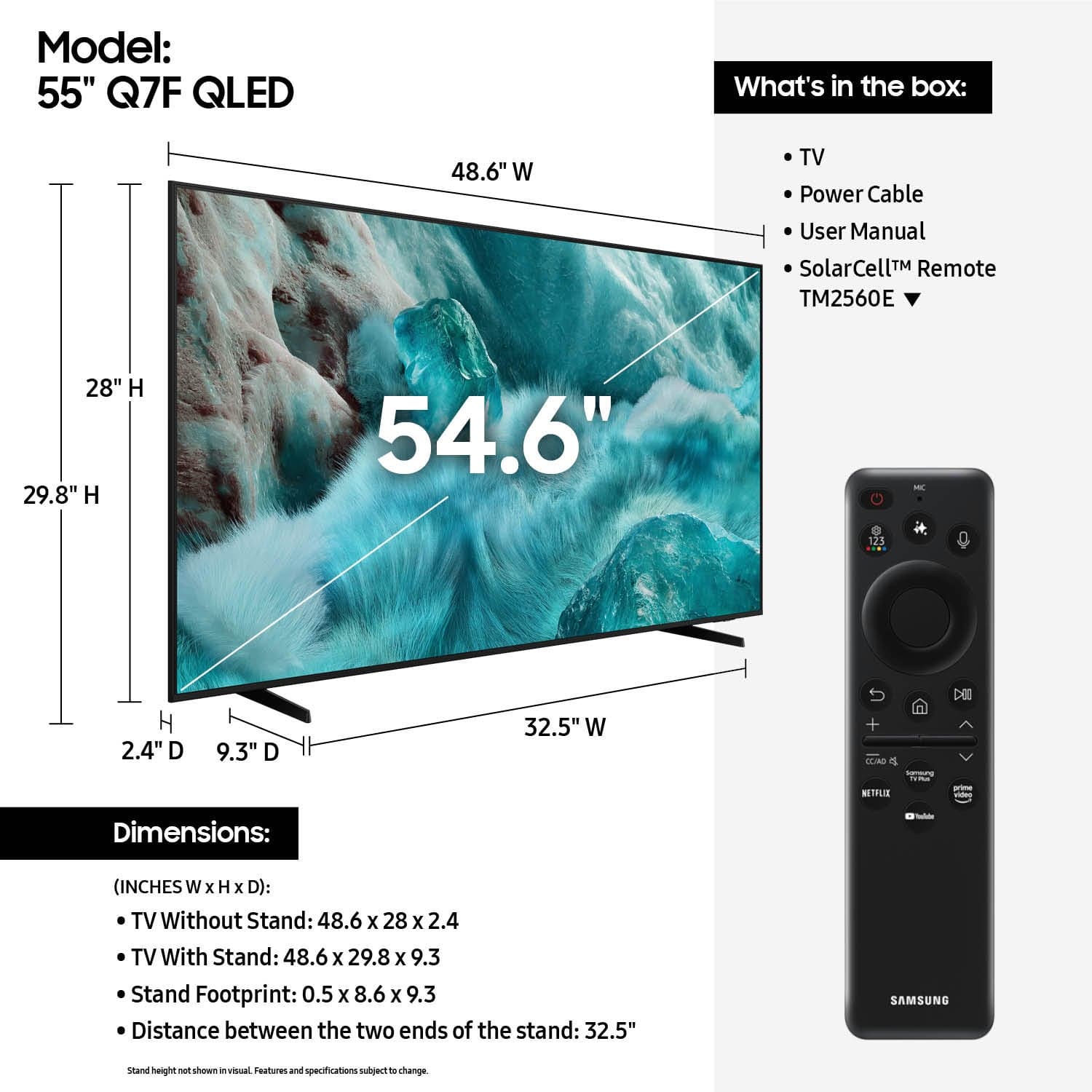











- Model:
- QN55Q7FAAFXZA
- |
- SKU:
- 10187687
Customer reviews
Rating 4.7 out of 5 stars with 903 reviews
(903 customer reviews)Rating by feature
- Picture Quality4.8
Rating 4.8 out of 5 stars
- Sound Quality4.6
Rating 4.6 out of 5 stars
- Brightness4.8
Rating 4.8 out of 5 stars
- Pros mentioned:Picture quality
Rated 5 out of 5 stars
Samsung QLED TV
||Posted . Owned for 1 month when reviewed.This reviewer received promo considerations or sweepstakes entry for writing a review.Very Happy with my new TV. Great Picture for such an economical purchase
This review is from Samsung - 55” Class Q7F Series QLED 4K UHD SamsungVision AI Smart Tizen TV (2025)
I would recommend this to a friend - Pros mentioned:Picture quality
Rated 4 out of 5 stars
Decent TV
||Posted .This reviewer received promo considerations or sweepstakes entry for writing a review.Easy to set up and good picture. Remote is not good but a replacement is easy to find and much better.
This review is from Samsung - 55” Class Q7F Series QLED 4K UHD SamsungVision AI Smart Tizen TV (2025)
I would recommend this to a friend - Pros mentioned:Picture quality
Rated 4 out of 5 stars
Pretty good
||Posted . Owned for 2 months when reviewed.This reviewer received promo considerations or sweepstakes entry for writing a review.The picture is beautiful and it meets almost all my expectations. The sound could be a little bit better. It’s very quiet and I have to turn it up quite a bit.
This review is from Samsung - 55” Class Q7F Series QLED 4K UHD SamsungVision AI Smart Tizen TV (2025)
I would recommend this to a friend - Pros mentioned:Picture quality
Rated 5 out of 5 stars
Great TV
||Posted .This reviewer received promo considerations or sweepstakes entry for writing a review.Nice picture. Tv is everything I expected. Highly recommend.
This review is from Samsung - 55” Class Q7F Series QLED 4K UHD SamsungVision AI Smart Tizen TV (2025)
I would recommend this to a friend - Pros mentioned:Picture quality
Rated 5 out of 5 stars
Samsung tv
||Posted . Owned for 1 month when reviewed.This reviewer received promo considerations or sweepstakes entry for writing a review.It’s a nice tv great for gaming and watching movies
This review is from Samsung - 55” Class Q7F Series QLED 4K UHD SamsungVision AI Smart Tizen TV (2025)
I would recommend this to a friend - Pros mentioned:Picture quality
Rated 5 out of 5 stars
Perfect Picture
||Posted .This reviewer received promo considerations or sweepstakes entry for writing a review.The picture on this is AMAZING I would for sure recommend!
This review is from Samsung - 55” Class Q7F Series QLED 4K UHD SamsungVision AI Smart Tizen TV (2025)
I would recommend this to a friend - Pros mentioned:Picture quality
Rated 5 out of 5 stars
I love it.
||Posted . Owned for 1 month when reviewed.This reviewer received promo considerations or sweepstakes entry for writing a review.Is this TV really good It has a very good image and sound.
This review is from Samsung - 55” Class Q7F Series QLED 4K UHD SamsungVision AI Smart Tizen TV (2025)
I would recommend this to a friend - Pros mentioned:Picture quality
Rated 5 out of 5 stars
Samsung 55 inch TV
||Posted . Owned for 1 month when reviewed.This reviewer received promo considerations or sweepstakes entry for writing a review.It was easy to assemble and install. worked fine when plugged in and pushed the on button.
This review is from Samsung - 55” Class Q7F Series QLED 4K UHD SamsungVision AI Smart Tizen TV (2025)
I would recommend this to a friend Rated 5 out of 5 stars
Samsung TV
||Posted . Owned for 1 month when reviewed.This reviewer received promo considerations or sweepstakes entry for writing a review.Nice product..........,,,,,,,,,,,,,,,,,,,,,,,,,,,,
This review is from Samsung - 55” Class Q7F Series QLED 4K UHD SamsungVision AI Smart Tizen TV (2025)
I would recommend this to a friend- Pros mentioned:Picture quality
Rated 5 out of 5 stars
samsung tv
||Posted . Owned for 1 week when reviewed.This reviewer received promo considerations or sweepstakes entry for writing a review.I thought it was an excellent product, I would recommend it.
This review is from Samsung - 55” Class Q7F Series QLED 4K UHD SamsungVision AI Smart Tizen TV (2025)
I would recommend this to a friend - Pros mentioned:Picture quality
Rated 5 out of 5 stars
Great QLED TV
||Posted . Owned for 2 weeks when reviewed.This reviewer received promo considerations or sweepstakes entry for writing a review.Great TV! Samsung QLED has amazing picture quality and would highly recommend!
This review is from Samsung - 55” Class Q7F Series QLED 4K UHD SamsungVision AI Smart Tizen TV (2025)
I would recommend this to a friend - Pros mentioned:Picture quality
Rated 5 out of 5 stars
happy 55-inch owner
||Posted . Owned for 1 month when reviewed.This reviewer received promo considerations or sweepstakes entry for writing a review.Great picture, sound and appearance. Nice addition to our family room.
This review is from Samsung - 55” Class Q7F Series QLED 4K UHD SamsungVision AI Smart Tizen TV (2025)
I would recommend this to a friend - Pros mentioned:Picture quality
Rated 5 out of 5 stars
Another great Samsung product
||Posted . Owned for 1 week when reviewed.This reviewer received promo considerations or sweepstakes entry for writing a review.Very good TV light weight easy to set up, great picture
This review is from Samsung - 55” Class Q7F Series QLED 4K UHD SamsungVision AI Smart Tizen TV (2025)
I would recommend this to a friend - Pros mentioned:Picture quality
Rated 5 out of 5 stars
55" TV
||Posted . Owned for 3 weeks when reviewed.This reviewer received promo considerations or sweepstakes entry for writing a review.good picture and good quality. Happy with the purchase.
This review is from Samsung - 55” Class Q7F Series QLED 4K UHD SamsungVision AI Smart Tizen TV (2025)
I would recommend this to a friend Rated 5 out of 5 stars
Excellent Resolution ~ Excellent Value
||Posted .This reviewer received promo considerations or sweepstakes entry for writing a review.Excellent value and the resolution is incredible! We purchased this size to just fit in an opening on our wall unit - just 1-1/2” to spare on each side. It works great, whether watching TV, DVDs or when my kids play games. We have several Samsung TVs and never had any difficulties or problems. If this is the size you need I recommend it highly.
This review is from Samsung - 55” Class Q7F Series QLED 4K UHD SamsungVision AI Smart Tizen TV (2025)
I would recommend this to a friendRated 5 out of 5 stars
owner
||Posted . Owned for 3 weeks when reviewed.This reviewer received promo considerations or sweepstakes entry for writing a review.Love the new television for my granddaughters playroom
This review is from Samsung - 55” Class Q7F Series QLED 4K UHD SamsungVision AI Smart Tizen TV (2025)
I would recommend this to a friend- Pros mentioned:Picture quality
Rated 5 out of 5 stars
samsung
||Posted . Owned for 1 week when reviewed.This reviewer received promo considerations or sweepstakes entry for writing a review.staff very knowledgeable smooth process quick load out
This review is from Samsung - 55” Class Q7F Series QLED 4K UHD SamsungVision AI Smart Tizen TV (2025)
I would recommend this to a friend Rated 5 out of 5 stars
Works well
||Posted . Owned for 2 weeks when reviewed.This reviewer received promo considerations or sweepstakes entry for writing a review.TV picture is good for price and the smart system is good.
This review is from Samsung - 55” Class Q7F Series QLED 4K UHD SamsungVision AI Smart Tizen TV (2025)
I would recommend this to a friend- Pros mentioned:Picture quality
Rated 5 out of 5 stars
Perfection at its best
||Posted .This reviewer received promo considerations or sweepstakes entry for writing a review.I was very happy with this purchase very clear picture and the sound from the audio is stunning
This review is from Samsung - 55” Class Q7F Series QLED 4K UHD SamsungVision AI Smart Tizen TV (2025)
I would recommend this to a friend - Pros mentioned:Picture quality
Rated 5 out of 5 stars
An excellent purchase
||Posted . Owned for 3 weeks when reviewed.This reviewer received promo considerations or sweepstakes entry for writing a review.Picture and colors are bright. Use of Samsung sound bar keeps dialogue clear and distinct
This review is from Samsung - 55” Class Q7F Series QLED 4K UHD SamsungVision AI Smart Tizen TV (2025)
I would recommend this to a friend