Customer Ratings & Reviews





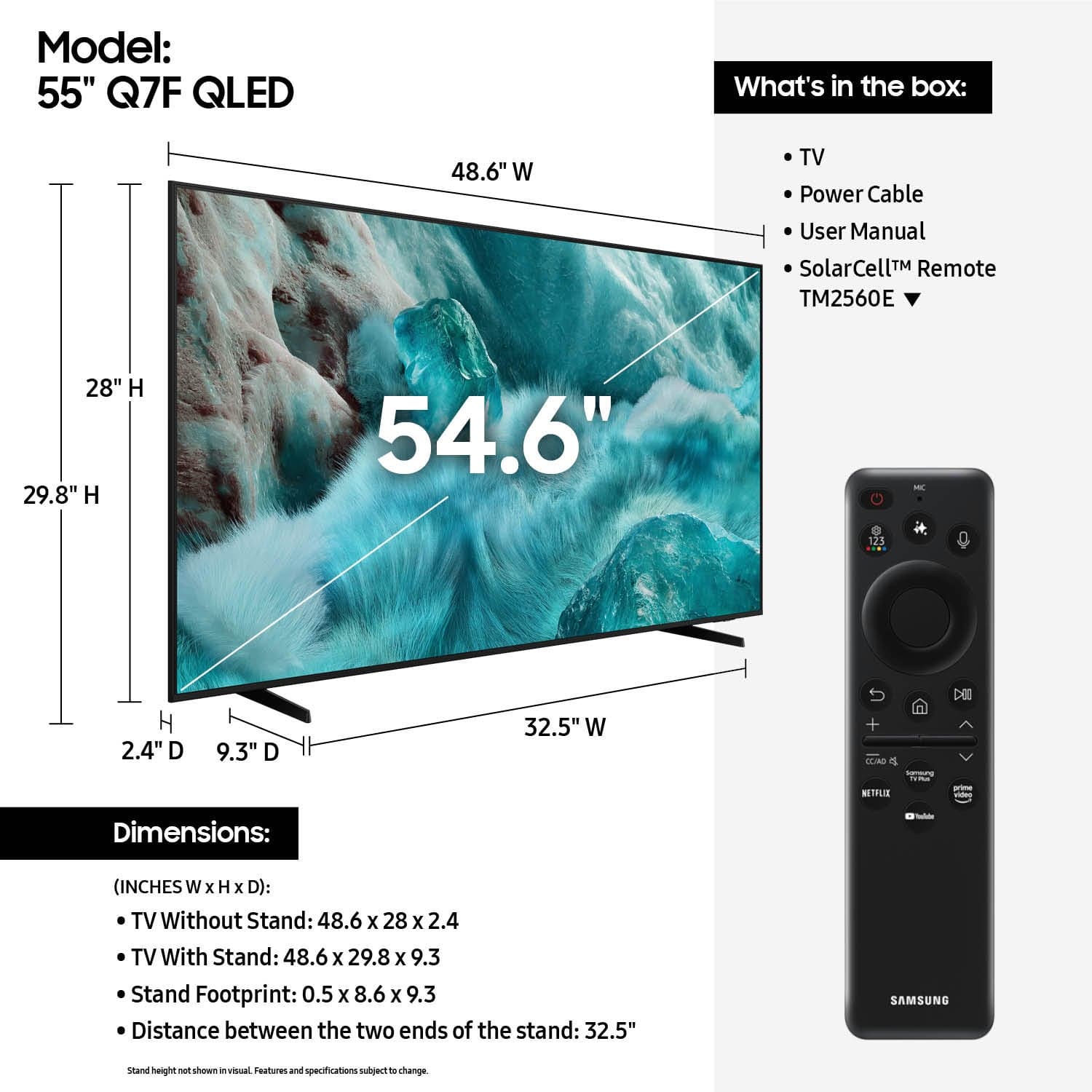











- Model:
- QN55Q7FAAFXZA
- |
- SKU:
- 10187687
Customer reviews
Rating 4.7 out of 5 stars with 904 reviews
(904 customer reviews)Rating by feature
- Picture Quality4.8
Rating 4.8 out of 5 stars
- Sound Quality4.6
Rating 4.6 out of 5 stars
- Brightness4.8
Rating 4.8 out of 5 stars
Rated 4 out of 5 stars
Good but wait for a sale
||Posted .This reviewer received promo considerations or sweepstakes entry for writing a review.Fine tv for the price, I’ve heard of some horror stories of these boards failing but mine is fine so far.
This review is from Samsung - 55” Class Q7F Series QLED 4K UHD SamsungVision AI Smart Tizen TV (2025)
I would recommend this to a friendRated 5 out of 5 stars
Television purchase
||Posted .This reviewer received promo considerations or sweepstakes entry for writing a review.No problem whatsoever with the product. Setup was easy and so far I’m happy with it.
This review is from Samsung - 55” Class Q7F Series QLED 4K UHD SamsungVision AI Smart Tizen TV (2025)
I would recommend this to a friendRated 5 out of 5 stars
Very Solid TV
||Posted . Owned for 2 weeks when reviewed.This reviewer received promo considerations or sweepstakes entry for writing a review.Everything looks very smooth, and the audio quality is good. Easier to read text on screen than the smaller tv we had before.
This review is from Samsung - 55” Class Q7F Series QLED 4K UHD SamsungVision AI Smart Tizen TV (2025)
I would recommend this to a friendRated 5 out of 5 stars
More than happy with my purchase
||Posted .This reviewer received promo considerations or sweepstakes entry for writing a review.I’m in love with this new TV! It was installed by Best Buy with no issues and I received a great demonstration on the features.
This review is from Samsung - 55” Class Q7F Series QLED 4K UHD SamsungVision AI Smart Tizen TV (2025)
I would recommend this to a friendRated 3 out of 5 stars
It’s ok
||Posted . Owned for 3 weeks when reviewed.This reviewer received promo considerations or sweepstakes entry for writing a review.I had problems from the beginning. I kept getting error messages. I had to buy an Apple TV just to be able to use the tv
This review is from Samsung - 55” Class Q7F Series QLED 4K UHD SamsungVision AI Smart Tizen TV (2025)
No, I would not recommend this to a friendRated 5 out of 5 stars
Love it!
||Posted . Owned for 2 weeks when reviewed.This reviewer received promo considerations or sweepstakes entry for writing a review.We purchased this TV to replace our 6 year old 50 in. Samsung, We have never had a problem with Samsung and will continue to purchase
This review is from Samsung - 55” Class Q7F Series QLED 4K UHD SamsungVision AI Smart Tizen TV (2025)
I would recommend this to a friend- Pros mentioned:Size
Rated 4 out of 5 stars
Great price
||Posted . Owned for 1 month when reviewed.This reviewer received promo considerations or sweepstakes entry for writing a review.Nice tv for the price. Fits well in my game room..
This review is from Samsung - 55” Class Q7F Series QLED 4K UHD SamsungVision AI Smart Tizen TV (2025)
I would recommend this to a friend Rated 5 out of 5 stars
Great Customer Service
||Posted . Owned for 1 month when reviewed.This reviewer received promo considerations or sweepstakes entry for writing a review.Torin was so knowledgeable, He helped me to make a decision and purchase exactly what I wanted. I felt completely comfortable asking all of my questions, outstanding employee.
This review is from Samsung - 55” Class Q7F Series QLED 4K UHD SamsungVision AI Smart Tizen TV (2025)
I would recommend this to a friendRated 4 out of 5 stars
Smart tv
||Posted . Owned for 3 weeks when reviewed.This reviewer received promo considerations or sweepstakes entry for writing a review.This replaced my 8 years old tv. Happy with the purchase.
This review is from Samsung - 55” Class Q7F Series QLED 4K UHD SamsungVision AI Smart Tizen TV (2025)
I would recommend this to a friendRated 5 out of 5 stars
Samsung Success
||Posted . Owned for 1 month when reviewed.This reviewer received promo considerations or sweepstakes entry for writing a review.Great definition and perfect size. We like it much better that 75 inch Sony Brava which cost four times as much.
This review is from Samsung - 55” Class Q7F Series QLED 4K UHD SamsungVision AI Smart Tizen TV (2025)
I would recommend this to a friendRated 5 out of 5 stars
Fully on libe
||Posted .This reviewer received promo considerations or sweepstakes entry for writing a review.This new tv replaced one that the have all the requirements to be fully streaming . We new tv I am know able to watch all streaming that is available
This review is from Samsung - 55” Class Q7F Series QLED 4K UHD SamsungVision AI Smart Tizen TV (2025)
I would recommend this to a friendRated 5 out of 5 stars
Quality service
||Posted . Owned for 2 weeks when reviewed.This reviewer received promo considerations or sweepstakes entry for writing a review.Best customer service fast. The insurance that they offer is excellent. All my appliances is from Best Buy. I will never buy anything else out of Best Buy.
This review is from Samsung - 55” Class Q7F Series QLED 4K UHD SamsungVision AI Smart Tizen TV (2025)
I would recommend this to a friend- Pros mentioned:Picture quality
Rated 4 out of 5 stars
Finally get to watch my MLB on this TV
||Posted .This reviewer received promo considerations or sweepstakes entry for writing a review.Enjoyed the fact that I can see my MLB.com on this TV!
This review is from Samsung - 55” Class Q7F Series QLED 4K UHD SamsungVision AI Smart Tizen TV (2025)
I would recommend this to a friend Rated 5 out of 5 stars
Samsung - 55” Class Q7F Series QLED 4K UHD Samsung
||Posted . Owned for 1 month when reviewed.This reviewer received promo considerations or sweepstakes entry for writing a review.Excellent TV with good Picture quality and Sound system. Very reliable one.
This review is from Samsung - 55” Class Q7F Series QLED 4K UHD SamsungVision AI Smart Tizen TV (2025)
I would recommend this to a friendRated 5 out of 5 stars
Samsung gem!
||Posted . Owned for 2 weeks when reviewed.This reviewer received promo considerations or sweepstakes entry for writing a review.Great picture and features! Price was great too during the Cyber Monday sales.
This review is from Samsung - 55” Class Q7F Series QLED 4K UHD SamsungVision AI Smart Tizen TV (2025)
I would recommend this to a friendRated 5 out of 5 stars
TV purchase
||Posted . Owned for 1 month when reviewed.This reviewer received promo considerations or sweepstakes entry for writing a review.Good service, immediate attention Fast home delivery. Accessible to give credit.
This review is from Samsung - 55” Class Q7F Series QLED 4K UHD SamsungVision AI Smart Tizen TV (2025)
I would recommend this to a friendRated 5 out of 5 stars
Samsung Electronics
||Posted . Owned for 1 month when reviewed.This reviewer received promo considerations or sweepstakes entry for writing a review.One of the best purchases for my STR, very easy to use!
This review is from Samsung - 55” Class Q7F Series QLED 4K UHD SamsungVision AI Smart Tizen TV (2025)
I would recommend this to a friendRated 5 out of 5 stars
Good viewing
||Posted . Owned for 1 month when reviewed.This reviewer received promo considerations or sweepstakes entry for writing a review.Good Buy and the price was competitive when compare with other brands
This review is from Samsung - 55” Class Q7F Series QLED 4K UHD SamsungVision AI Smart Tizen TV (2025)
I would recommend this to a friendRated 5 out of 5 stars
Teresa C.
||Posted . Owned for 1 month when reviewed.This reviewer received promo considerations or sweepstakes entry for writing a review.Definitely satisfied with customer service in store and installation of purchases by the technicians. Best Buy has an excellent team. Continue the great teamwork.
This review is from Samsung - 55” Class Q7F Series QLED 4K UHD SamsungVision AI Smart Tizen TV (2025)
I would recommend this to a friendRated 5 out of 5 stars
Samsung Tv
||Posted . Owned for 3 weeks when reviewed.This reviewer received promo considerations or sweepstakes entry for writing a review.Nice gifted, i encourage anyone to buy this product
This review is from Samsung - 55” Class Q7F Series QLED 4K UHD SamsungVision AI Smart Tizen TV (2025)
I would recommend this to a friend