Customer Ratings & Reviews





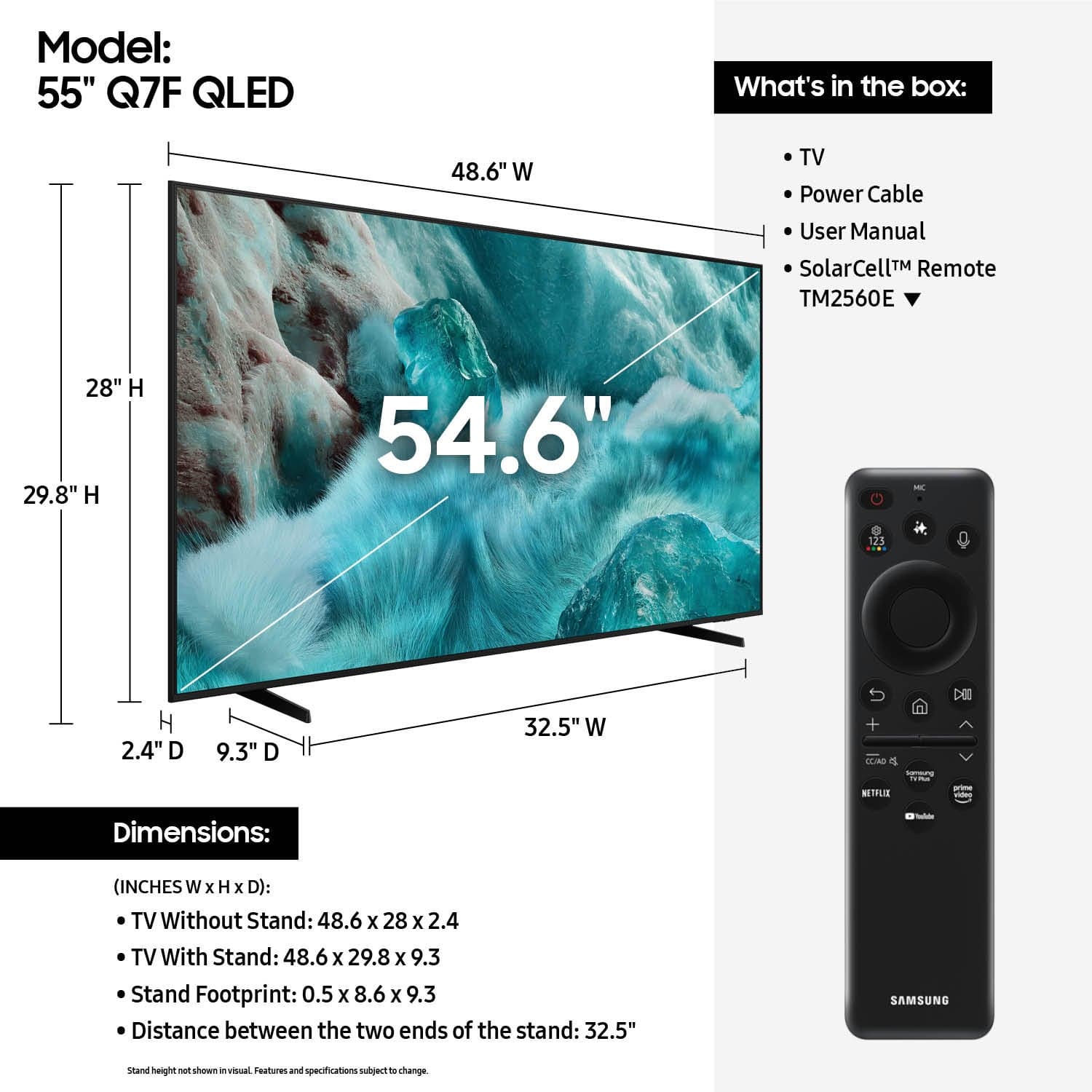











- Model:
- QN55Q7FAAFXZA
- |
- SKU:
- 10187687
Customer reviews
Rating 4.7 out of 5 stars with 948 reviews
(948 customer reviews)Rating by feature
- Picture Quality4.8
Rating 4.8 out of 5 stars
- Sound Quality4.6
Rating 4.6 out of 5 stars
- Brightness4.8
Rating 4.8 out of 5 stars
Customers are saying
Customers highly value the excellent picture quality, even in bright rooms, and appreciate the easy setup, convenient size, and light weight, noting the sharp contrast. However, some customers are not fond of the remote control and desire more HDMI ports. Additionally, the user interface is considered difficult to navigate by some, and a few users wish for louder volume and improved viewing angles.
This summary was generated by AI based on customer reviews.
Rated 5 out of 5 stars
Great TV so far!
||Posted . Owned for 2 weeks when reviewed.This reviewer received promo considerations or sweepstakes entry for writing a review.I had to buy it twice, as the first one had a big smash in the screen at lower right side. I'd picked up on a Sunday at a store a fair distance as my local store didn't have this model in stock. The only hassle was having to drive to a store even further away a couple of days later to return and excange for a new one. But the staff at Best Buy on East side of Indy was great. No problems with the return/exchange as once they looked at the TV they even pointed out where the box showed an indentation where it had been hit that lined up with the damaged screen. So I came home with my replacement, set up was easy, and have been enjoying it ever since - no issues so far and it looks great! Serves our purpose well for a family room TV that is a fairly small room.
This review is from Samsung - 55” Class Q7F Series QLED 4K UHD SamsungVision AI Smart Tizen TV (2025)
I would recommend this to a friend- Pros mentioned:Picture quality, Weight
Rated 5 out of 5 stars
Great tv
||Posted . Owned for 3 weeks when reviewed.This reviewer received promo considerations or sweepstakes entry for writing a review.Great tv for the price, light weight and very simple to set up, image is great
This review is from Samsung - 55” Class Q7F Series QLED 4K UHD SamsungVision AI Smart Tizen TV (2025)
I would recommend this to a friend - Pros mentioned:Picture quality, Size
Rated 5 out of 5 stars
Perfect TV
||Posted . Owned for 2 weeks when reviewed.This reviewer received promo considerations or sweepstakes entry for writing a review.Absolutely a great tv choice! Perfect size for my living room. The picture is exceptionally clear, bright even on some of the older movies, and sporting events are exceptional love the choice!
This review is from Samsung - 55” Class Q7F Series QLED 4K UHD SamsungVision AI Smart Tizen TV (2025)
I would recommend this to a friend - Pros mentioned:Picture quality, Setup ease
Rated 5 out of 5 stars
Samsung Review
||Posted . Owned for 2 weeks when reviewed.This reviewer received promo considerations or sweepstakes entry for writing a review.Very nice television. Picture quality is beautiful, remote is easy to use. Quality purchase.
This review is from Samsung - 55” Class Q7F Series QLED 4K UHD SamsungVision AI Smart Tizen TV (2025)
I would recommend this to a friend - Pros mentioned:Picture quality, Setup easeCons mentioned:Viewing angle
Rated 4 out of 5 stars
Nice picture
||Posted . Owned for 3 weeks when reviewed.This reviewer received promo considerations or sweepstakes entry for writing a review.Very nice picture, but not great if you are looking at an angle. Easy to set up. Good color.
This review is from Samsung - 55” Class Q7F Series QLED 4K UHD SamsungVision AI Smart Tizen TV (2025)
I would recommend this to a friend - Pros mentioned:Picture quality
Rated 5 out of 5 stars
Very Satisfied
||Posted . Owned for 2 weeks when reviewed.This reviewer received promo considerations or sweepstakes entry for writing a review.Good TV. Decent picture and easy to use. I upgraded from a Fire TV and navigation was the worst, it was extremely slow and sluggish, waiting for churning channels to come up and often just randomly returning to the home screen. This TV is the exact opposite, very fast and navigation is a breeze. I can live with decent quality viewing and audio, but I don't want to have to fight with a TV that acts like a 30 yr. old computer.
This review is from Samsung - 55” Class Q7F Series QLED 4K UHD SamsungVision AI Smart Tizen TV (2025)
I would recommend this to a friend - Pros mentioned:Picture qualityCons mentioned:Connectivity
Rated 5 out of 5 stars
Love Samsung TV.s
||Posted . Owned for 2 weeks when reviewed.This reviewer received promo considerations or sweepstakes entry for writing a review.Should have 3 HDMI ports remote is small should of had numbers on remote. I'm learning how to use it. Great TV for the price. All the TVs in my house are Samsung. I'm going to get another one time to upgrade didn't know it had such great picture quality all i need now is a sound bar.
This review is from Samsung - 55” Class Q7F Series QLED 4K UHD SamsungVision AI Smart Tizen TV (2025)
I would recommend this to a friend - Pros mentioned:Picture qualityCons mentioned:Menu navigation
Rated 4 out of 5 stars
Clear picture and sleek design
||Posted . Owned for 1 month when reviewed.This reviewer received promo considerations or sweepstakes entry for writing a review.The TV screen gives a clear and scrisp picture with a lot of depth. Its home screen can be confusing because there are too many programs and apps installed with contents that are not easily discernible in any particular order. It takes me a long time to get used to all the channels and programs and contents that the TV offers. They are all listed but not in any logical order according to types or genre. There is a lack of controls to manage how the main home screen should look for a particular user. It is not easy to get to the Setting features, and once getting to it, there are limited control options.
This review is from Samsung - 55” Class Q7F Series QLED 4K UHD SamsungVision AI Smart Tizen TV (2025)
I would recommend this to a friend - Pros mentioned:Picture quality
Rated 5 out of 5 stars
Great Buy!
||Posted .This reviewer received promo considerations or sweepstakes entry for writing a review.We purchased the Samsung 55” Q7F QLED 4K from to replace an older TV in our bedroom, and it’s been a great upgrade. The picture quality is crystal clear with vibrant colors and excellent brightness, even in a well-lit room. Everything looks sharp, whether we’re streaming shows or watching regular cable. Setup was quick and easy, and the Tizen Smart TV system is very user-friendly. Apps load fast, and navigating between them is smooth. The sound quality is also much better than our previous TV, which was important for us since we keep background noise on most of the time. Overall, this TV is great and well worth the price. Samsung did a great job with this model, and I’d definitely recommend it if you’re looking for a quality bedroom or main living space TV.
This review is from Samsung - 55” Class Q7F Series QLED 4K UHD SamsungVision AI Smart Tizen TV (2025)
I would recommend this to a friend Rated 5 out of 5 stars
Good budget buy
Posted .This reviewer received promo considerations or sweepstakes entry for writing a review.Nice tv for the price, got it on a lightening deal, my only issue was getting the feet on securely, probably the only person with that problem
This review is from Samsung - 55” Class Q7F Series QLED 4K UHD SamsungVision AI Smart Tizen TV (2025)
I would recommend this to a friend- Pros mentioned:Picture quality, Setup ease
Rated 5 out of 5 stars
Buyer
||Posted . Owned for 1 month when reviewed.This reviewer received promo considerations or sweepstakes entry for writing a review.The TV Sets up quickly and works well. The remote is small, which nice, but like some illumination on it when using it in the dark. All in all a good TV.
This review is from Samsung - 55” Class Q7F Series QLED 4K UHD SamsungVision AI Smart Tizen TV (2025)
I would recommend this to a friend - Pros mentioned:Picture quality, Setup ease
Rated 4 out of 5 stars
Good buy , great picture
||Posted . Owned for 3 weeks when reviewed.This reviewer received promo considerations or sweepstakes entry for writing a review.Ease of setup, picture is clean and clear, great value for the price.
This review is from Samsung - 55” Class Q7F Series QLED 4K UHD SamsungVision AI Smart Tizen TV (2025)
I would recommend this to a friend - Pros mentioned:Setup ease, Weight
Rated 5 out of 5 stars
Two thumbs up
||Posted .This reviewer received promo considerations or sweepstakes entry for writing a review.Great micro flat screen TV. Extra lightweight and easy to set up. Two thumbs up.
This review is from Samsung - 55” Class Q7F Series QLED 4K UHD SamsungVision AI Smart Tizen TV (2025)
I would recommend this to a friend - Pros mentioned:Picture qualityCons mentioned:Viewing angle
Rated 4 out of 5 stars
55" Samsung QLED
||Posted . Owned for 1 month when reviewed.This reviewer received promo considerations or sweepstakes entry for writing a review.We really like this tv with a few caveats. First, the good. The response time is very fast, the picture and colors are first rate and it was super simple to set up. However, to get all those benefits it is best to be viewing straight on. Viewing from the side washes out the color and skews the picture. We're glad we're glad we bought it but have had to make adjustments in order for all to get the best view.
This review is from Samsung - 55” Class Q7F Series QLED 4K UHD SamsungVision AI Smart Tizen TV (2025)
I would recommend this to a friend - Pros mentioned:Picture quality, Size
Rated 5 out of 5 stars
TV for large bedroom
||Posted . Owned for 3 weeks when reviewed.This reviewer received promo considerations or sweepstakes entry for writing a review.Great picture quality and sound! Perfect size for the size room I put it in.
This review is from Samsung - 55” Class Q7F Series QLED 4K UHD SamsungVision AI Smart Tizen TV (2025)
I would recommend this to a friend - Pros mentioned:Picture quality, Setup ease
Rated 5 out of 5 stars
Great Purchase
||Posted . Owned for 2 weeks when reviewed.This reviewer received promo considerations or sweepstakes entry for writing a review.Easy to set up. I used alexa for my remote but it acted funky. I switched to Bixby and haven't had a problem. The picture is great as is the sound.
This review is from Samsung - 55” Class Q7F Series QLED 4K UHD SamsungVision AI Smart Tizen TV (2025)
I would recommend this to a friend - Pros mentioned:Picture qualityCons mentioned:Remote control
Rated 4 out of 5 stars
Good Value--solid picture
||Posted . Owned for 3 weeks when reviewed.This reviewer received promo considerations or sweepstakes entry for writing a review.Terrific TV for the size and price. Out of the box picture settings need to be adjusted, but once they are, it's a solid picture with great color, brightness and clarity. Not a big fan of remote control but manageable after several uses. TV sound is passable but not great. Overall, pleased with the purchase.
This review is from Samsung - 55” Class Q7F Series QLED 4K UHD SamsungVision AI Smart Tizen TV (2025)
I would recommend this to a friend - Pros mentioned:Picture quality, Setup ease
Rated 5 out of 5 stars
High quality picture
||Posted . Owned for 1 month when reviewed.This reviewer received promo considerations or sweepstakes entry for writing a review.Clear picture, easy to use smart tv that fit perfectly in my home.
This review is from Samsung - 55” Class Q7F Series QLED 4K UHD SamsungVision AI Smart Tizen TV (2025)
I would recommend this to a friend - Pros mentioned:Picture quality
Rated 4 out of 5 stars
Samsung 55” Q7F
Posted .This reviewer received promo considerations or sweepstakes entry for writing a review.Great tv for the price. Clear definition on picture Easy to add new apps
This review is from Samsung - 55” Class Q7F Series QLED 4K UHD SamsungVision AI Smart Tizen TV (2025)
I would recommend this to a friend - Pros mentioned:Picture quality, Setup ease
Rated 5 out of 5 stars
Quality
||Posted . Owned for 1 month when reviewed.This reviewer received promo considerations or sweepstakes entry for writing a review.We love this Samsung TV, great quality, wonderful picture easy set up, sleek design , not the first Samsung and will not be the last one we purchase!
This review is from Samsung - 55” Class Q7F Series QLED 4K UHD SamsungVision AI Smart Tizen TV (2025)
I would recommend this to a friend