Customer Ratings & Reviews





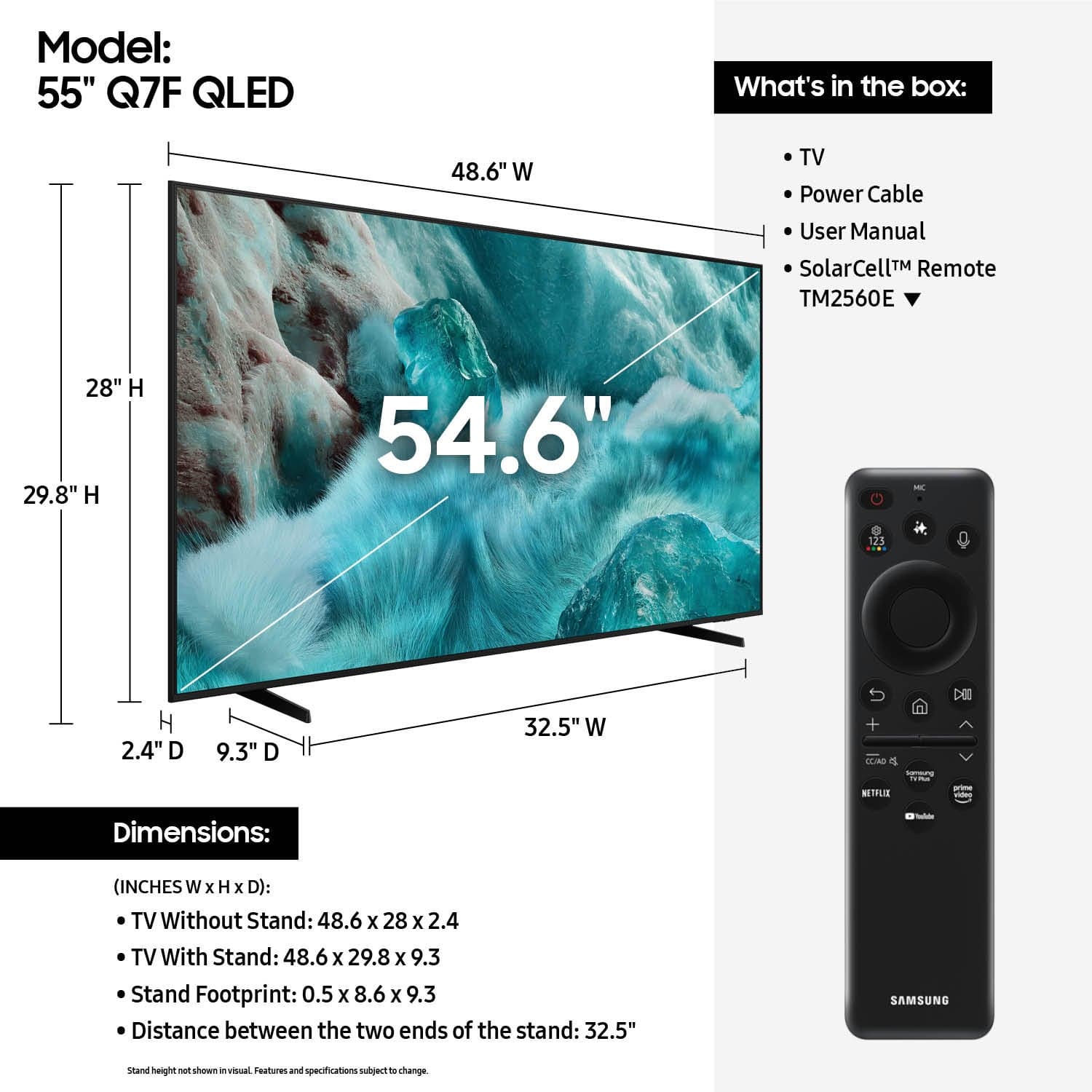











- Model:
- QN55Q7FAAFXZA
- |
- SKU:
- 10214316
Customer reviews
Rating 4.7 out of 5 stars with 814 reviews
(814 customer reviews)Rating by feature
- Picture Quality4.8
Rating 4.8 out of 5 stars
- Sound Quality4.6
Rating 4.6 out of 5 stars
- Brightness4.8
Rating 4.8 out of 5 stars
- Pros mentioned:Picture quality
Rated 5 out of 5 stars
Quality
||Posted .This reviewer received promo considerations or sweepstakes entry for writing a review.Good quality, good picture and big enough for the bedroom!
This review is from Samsung - 55” Class Q7F Series QLED 4K UHD SamsungVision AI Smart Tizen TV (2025)
I would recommend this to a friend - Pros mentioned:Picture quality
Rated 5 out of 5 stars
Qled 55
||Posted . Owned for 3 weeks when reviewed.This reviewer received promo considerations or sweepstakes entry for writing a review.Watched setup videos which really helped great picture
This review is from Samsung - 55” Class Q7F Series QLED 4K UHD SamsungVision AI Smart Tizen TV (2025)
I would recommend this to a friend Rated 5 out of 5 stars
Samsung #1
||Posted . Owned for 3 weeks when reviewed.This reviewer received promo considerations or sweepstakes entry for writing a review.Samsung TV's are the only brand I will consider. I do not have cable, dish or other TV service by choice. Samsung TV has many awesome stations that satisfy my viewing needs. I remain loyal to Samsung.
This review is from Samsung - 55” Class Q7F Series QLED 4K UHD SamsungVision AI Smart Tizen TV (2025)
I would recommend this to a friendRated 5 out of 5 stars
Samsung 55" Class Q7F Series QLED 4K UHD
||Posted . Owned for 1 month when reviewed.This reviewer received promo considerations or sweepstakes entry for writing a review.The Samsung television I purchased is great! the salesman was very professional in explaining the different choices and styles. I will be purchasing another television on Black Friday!
This review is from Samsung - 55” Class Q7F Series QLED 4K UHD SamsungVision AI Smart Tizen TV (2025)
I would recommend this to a friend- Pros mentioned:Picture quality
Rated 5 out of 5 stars
Great customer service!
||Posted .This reviewer received promo considerations or sweepstakes entry for writing a review.Happy with this TV! Love the picture and brightness quality.
This review is from Samsung - 55” Class Q7F Series QLED 4K UHD SamsungVision AI Smart Tizen TV (2025)
I would recommend this to a friend - Pros mentioned:Picture quality
Rated 5 out of 5 stars
Samsung TV
||Posted . Owned for 3 weeks when reviewed.This reviewer received promo considerations or sweepstakes entry for writing a review.Great overall picture. Easy to operate with remote.
This review is from Samsung - 55” Class Q7F Series QLED 4K UHD SamsungVision AI Smart Tizen TV (2025)
I would recommend this to a friend - Pros mentioned:Picture quality
Rated 5 out of 5 stars
fan of Samsung tvs
||Posted . Owned for 1 month when reviewed.This reviewer received promo considerations or sweepstakes entry for writing a review.great volume and great features with the controller
This review is from Samsung - 55” Class Q7F Series QLED 4K UHD SamsungVision AI Smart Tizen TV (2025)
I would recommend this to a friend Rated 5 out of 5 stars
Extremely Happy
||Posted .This reviewer received promo considerations or sweepstakes entry for writing a review.Great price, great quality, great customer service!!!
This review is from Samsung - 55” Class Q7F Series QLED 4K UHD SamsungVision AI Smart Tizen TV (2025)
I would recommend this to a friendRated 5 out of 5 stars
Good Purchase!
||Posted . Owned for 3 weeks when reviewed.This reviewer received promo considerations or sweepstakes entry for writing a review.The Samsung smart TV certainly overshadows olders TVs! Wow; the clarity of screen, the choices of what to set up/subscibe to are amazing! This is a wonderful TV and I highly recommend purchasing it for your home!
This review is from Samsung - 55” Class Q7F Series QLED 4K UHD SamsungVision AI Smart Tizen TV (2025)
I would recommend this to a friend- Pros mentioned:Picture quality
Rated 5 out of 5 stars
Samsung Tv
||Posted . Owned for 3 weeks when reviewed.This reviewer received promo considerations or sweepstakes entry for writing a review.It is very clear and great sound and picture quality!
This review is from Samsung - 55” Class Q7F Series QLED 4K UHD SamsungVision AI Smart Tizen TV (2025)
I would recommend this to a friend - Pros mentioned:Picture quality
Rated 5 out of 5 stars
Great TV.
||Posted .This reviewer received promo considerations or sweepstakes entry for writing a review.Love it! Picture, sound and overall look is great. Would recommend.
This review is from Samsung - 55” Class Q7F Series QLED 4K UHD SamsungVision AI Smart Tizen TV (2025)
I would recommend this to a friend - Pros mentioned:Setup ease
Rated 5 out of 5 stars
Great TV
||Posted .This reviewer received promo considerations or sweepstakes entry for writing a review.Great TV, easy setup. Gift to our son. Excellent price.
This review is from Samsung - 55” Class Q7F Series QLED 4K UHD SamsungVision AI Smart Tizen TV (2025)
I would recommend this to a friend Rated 4 out of 5 stars
Smart tv
||Posted . Owned for 3 weeks when reviewed.This reviewer received promo considerations or sweepstakes entry for writing a review.This replaced my 8 years old tv. Happy with the purchase.
This review is from Samsung - 55” Class Q7F Series QLED 4K UHD SamsungVision AI Smart Tizen TV (2025)
I would recommend this to a friendRated 5 out of 5 stars
Stanlet
||Posted . Owned for 2 weeks when reviewed.This reviewer received promo considerations or sweepstakes entry for writing a review.The sales associate was really helpful and we are really pleased with the Samsung television that we purchased!
This review is from Samsung - 55” Class Q7F Series QLED 4K UHD SamsungVision AI Smart Tizen TV (2025)
I would recommend this to a friend- Pros mentioned:Picture quality
Rated 5 out of 5 stars
Great Value
||Posted . Owned for 1 month when reviewed.This reviewer received promo considerations or sweepstakes entry for writing a review.Excellent TV for the money. Great value. Easy setup
This review is from Samsung - 55” Class Q7F Series QLED 4K UHD SamsungVision AI Smart Tizen TV (2025)
I would recommend this to a friend - Pros mentioned:Picture quality
Rated 5 out of 5 stars
Amazing quality.
||Posted . Owned for 1 month when reviewed.This reviewer received promo considerations or sweepstakes entry for writing a review.I love the q symphony! The surround sound is amazing.
This review is from Samsung - 55” Class Q7F Series QLED 4K UHD SamsungVision AI Smart Tizen TV (2025)
I would recommend this to a friend - Pros mentioned:Picture quality
Rated 5 out of 5 stars
Samsung qled tv
||Posted .This reviewer received promo considerations or sweepstakes entry for writing a review.Great tv. Color is amazing, good sound, easy to use. Would buy again
This review is from Samsung - 55” Class Q7F Series QLED 4K UHD SamsungVision AI Smart Tizen TV (2025)
I would recommend this to a friend - Pros mentioned:Picture quality
Rated 4 out of 5 stars
Jack's new T.V.
||Posted . Owned for 1 month when reviewed.This reviewer received promo considerations or sweepstakes entry for writing a review.Picture is fine. Color is great. Remote works well.
This review is from Samsung - 55” Class Q7F Series QLED 4K UHD SamsungVision AI Smart Tizen TV (2025)
I would recommend this to a friend Rated 5 out of 5 stars
Great TV
||Posted .This reviewer received promo considerations or sweepstakes entry for writing a review.This television was recommended to me and I must say it was great buy. Good customer service when picking up the tv.
This review is from Samsung - 55” Class Q7F Series QLED 4K UHD SamsungVision AI Smart Tizen TV (2025)
I would recommend this to a friend- Pros mentioned:Picture quality
Rated 5 out of 5 stars
Great!
||Posted . Owned for 3 weeks when reviewed.This reviewer received promo considerations or sweepstakes entry for writing a review.Awesome TV! No complaints, awesome value for price!
This review is from Samsung - 55” Class Q7F Series QLED 4K UHD SamsungVision AI Smart Tizen TV (2025)
I would recommend this to a friend