Skip to contentGo to Product SearchGo to Footer
Main Content

Customer Ratings & Reviews


Your price for this item is $349.99
The comparable value price is $379.99

Customer reviews

Rating 4.7 out of 5 stars with 1519 reviews

Rating Filter

Rating by feature

  • Picture Quality

    Rating 4.8 out of 5 stars

  • Sound Quality

    Rating 4.7 out of 5 stars

  • Brightness

    Rating 4.8 out of 5 stars

95%
would recommend
to a friend
The vast majority of our reviews come from verified purchases. Reviews from customers may include My Best Buy members, employees, and Tech Insider Network members (as tagged). Select reviewers may receive discounted products, promotional considerations or entries into drawings for honest, helpful reviews.
Page 72 Showing 1,421-1,440 of 1,519 reviews
  • Rated 4 out of 5 stars

    Samsung 55" TV

    |
    |
    Posted . Owned for 3 weeks when reviewed.
    This reviewer received promo considerations or sweepstakes entry for writing a review.

    Nice TV, nothing special, reflects the reduced price, I guess.

    I would recommend this to a friend
  • Rated 1 out of 5 stars

    Don't buy from Best Buy

    |
    |
    Posted . Owned for 2 months when reviewed.
    This reviewer received promo considerations or sweepstakes entry for writing a review.

    I purchased this TV from my local store 2 and half months ago and it has already broken. I have tried to resolve with Best Buy and I was told I needed to handle with Samsung. Samsung is willing to exhange it but it will take at least 3 weeks to receive. I called Best Buy again and was told I should not have been transferred to Samsung in the first place as I purchased the warranty and protection from Best Buy and was transferred to Best Buy product service. I was then told that Best Buy could not do anything about it, that I had to deal with Samsung. This is unacceptable customer service. To have purchased a TV from Best Buy to only have it stop working after 8 weeks and to have to wait for at least 3 weeks to have it exhanged and have zero accountability from Best Buy to stand by the products they sell.

    No, I would not recommend this to a friend
    • Brand response from Samsung
      Posted .

      Hi TracyF,

      I'm very sorry to hear about your experience. If you would like to schedule a warranty appointment, please do not hesitate to reach out to us. Call 1-800-SAMSUNG from 8AM - 12AM EST, seven days a week, or connect with a LiveChat agent anytime by selecting ‘Support’ on our website.

      ~ Samsung Advisor Samsung

  • Rated 5 out of 5 stars

    I love it !

    |
    |
    Posted .
    This reviewer received promo considerations or sweepstakes entry for writing a review.

    Great TV Great Value very happy with the purchase.

    I would recommend this to a friend
  • Rated 5 out of 5 stars

    Samsung TV

    |
    |
    Posted .
    This reviewer received promo considerations or sweepstakes entry for writing a review.

    Great Tv, excellent price. Best Buy is the place to go!

    I would recommend this to a friend
  • Rated 5 out of 5 stars

    Definitely worth the price

    |
    |
    Posted . Owned for 2 weeks when reviewed.
    This reviewer received promo considerations or sweepstakes entry for writing a review.

    It’s been about a month and I love it. For the price it’s a fantastic value

    I would recommend this to a friend
  • Rated 5 out of 5 stars

    Great price

    |
    |
    Posted .
    This reviewer received promo considerations or sweepstakes entry for writing a review.

    Worth it for the price we paid. Screen is very slim looking good

    I would recommend this to a friend
  • Rated 4 out of 5 stars

    Good TV but not good smart TV

    |
    |
    Posted .
    This reviewer received promo considerations or sweepstakes entry for writing a review.

    Overall quality is good but smart features would not work. Kept saying server issues so I had to use a fire stick.

    I would recommend this to a friend
  • Rated 5 out of 5 stars

    Television

    |
    |
    Posted .
    This reviewer received promo considerations or sweepstakes entry for writing a review.

    I love it. It was nice and the price was perfect. Thanks.

    I would recommend this to a friend
  • Rated 5 out of 5 stars

    New TV

    |
    |
    Posted .
    This reviewer received promo considerations or sweepstakes entry for writing a review.

    Is not that wonderful, but it is OK. I had one better than this one.

    I would recommend this to a friend
  • Rated 3 out of 5 stars

    Very limited connectivity

    |
    |
    Posted .
    This reviewer received promo considerations or sweepstakes entry for writing a review.

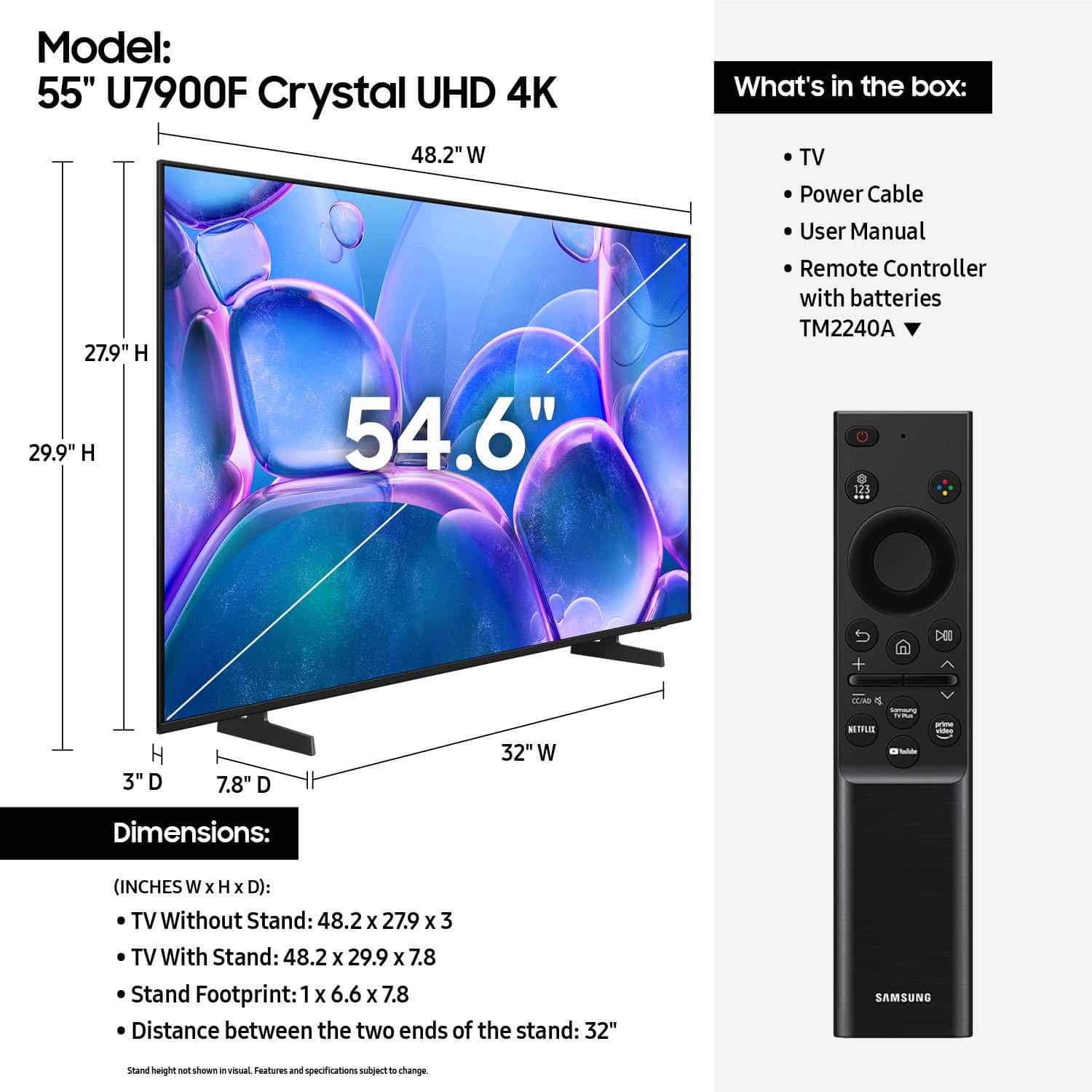
    Picture seems good, but lack of connectivity is my reason for lower rating. There are zero Optical outputs, and only two HDMI, one of which is eARC, so if you have a soundbar, that really only leaves you one input. I found this to be ridiculous. My laptop has more connectivity than this TV. If there were two more HDMI I would rate it a 5.

    No, I would not recommend this to a friend
    • Brand response from Samsung
      Posted .

      Hi Treyfromecu,

      Thanks for sharing your review. We appreciate your feedback on the inputs offered on the U7900F and will be sure to pass it along to the appropriate teams.

      Should you need further assistance or have questions, please contact Samsung Customer Support at 1-800-SAMSUNG, available daily from 8AM - 12AM EST. You can also visit the Samsung website and click on ‘Support’ for:
      • Live Chat
      • Manuals, Software, & Warranty Info

      ~ Samsung Specialist Samsung

  • Rated 3 out of 5 stars

    Samsung tv

    |
    |
    Posted . Owned for 1 month when reviewed.
    This reviewer received promo considerations or sweepstakes entry for writing a review.

    It’s an ok tv, Gets the job done. Only real complaint is that if you’re off to the side watching it’s super dark. Might be a settings thing but I can’t figure it out

    I would recommend this to a friend
    • Brand response from Samsung
      Posted .

      Hi CarlB,

      We’re sorry to hear you’re not fully satisfied with the picture quality on your Samsung U7900 TV. If the image appears too dark, we suggest disabling certain energy-saving features, which can automatically adjust brightness and affect how the screen looks.

      Go to: Settings > All Settings > General & Privacy > Power and Energy Saving, then turn off Brightness Optimization, Energy Saving Solution, Motion Lighting, and/or Contrast Enhancer.

      You can also adjust the Picture Mode to better suit your environment: Settings > All Settings > Picture > Picture Mode
      • Standard – Default mode for general viewing
      • Dynamic – Brighter and clearer, ideal for well-lit rooms
      • Movie – Best for dark room viewing
      • Eco – Energy-saving mode
      • Filmmaker Mode – Preserves content as intended by creators

      To fine-tune brightness, go to: Home > left directional key > Settings > All Settings > Picture > Expert Settings, then adjust the Brightness level (0–50) to your preference.

      Lastly, please make sure your TV is running the latest firmware: Home > Home > left directional key > Settings > Support > Software Update > Update Now

      We hope these tips help improve your viewing experience. If you need further support, feel free to contact us at 1-800-SAMSUNG, 8AM – 12AM EST, 7 days a week. LiveChat is also available via the ‘Support’ link on our website.

      ~Samsung Advisor Samsung

  • Rated 3 out of 5 stars

    Do better

    |
    |
    Posted .
    This reviewer received promo considerations or sweepstakes entry for writing a review.

    Glichy with the game mode in the begining thought i would have to return it but so far so good. I would have giving the whole experience a 5 star over all but the guy in who handled my tv dragged in the floor didnt even bother to set it on a cart i had to get it myself it was terrible how my item got treated before it reached my hands

    I would recommend this to a friend
    • Brand response from Samsung
      Posted .

      Hi Notyouraverageshopper,

      I'm very sorry to hear about your shopping experience. If there's anything we can do to help or if you have any product questions, please do not hesitate to reach out to us. . Reach out by calling 1-800-SAMSUNG between 8AM - 12AM EST, any day of the week. You can also chat with us online by visiting the ‘Support’ section of our website.

      ~ Samsung Advisor Samsung

  • Rated 3 out of 5 stars

    Basic TV For The Price

    |
    |
    Posted .
    This reviewer received promo considerations or sweepstakes entry for writing a review.

    Purchased as a moderately priced second tv. Tizen interface works OK, but I believe the Roku interface is better. Picture quality is ok; I expected a little better than what this tv offers, even after making a few adjustments in settings. Recommend at a price point that purchaser would be comfortable with (i.e, Sale)

    I would recommend this to a friend
    • Brand response from Samsung
      Posted .

      Hi Starrzz,

      We appreciate your feedback on the picture quality of Samsung’s U7900F TV. If the image doesn’t quite match your preferences, there are several adjustments you can make to better suit your viewing environment and content type.

      First, please ensure your TV is running the latest firmware, as updates may include important picture quality enhancements. Go to: Home > Left directional button > Settings > Support > Software Update > Update Now

      To explore picture mode options, navigate to: Home > Left directional button > Settings > All Settings > Picture > Picture Mode. Options include:
      • Standard – Ideal for general viewing
      • Dynamic – Brighter and more vibrant for well-lit spaces
      • Eco – Optimized for energy efficiency
      • Movie – Best for viewing in low light
      • Filmmaker Mode – Preserves the content creator’s intent and disables motion smoothing for supported content

      You can further customize your image by going to: Settings > All Settings > Picture > Expert Settings, where you can adjust Brightness, Contrast, Color Tone, Sharpness, Contrast Enhancer and more.

      If you’d like help finding the best picture settings for your preferences, please don’t hesitate to contact Samsung Support at 1-800-SAMSUNG, available 8AM – 12AM EST, 7 days a week. You can also LiveChat with an agent or explore additional resources on our website by clicking the ‘Support’ link.

      ~ Samsung Advisor Samsung

  • Rated 4 out of 5 stars

    Samsung 55" smart tv

    |
    |
    Posted . Owned for 1 week when reviewed.
    This reviewer received promo considerations or sweepstakes entry for writing a review.

    Affordable smart tv with clear picture quality and easy to maneuver remote.

    I would recommend this to a friend
  • Rated 5 out of 5 stars

    Great

    |
    |
    Posted . Owned for 1 month when reviewed.
    This reviewer received promo considerations or sweepstakes entry for writing a review.

    Great item I would recommend great visuals for gaming

    I would recommend this to a friend
  • Rated 3 out of 5 stars

    Glitchy

    |
    |
    Posted . Owned for 1 week when reviewed.
    This reviewer received promo considerations or sweepstakes entry for writing a review.

    Streaming Netflix,philo ect... the tv jumps/ Glitches repeatedly during the movie or show. Thats the only problem im seeming to be running into. I hate it.

    No, I would not recommend this to a friend
    • Brand response from Samsung
      Posted .

      Hi Keelo22,

      We appreciate you sharing details about the flickering you’ve noticed on your Samsung U7900 TV. This behavior may be related to energy-saving features or dynamic picture settings that adjust the screen brightness automatically.

      Please try disabling the following features: Settings > All Settings > General & Privacy > Power and Energy Saving
      • Brightness Optimization
      • Energy Saving Solution
      • Motion Lighting

      If these are already off, check if Contrast Enhancer is enabled, which can also cause brightness to shift depending on content: Settings > All Settings > Picture > Expert Settings > Contrast Enhancer

      To ensure optimal performance, please also confirm your TV is running the latest firmware: Settings > Support > Software Update > Update Now

      We hope these steps help stabilize your screen brightness. If you continue to experience issues, please don’t hesitate to contact Samsung Customer Support at 1-800-SAMSUNG, 8AM – 12AM EST, 7 days a week. LiveChat is also available via the ‘Support’ link on our website.

      ~ Samsung Advisor Samsung

  • Rated 3 out of 5 stars

    Samsung TV

    |
    |
    Posted .
    This reviewer received promo considerations or sweepstakes entry for writing a review.

    It's A good product, but I find the need to use two control devices to be cumbersome

    No, I would not recommend this to a friend
    • Brand response from Samsung
      Posted .

      Hi AnthonyC,

      Thank you for your feedback. Please know you can control multiple devices with your Samsung TV remote if they are connected via HDMI cable. If your Remote isn’t controlling your external device, please try the following:
      1. Reset the Remote: Press and hold Return and Enter (center of the navigation pad) for more than 10 seconds. Then, re-pair the remote by pressing Return and Play/Pause simultaneously for at least 5 seconds, or until a message appears on screen confirming connection.
      2. Check the Remote Battery: On your TV, go to: Home > left directional key > Settings > All Settings > General & Privacy > Remote Control
      3. Ensure the Remote is Sending IR Signals: Use your smartphone camera to check for infrared. If you see a flashing light from the remote’s front when pressing a button, it’s working properly.
      4. Enable Anynet+ (HDMI-CEC): This feature allows your remote to control HDMI-connected devices. To enable it:
      Settings > All Settings > General & Privacy > External Device Manager > Anynet+ (HDMI-CEC) = On
      5. If the device doesn’t support HDMI-CEC, use the Universal Remote feature. First, confirm the external device is properly connected. Then go to: Home > left directional key > Connected Devices > Universal Remote Setup, and follow the prompts.

      If the issue persists, please call Samsung Support at 1-800-SAMSUNG, 8AM – 12AM EST, 7 days a week. Our LiveChat agents are also available by clicking the ‘Support’ link on our website.

      ~Samsung Advisor Samsung

  • Rated 4 out of 5 stars

    Not all changes are good

    |
    |
    Posted . Owned for 1 month when reviewed.
    This reviewer received promo considerations or sweepstakes entry for writing a review.

    Not enough connections on back to connect devices.

    I would recommend this to a friend
  • Rated 3 out of 5 stars

    Soid TV but very poor UI Performance

    |
    |
    Posted . Owned for 1 month when reviewed.
    This reviewer received promo considerations or sweepstakes entry for writing a review.

    Very poor UI performance. Delayed when using the interface of the tv. Had to get a amaazon firestick because the built in UI is so bad

    No, I would not recommend this to a friend
    • Brand response from Samsung
      Posted .

      dragonslayer69,

      We appreciate your feedback regarding response time. For optimal performance, please ensure your TV is running the latest firmware. You can check this by going to: Home > left directional key > Settings > Support > Software Update

      To further optimize performance, try running Device Care, which checks memory, clears unused cached data, and closes background apps: Home > left directional key > Settings > Support > Device Care > Start Device Care

      If issues continue, please reach Samsung Support at 1-800-SAMSUNG, available 8AM – 12AM EST, 7 days a week.
      LiveChat is also available via the ‘Support’ link on our website.

      ~ Samsung Specialist Samsung

  • Rated 3 out of 5 stars

    Decent TV, horrible UI experience

    |
    |
    Posted .
    This reviewer received promo considerations or sweepstakes entry for writing a review.

    Decent TV for the price. Not 5 stars because of the absolutely HORRIBLE samsung interface - my tv just starts playing a random movie channel when i turn it on. Genuinely who asked for this

    I would recommend this to a friend
    • Brand response from Samsung
      Posted .

      Hi Noah,

      Thank you for your review. While your U7900F TV may currently default to Samsung TV Plus when powered on, you can customize what your TV does at startup by adjusting the Start Screen Options.

      To do this, navigate to: Settings > All Settings > Advanced Features > Start Screen Option and choose from the following:
      1. Start with Smart Hub Home – Automatically launches Smart Hub when the TV is turned on. You can enable or disable this option based on your preference.
      2. Autorun Multi View Casting – If you cast YouTube content from your mobile device, the TV will automatically display the content using Multi View.
      3. Autorun Multi View Mirroring – When you screen mirror your mobile device, Multi View will automatically open to show your device’s screen.

      If you need help adjusting these settings or have any other questions, please contact Samsung Support at 1-800-SAMSUNG, 8AM – 12AM EST, 7 days a week. LiveChat agents are also available by clicking on the ‘Support’ link on our website.

      ~ Samsung Advisor Samsung