Customer Ratings & Reviews





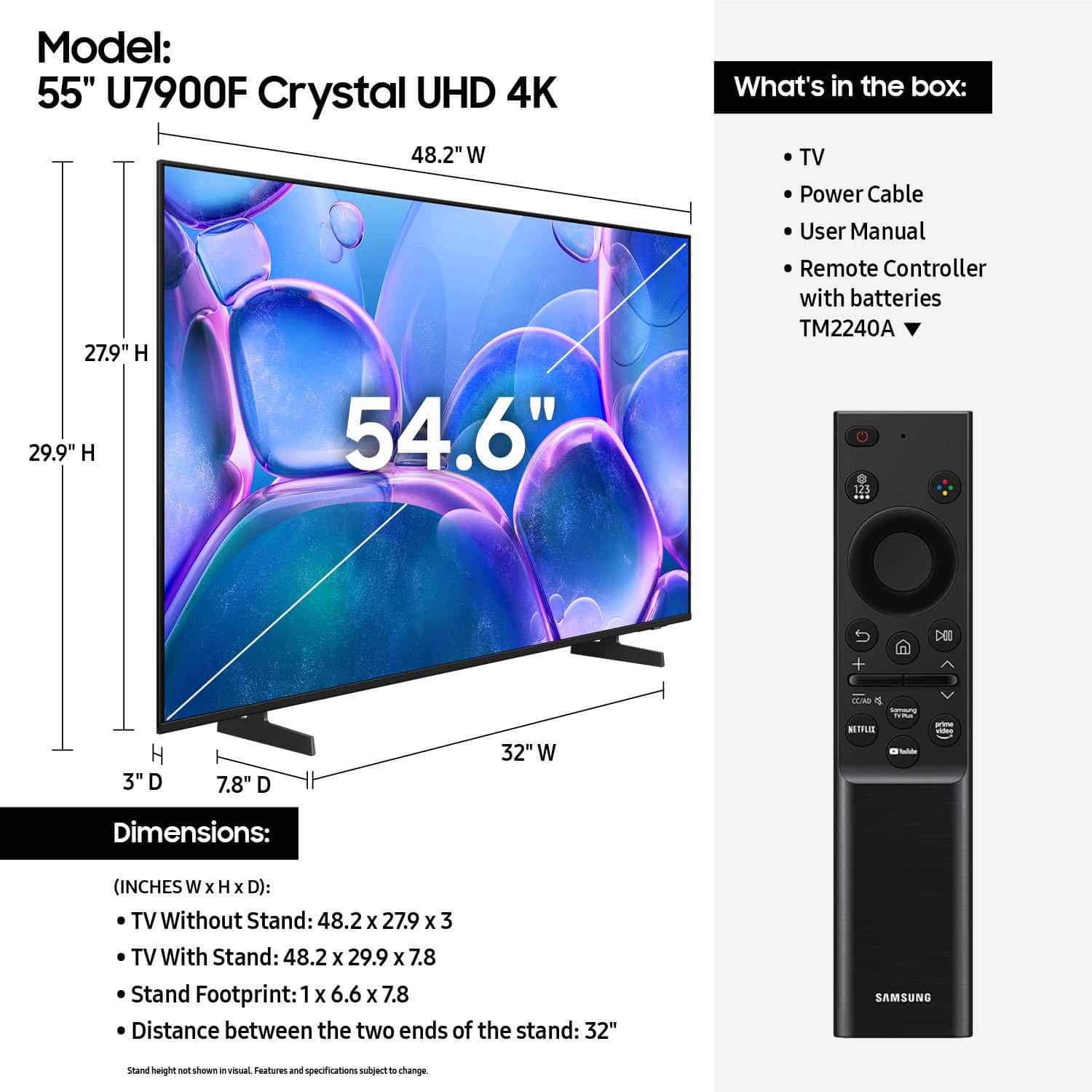






- Model:
- UN55U7900FFXZA
- |
- SKU:
- 10367433
Customer reviews
Rating 4.7 out of 5 stars with 1853 reviews
(1,853 customer reviews)Rating by feature
- Picture Quality4.8
Rating 4.8 out of 5 stars
- Sound Quality4.7
Rating 4.7 out of 5 stars
- Brightness4.8
Rating 4.8 out of 5 stars
Customers are saying
Customers are delighted by the TV's picture quality, ease of setup, and perfect size. Many appreciate its lightweight design and modern look. However, some customers have expressed concerns about connectivity issues, the remote control, and app performance.
This summary was generated by AI based on customer reviews.
Rated 4 out of 5 stars
Good upgrade from dumb TV
||Posted . Owned for 3 weeks when reviewed.This reviewer received promo considerations or sweepstakes entry for writing a review.This is a nice and reasonably-priced upgrade from our old "dumb" 42" TV; it's more energy efficient, too. Main drawbacks are that the remote buttons and text are quite small, and it has taken some time to learn how to navigate the many menus (more shortcut buttons on the remote or home screens would have been helpful). Note: we had to send the 1st TV back due to an intermittent problem with the picture; the replacement arrived quickly and we've had no problems with the new one.
This review is from Samsung - 55" Class U7900 Series UHD 4K Smart Tizen TV (2025)
I would recommend this to a friend- Pros mentioned:Picture quality
Rated 4 out of 5 stars
GOOD BUY
||Posted . Owned for 3 weeks when reviewed.This reviewer received promo considerations or sweepstakes entry for writing a review.tHIS IS A GREAT PICTURE AND SOUND. NO SOUND BAR NEEDED
This review is from Samsung - 55" Class U7900 Series UHD 4K Smart Tizen TV (2025)
I would recommend this to a friend - Pros mentioned:Picture quality
Rated 5 out of 5 stars
Good purchase
||Posted .This reviewer received promo considerations or sweepstakes entry for writing a review.Perfect sound and picture, also very quicky access to apps.
This review is from Samsung - 55" Class U7900 Series UHD 4K Smart Tizen TV (2025)
I would recommend this to a friend - Pros mentioned:Picture quality
Rated 5 out of 5 stars
Love it
||Posted . Owned for 2 weeks when reviewed.This reviewer received promo considerations or sweepstakes entry for writing a review.Love it very nice picture and the experience was very pleasant
This review is from Samsung - 55" Class U7900 Series UHD 4K Smart Tizen TV (2025)
No, I would not recommend this to a friend - Pros mentioned:Picture quality
Rated 5 out of 5 stars
55" TV
||Posted . Owned for 1 month when reviewed.This reviewer received promo considerations or sweepstakes entry for writing a review.great product, great size, easy to install. Very good sound.
This review is from Samsung - 55" Class U7900 Series UHD 4K Smart Tizen TV (2025)
I would recommend this to a friend - Pros mentioned:Picture quality
Rated 5 out of 5 stars
Open box product
||Posted . Owned for 1 month when reviewed.This reviewer received promo considerations or sweepstakes entry for writing a review.Nice tv, great open box price, and sales rep was very helpful
This review is from Samsung - 55" Class U7900 Series UHD 4K Smart Tizen TV (2025)
I would recommend this to a friend - Pros mentioned:Weight
Rated 5 out of 5 stars
Samsung 55
||Posted .This reviewer received promo considerations or sweepstakes entry for writing a review.This is a great product. Easy set up and so light!
This review is from Samsung - 55" Class U7900 Series UHD 4K Smart Tizen TV (2025)
I would recommend this to a friend - Pros mentioned:Picture quality
Rated 5 out of 5 stars
Outstanding
||Posted . Owned for less than 1 week when reviewed.This reviewer received promo considerations or sweepstakes entry for writing a review.Very clear picture. A quality tv and quality company
This review is from Samsung - 55" Class U7900 Series UHD 4K Smart Tizen TV (2025)
I would recommend this to a friend - Pros mentioned:Picture quality
Rated 5 out of 5 stars
Samsung
||Posted . Owned for 1 month when reviewed.This reviewer received promo considerations or sweepstakes entry for writing a review.Nice purchase! I like my new Samsung ! Quality is good!
This review is from Samsung - 55" Class U7900 Series UHD 4K Smart Tizen TV (2025)
I would recommend this to a friend - Pros mentioned:Picture quality
Rated 5 out of 5 stars
55inch Tv
||Posted . Owned for 1 month when reviewed.This reviewer received promo considerations or sweepstakes entry for writing a review.My family love the tv very much. They think it Excellent
This review is from Samsung - 55" Class U7900 Series UHD 4K Smart Tizen TV (2025)
I would recommend this to a friend - Pros mentioned:Picture quality
Rated 5 out of 5 stars
Great TV
||Posted .This reviewer received promo considerations or sweepstakes entry for writing a review.Excellent sound quality and perfect picture quality
This review is from Samsung - 55" Class U7900 Series UHD 4K Smart Tizen TV (2025)
I would recommend this to a friend - Pros mentioned:Picture quality
Rated 5 out of 5 stars
Samsung TV
||Posted .This reviewer received promo considerations or sweepstakes entry for writing a review.The Tv works well on the Samsung channels and with my antenna.
This review is from Samsung - 55" Class U7900 Series UHD 4K Smart Tizen TV (2025)
I would recommend this to a friend - Pros mentioned:Picture quality
Rated 5 out of 5 stars
Samsung 55”
||Posted .This reviewer received promo considerations or sweepstakes entry for writing a review.I love it, it was on discount, I took that offer and I love it
This review is from Samsung - 55" Class U7900 Series UHD 4K Smart Tizen TV (2025)
I would recommend this to a friend - Cons mentioned:Remote control
Rated 5 out of 5 stars
always trust samsung
||Posted . Owned for 1 month when reviewed.This reviewer received promo considerations or sweepstakes entry for writing a review.overall great so far, only downside is the remote but is ok
This review is from Samsung - 55" Class U7900 Series UHD 4K Smart Tizen TV (2025)
I would recommend this to a friend - Pros mentioned:Setup ease
Rated 4 out of 5 stars
Sleek and simple
||Posted . Owned for 3 weeks when reviewed.This reviewer received promo considerations or sweepstakes entry for writing a review.Set was a breeze, video gaming looks good on screen, overall for the price and quality - I give it a win
This review is from Samsung - 55" Class U7900 Series UHD 4K Smart Tizen TV (2025)
I would recommend this to a friend - Pros mentioned:Picture quality
Rated 5 out of 5 stars
TV PURCHASE
||Posted .This reviewer received promo considerations or sweepstakes entry for writing a review.VERY STREAMLINED TO ORDER AND PICKUP. NO COMPLAINTS.
This review is from Samsung - 55" Class U7900 Series UHD 4K Smart Tizen TV (2025)
I would recommend this to a friend - Pros mentioned:Picture quality
Rated 5 out of 5 stars
New tv
||Posted .This reviewer received promo considerations or sweepstakes entry for writing a review.Really happy with my new tv. Like the size and quality.
This review is from Samsung - 55" Class U7900 Series UHD 4K Smart Tizen TV (2025)
I would recommend this to a friend - Pros mentioned:Picture quality
Rated 5 out of 5 stars
Samsung tv
||Posted . Owned for 1 month when reviewed.This reviewer received promo considerations or sweepstakes entry for writing a review.Great picture and I love the gaming capabilities!!
This review is from Samsung - 55" Class U7900 Series UHD 4K Smart Tizen TV (2025)
I would recommend this to a friend - Pros mentioned:Picture quality
Rated 5 out of 5 stars
Great tv
||Posted .This reviewer received promo considerations or sweepstakes entry for writing a review.Great quality , nice tv for the price and perfect picture.
This review is from Samsung - 55" Class U7900 Series UHD 4K Smart Tizen TV (2025)
I would recommend this to a friend Rated 5 out of 5 stars
Solid TV
||Posted . Owned for 3 months when reviewed.This reviewer received promo considerations or sweepstakes entry for writing a review.Great TV, I have another Samsung already. I use with my Apple TV but I always forget the other apps and such that come with Samsung like TV Plus which is cool when you don’t know what to watch.
This review is from Samsung - 55" Class U7900 Series UHD 4K Smart Tizen TV (2025)
I would recommend this to a friend