Customer Ratings & Reviews





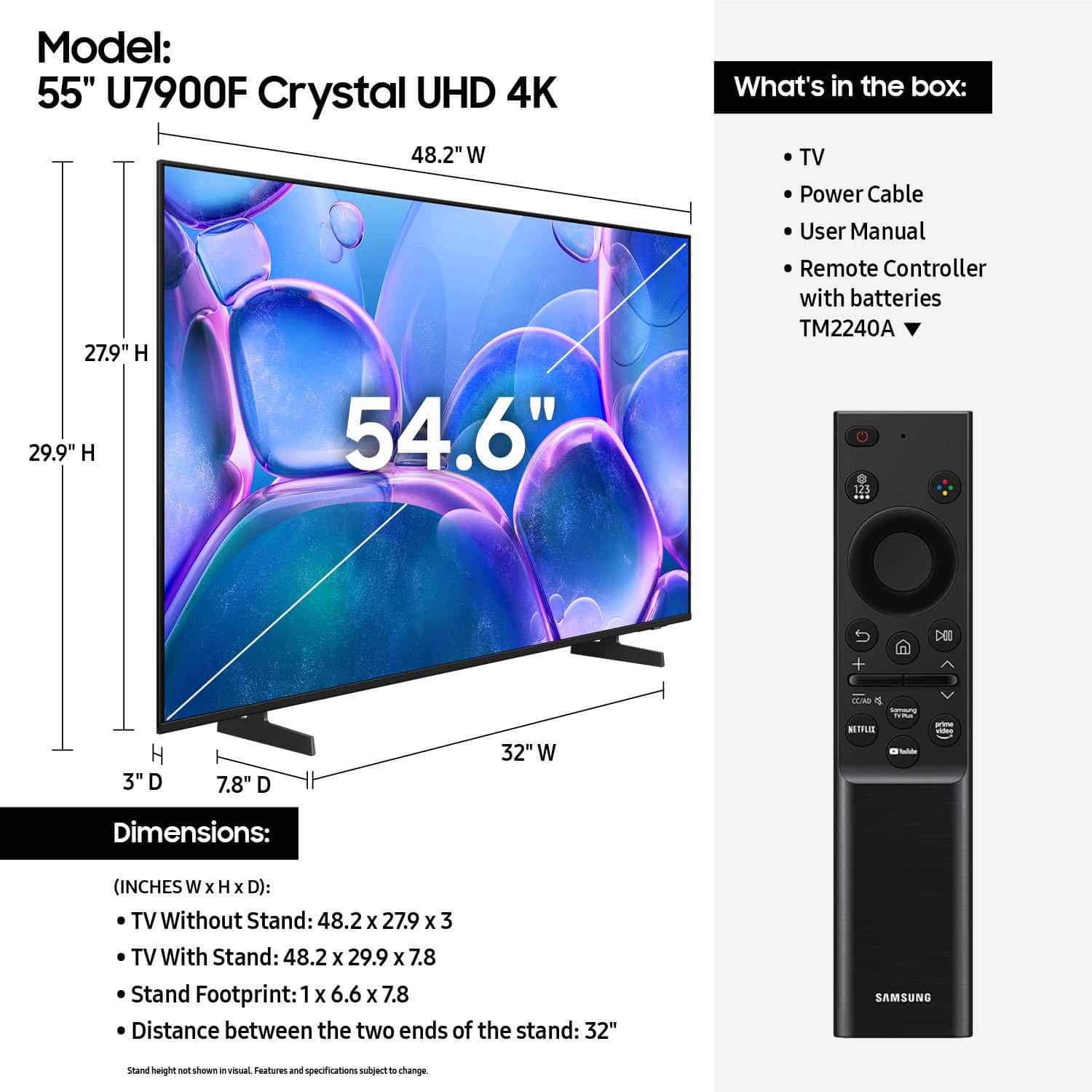






- Model:
- UN55U7900FFXZA
- SKU:
- 10367433
Rating by feature
- Picture Quality
Rating 4.8 out of 5 stars
- Sound Quality
Rating 4.7 out of 5 stars
- Brightness
Rating 4.8 out of 5 stars
Customers are saying
Customers praise the excellent picture quality, which is a standout feature. They also appreciate the easy setup, convenient size, light weight, modern design, and good brightness. However, some customers have concerns regarding limited connectivity options, a problematic remote control, and laggy app performance.
This summary was generated by AI based on customer reviews.
great tv and great customer service!
||Posted .This reviewer received promo considerations or sweepstakes entry for writing a review.had a issue with the first tv and we took it back they were awesome about exchanging it... and the tv is awesome!!!!
I would recommend this to a friendPerfect service
||Posted .This reviewer received promo considerations or sweepstakes entry for writing a review.Next day delivery on time very professional Online purchase easily completed. Competitive Price.
I would recommend this to a friendLove it
||Posted .This reviewer received promo considerations or sweepstakes entry for writing a review.We love Samsung TVs this is no exception. The clarity, interface, software. All make it a beautiful experience. We put it in one of our larger bedrooms. It’s just perfect!
I would recommend this to a friendGood garage TV
||Posted . Owned for 2 months when reviewed.This reviewer received promo considerations or sweepstakes entry for writing a review.Got this on sale at the start of football season and its nice to watch tv in the grage early in the morning when my family is sleeping.
I would recommend this to a friend- Pros mentioned:Picture quality
Great Picture Quality, but the Operating System Ru
||Posted .This reviewer received promo considerations or sweepstakes entry for writing a review.I honestly regret buying this Samsung 55-inch TV. While the picture quality is very good, the operating system is extremely disappointing and feels very limited. Many of the apps I personally like and regularly use cannot be installed at all. The app ecosystem is restricted, and I feel forced to use only what Samsung decides to offer. This completely ruined the smart TV experience for me. A smart TV should give users freedom and flexibility, not limitations. I made a mistake choosing this TV, and if you care about app availability and a smooth, open operating system, I strongly recommend thinking twice before buying this model.
No, I would not recommend this to a friendBrand response from Samsung
Posted .OshinB,
Thank you for sharing your thoughts on the U7900F - we'll pass this feedback along to our internal teams.
If there’s anything we can assist with, please don’t hesitate to call us at 1-800-SAMSUNG, available daily from 8AM - 12AM EST. You can also visit the Samsung website and click on ‘Support’ for:
• Live Chat
• Manuals, Software, & Warranty Info
~ Samsung Specialist
Great tv, works well!!!
||Posted . Owned for 3 weeks when reviewed.This reviewer received promo considerations or sweepstakes entry for writing a review.Cool little tv has all the bells and whistles. Does everything i need it to do and i can connect my phone to it too!!!
I would recommend this to a friend55” Samsung TV
||Posted .This reviewer received promo considerations or sweepstakes entry for writing a review.Love the Tv and had a great experience with Best Buy keeping me informed as to delivery.
I would recommend this to a friendBest Purchase of the Summer
||Posted .This reviewer received promo considerations or sweepstakes entry for writing a review.This was my best purchase of the summer. I got it on sale during the holiday weekend, and it was an upgraded version of my previous Samsung TV. The warranty also puts me at ease in the event anything were to ever happen.
I would recommend this to a friendSamsung TV
||Posted .This reviewer received promo considerations or sweepstakes entry for writing a review.Amazing service, amazing staff! I went in and asked some questions then bought the tv online and went to go pick up in store and they were extremely nice and friendly!
I would recommend this to a friendExcellent experience
||Posted . Owned for 3 months when reviewed.This reviewer received promo considerations or sweepstakes entry for writing a review.Great service and communication, the delivery driver was very courteous
I would recommend this to a friendHappy
||Posted . Owned for 3 weeks when reviewed.This reviewer received promo considerations or sweepstakes entry for writing a review.It was a gift to my son and so far he loves his TV so if he's happy then I'm happy money well spent.
I would recommend this to a friendSamsung TV
||Posted . Owned for 1 month when reviewed.This reviewer received promo considerations or sweepstakes entry for writing a review.The best TV I ever owned. I have owned other Samsung TVs, and this by far exceeds those. I recommend Samsung for picture quality, sound, and ease of operation.
I would recommend this to a friendSamsung TV review
||Posted . Owned for 1 month when reviewed.This reviewer received promo considerations or sweepstakes entry for writing a review.love samsung TV new technology and setting in up wasn’t as easy as before
I would recommend this to a friendAwesome
||Posted .This reviewer received promo considerations or sweepstakes entry for writing a review.Best Buy was great ordered out of state for family member and process was flawless. The TV also was an excellent price and value.
I would recommend this to a friendU7900
||Posted . Owned for 3 weeks when reviewed.This reviewer received promo considerations or sweepstakes entry for writing a review.Great TV at a super price. Easy set up with step by step guide
I would recommend this to a friendGreat price at best buy
||Posted . Owned for 2 weeks when reviewed.This reviewer received promo considerations or sweepstakes entry for writing a review.Overall great price I looked around in other stores but Best Buy had the best price and best financing option!
I would recommend this to a friendGreat purchase
||Posted .This reviewer received promo considerations or sweepstakes entry for writing a review.It really nice i love it good feature easy to use the screen Resolution 10/10
I would recommend this to a friendSamsung
||Posted .This reviewer received promo considerations or sweepstakes entry for writing a review.Great item and people from the store really helpfull great costumer services
I would recommend this to a friend- Cons mentioned:App performance, Remote control
Samsung tv
||Posted .This reviewer received promo considerations or sweepstakes entry for writing a review.I don't like it the remote is difficult to operate and the apps cut out
No, I would not recommend this to a friendBrand response from Samsung
Posted .MarkC,
We appreciate you sharing your experience with the included remote. To help you get the most from your TV and remote functions, you can download the full e-Manual and more by visiting Samsung’s website then navigating to: Support > Manual & Software > TVs & Home Theater. From there, you can search for and select your U7900F TV model to view or download the available guides.
The e-Manual & Remote Control Guide are also conveniently built into your TV: Settings > Support > Tips and User Guides
Learn TV Remote is another feature designed to help users become familiar with the layout and function of each button on the Samsung remote. When enabled, pressing any button (except the Power button, which will still turn off the TV) will prompt the TV to announce the button’s name and its purpose – without affecting TV operation.
This teaching mode is especially useful for users who are visually impaired or new to Samsung remotes. To enable this feature, go to: Settings > All Settings > General & Privacy > Accessibility > Learn TV Remote. To exit, simply press the Return key twice.
If you’d like more assistance with this feature, please reach Samsung Support at 1-800-SAMSUNG, available 8AM – 12AM EST, 7 days a week. LiveChat agents are also available through the ‘Support’ link on our website.
~ Samsung Specialist
TV Purchase
||Posted . Owned for 3 weeks when reviewed.This reviewer received promo considerations or sweepstakes entry for writing a review.The sales person that helped us, Stefano was amazing and he helped us find the right TV for us.
I would recommend this to a friend