Customer Ratings & Reviews





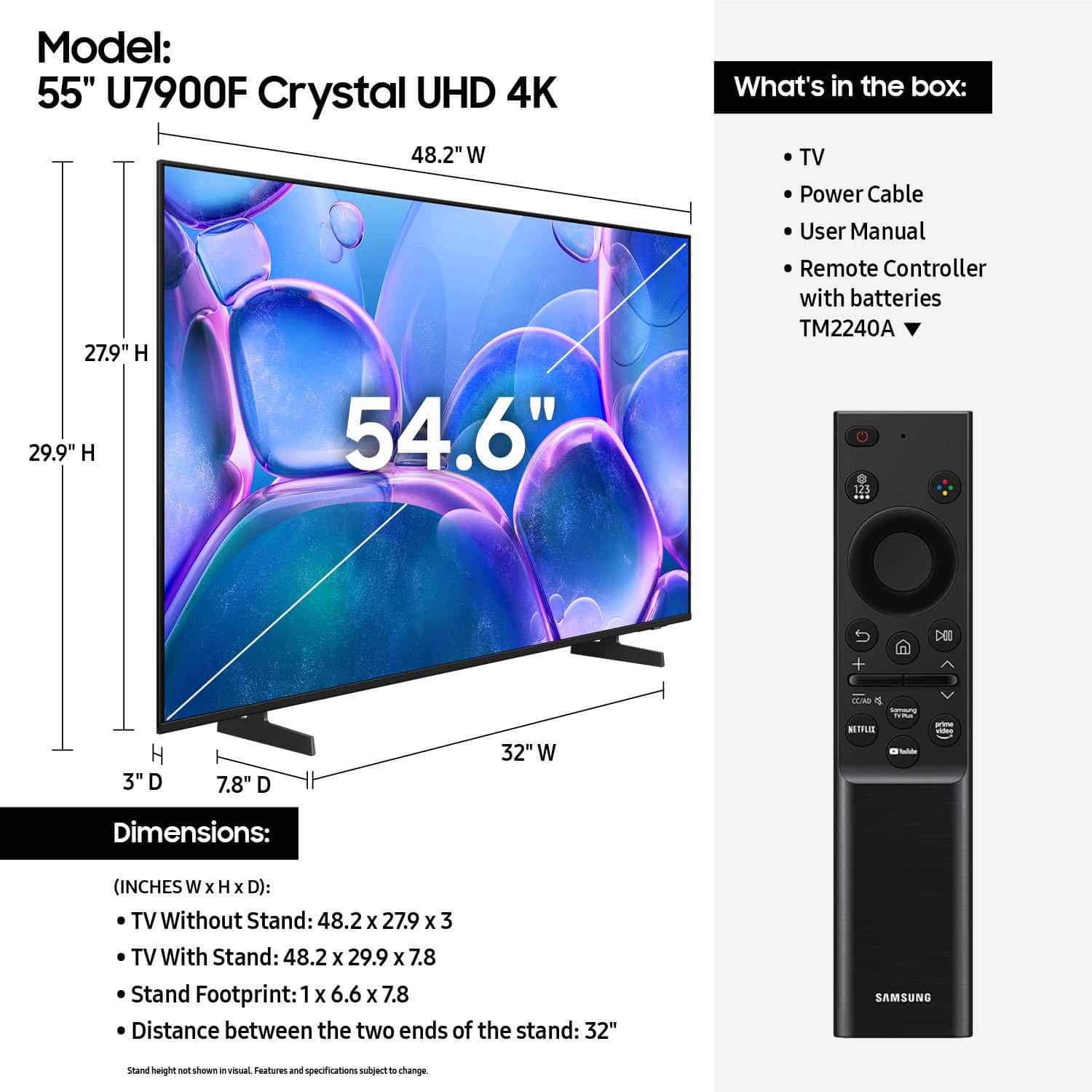






- Model:
- UN55U7900FFXZA
- |
- SKU:
- 10367433
Customer reviews
Rating 4.7 out of 5 stars with 1864 reviews
(1,864 customer reviews)Rating by feature
- Picture Quality4.8
Rating 4.8 out of 5 stars
- Sound Quality4.7
Rating 4.7 out of 5 stars
- Brightness4.8
Rating 4.8 out of 5 stars
Customers are saying
Customers praise the excellent picture quality, which is a standout feature. They also appreciate the easy setup, convenient size, light weight, modern design, and good brightness. However, some customers have concerns regarding limited connectivity options, a problematic remote control, and laggy app performance.
This summary was generated by AI based on customer reviews.
Rated 5 out of 5 stars
A very happy customer
||Posted .This reviewer received promo considerations or sweepstakes entry for writing a review.Best Buy is really the best. Customer service is great store is well maintained employees are very friendly
This review is from Samsung - 55" Class U7900 Series UHD 4K Smart Tizen TV (2025)
I would recommend this to a friendRated 4 out of 5 stars
TV great but not all devices connected and working
||Posted . Owned for 1 month when reviewed.This reviewer received promo considerations or sweepstakes entry for writing a review.The TV is great. Very little user guide given and information online is not good. Installer got it placed up on the wall and semi working but didn’t help my husband with the rest of the connection.
This review is from Samsung - 55" Class U7900 Series UHD 4K Smart Tizen TV (2025)
I would recommend this to a friendRated 5 out of 5 stars
0 percent interest
||Posted .This reviewer received promo considerations or sweepstakes entry for writing a review.Great TV at an incredible price. Plus Best Buy has a great 0% rate for 12 months.
This review is from Samsung - 55" Class U7900 Series UHD 4K Smart Tizen TV (2025)
I would recommend this to a friendRated 5 out of 5 stars
I love my tv
||Posted . Owned for 1 month when reviewed.This reviewer received promo considerations or sweepstakes entry for writing a review.Nice clear image I love it I would recommend to a friends and family
This review is from Samsung - 55" Class U7900 Series UHD 4K Smart Tizen TV (2025)
I would recommend this to a friendRated 5 out of 5 stars
Television purchase.
||Posted . Owned for 1 month when reviewed.This reviewer received promo considerations or sweepstakes entry for writing a review.Knew what i wanted. Quick and easy. Sales person checked me out, brought it out and loaded it up. Very happy.
This review is from Samsung - 55" Class U7900 Series UHD 4K Smart Tizen TV (2025)
I would recommend this to a friendRated 5 out of 5 stars
Ports on back
||Posted . Owned for 1 month when reviewed.This reviewer received promo considerations or sweepstakes entry for writing a review.The only thing is that instead of having the ports on side thay sre on the back.
This review is from Samsung - 55" Class U7900 Series UHD 4K Smart Tizen TV (2025)
I would recommend this to a friendRated 5 out of 5 stars
My tv
||Posted .This reviewer received promo considerations or sweepstakes entry for writing a review.I bought my tv and it’s so nice I’m really enjoying the picture quality on it !
This review is from Samsung - 55" Class U7900 Series UHD 4K Smart Tizen TV (2025)
I would recommend this to a friendRated 5 out of 5 stars
Sam View
||Posted . Owned for 1 month when reviewed.This reviewer received promo considerations or sweepstakes entry for writing a review.Samsung is the very best TV manufacturers, and it shows.
This review is from Samsung - 55" Class U7900 Series UHD 4K Smart Tizen TV (2025)
I would recommend this to a friendRated 5 out of 5 stars
Excellent Gift from my Husband
||Posted . Owned for 3 weeks when reviewed.This reviewer received promo considerations or sweepstakes entry for writing a review.I received this television from my husband for my birthday, for me, was perfect
This review is from Samsung - 55" Class U7900 Series UHD 4K Smart Tizen TV (2025)
I would recommend this to a friendRated 5 out of 5 stars
Samsung TV is great
||Posted .This reviewer received promo considerations or sweepstakes entry for writing a review.Great Tv. Very happy with this purchase. Would definitely buy again.
This review is from Samsung - 55" Class U7900 Series UHD 4K Smart Tizen TV (2025)
I would recommend this to a friendRated 5 out of 5 stars
Customer
||Posted .This reviewer received promo considerations or sweepstakes entry for writing a review.Great job with delivery. My order was on time and easy to buy on the app.
This review is from Samsung - 55" Class U7900 Series UHD 4K Smart Tizen TV (2025)
I would recommend this to a friendRated 5 out of 5 stars
Amazing customer service!
||Posted .This reviewer received promo considerations or sweepstakes entry for writing a review.Tv was in great shape delivery was amazing and size was good!
This review is from Samsung - 55" Class U7900 Series UHD 4K Smart Tizen TV (2025)
I would recommend this to a friendRated 5 out of 5 stars
Love Samsung TV
||Posted .This reviewer received promo considerations or sweepstakes entry for writing a review.This tv was my 1st smart tv, I used it 2 days before taking it back to get the 65 inch Samsung smart tv lol
This review is from Samsung - 55" Class U7900 Series UHD 4K Smart Tizen TV (2025)
I would recommend this to a friendRated 5 out of 5 stars
Great TV
||Posted .This reviewer received promo considerations or sweepstakes entry for writing a review.Samsung is a great product and makes great tvs. I’ve purchased 3 already
This review is from Samsung - 55" Class U7900 Series UHD 4K Smart Tizen TV (2025)
I would recommend this to a friendRated 5 out of 5 stars
samsung TV
||Posted . Owned for 3 weeks when reviewed.This reviewer received promo considerations or sweepstakes entry for writing a review.love my samsung tv, i’ve had several and never disappointed!
This review is from Samsung - 55" Class U7900 Series UHD 4K Smart Tizen TV (2025)
I would recommend this to a friendRated 5 out of 5 stars
Samsung 55 inch
||Posted .This reviewer received promo considerations or sweepstakes entry for writing a review.The tv is great. The delivery was promised between 9am and 1 and wasn’t delivered until 1:15 but my mail room was able to receive the delivery without a problem.
This review is from Samsung - 55" Class U7900 Series UHD 4K Smart Tizen TV (2025)
I would recommend this to a friendRated 5 out of 5 stars
Decent budget
||Posted . Owned for 3 weeks when reviewed.This reviewer received promo considerations or sweepstakes entry for writing a review.It’s an average 4k screen nothing special but you get more for what you for if I’m being honest
This review is from Samsung - 55" Class U7900 Series UHD 4K Smart Tizen TV (2025)
I would recommend this to a friendRated 5 out of 5 stars
A great affordable tv!
||Posted . Owned for 1 month when reviewed.This reviewer received promo considerations or sweepstakes entry for writing a review.Such s beautiful display! And very affordable! Best purchase ever!
This review is from Samsung - 55" Class U7900 Series UHD 4K Smart Tizen TV (2025)
I would recommend this to a friendRated 5 out of 5 stars
Best tv ever
||Posted . Owned for 1 month when reviewed.This reviewer received promo considerations or sweepstakes entry for writing a review.This is the best tv I have ever owned. I am amazed how many stations you get on Samsung tv. I cancelled my cable tv once I got this.
This review is from Samsung - 55" Class U7900 Series UHD 4K Smart Tizen TV (2025)
I would recommend this to a friendRated 5 out of 5 stars
I'm a huge fan of Samung TVs.
||Posted .This reviewer received promo considerations or sweepstakes entry for writing a review.Great price with crisp and sharp displays. I'm a huge fan of Samsung TVs.
This review is from Samsung - 55" Class U7900 Series UHD 4K Smart Tizen TV (2025)
I would recommend this to a friend