Customer Ratings & Reviews





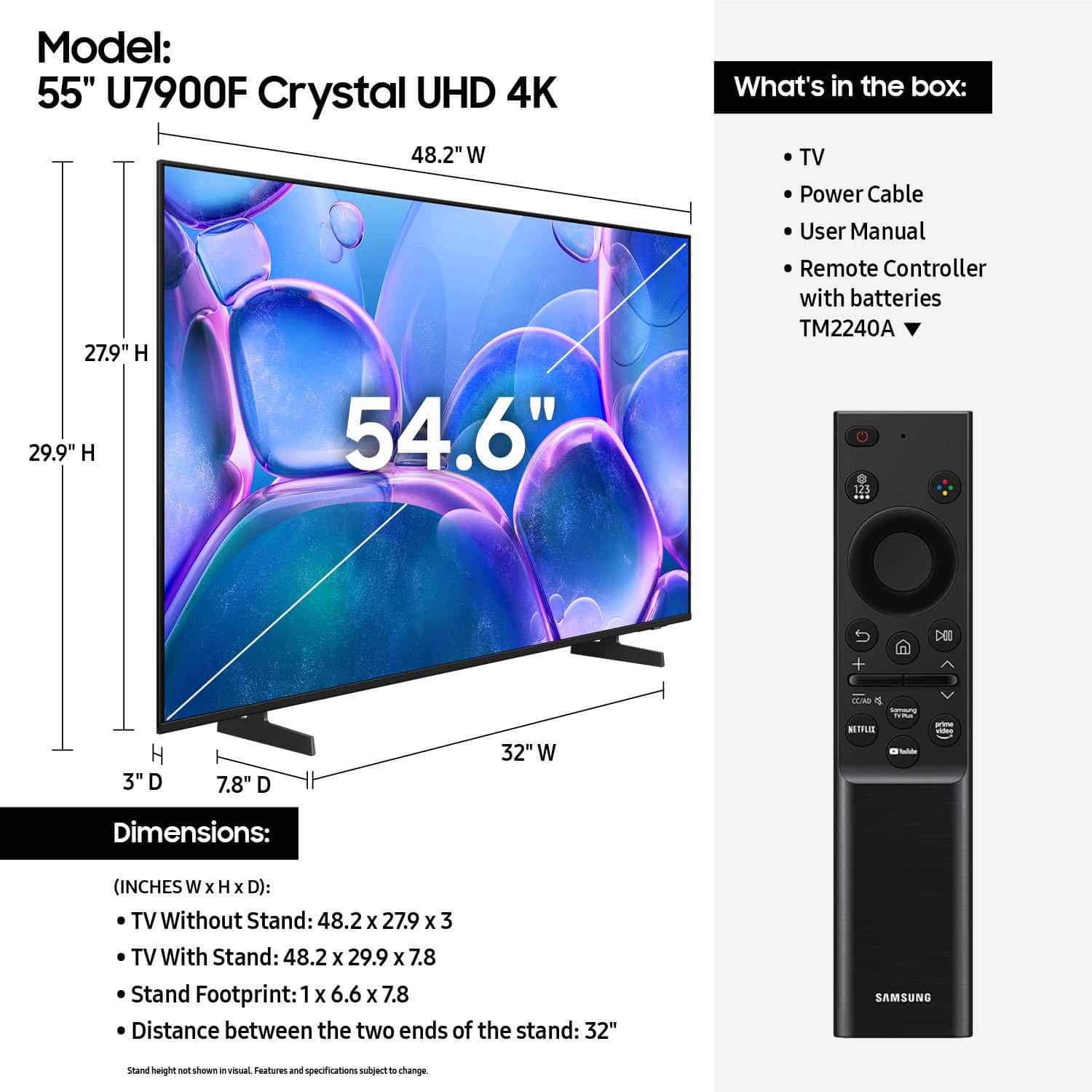






- Model:
- UN55U7900FFXZA
- SKU:
- 10367433
Rating by feature
- Picture Quality
Rating 4.8 out of 5 stars
- Sound Quality
Rating 4.7 out of 5 stars
- Brightness
Rating 4.8 out of 5 stars
Customers are saying
Customers praise the excellent picture quality, which is a standout feature. They also appreciate the easy setup, convenient size, light weight, modern design, and good brightness. However, some customers have concerns regarding limited connectivity options, a problematic remote control, and laggy app performance.
This summary was generated by AI based on customer reviews.
new TV
||Posted . Owned for less than 1 week when reviewed.This reviewer received promo considerations or sweepstakes entry for writing a review.The product I purchased met my expectations! the customer service was excellent!
I would recommend this to a friendSamsung TV
||Posted . Owned for 1 week when reviewed.This reviewer received promo considerations or sweepstakes entry for writing a review.Really good tv, super smooth process to instal and hang up with the tv mount we got.
I would recommend this to a friend- Pros mentioned:Picture quality
TV evaluarion
||Posted . Owned for 1 month when reviewed.This reviewer received promo considerations or sweepstakes entry for writing a review.Good perfomance, good qualiry and the price was accesible.
I would recommend this to a friendBrand response from Samsung
Posted .Hi OscarC,
We appreciate your feedback on the U7900 TV. If there’s anything we can assist with, please don’t hesitate to call us at 1-800-SAMSUNG, available daily from 8AM - 12AM EST. You can also visit the Samsung website and click on ‘Support’ for:
• Live Chat
• Manuals, Software, & Warranty Info
~ Samsung Advisor
Awesome TV!
||Posted .This reviewer received promo considerations or sweepstakes entry for writing a review.Great TV. Awesome technology and easy to use. Has everything i was looking for.
I would recommend this to a friendGreat buy
||Posted . Owned for 2 weeks when reviewed.This reviewer received promo considerations or sweepstakes entry for writing a review.Great Smart TV for the price. Our daughter loves it.
I would recommend this to a friendAll in one
||Posted . Owned for 3 months when reviewed.This reviewer received promo considerations or sweepstakes entry for writing a review.Looks amazing and has all the built in apps we need.
I would recommend this to a friendNew tv
||Posted . Owned for 3 weeks when reviewed.This reviewer received promo considerations or sweepstakes entry for writing a review.Great purchase. We love our new tv. Best Buy staff was very helpful with our decision.
I would recommend this to a friendBuy a Different Brand--PLEASE
||Posted .This reviewer received promo considerations or sweepstakes entry for writing a review.T V is not simple to set up. I use a fire stick and the t v hangs up at times and will not respond. When tv is turned on it goes to Samsung tv mode and doesn't respond to fire stick; The sound volume may fluctuate between channels or movies at times; I can continue but not enough time. My 7 year old Vizio is easier to use, better picture, etc...!!
No, I would not recommend this to a friendBrand response from Samsung
Posted .Hi user381725,
Thank you for your review. While your U7900 TV may currently default to Samsung TV Plus when powered on, you can customize what your TV does at startup by adjusting the Start Screen Options.
To do this, navigate to: Settings > All Settings > Advanced Features > Start Screen Option and choose from the following:
1. Start with Smart Hub Home – Automatically launches Smart Hub when the TV is turned on. You can enable or disable this option based on your preference.
2. Autorun Multi View Casting – If you cast YouTube content from your mobile device, the TV will automatically display the content using Multi View.
3. Autorun Multi View Mirroring – When you screen mirror your mobile device, Multi View will automatically open to show your device’s screen.
Sudden changes in volume can often be related to audio settings or content differences between sources or apps.
Please try the following adjustments to help stabilize your TV's audio:
1. Enable Auto Volume. Go to: Settings > All Settings > Sound > Expert Settings > Auto Volume. This feature helps maintain a consistent volume level when switching channels or apps.
2. Change Sound Mode. Try a different sound mode to see if one offers a more stable output: Settings > All Settings > Sound > Sound Mode (We recommend Standard or Amplify for more even performance.)
3. Check External Devices. If you're using a soundbar, receiver, or other audio device, check that its volume leveling or dynamic range settings aren’t interfering with the TV’s audio.
4. Update Firmware. Ensure your TV is running the latest software, as updates may include audio improvements: Settings > Support > Software Update > Update Now
If the issue persists after these steps, please don’t hesitate to reach Samsung Customer Support at 1-800-SAMSUNG, 8AM – 12AM EST, 7 days a week. LiveChat is also available via the ‘Support’ link on our website.
~ Samsung Advisor
Great TV
||Posted .This reviewer received promo considerations or sweepstakes entry for writing a review.This is the second time I bought the same TV and I love it Great buy too Thank you!!
I would recommend this to a friendSony tv
||Posted . Owned for 1 month when reviewed.This reviewer received promo considerations or sweepstakes entry for writing a review.Just bought the tv but its a grea tv sale's rep was great and very helpful ,
I would recommend this to a friendBest brand
||Posted .This reviewer received promo considerations or sweepstakes entry for writing a review.Great tv the resolution and the easy way to navigate into the tv are awesome
I would recommend this to a friendSamsung
||Posted .This reviewer received promo considerations or sweepstakes entry for writing a review.Excellent size perfect for a small apartment and quality is great ! Would recommend
I would recommend this to a friendMargaretAnn
||Posted . Owned for 1 month when reviewed.This reviewer received promo considerations or sweepstakes entry for writing a review.Love my new Crystal Samsung TV!!!! The process was easy
I would recommend this to a friendReview
||Posted .This reviewer received promo considerations or sweepstakes entry for writing a review.Very happy. Easy to get up and running and connected
I would recommend this to a friendReplacement good but not fully satisfying
||Posted . Owned for 1 week when reviewed.This reviewer received promo considerations or sweepstakes entry for writing a review.Device for the price works well but appears to have some issues with signal when using as a primary smart TV. The TV starts to jump as if having trouble translating video. This development was a bit disappointing and may result in return if the glitch continues.
No, I would not recommend this to a friendBrand response from Samsung
Posted .Hi RobertA,
Thank you for your feedback. Please ensure your U7900 TV is running the latest firmware update 1132.0. To do so, go to Settings> Support> Software Update. If that version is not available you can download the update on a USB drive and manually update your TV:
1. On Samsung's website (upper right corner), go to: Support > Manual & Software > Find your TV model, and click on the Firmware – Upgrade File.
2. When the file has finished downloading, locate it and then unzip it. There is normally one folder inside but there may be multiple files.
3. Copy or move all of the files that were included in the zip file to a USB flash drive, but do not place them inside any other folders. If you place the software folders inside a folder on the USB flash drive, the TV or monitor will not find them.
4. Connect the USB drive containing the software upgrade into a USB port on your device.
5. Using your device's remote, navigate to and select Settings, then select All Settings, and then select Support. Select Software Update, select Update Now, and then select Yes if prompted.
Your device will search the USB drive for update files. Follow the on-screen instructions to install the updated software. Updates usually take a few minutes; please do not turn off the TV until the update is complete. When the update is finished, it will restart automatically.
If you need additional support, Samsung is here to help. Please call us at 1-800-SAMSUNG, available daily from 8AM - 12AM EST. You can also chat with a LiveChat agent by clicking the ‘Support’ link on our website for:
• Live Chat
• Manuals, Software, & Warranty Info
• Creating a Service ticket
~Samsung Advisor
Samsung 55 inch TV
||Posted .This reviewer received promo considerations or sweepstakes entry for writing a review.Very good price on this TV. Bought two of them. Samsung is a great brand.
I would recommend this to a friendGreat Value
||Posted . Owned for 3 weeks when reviewed.This reviewer received promo considerations or sweepstakes entry for writing a review.Great TV for the price. Not many input jacks but for $250 it was a great deal
I would recommend this to a friendGood buy.
||Posted . Owned for 1 month when reviewed.This reviewer received promo considerations or sweepstakes entry for writing a review.Good television for the price. Easy setup and use.
I would recommend this to a friendSamsung 55 U7900
||Posted .This reviewer received promo considerations or sweepstakes entry for writing a review.very nice TV. For the price go get one. You can't go wrong.
I would recommend this to a friendEnjoy new smart TV
||Posted . Owned for 2 weeks when reviewed.This reviewer received promo considerations or sweepstakes entry for writing a review.Like it but can’t seem to work remote like to mute tv.
I would recommend this to a friend