Last Chance 48-Hour Flash SaleEnds Dec. 24. Limited quantities.Shop now

Skip to content
Gift Ideas
Main Content

Customer Ratings & Reviews


Last Minute Deal
Your price for this item is $249.99
The comparable value price is $379.99

Customer reviews

Rating 4.7 out of 5 stars with 1141 reviews

Rating Filter

Rating by feature

  • Picture Quality

    Rating 4.8 out of 5 stars

  • Sound Quality

    Rating 4.6 out of 5 stars

  • Brightness

    Rating 4.8 out of 5 stars

Pros mentioned filter

Cons mentioned filter

94%would recommend to a friend

Customers are saying

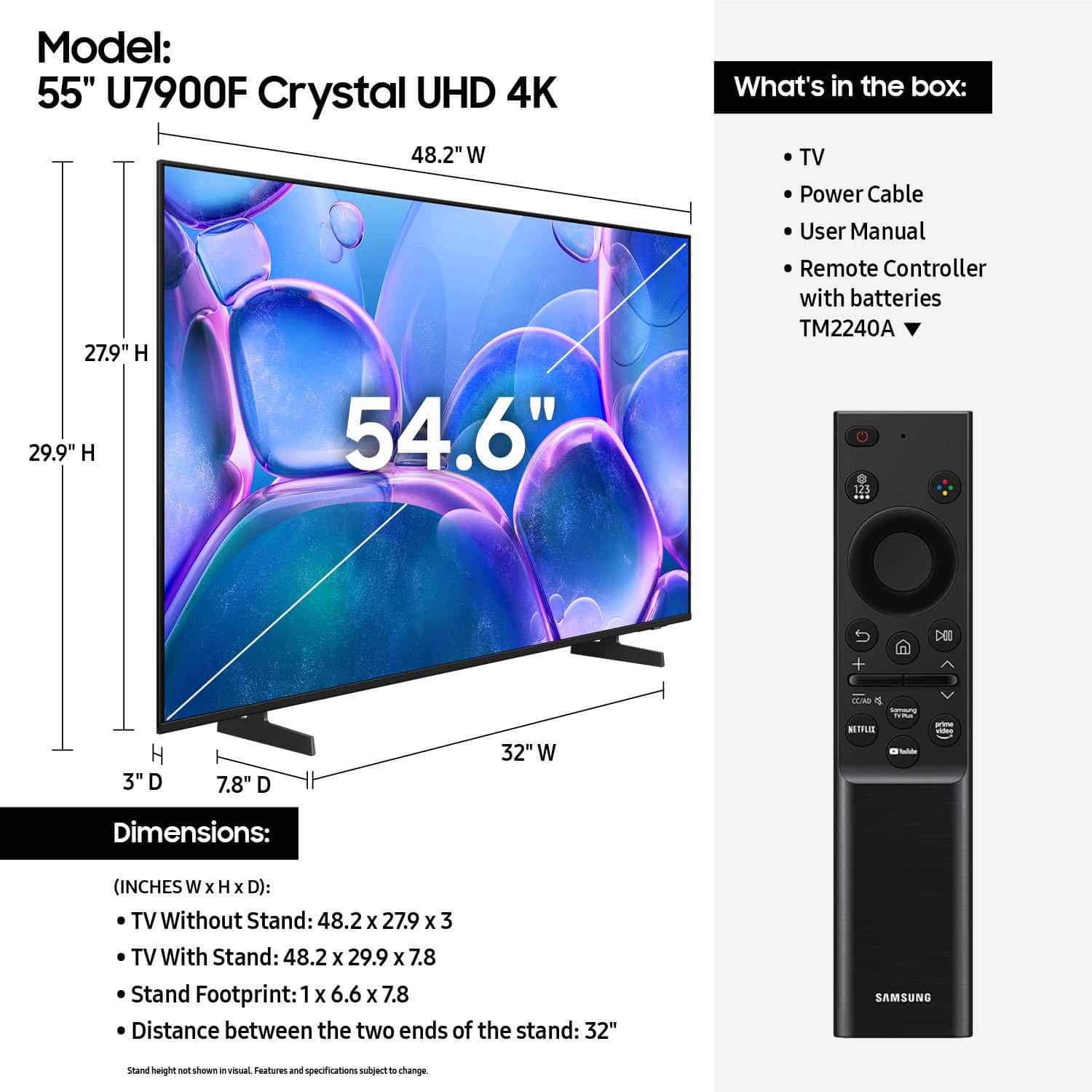
Customers consistently note the great picture quality and ease of setup of the 55" Class U7900 Series UHD 4K Smart Tizen TV (2025). Many appreciate the size and light weight, as well as the design and connectivity. Criticisms include the remote control, app performance, and port quantity.

This summary was generated by AI based on customer reviews.

The vast majority of our reviews come from verified purchases. Reviews from customers may include My Best Buy members, employees, and Tech Insider Network members (as tagged). Select reviewers may receive discounted products, promotional considerations or entries into drawings for honest, helpful reviews.
Page 56 Showing 1,101-1,120 of 1,141 reviews
  • Rated 2 out of 5 stars

    Samsung

    |
    |
    Posted . Owned for 2 weeks when reviewed.
    This reviewer received promo considerations or sweepstakes entry for writing a review.

    Do not like the tv remote sucks getting spectrum tv

    No, I would not recommend this to a friend
    • Brand response from Samsung
      Posted .

      Hi Bruce,

      Thank you for your purchase and for sharing your experience with us. To better assist you with setting up your TV, please contact us at 1-800-SAMSUNG from 8AM - 12AM EST, seven days a week, or connect with a LiveChat agent anytime by selecting ‘Support’ on our website.

      ~ Samsung Advisor Samsung

  • Rated 1 out of 5 stars

    Mine was defective

    |
    |
    Posted .
    This reviewer received promo considerations or sweepstakes entry for writing a review.

    Screen turned black one month after purchase it’s a 2025 model and Samsung claims they no longer make the parts that the tv needs. They claimed I won’t receive a refund or credit for three weeks after I turn the tv back to them

    No, I would not recommend this to a friend
    • Brand response from Samsung
      Posted .

      Hi user576068,

      We appreciate you sharing the issues you’re experiencing with your U7900 TV, and we appreciate your patience while waiting for a refund. Please know that Samsung is committed to providing the best possible product experience, quality, and value, and your feedback will be shared with our product and customer care teams.

      Should you wish to contact us directly with your ticket number, please call us at 1-800-SAMSUNG, 8AM - 12AM EST, 7 days a week. Our LiveChat agents are also available by clicking on the ‘Support’ link on our website.

      ~ Samsung Advisor Samsung

  • Rated 1 out of 5 stars

    Terrible TV

    |
    |
    Posted .
    This reviewer received promo considerations or sweepstakes entry for writing a review.

    Never buy anything from Best Buy and never buy from Samsung. I bought a tv and it has stopped working within 2 months of me purchasing. Neither party has been willing to work with me to help me get my issue resolved. Best part was when I went to get my issue resolved I watch an employee drop a piece of equipment directly on the ground. DO NOT SHOP HERE.

    No, I would not recommend this to a friend
    • Brand response from Samsung
      Posted .

      Hi Knox,

      I'm very sorry to hear about your experience. Please give us a call so we can better understand how to assist you. Call 1-800-SAMSUNG from 8AM - 12AM EST, seven days a week, or connect with a LiveChat agent anytime by selecting ‘Support’ on our website.

      ~ Samsung Advisor Samsung

  • Rated 1 out of 5 stars

    My community has many like storiess about Brandon.

    |
    |
    Posted . Owned for 3 weeks when reviewed.
    This reviewer received promo considerations or sweepstakes entry for writing a review.

    TV has not functiond properly since day of purchase. Your geek Martin from Manada did nothing to resolve problem. The sale person promised better service than she deliverd.

    No, I would not recommend this to a friend
    • Brand response from Samsung
      Posted .

      Hi Mariodeangelo,

      We're sorry to hear about your experience. If there's anything we can do to assist you, please do not hesitate to reach out to Samsung Customer Service. Call 1-800-SAMSUNG from 8AM - 12AM EST, seven days a week, or connect with a LiveChat agent anytime by selecting ‘Support’ on our website.

      ~ Samsung Advisor Samsung

  • Rated 2 out of 5 stars

    Not so good

    |
    |
    Posted .
    This reviewer received promo considerations or sweepstakes entry for writing a review.

    The image is so dark. The colors look opaque. Difficult to distinguish the colors.

    No, I would not recommend this to a friend
    • Brand response from Samsung
      Posted .

      Hi GloriaT,

      We’re sorry to hear you’re not fully satisfied with the picture quality on your Samsung U7900 TV. If the image appears too dark, we suggest disabling certain energy-saving features, which can automatically adjust brightness and affect how the screen looks.

      Go to: Settings > All Settings > General & Privacy > Power and Energy Saving, then turn off Brightness Optimization, Energy Saving Solution, Motion Lighting, and/or Contrast Enhancer.

      You can also adjust the Picture Mode to better suit your environment: Settings > All Settings > Picture > Picture Mode
      • Standard – Default mode for general viewing
      • Dynamic – Brighter and clearer, ideal for well-lit rooms
      • Movie – Best for dark room viewing
      • Eco – Energy-saving mode
      • Filmmaker Mode – Preserves content as intended by creators

      To fine-tune brightness, go to: Home > left directional key > Settings > All Settings > Picture > Expert Settings, then adjust the Brightness level (0–50) to your preference.

      Lastly, please make sure your TV is running the latest firmware: Home > Home > left directional key > Settings > Support > Software Update > Update Now

      We hope these tips help improve your viewing experience. If you need further support, feel free to contact us at 1-800-SAMSUNG, 8AM – 12AM EST, 7 days a week. LiveChat is also available via the ‘Support’ link on our website.

      ~ Samsung Advisor Samsung

  • Cons mentioned:
    App performance

    Rated 1 out of 5 stars

    Smart Hub not working.

    |
    |
    Posted .
    This reviewer received promo considerations or sweepstakes entry for writing a review.

    I am having problems with the app. Smart hup isn't loading. I need help

    No, I would not recommend this to a friend
    • Brand response from Samsung
      Posted .

      Hi BrianJ,

      We appreciate your feedback regarding the performance of Smart Hub on your U7900 TV. If you're experiencing freezing, lag, or issues with apps not launching properly, the following steps may help:

      1. Reset Smart Hub – This restores Smart Hub to factory settings and can resolve many performance issues: Home > left directional key > Settings > Support > Device Care > Self Diagnosis > Reset Smart Hub
      (Note: This will sign you out of all apps and reset Smart Hub preferences.)
      2. Check for Firmware Updates – An outdated software version can impact Smart Hub functionality: Home > left directional key > Settings > Support > Software Update > Update Now
      3. Run Device Care – This tool helps optimize performance by clearing cached memory and closing background processes: Home > left directional key > Settings > Support > Device Care > Start Device Care

      If Smart Hub continues to have issues after performing these steps, please contact Samsung Support at 1-800-SAMSUNG, available 8AM – 12AM EST, 7 days a week. LiveChat support is also available through the ‘Support’ link on our website.

      ~ Samsung Advisor Samsung

  • Rated 1 out of 5 stars

    Low Quality Samsung Product

    |
    |
    Posted . Owned for 1 week when reviewed.
    This reviewer received promo considerations or sweepstakes entry for writing a review.

    Lowest Quality Samsung Tv that I have ever purchased. Only a couple of ports. No digital output port for sound bars. Bluetooth doesn't connect. Overall horrible product.

    No, I would not recommend this to a friend
    • Brand response from Samsung
      Posted .

      Display52,

      Thank you for sharing your thoughts on the available inputs for the U7900F. If an Optical port is a crucial part of your setup needs, you’ll find that connection starting with our Q8F Series and above.

      For future purchases, we recommend double-checking the product specs on Best Buy’s site to ensure the model you choose has the ports you need. You’ll find the full list under the “Specifications” tab (just beneath the Highlights section): https://www.bestbuy.com/site/samsung-43-class-q7f-series-qled-4k-uhd-samsungvision-ai-smart-tizen-tv-2025/6619443.p?skuId=6619443

      So we can better understand the Bluetooth issues you’re experiencing and provide you with troubleshooting assistance, please reach out to Samsung Customer Support at 1-800-SAMSUNG, available daily from 8AM - 12AM EST. You can also chat with a LiveChat agent by clicking the ‘Support’ link on our website for:
      • Live Chat
      • Manuals, Software, & Warranty Info
      • Creating a Service ticket

      ~ Samsung Specialist Samsung

  • Rated 1 out of 5 stars

    My TV is a lemon

    |
    |
    Posted . Owned for 3 weeks when reviewed.
    This reviewer received promo considerations or sweepstakes entry for writing a review.

    Tv worked great for a week or so then started having issues freezing and not responding to remote. Now, i turn it on to just a black screen. Best Buy told me to call Samsung, so far Samsung support has not resolved my issues.

    No, I would not recommend this to a friend
    • Brand response from Samsung
      Posted .

      Hi MichaelW,

      We appreciate your feedback regarding your U7900 TV’s performance. If you're experiencing slow apps, freezing, or lag in general response time, try the following steps:

      1. Check for firmware updates – Keeping your TV up to date can resolve many performance issues: Home > left directional key > Settings > Support > Software Update > Update Now
      2. Run Device Care – This tool checks system memory, frees up cached data, and closes background apps that could be slowing things down: Home > left directional key > Settings > Support > Device Care > Start Device Care
      3. Cold boot your TV – With the TV powered on, press and hold the Power button on your remote for 5+ seconds until the TV restarts. This helps refresh the system.

      If you're still noticing performance issues after these steps, please contact Samsung Support at 1-800-SAMSUNG, 8AM – 12AM EST, 7 days a week. You can also connect with a LiveChat agent via the ‘Support’ link on our website.

      ~ Samsung Advisor Samsung

  • Rated 1 out of 5 stars

    samsung tv

    |
    |
    Posted .
    This reviewer received promo considerations or sweepstakes entry for writing a review.

    not a clear picture,was told it had an optical connection for my sound bar,it clearly does not,was mislead by the samsung sales person at store.

    No, I would not recommend this to a friend
    • Brand response from Samsung
      Posted .

      Hi user186612,

      We are very sorry for any confusion. You are correct, the U7900 TV does not offer a digital optical input, but does offer 2 HDMI inputs and is Bluetooth-enabled. If an Optical port is a crucial part of your setup needs, you’ll find that connection starting with our Q8F Series and above.

      Should you ever need assistance with your TV, Samsung is here for you. Reach out by calling 1-800-SAMSUNG between 8AM - 12AM EST, any day of the week. You can also chat with us online by visiting the ‘Support’ section of our website.

      ~Samsung Advisor Samsung

  • Rated 1 out of 5 stars

    Don't buy this TV

    |
    |
    Posted .
    This reviewer received promo considerations or sweepstakes entry for writing a review.

    THe TVs picture went 2 weeks after purchase I was working in hospital so I did not get to location till 10/31, they told me my warranty expired after 15 days to try Samsung, so I had to eat the cost.

    No, I would not recommend this to a friend
    • Brand response from Samsung
      Posted .

      Hi MikeD,

      Please know that the U7900 TV comes with a 1-year manufacturer's warranty. To schedule a warranty appointment, please call us at 1-800-SAMSUNG, available daily from 8AM - 12AM EST. You can also visit the Samsung website and click on ‘Support’ for:
      • Live Chat
      • Manuals, Software, & Warranty Info

      ~ Samsung Advisor Samsung

  • Rated 1 out of 5 stars

    Broken tv brand

    |
    |
    Posted .
    This reviewer received promo considerations or sweepstakes entry for writing a review.

    I opened a brand new box to a cracked screen during the week. Definitely returning it

    No, I would not recommend this to a friend
    • Brand response from Samsung
      Posted .

      Hi user770312,

      We're very sorry to hear that you received a damaged TV. Please reach out to Walmart to assist you with an exchange. If there’s anything we can assist with, please don’t hesitate to call us at 1-800-SAMSUNG, available daily from 8AM - 12AM EST. You can also visit the Samsung website and click on ‘Support’ for:
      • Live Chat
      • Manuals, Software, & Warranty Info

      ~ Samsung Advisor Samsung

  • Rated 1 out of 5 stars

    Bad experience

    |
    |
    Posted .
    This reviewer received promo considerations or sweepstakes entry for writing a review.

    40 days in, tv won’t turn on. The red light comes on underneath but the tv screen won’t turn on. I have tried all the troubleshooting advice but still not working.

    No, I would not recommend this to a friend
    • Brand response from Samsung
      Posted .

      Hi IsraelR,

      Please give us a call so we can better support you. Call 1-800-SAMSUNG from 8AM - 12AM EST, seven days a week, or connect with a LiveChat agent anytime by selecting ‘Support’ on our website.

      ~ Samsung Advisor Samsung

  • Rated 1 out of 5 stars

    New TV glitching

    |
    |
    Posted .
    This reviewer received promo considerations or sweepstakes entry for writing a review.

    TV is constantly glitching and I have to factory reset it every other day just for it to connect to my wifi.

    No, I would not recommend this to a friend
    • Brand response from Samsung
      Posted .

      Hi user520355,

      Thank you for sharing your experience with buffering on your TV. The issue you’re encountering may be related to network strength or stability. We recommend the following steps:

      1. Connect to a 5GHz Wi-Fi network, if available
      2. Use a wired LAN connection for increased stability
      3. Reposition your router to reduce obstacles between the TV and the router

      Please also check that your TV is running the latest firmware by going to: Settings > Support > Software Update. From there, you can also enable Auto Update for added convenience.

      For improved app performance, we recommend running Device Care, which can help by clearing memory and closing background apps. To access it: Settings > Support > Device Care

      We hope these steps improve your streaming experience. If the issue continues, please reach out to us at 1-800-SAMSUNG, available daily from 8AM - 12AM EST. You can also chat with a LiveChat agent by clicking the ‘Support’ link on our website.

      ~ Samsung Advisor Samsung

  • Rated 2 out of 5 stars

    Not the best

    |
    |
    Posted . Owned for 1 month when reviewed.
    This reviewer received promo considerations or sweepstakes entry for writing a review.

    Rating 2.2 not a lot to say..not a very loud product

    No, I would not recommend this to a friend
    • Brand response from Samsung
      Posted .

      Hi JBsoyea,

      Thank you for purchasing Samsung’s U7900F TV and for sharing your feedback regarding low volume. To start, we recommend making sure your TV is running the latest firmware, as updates can include improvements to sound performance: Home > left directional key > Settings > Support > Software Update.

      If volume levels still seem too low, you can improve sound performance by adjusting a few key settings:

      Sound Mode: Navigate to: Settings > All Settings > Sound > Sound Mode

      Auto Volume: This feature helps maintain consistent volume levels across content and input sources. Turn it on under: Settings > All Settings > Sound > Expert Settings > Auto Volume = On

      You can also explore Expert Settings to fine-tune sound output with adjustments for Balance, Equalizer, and more.

      If you’re considering enhancing your setup, Samsung’s Q- and S-Series Soundbars (like the HW-xxx) feature Q-Symphony, which syncs your TV and soundbar speakers for a fuller, more immersive sound experience.

      For personalized support with these settings or selecting a soundbar to complement your setup, contact Samsung Support at 1-800-SAMSUNG (8AM – 12AM EST, 7 days a week) or use LiveChat via the ‘Support’ link on our website.

      ~ Samsung Advisor Samsung

  • Rated 1 out of 5 stars

    on knowledgeable sales staff

    |
    |
    Posted . Owned for 3 weeks when reviewed.
    This reviewer received promo considerations or sweepstakes entry for writing a review.

    TV is only good to watch. TV could not connect any thing else to it surround sound and other things I have not enough parts I would never buy one again from Samsung and inexperience sales help that said I’d be all set and could connect everything to it this was in Mansfield

    No, I would not recommend this to a friend
    • Brand response from Samsung
      Posted .

      Hi WarrenB,

      To best assist you, please contact us at 1-800-SAMSUNG, available daily from 8AM - 12AM EST. You can also visit the Samsung website and click on ‘Support’ for:
      • Live Chat
      • Manuals, Software, & Warranty Info

      ~ Samsung Advisor Samsung

  • Rated 1 out of 5 stars

    Thought I was getting a good tv but it’s glitchy

    |
    |
    Posted .
    This reviewer received promo considerations or sweepstakes entry for writing a review.

    The image glitches back and forth sometimes it’s so annoying.

    No, I would not recommend this to a friend
    • Brand response from Samsung
      Posted .

      Hi Minniex2,

      Thank you for your feedback. Please ensure your U7900 TV is running the latest firmware update 1132.0. To do so, go to Settings> Support> Software Update. If that version is not available you can download the update on a USB drive and manually update your TV:

      1. On Samsung's website (upper right corner), go to: Support > Manual & Software > Find your TV model, and click on the Firmware – Upgrade File.
      2. When the file has finished downloading, locate it and then unzip it. There is normally one folder inside but there may be multiple files.
      3. Copy or move all of the files that were included in the zip file to a USB flash drive, but do not place them inside any other folders. If you place the software folders inside a folder on the USB flash drive, the TV or monitor will not find them.
      4. Connect the USB drive containing the software upgrade into a USB port on your device.
      5. Using your device's remote, navigate to and select Settings, then select All Settings, and then select Support. Select Software Update, select Update Now, and then select Yes if prompted.

      Your device will search the USB drive for update files. Follow the on-screen instructions to install the updated software. Updates usually take a few minutes; please do not turn off the TV until the update is complete. When the update is finished, it will restart automatically.

      Should you need any help, please call us at 1-800-SAMSUNG between 8AM and 12AM EST, any day of the week. You’re also welcome to visit the Samsung website and select ‘Support’ for:
      • Live Chat
      • Manuals, Software, and Warranty Info
      • Creating a Service ticket

      ~Samsung Advisor Samsung

  • Rated 1 out of 5 stars

    Installation was horrendous

    |
    |
    Posted .
    This reviewer received promo considerations or sweepstakes entry for writing a review.

    TV is great. Installation was horrible. I had to redo the installation and should be refunded.

    I would recommend this to a friend
    • Brand response from Samsung
      Posted .

      Hi NelsonC,

      We're very sorry to hear about your experience with Best Buy installation. We recommend reaching out to them directly to assist you.

      If there’s anything we can assist with, please don’t hesitate to call us at 1-800-SAMSUNG, available daily from 8AM - 12AM EST. You can also visit the Samsung website and click on ‘Support’ for:
      • Live Chat
      • Manuals, Software, & Warranty Info

      ~ Samsung Advisor Samsung

  • Rated 1 out of 5 stars

    Worst don’t buy

    |
    |
    Posted .
    This reviewer received promo considerations or sweepstakes entry for writing a review.

    The worst tv I have ever had. And no one will help you

    No, I would not recommend this to a friend
    • Brand response from Samsung
      Posted .

      Hi NaomiP,

      We're very sorry that you are not enjoying your new U7900 TV. Please know that Samsung Customer Service is available and happy to help you with setting up your TV, as well as setting adjustments.

      Please call us at 1-800-SAMSUNG, available daily from 8AM - 12AM EST. You can also chat with a LiveChat agent by clicking the ‘Support’ link on our website for:
      • Live Chat
      • Manuals, Software, & Warranty Info
      • Creating a Service ticket

      ~Samsung Advisor Samsung

  • Rated 1 out of 5 stars

    Doesn’t work

    |
    |
    Posted . Owned for 1 month when reviewed.
    This reviewer received promo considerations or sweepstakes entry for writing a review.

    Doesn’t work , hadn’t worked since I’ve had it. Haven’t had time to return it.

    No, I would not recommend this to a friend
    • Brand response from Samsung
      Posted .

      Hi Teamsamsung,

      Thank you for reaching out to us regarding your U7900 TV. Please give us a chance to assist you by calling Samsung Customer Support at 1-800-SAMSUNG, available daily from 8AM - 12AM EST. You can also visit the Samsung website and click on ‘Support’ for:
      • Live Chat
      • Manuals, Software, & Warranty Info

      ~ Samsung Advisor Samsung

  • Rated 1 out of 5 stars

    Stopped working almost immediately

    |
    |
    Posted .
    This reviewer received promo considerations or sweepstakes entry for writing a review.

    It stopped working after three days. Probably just going to throw it into the trash.

    No, I would not recommend this to a friend
    • Brand response from Samsung
      Posted .

      Hi user773981,

      We're very sorry that your TV stopped working after three days. Please know we back this TV with a 1-year manufacturer's warranty. To schedule an appointment, you can reach us at 1-800-SAMSUNG, available daily from 8AM - 12AM EST. You can also visit the Samsung website and click on ‘Support’ for:
      • Live Chat
      • Manuals, Software, & Warranty Info

      ~ Samsung Advisor Samsung