Customer Ratings & Reviews





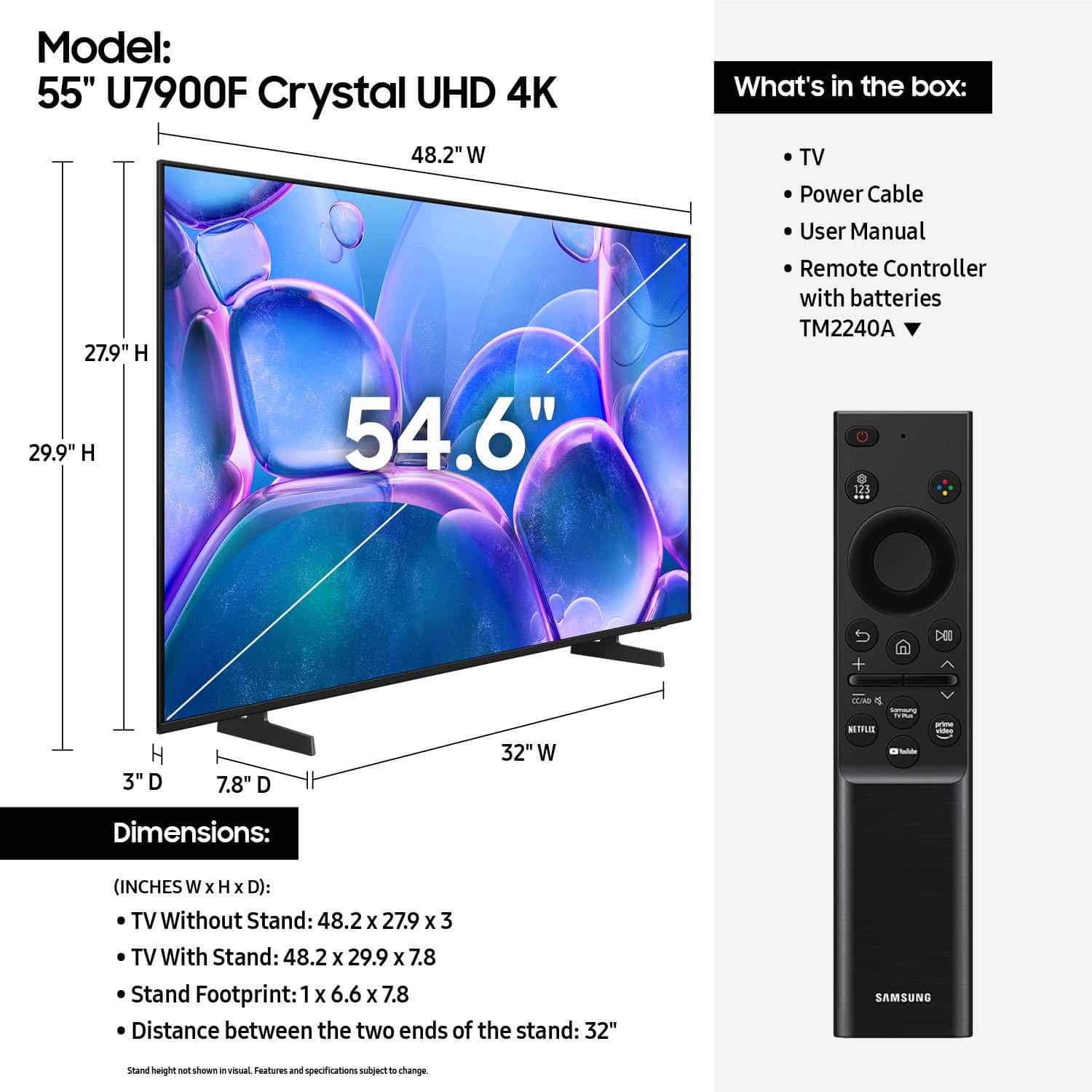






- Model:
- UN55U7900FFXZA
- SKU:
- 6632331
Rating by feature
- Picture Quality
Rating 4.8 out of 5 stars
- Sound Quality
Rating 4.7 out of 5 stars
- Brightness
Rating 4.8 out of 5 stars
Customers are saying
Customers highly value the 55" Class U7900 Series UHD 4K Smart Tizen TV (2025) for its sharp and vibrant picture quality, ease of setup, and perfect size. Many appreciate its lightweight design and modern look. However, some customers have expressed concerns about connectivity issues, the remote control, and occasional lag in app performance.
This summary was generated by AI based on customer reviews.
Perfect gift
||Posted . Owned for 1 month when reviewed.This reviewer received promo considerations or sweepstakes entry for writing a review.What did i like about this item?. Id say the overall quality and simplicity to setup
I would recommend this to a friendGreat price
||Posted .This reviewer received promo considerations or sweepstakes entry for writing a review.Good TV. Sound and picture quality is great. Great price for the size of the TV.
I would recommend this to a friend- Cons mentioned:App performance
Poor OS
||Posted .This reviewer received promo considerations or sweepstakes entry for writing a review.The operating system for this TV is really poor. From the first time I started it out of the box there were issues where apps would not open. Periodically I need to factory reset to get it to work properly. I cannot in good faith recommend this TV to anyone. I usually like Samsung products but will be avoiding their TVs
No, I would not recommend this to a friendBrand response from Samsung
Posted .Hi ElishaM,
We're sorry to hear about the issues you are experiencing with the operating system on your TV. Please ensure your TV is running the latest Firmware, version 1132.0. Go to Settings> Support> Software Update. If this firmware version is not yet available on your TV, you can download the update on a USB drive and manually update your TV:
1. On Samsung's website (upper right corner), go to: Support > Manual & Software > Find your TV model, and click on the Firmware – Upgrade File.
2. When the file has finished downloading, locate it and then unzip it. There is normally one folder inside but there may be multiple files.
3. Copy or move all of the files that were included in the zip file to a USB flash drive, but do not place them inside any other folders. If you place the software folders inside a folder on the USB flash drive, the TV or monitor will not find them.
4. Connect the USB drive containing the software upgrade into a USB port on your device.
5. Using your device's remote, navigate to and select Settings, then select All Settings, and then select Support. Select Software Update, select Update Now, and then select Yes if prompted.
Your device will search the USB drive for update files. Follow the on-screen instructions to install the updated software. Updates usually take a few minutes; please do not turn off the TV until the update is complete. When the update is finished, it will restart automatically.
If you need additional support, Samsung is here to help. Please call us at 1-800-SAMSUNG, available daily from 8AM - 12AM EST. You can also chat with a LiveChat agent by clicking the ‘Support’ link on our website.
~ Samsung Advisor
- Cons mentioned:App performance, Remote control
Samsung tv
||Posted .This reviewer received promo considerations or sweepstakes entry for writing a review.I don't like it the remote is difficult to operate and the apps cut out
No, I would not recommend this to a friendBrand response from Samsung
Posted .MarkC,
We appreciate you sharing your experience with the included remote. To help you get the most from your TV and remote functions, you can download the full e-Manual and more by visiting Samsung’s website then navigating to: Support > Manual & Software > TVs & Home Theater. From there, you can search for and select your U7900F TV model to view or download the available guides.
The e-Manual & Remote Control Guide are also conveniently built into your TV: Settings > Support > Tips and User Guides
Learn TV Remote is another feature designed to help users become familiar with the layout and function of each button on the Samsung remote. When enabled, pressing any button (except the Power button, which will still turn off the TV) will prompt the TV to announce the button’s name and its purpose – without affecting TV operation.
This teaching mode is especially useful for users who are visually impaired or new to Samsung remotes. To enable this feature, go to: Settings > All Settings > General & Privacy > Accessibility > Learn TV Remote. To exit, simply press the Return key twice.
If you’d like more assistance with this feature, please reach Samsung Support at 1-800-SAMSUNG, available 8AM – 12AM EST, 7 days a week. LiveChat agents are also available through the ‘Support’ link on our website.
~ Samsung Specialist
Samsung TV
||Posted . Owned for 1 month when reviewed.This reviewer received promo considerations or sweepstakes entry for writing a review.The best TV I ever owned. I have owned other Samsung TVs, and this by far exceeds those. I recommend Samsung for picture quality, sound, and ease of operation.
I would recommend this to a friendBest Purchase of the Summer
||Posted .This reviewer received promo considerations or sweepstakes entry for writing a review.This was my best purchase of the summer. I got it on sale during the holiday weekend, and it was an upgraded version of my previous Samsung TV. The warranty also puts me at ease in the event anything were to ever happen.
I would recommend this to a friendSamsung TV
||Posted .This reviewer received promo considerations or sweepstakes entry for writing a review.Amazing service, amazing staff! I went in and asked some questions then bought the tv online and went to go pick up in store and they were extremely nice and friendly!
I would recommend this to a friendDorothyJ
||Posted .This reviewer received promo considerations or sweepstakes entry for writing a review.I am enjoying my new 55 inch Samsung TV. I have had Samsungs for many years now.'
I would recommend this to a friendAngelina's Review
||Posted .This reviewer received promo considerations or sweepstakes entry for writing a review.the tv's are great, we have a small crack and will be exchanging it for the exact same tv!
I would recommend this to a friendExcellent TV
||Posted .This reviewer received promo considerations or sweepstakes entry for writing a review.Great product; excellent service, on time delivery! Price was right!
I would recommend this to a friend55" Samsung TV
||Posted .This reviewer received promo considerations or sweepstakes entry for writing a review.Amazing product. I love this Samsung 55" tv and best buy's service was great
I would recommend this to a friendSamsung
||Posted .This reviewer received promo considerations or sweepstakes entry for writing a review.Always have nothing bad to say about Samsung tvs never had any problems with them
I would recommend this to a friendGreat Christmas gift
||Posted .This reviewer received promo considerations or sweepstakes entry for writing a review.This was a Christmas gift for my mother and she was absolutely shocked to get it.
I would recommend this to a friendfantastic value
||Posted .This reviewer received promo considerations or sweepstakes entry for writing a review.Fantastic value for the price, looks amazing and sounds prety good as well. i was shocked, given the price
I would recommend this to a friendGreat value with a lot of tech
||Posted .This reviewer received promo considerations or sweepstakes entry for writing a review.We wanted an affordable tv with the latest technology. This tv is a great value for our living room!
I would recommend this to a friendSamsung 55" Class U7900 Series UHD 4K Smart Tizen
||Posted .This reviewer received promo considerations or sweepstakes entry for writing a review.The Samsung TV that I purchased from Best Buy is a great TV. The purchase was on line and picking it up at the store was seamless. It works perfectly.
I would recommend this to a friendNot enough hdmi ports
||Posted .This reviewer received promo considerations or sweepstakes entry for writing a review.Tv is great. Home Screen is terrible. So much advertisement and just too much confusion. Older Samsung tv settings much better. Overall good tv for good price. Sucks to only have two hdmi ports
I would recommend this to a friendPerfect Delivery
||Posted .This reviewer received promo considerations or sweepstakes entry for writing a review.Samsung 55 delivered with care. Driver was friendly, professional.
I would recommend this to a friendClear and bright
||Posted . Owned for 1 month when reviewed.This reviewer received promo considerations or sweepstakes entry for writing a review.Clear and bright. Easy set up and install. Nice features for an amazing price.
I would recommend this to a friend0 percent interest
||Posted .This reviewer received promo considerations or sweepstakes entry for writing a review.Great TV at an incredible price. Plus Best Buy has a great 0% rate for 12 months.
I would recommend this to a friend