Customer Ratings & Reviews






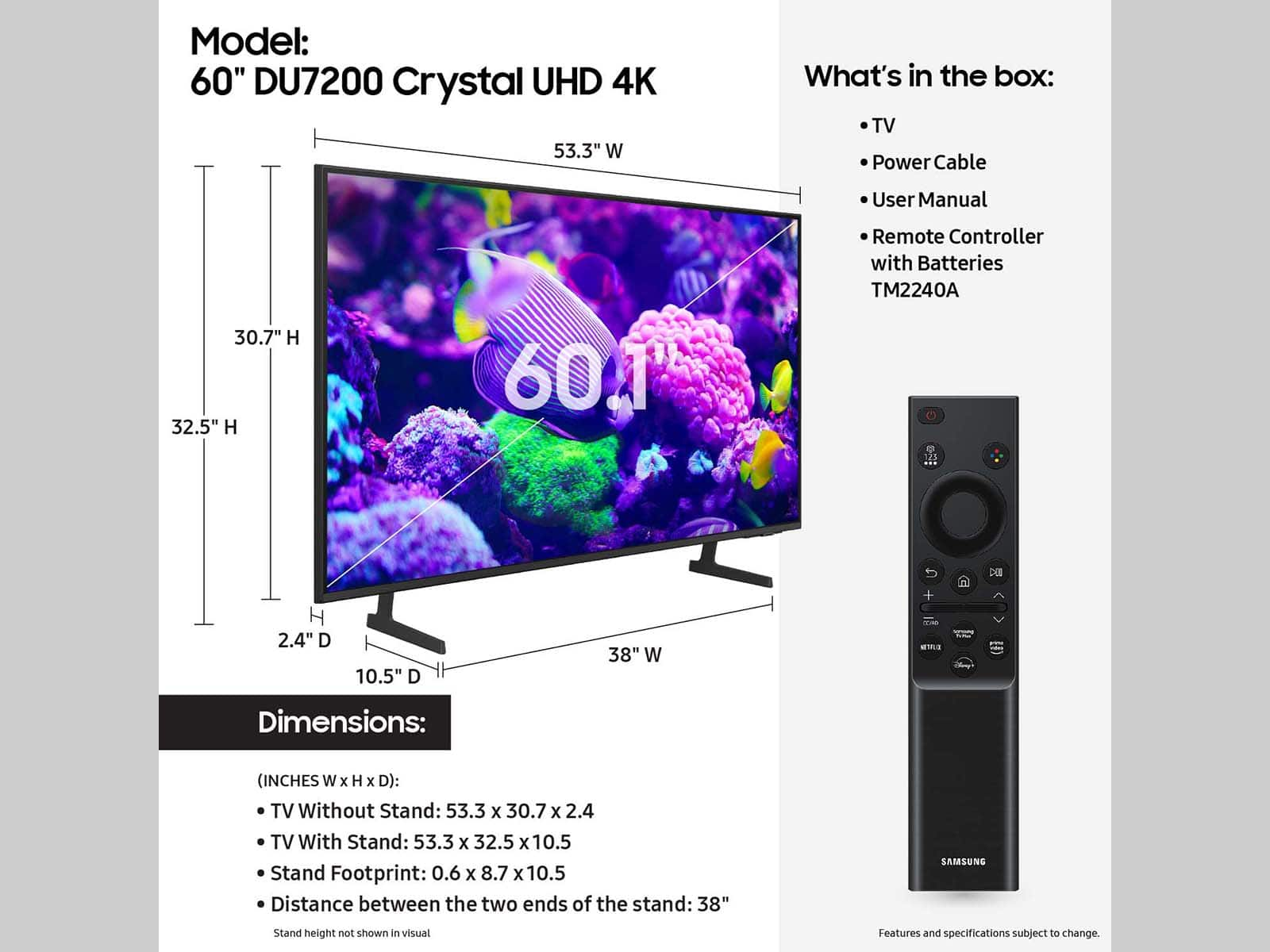




- Model:
- UN60DU7200FXZA
- SKU:
- 6576338
Rating by feature
- Picture Quality
Rating 4.7 out of 5 stars
- Sound Quality
Rating 4.4 out of 5 stars
- Brightness
Rating 4.7 out of 5 stars
Customers are saying
Customers are positive about the 60” Class DU7200 Series Crystal UHD 4K Smart Tizen TV (2024)'s picture quality, ease of use, and color accuracy. Many also praised the TV's value for its price and the straightforward setup process. However, some customers expressed dissatisfaction with the remote control's functionality and user-friendliness. Overall, the positive feedback on picture quality and affordability outweighs the negative comments regarding the remote.
This summary was generated by AI based on customer reviews.
Great buy
||Posted . Owned for 3 weeks when reviewed.This reviewer received promo considerations or sweepstakes entry for writing a review.Service 1st. Class price checked other stores….no comparison.
I would recommend this to a friendGreat TV
||Posted . Owned for 2 weeks when reviewed.This reviewer received promo considerations or sweepstakes entry for writing a review.Great picture clarity and a great price. Like it.
I would recommend this to a friendGood service
||Posted . Owned for 1 month when reviewed.This reviewer received promo considerations or sweepstakes entry for writing a review.Always enjoy shopping at Best Buy—great deals and customer service.
I would recommend this to a friendsamsung tv
||Posted . Owned for 1 month when reviewed.This reviewer received promo considerations or sweepstakes entry for writing a review.i love this tv.im very happy with it.my son has one also.
I would recommend this to a friendChristmas Gift for Son
||Posted . Owned for 1 month when reviewed.This reviewer received promo considerations or sweepstakes entry for writing a review.This television was bought for a Christmas Gift for my son. I believe he is satisfied with it because I have not heard him complain the picture or quality of the television.
I would recommend this to a friendBrand response from Samsung
Posted .Hi Completelysatisfied,
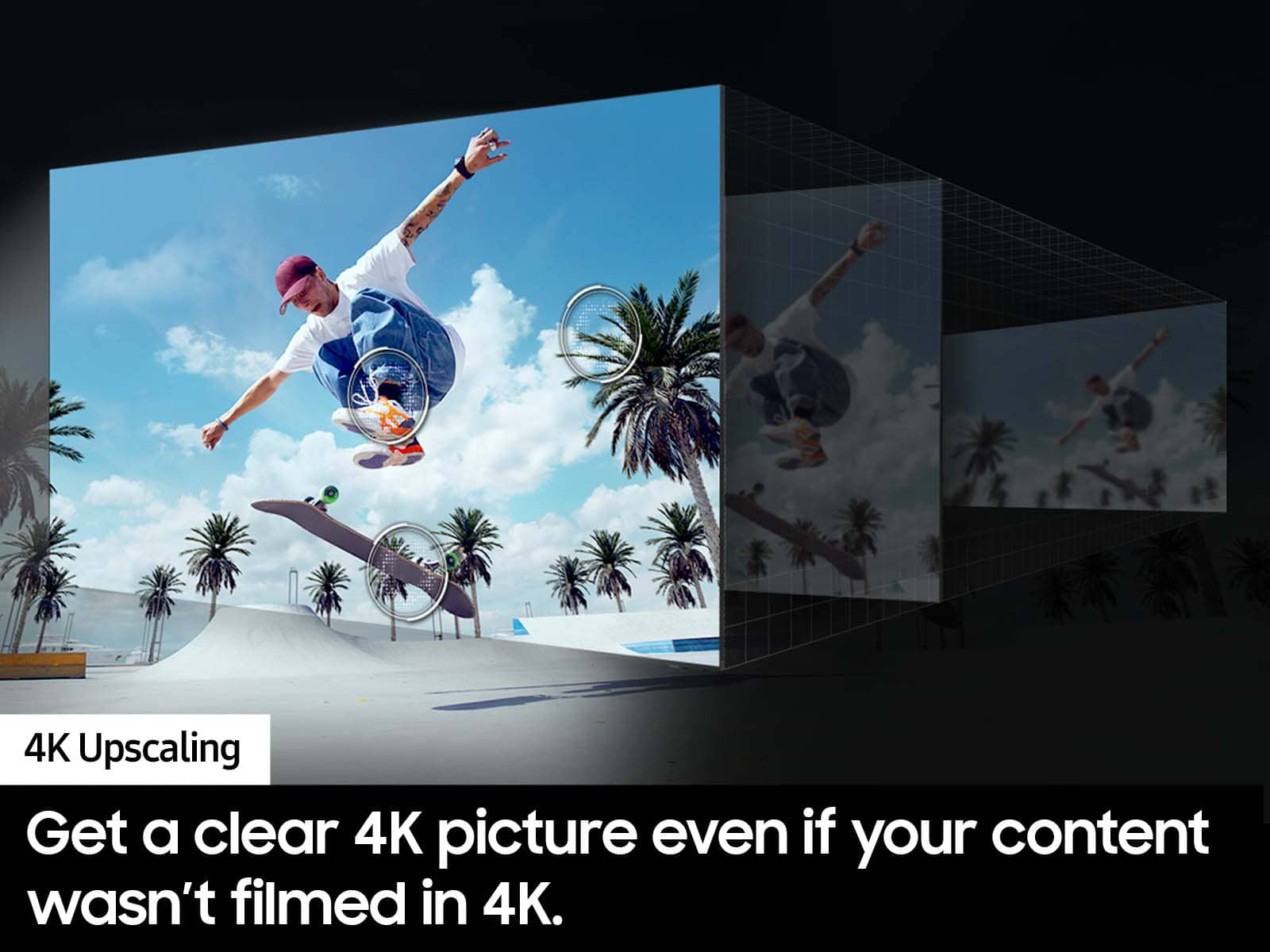
We appreciate you choosing Samsung as your gift of choice. With the DU7200 TV you get a clearer picture for more of your shows and videos. The 4K Upscaling transforms each pixel for improved content.
If you ever have questions or need help, Samsung is here for you! Give us a call at 1-800-SAMSUNG, 8 AM - 12 AM EST, seven days a week. Our LiveChat agents are also available by clicking on the ‘Support’ link on our website.
Thanks for being a part of the Samsung family!
~ Samsung Advisor
Buyers take note!
||Posted . Owned for 1 month when reviewed.This reviewer received promo considerations or sweepstakes entry for writing a review.I would have loved to keep this TV but returned it because it has no optical or analog audio output to connect with my Bose Cinemate GS Series 2 speakers.
I would recommend this to a friendBrand response from Samsung
Posted .Hi IkeO,
Thank you for your feedback on the DU7200 TV. Your opinion is important to us and will be shared with our internal product teams.
The DU72000F TV offers 3 HDMI ports and is Bluetooth and Wi-Fi capable, allowing a seamless connection across multiple devices at a time. If your external device requires an Optical port, we recommend utilizing an HDMI to Optical Converter. These can be found at your local electronics store. Please also keep in mind that an Optical port can be found on our DU8000F Series and above.
Should you ever decide to give Samsung TVs another try and have questions or need help with settings, setup, or features, we would be happy to help. Call us at 1-800-SAMSUNG, 8 AM – 12 AM EST, seven days a week. LiveChat with an agent, as well as manuals, software, and warranty info, can be found at the ‘Support’ link on our Samsung website.
~Samsung Advisor
Good for the price.
||Posted . Owned for 3 weeks when reviewed.This reviewer received promo considerations or sweepstakes entry for writing a review.It’s a decent tv for the price. The picture quality is not the best. We did not see it before we bought it.
No, I would not recommend this to a friendBrand response from Samsung
Posted .Hi ChrisB,
Thank you for sharing your thoughts on the DU7200 TV’s image quality. If the image you’re seeing isn’t to your liking, there are several picture settings you may want to adjust.
Go to Home > left direction button > Settings > All Settings > Picture > Picture Mode
...and select the mode that best fits your usage:
1. Standard: Is the default mode suitable for general viewing environments
2. Dynamic: Makes the picture brighter and clearer in bright viewing environments
3. Eco: Provided to save energy
4. Movie: Suitable for watching TV or movies in a dark room
5. Filmmaker Mode: Provides source content just as the creators intended. If the image is defined as Filmmaker Mode, it’ll automatically switch to Filmmaker Mode while watching.
You can also fine-tune your picture with expert settings such as brightness, contrast, sharpness and more (All Settings > Picture > Expert Settings).
I hope these tips help you enjoy your new product.
You can always contact us for further help at 1-800-SAMSUNG, 8AM - 12AM EST, 7 days a week. Our LiveChat agents are also available by clicking on the ‘Support’ link on our website.
~Samsung Advisor
Tv
||Posted . Owned for 1 month when reviewed.This reviewer received promo considerations or sweepstakes entry for writing a review.Needs better quality I like the tv for the kids but not a living room tv.
No, I would not recommend this to a friendBrand response from Samsung
Posted .Hi DanteJ,
We appreciate you sharing your experience with the DU7200 TV. If you are not satisfied with the image on your screen, I recommend the below setting adjustments.
Go to Home > Settings > All Settings > Picture > Picture Mode and select the mode that best fits your usage:
1) Standard: Default mode suitable for general viewing environments.
2) Natural: Reduces eye strain for a comfortable viewing experience.
3) Movie: Most suitable for watching TV or movies in a dark room.
4) Dynamic: Makes the picture brighter and clearer in bright viewing environments.
5) Filmmaker Mode: You can watch the source content (e.g., movie) as it is. If the image is defined as Filmmaker Mode, it will automatically switch to Filmmaker Mode while watching.
You can also go to Settings > All Settings> Picture > Expert Settings > to manually fine-tune your image.
If you need more help, Samsung is here for you. Call us at 1-800-SAMSUNG, 8 AM - 12 AM EST, seven days a week. Our LiveChat agents are also available by clicking on the ‘Support’ link on our website.
~ Samsung Advisor
Samsung 60" DU7200 Crystal UHD Smart TV
||Posted . Owned for 1 month when reviewed.This reviewer received promo considerations or sweepstakes entry for writing a review.The TV was but after setting it up on the 2nd day their was a vertical line on the right side of screen. Returned it the next day and purchased a 65" same model which is working fine
No, I would not recommend this to a friendBrand response from Samsung
Posted .Lionola,
We appreciate you sharing the issues you’ve initially experienced with Samsung’s DU7200 TV. Thank you for your patience in having to deal with the inconvenience of an exchange.
Should you need help with your new unit, please contact Samsung Customer Support at 1-800-SAMSUNG, 8AM - 12AM EST, 7 days a week. Our LiveChat agents are also available by clicking on the ‘Support’ link on our website.
~ Samsung Specialist
- Pros mentioned:Picture quality
Don’t buy
||Posted . Owned for 2 weeks when reviewed.This reviewer received promo considerations or sweepstakes entry for writing a review.Bought the tv for my living room when it worked it was a nice tv but it only worked for 2 weeks before completely breaking, Samsung services are worthless. Gonna return this and buy a completely different brand.
No, I would not recommend this to a friendBrand response from Samsung
Posted .Hi Cole,
I'm very sorry to hear that your DU7200 TV stopped working after two weeks. Please know your TV is backed by a 1-year limited warranty and we are here to help. Please call us at 1-800-SAMSUNG, 8 AM - 12 AM EST, seven days a week. Our LiveChat agents are also available by clicking on the ‘Support’ link on our website.
~ Samsung Advisor
- Pros mentioned:Picture quality
Beautiful screen!
||Posted . Owned for 1 month when reviewed.This reviewer received promo considerations or sweepstakes entry for writing a review.Nice television, good quality, very clear, great features.
I would recommend this to a friendBrand response from Samsung
Posted .MonicaA,
Thanks for your review. If you’re experiencing specific issues which caused you to give this a 1-star rating, please know Samsung Customer Support is here to help.
You can reach us at 1-800-SAMSUNG, 8AM - 12AM EST, 7 days a week. Or visit us on the Samsung website and click on the ‘Support’ link for:
• LiveChat
• Manuals, Software, & Warranty Info
~ Samsung Specialist
Waste of money, garbage
||Posted . Owned for 4 months when reviewed.This reviewer received promo considerations or sweepstakes entry for writing a review.Total garbage, lasted 5 months. Scheduled a service appointment but noone ever came because if a tv is at a business it only has a 90 day warranty, but they don't bother to call and tell you. Meanwhile the Lg next to it is running 10 years strong. I will never buy another samsung product,,,ever
No, I would not recommend this to a friendBrand response from Samsung
Posted .Hi MichaelA,
Please know we back this TV with a 1-year limited manufacturer's warranty. To best assist you, please contact us at 1-800-SAMSUNG, 8 AM - 12 AM EST, seven days a week. Or visit us on the Samsung website and click on the ‘Support’ link for:
1) LiveChat
2) Manuals, Software, & Warranty Info
~ Samsung Advisor
a lemon or a samsung?
||Posted .This reviewer received promo considerations or sweepstakes entry for writing a review.zero stars. this tv died a little over a year after purchasing. no wonder it is discontinued.
No, I would not recommend this to a friendHorrible
||Posted .This reviewer received promo considerations or sweepstakes entry for writing a review.Only lasted one year and gave out one month after the warranty was up. What a waste of money.
No, I would not recommend this to a friendTV purchase
||Posted . Owned for 1 month when reviewed.This reviewer received promo considerations or sweepstakes entry for writing a review.Terrible purchase. I don’t know what’s worse the product or the customer service. TV malfunctions and turns off frequently. Customer service was not able to help me and management was even worse.
No, I would not recommend this to a friendBrand response from Samsung
Posted .Hi JohnS,
Thank you for purchasing the Samsung DU7200 TV. I’m sorry to hear you’re experiencing an issue where your TV turns itself off. Please try a few troubleshooting steps that may help solve the issue:
1) Check the power cable for damage and proper connection.
2) If the cable is bent, broken, kinked, pinched, pressed excessively (possibly by a heavy object on top of it), or damaged, this is likely the cause of the issue. Replace the cable.
3) Unplug the TV from the wall outlet for 30 seconds, then plug it back in.
4) If the power cycling allows enough time between powering on and off, try updating the TV to the latest firmware. There is a risk, however. If the TV turns off during the software update, it could damage the TV. Updates can take up to 30 minutes, depending on network speed, so if the TV is not turning off too frequently, try updating the software.
If the issue persists after these steps, then the TV will likely need service. Please contact Samsung Customer Service so that we can better investigate your issue and assist you with a solution or replacement. Just call us at 1-800-SAMSUNG, 8 AM - 12 AM EST, seven days a week. Our LiveChat agents are also available by clicking on the ‘Support’ link on our website.
~ Samsung Advisor
Poor Clarity
||Posted . Owned for 1 month when reviewed.This reviewer received promo considerations or sweepstakes entry for writing a review.Not quite the level of clarity I was hoping for in a new HD TV.
No, I would not recommend this to a friendBrand response from Samsung
Posted .Hi Jonathan,
Thank you for sharing your thoughts on your DU7200 TV’s image quality. The TV will upscale any content sent to it as best as possible. The closer your content is to 4K, the better the image will look on the screen.
Here are some tips to help improve picture clarity:
1) HDMI cables are recommended for optimal HD viewing.
2) If you have an analog cable box or satellite box, upgrade to a digital cable box or satellite box.
3) Change the output resolution of your devices, such as digital broadcast receivers, IPTV, and set-top boxes, to UHD or HD.
4) You can further adjust your sharpness, brightness, contrast, color, and more by going to Settings > All Settings> Picture > Expert Settings
5) Choose a Picture Mode by going to Settings > All Settings> Picture > Picture Mode and choose from Dynamic, Standard, Natural, Movie, or Filmmaker Mode.
Should you ever have questions or need help with TV features, specs, or operations, we are here to help. You can call us at 1-800-SAMSUNG, 8 AM - 12 AM EST, seven days a week. Our LiveChat agents are also available by clicking on the ‘Support’ link on our website.
~ Samsung Advisor
Three months then broken
||Posted . Owned for 3 months when reviewed.This reviewer received promo considerations or sweepstakes entry for writing a review.We had our tv for three months and it took a crap on us!!!! I’m 18 years old and just moved across country and just started my new job money isn’t coming easy right now. So if you buy I recommend the warranty.
No, I would not recommend this to a friendBrand response from Samsung
Posted .Hi Kaylee,
I'm sorry your TV is non-functional. Please know that we back this Samsung TV with a 1-year limited manufacturer's warranty, including authorized repair for manufacturer defect, if purchased brand-new directly from an authorized seller.
Please give us the chance to make this right by contacting Samsung Customer Support at 1-800-SAMSUNG, 8 AM - 12 AM EST, seven days a week. Our LiveChat agents are also available by clicking on the ‘Support’ link on our website.
~Samsung Advisor
Horrible do not buy
||Posted .This reviewer received promo considerations or sweepstakes entry for writing a review.Absolutely horrible television. You cannot turn it off if you have a Roku. It has to stay on all the time. If you have a PlayStation it turns it on every time you turn the tv on. Egregiously bad product.
No, I would not recommend this to a friendBrand response from Samsung
Posted .Hi user290416,
Thank you for reaching out to us. If you don’t want externally connected devices to turn on/off when you turn your TV on/off, please make sure Anynet+ is disabled.
To turn off Anynet+ (HDMI-CEC), go to: Settings > All Settings > Connection > External Device Manager > Anynet+ (HDMI-CEC) = OFF.
If you need more help, Samsung is here for you! Please call us at 1-800-SAMSUNG, 8 AM - 12 AM EST, seven days a week. Our LiveChat agents are also available by clicking on the ‘Support’ link on our website.
~ Samsung Advisor
Samsung dumb TV
||Posted .This reviewer received promo considerations or sweepstakes entry for writing a review.Product arrived damaged. The worse customer service I ever experience.
No, I would not recommend this to a friendBrand response from Samsung
Posted .Hi GaleF,
We are very sorry that you received a broken DU7200 TV. If you have not already done so, please reach out to Best Buy to assist you with a replacement.
If there’s anything we can ever help with, please call us at 1-800-SAMSUNG, 8 AM - 12 AM EST, seven days a week. Or visit us on the Samsung website and click on the ‘Support’ link for:
1) LiveChat
2) Manuals, Software, & Warranty Info
~ Samsung Advisor
Worst tv
||Posted . Owned for 1 month when reviewed.This reviewer received promo considerations or sweepstakes entry for writing a review.Worst tv cant upload any ap. We are now stuck with this tv.
No, I would not recommend this to a friendBrand response from Samsung
Posted .ShereeG,
We appreciate you taking the time to let us know about your experience with your DU7200 TV. So that we can better troubleshoot this issue and provide steps towards a solution, please contact Samsung Support at 1-800-SAMSUNG, 8AM - 12AM EST, 7 days a week. Our LiveChat agents are also available by clicking on the ‘Support’ link on our website.
~ Samsung Specialist