Customer Ratings & Reviews






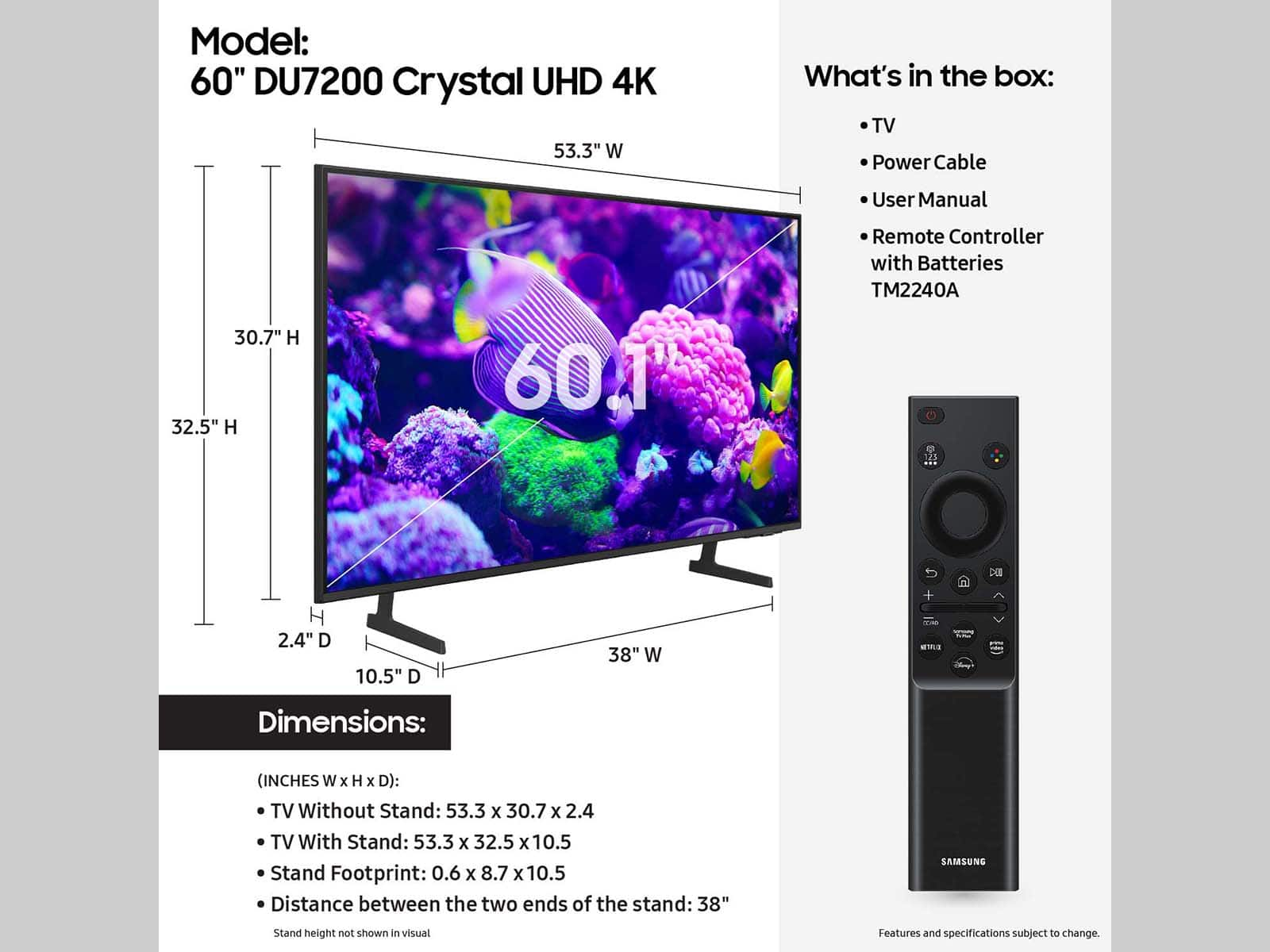




- Model:
- UN60DU7200FXZA
- SKU:
- 6576338
Rating by feature
- Picture Quality
Rating 4.7 out of 5 stars
- Sound Quality
Rating 4.4 out of 5 stars
- Brightness
Rating 4.7 out of 5 stars
Customers are saying
Customers are positive about the 60” Class DU7200 Series Crystal UHD 4K Smart Tizen TV (2024)'s picture quality, ease of use, and color accuracy. Many also praised the TV's value for its price and the straightforward setup process. However, some customers expressed dissatisfaction with the remote control's functionality and user-friendliness. Overall, the positive feedback on picture quality and affordability outweighs the negative comments regarding the remote.
This summary was generated by AI based on customer reviews.
Good for store
||Posted . Owned for 1 month when reviewed.This reviewer received promo considerations or sweepstakes entry for writing a review.Good for store, show room, not good for home main TV
No, I would not recommend this to a friendBrand response from Samsung
Posted .Hi Joepeji,
Thank you for sharing your thoughts on the picture and sound quality of your DU7200 TV. There are several picture and sound settings that you can adjust to best fit what you are watching. Go to Home > Settings > All Settings > Picture > Picture Mode and select the mode that best fits your usage:
1) Standard: Default mode suitable for general viewing environments.
2) Natural: Reduces eye strain for a comfortable viewing experience.
3) Movie: Most suitable for watching TV or movies in a dark room.
4) Dynamic: Makes the picture brighter and clearer in bright viewing environments.
5) Filmmaker Mode: You can watch the source content (e.g., movie) as it is. If the image is defined as Filmmaker Mode, it will automatically switch to Filmmaker Mode while watching.
You can also go to Settings > All Settings> Picture > Expert Settings > to manually fine-tune your image.
For sound adjustments, go to Settings> All Settings> Sound.
If you need further assistance, we would be happy to help! Please feel free to contact Samsung Support at 1-800-SAMSUNG, available from 8 AM to 12 AM EST, seven days a week. You can also chat with us on Samsung.com for immediate assistance.
~Samsung Advisor
- Pros mentioned:Picture qualityCons mentioned:Remote control
Best Buy to the rescue!
Posted .This reviewer received promo considerations or sweepstakes entry for writing a review.While every item needs to be judged with its initial cost in mind, for my office space this TV exceeded my expectations, both sound and picture. It rates 4.9 stars. It fails to gain that extra 10th of a point as the remote requires me to hold it parallel with the tv from my sitting area rather than shooting from the hip. I did want to mention that when the first TV was delivered it had been damaged. I called the local store where we had ordered the tv and without any questions or concerns I received a replacement unit within two days. Excellent client service.
I would recommend this to a friend - Pros mentioned:Ease of use, Picture quality
Ms
Posted .This reviewer received promo considerations or sweepstakes entry for writing a review.For the price the tv has a very good picture. Leaves almost have a 3d effect. The sound is very good, too. It was easy to set up and stream. I am not a technical whiz.
I would recommend this to a friend - Cons mentioned:Remote control
Liked my old Samsung better!
Posted .This reviewer received promo considerations or sweepstakes entry for writing a review.The 4K picture quality is good but I can’t tell it’s better than my old Samsung with 1080 pixels. Frequently the sound does not come on when you turn the tv on. I have to unplug it to get it to reset. This is an inconvenience and aggravation! The remote is slow to respond as well. I actually liked my old Samsung better. Unfortunately it had 3 light spots where the LCD crystals had become dislodged over time. The only good thing is I needed a 60” tv and it fit my space well.
No, I would not recommend this to a friendBrand response from Samsung
Posted .Hi KeithF,
Thank you for your purchase and for reaching out to let us know about the issues you are having with your DU7200 TV. Please know we are here to help and have a few recommendations that may resolve these issues.
First, there are several picture settings that you can adjust to best fit what you are watching. Go to Home > Settings > All Settings > Picture > Picture Mode and select the mode that best fits your usage:
1) Standard: Default mode suitable for general viewing environments.
2) Natural: Reduces eye strain for a comfortable viewing experience.
3) Movie: Most suitable for watching TV or movies in a dark room.
4) Dynamic: Makes the picture brighter and clearer in bright viewing environments.
5) Filmmaker Mode: You can watch the source content (e.g., movie) as it is. If the image is defined as Filmmaker Mode, it will automatically switch to Filmmaker Mode while watching.
You can also go to Settings > All Settings> Picture > Expert Settings > to manually fine-tune your image.
Next, if you turn on your TV and there is no sound, try the following:
1) Please check the volume control of your TV, and then check the volume control of any external devices (cable box or satellite box, DVD, Blu-ray, etc.) connected to your TV. Also, check the cable connection between any external device and the TV and then try the cable connection again.
2) Set the Sound Output to the TV Speaker by going to Settings > All Settings> Sound > Sound Output.
3) Check whether Digital Output Audio Format is set to Pass-Through by going to Settings > All Settings> Sound > Expert Settings > Digital Output Audio Format > Auto.
Finally, regarding the slow response time on your remote, please ensure there is nothing blocking the remote from the sensor on the TV, located below the Samsung logo.
I hope these tips help you enjoy your new product.
You can contact us for further help at 1-800-SAMSUNG, 8 AM - 12 AM EST, seven days a week. Our LiveChat agents are also available by clicking on the ‘Support’ link on our website.
~ Samsung Advisor
- Pros mentioned:Picture quality
Better than expected
Posted .This reviewer received promo considerations or sweepstakes entry for writing a review.I like the 60 inch size because it fits perfect with my built in. It's bright, clear, light, and the UI is pretty snappy. The only thing i can complain about is that it's missing an optical port as others have pointed out but luckily, my Samsung soundbar has HDMI ARC which connected seamlessly out of the box.
I would recommend this to a friend - Pros mentioned:Picture quality, Price
Samsung 60
Posted .This reviewer received promo considerations or sweepstakes entry for writing a review.Great. Tv worth the price and a good picture, would recommend
I would recommend this to a friend - Pros mentioned:Color, Sound
TV
Posted .This reviewer received promo considerations or sweepstakes entry for writing a review.Great TV, spot on color and awesome sound! Would buy again.
I would recommend this to a friend SUPER SICK TV
Posted .This reviewer received promo considerations or sweepstakes entry for writing a review.It works really well for watching the shows, and am really pickey about pricing and the quality of what I'm watching. This TV didn't disappoint
I would recommend this to a friend- Pros mentioned:Picture quality
Review
Posted .This reviewer received promo considerations or sweepstakes entry for writing a review.This was absolutely the most perfect size television for me. I don’t need anything larger. If and when it dies, I will replace it with exactly the same thing. Picture is beyond beautiful.
I would recommend this to a friend Nice, minor issue
Posted .This reviewer received promo considerations or sweepstakes entry for writing a review.Great TV but as another buyer mentioned, no volume when you first turn on time to time. Have to unplug to reset. Other than that issue I really like the television.
I would recommend this to a friend- Pros mentioned:Picture quality
New tv
Posted .This reviewer received promo considerations or sweepstakes entry for writing a review.The tv works very well and looks great. The store staff was also very helpful.
I would recommend this to a friend - Pros mentioned:Picture quality
Samsung 60” tv
Posted .This reviewer received promo considerations or sweepstakes entry for writing a review.Great picture, great sound and enough hdmi ports. Sale price helped too.
I would recommend this to a friend - Pros mentioned:Ease of use
Great TV
Posted .This reviewer received promo considerations or sweepstakes entry for writing a review.Awesome TV, easy to use & you can stream on a lot of platforms
I would recommend this to a friend Excellent
Posted .This reviewer received promo considerations or sweepstakes entry for writing a review.Excellent quality and a professional installation.
I would recommend this to a friendeArc doesn't work.
Posted .This reviewer received promo considerations or sweepstakes entry for writing a review.eArc does not work at all. Tried 2 different receivers, and Onkyo and a Sony, 2 sets of speakers, 3 different cables and it just doesn't work. Had it working for a few minutes and then it just quit and won't restart the audio connection for surround sound receiver. Blew a fuse in one receiver. Not sure if it damaged the other as I haven't had a chance to connect it to another tv yet to test it. Stay away from this tv.
No, I would not recommend this to a friendBrand response from Samsung
Posted .Hi Fibred,
We would like to assist you in the best way we can. In order for us to do so, please call us at 1-800-SAMSUNG, 8 AM - 12 AM EST, seven days a week. Our LiveChat agents are also available by clicking on the ‘Support’ link on our website.
~ Samsung Advisor
Samsung tv
Posted .This reviewer received promo considerations or sweepstakes entry for writing a review.Tv loses picture and goes to black every time it’s turned on and sometimes takes 30 minutes to stop. Got the protection plan on it and contacted Best Buy/ geek squad about it and I’m still waiting on a return email/call. It’s been over 3 weeks.
No, I would not recommend this to a friendBrand response from Samsung
Posted .Hi RobM,
We're sorry you are experiencing issues with your DU7200 TV. If your TV has a black screen even when it's on, it's quite possible it could actually be your external device and not your TV. Please try these troubleshooting steps for your blank screen issue:
1. Press the Home button on the remote.
If the menu appears, the TV is powered on but is either not on the correct source or not receiving a signal. If the menu does not appear, the TV may be having power issues.
Check the red standby light, a little red light at the edge of the TV that you aim the remote at. In normal use, the red standby light is on when the TV is off (indicating the TV is on standby), and the red standby light is off when the TV is in use (or doesn't have power).
2. Confirm that the TV is set to the same source as the external device.
For instance, if your cable box is connected to HDMI 1, set the TV source to HDMI 1.
If the TV is set to the correct source, but there is still no image, unplug and reconnect the AV connections one cable at a time from both ends of each cable. If there's any damage to the cable, it will need to be replaced.
After reconnecting the external device, please turn it off and back on.
3. Test the HDMI cable.
The test is designed for HDMI cords less than 6 feet long and may not give accurate results on longer cords.
To perform the test, make sure the TV's source is still on the HDMI setting for the cable you want to test, and then navigate to Settings > Support > Self Diagnosis > Signal Information > HDMI Cable Test > Start Test. If the test says the cable is bad, replace the cable. Service is not required.
4. Test different external devices.
The final thing to rule out is the external device you're using. Try connecting a different device or using a different source port.
If the TV can display a picture in any other setup, then you've ruled the TV out as the cause of the issue. Keep trying various setups until you identify the device or cable that is not working and troubleshoot or replace it.
If you’d like more help with settings, we are always happy to help! Call us at 1-800-SAMSUNG, 8 AM - 12 AM EST, seven days a week. Or visit us on the Samsung website and click on the ‘Support’ link for:
1) LiveChat
2) Manuals, Software, & Warranty Info
~ Samsung Advisor