Customer Ratings & Reviews








- Model:
- UN65AU8000FXZA
- SKU:
- 6453024
Rating by feature
- Picture Quality
Rating 4.7 out of 5 stars
- Sound Quality
Rating 4.4 out of 5 stars
- Brightness
Rating 4.7 out of 5 stars
Customers are saying
Customers are pleased with the picture quality, ease of use, and price of the 65" Class 8000 Series LED 4K UHD Smart Tizen TV. Many also appreciate the TV's design and setup process. However, some customers have expressed concerns about the remote control's functionality and the volume level. A few users also mentioned that the refresh rate could be improved.
This summary was generated by AI based on customer reviews.
no value
||Posted . Owned for 1.5 years when reviewed.This reviewer received promo considerations or sweepstakes entry for writing a review.broke down after 2 yrs. of moderate use. anyone else have this issue?
No, I would not recommend this to a friendNot good tv
||Posted . Owned for 1.5 years when reviewed.This reviewer received promo considerations or sweepstakes entry for writing a review.Very slow tv its pretty bad, it freezes very often , very disappointed
No, I would not recommend this to a friendGreat quality, but stopped working after 3 months
||Posted . Owned for 7 months when reviewed.This reviewer received promo considerations or sweepstakes entry for writing a review.Great TV but the entire right side of screen went black after 3 months of owning it. Was awesome before that, but that shouldn’t happen with a new TV.
No, I would not recommend this to a friendPurchased as a replacement
||Posted . Owned for 4 months when reviewed.This reviewer received promo considerations or sweepstakes entry for writing a review.Sound quality is not great, visuals are average. Purchase to replace my Samsung 65 in NU8000 from 2018, was a significant downgrade.
No, I would not recommend this to a friendBrand response from Samsung
Posted .Hi Bamba,
We greatly value the details you provided in your review regarding the sound and image quality of your new AU8000 TV. Your TV features Object Tracking Sound Lite, which tracks the action with strategically placed dynamic speakers, and Adaptive Sound, which automatically adjusts audio to enhance everything from dialogue to music and sports.
You can select a Sound Mode that you prefer for a content type or your listening environment. Go to: Home > Settings > Sound > Sound Mode
You can also customize balance and equalizer settings by going to Home > Settings > Sound > Expert Settings
Additionally, there are image adjustments you can make to optimize your picture to suit your preferences. Your TV has several Picture Modes to choose from, allowing you to enjoy content in optimal conditions. Go to Home > Settings > Picture > Picture Mode.
You can also go to Settings > Picture > Expert Settings to manually fine-tune your image.
For more help, please call us at 1-800-SAMSUNG, 8 AM - 12 AM EST, seven days a week. LiveChat with an agent, as well as manuals, software, and warranty info, can be found at the ‘Support’ link on our Samsung website.
~ Samsung Advisor
Annoyed
||Posted .This reviewer received promo considerations or sweepstakes entry for writing a review.The product is great, but…Stop blowing up my phone with all your emails. Just because I made a purchase & took out a credit card doesn’t mean I want numerous emails day in and day out. STOP!
No, I would not recommend this to a friendBrand response from Samsung
Posted .Hi there,
I am glad to hear you are enjoying the experience provided by your new Samsung Crystal UHD TV. You may want to provide your additional feedback to Best Buy directly.
If there is anything we can do to improve your experience with the product to raise your rating from 3 stars, please call us at 1-800-SAMSUNG (ask for TVs), available 8AM - 12AM EST, 7 days a week.
For additional support resources, visit us on the Samsung website and click on the ‘Support’ link in the upper right corner of the homepage for:
1) Chat with Us/Product Help: To begin a chat or find solutions, choose ‘TVs & Home Theater’ and select your model & topic.
2) Register a Product: For access to easy warranty support, convenient opt-in to special promos and offers, faster troubleshooting and service, and quick notification of system updates.
3) Manuals & Software
4) Warranty Info
5) Contact Us
~ Samsung Solutions
Very disappointed, but who's to blame??
||Posted . Owned for 1 month when reviewed.This reviewer received promo considerations or sweepstakes entry for writing a review.I bought this TV after a lot of back and forth with about 3 or 4 others. I've been having sound issues, along with the TV sometimes turning back on after it's been off for a bit. Now to be fair, I recently also had FIOS installed and both the FIOS guys and The Geek squad have been back out a few times and the problem remains. If The FIOS guys and The Geek squad can't correct my issues, I'm not sure who else to turn to. At this point, I'm very disappointed in both FIOS and or this TV. I just don't know where the problem lies!!! Another Geek squad visit scheduled for 12-21-2021
No, I would not recommend this to a friendBrand response from Samsung
Posted .Hi,
Thank you for purchasing the 2021 AU8000 Crystal UHD TV and for your review. I am sorry to hear that your TV is turning on by itself. Please try the troubleshooting steps below to resolve your issue.
Sometimes connected Smart devices send abnormal "power on" signals through the wireless network that triggers the TV to turn itself on. If you do not want this function, navigate to Settings > General > Network > Expert Settings > Power On with Mobile, and turn the setting off.
If you are using the device thru HDMI then it could cause the auto turn on as Anynet+ is set on. Occasionally connected devices such as game console (PS4, xbox) or cable set top box sending turn on signal, for example, if they have software updates. We recommend you to try turning Anynet+ off as it may be causing auto power on.
Go to Setting- General - External Device Manager - Anynet+, then Disable
If the TV continues to turn on by itself continuously, please contact our TV Support at 1-800-SAMSUNG (ask for TVs), available 8AM - 12AM EST, 7 days a week.
For additional support resources, visit us on the Samsung website and click on the ‘Support’ link in the upper right corner of the homepage for:
1) Chat with Us/Product Help: To begin a chat or find solutions, choose ‘TVs & Home Theater’ and select your model & topic.
2) Register a Product: For access to easy warranty support, convenient opt-in to special promos and offers, faster troubleshooting and service, and quick notification of system updates.
3) Manuals & Software
4) Warranty Info
5) Contact Us
~ Samsung Solutions
Not recommended
||Posted . Owned for 9 months when reviewed.This reviewer received promo considerations or sweepstakes entry for writing a review.The tv is already damaged only have a few months with it
No, I would not recommend this to a frienddefective products
||Posted . Owned for 9 months when reviewed.This reviewer received promo considerations or sweepstakes entry for writing a review.I have very bad experiences this tv is automatically turn on . I so many complaints but no bady is coming.
No, I would not recommend this to a friendBeware of warranty
||Posted . Owned for 1 year when reviewed.This reviewer received promo considerations or sweepstakes entry for writing a review.Beware of warranty. its 12 months but in Samsung it is 36 months
No, I would not recommend this to a friendNot good
||Posted . Owned for 3 weeks when reviewed.This reviewer received promo considerations or sweepstakes entry for writing a review.The sound stops working. Screen goes blank. Very frustrated with this purchase.
No, I would not recommend this to a friendSamsung smart TV
||Posted . Owned for 3 weeks when reviewed.This reviewer received promo considerations or sweepstakes entry for writing a review.Not like a regular TV where you have channels to choose from. Very hard to navigate. I would not buy this product a second time.
No, I would not recommend this to a friendBrand response from Samsung
Posted .Hi Obadiah,
Thank you for purchasing the Samsung 65" AU8000 Crystal UHD TV and for your review. Your experience is important to us and will be shared with our product teams.
To assist you in learning the various functions and settings of your new TV, you can download the AU8000 TV's User Manual, e-Manual, Remote Control Leaflet, and Quick Setup Guide on Samsung's website by clicking "Support" > "Manuals & Software" > "TVs & Home Theater" > "TVs". From there, you can select the AU8000 TV under "Crystal UHD TVs” > “A Model Lineup" and download the guides you would like. The e-Manual is also embedded into the TV itself under Settings > Support > Open e-Manual.
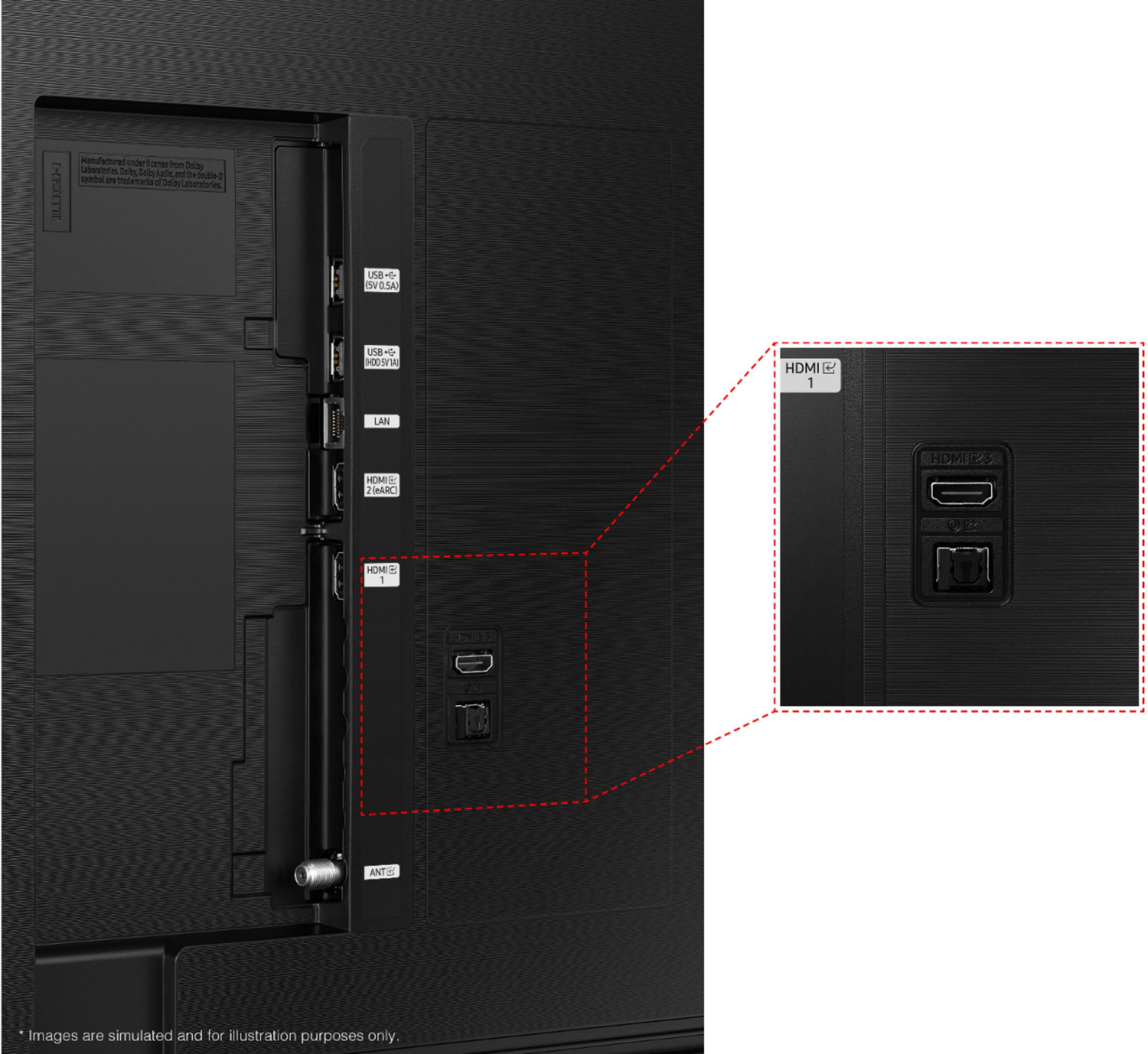
Please know the AU8000 features an RF antenna connection allowing you to receive live, local, over the air channels through the use of an external antenna. Alternatively you can use one of the three HDMI ports to connect a cable box. The AU8000 also features Samsung TV Plus giving you access to hundreds of channels for free when connected to the internet.
Should you ever have questions or need help, please call us at
1-800-SAMSUNG (ask for TVs), available 8AM -12AM EST M-F (9AM – 6PM EST Sat). Or text HELP to 62913.
For additional support resources, visit us on the Samsung website and click on the ‘Support’ link in the upper right corner of the homepage for:
1) More ‘Contact Us’ options – LiveChat, Facebook, Twitter, Samsung Community, Samsung Members app
2) Manuals & Software
3) Warranty Info
4) Product Registration: For access to easy warranty support, convenient opt-in to special promos and offers, faster troubleshooting and service, and quick notification of system updates.
~ Samsung Solutions
Not good don't buy
||Posted . Owned for 8 months when reviewed.This reviewer received promo considerations or sweepstakes entry for writing a review.It has some fault as it does not work on apple airplay..the picture quality also not as great as Samsung brand...
No, I would not recommend this to a friendBrand response from Samsung
Posted .Hi SamuelK,
We appreciate your feedback on the AU8000 TV regarding picture quality and functionality. I have a few troubleshooting tips which may improve your experience.
First, let's ensure both the AU8000 TV and your Apple device are both updated with the latest software. To update your Samsung TV, go to Settings> Support> Software Update.
Next, please restart both devices. Then disable Bluetooth on your Samsung TV. If you keep having issues, please get in touch with us so we can further troubleshoot with you.
To adjust the picture:
Go to Home > Settings > Picture > Picture Mode and select the mode that best fits your usage:
1) Standard: Default mode suitable for general viewing environments.
2) Natural: Reduces eye strain for a comfortable viewing experience.
3) Movie: Suitable for watching TV or movies in a dark room.
4) Dynamic: Makes the picture brighter and clearer in bright viewing environments.
5) Filmmaker Mode: You can watch the source content (e.g., movie) as it is. If the image is defined as Filmmaker Mode, it will automatically switch to Filmmaker Mode while watching.
You can also go to Settings > Picture > Expert Settings > to manually fine-tune your image.
If you need more help, Samsung is here for you. Call us at 1-800-SAMSUNG, 8 AM - 12 AM EST, seven days a week. Or visit us on the Samsung website and click on the ‘Support’ link for:
1) LiveChat
2) Manuals, Software, & Warranty Info
~ Samsung Advisor
Probably Not Common
||Posted . Owned for 1 month when reviewed.This reviewer received promo considerations or sweepstakes entry for writing a review.Keeps disconnecting from wireless and I can only use "Smart things" to get it to work. Happens every 3 or 4 days.
No, I would not recommend this to a friendBrand response from Samsung
Posted .Hi MarkB,
Thank you for sharing your experience with Internet connectivity. If you’re experiencing issues with the Wi-Fi connection, we suggest you try the following:
1. Use 5Ghz Wi-Fi if possible
2. Try wired LAN if available
3. Try repositioning the router, so there are no obstacles between your TV and the router
Please also be sure you are running the latest firmware. You can check to see what software version your TV is using and if there is an available update through the settings on your TV. Go to: Settings > Support > Software Update.
You can enable automatic updates for convenience.
Go to Settings > Support > Software Update, then select Auto Update.
If you continue to have issues, please give us a call at 1-800-SAMSUNG, 8 AM - 12 AM EST, seven days a week. Our LiveChat agents are also available by clicking on the ‘Support’ link on our website.
~ Samsung Advisor
manufacturers defect
Posted .This reviewer received promo considerations or sweepstakes entry for writing a review.had the tv less then a month it developed a horizontal line across the whole tv best buy was no help
No, I would not recommend this to a friendBrand response from Samsung
Posted .Hi steve52417,
Thank you for purchasing the Samsung AU8000 and for sharing the issues you are experiencing with your unit. Your feedback is important to us and will be shared with our product teams.
Samsung is committed to providing the best possible product experience, quality, and value. We back this Samsung TV with a 1-year limited manufacturer's warranty, including authorized repair for manufacturer defect, if purchased brand-new directly from an authorized seller. You can see the full details of your warranty here: https://www.samsung.com/us/support/service/warranty/UN65AU8000FXZA
Please give us the opportunity to assist you by contacting Samsung Customer Support at 1-800-SAMSUNG (ask for TVs), available 8AM - 12AM EST, 7 days a week.
For additional support resources, visit us on the Samsung website and click on the ‘Support’ link in the upper right corner of the homepage for:
1) Chat with Us/Product Help: To begin a chat or find solutions, choose ‘TVs & Home Theater’ and select your model & topic.
2) Register a Product: For access to easy warranty support, convenient opt-in to special promos and offers, faster troubleshooting and service, and quick notification of system updates.
3) Manuals & Software
4) Warranty Info
5) Contact Us
~ Samsung Solutions
Poor
||Posted . Owned for 1 month when reviewed.This reviewer received promo considerations or sweepstakes entry for writing a review.This TV just turned of its own and tried million times to turn back on but nothing happened!
No, I would not recommend this to a friendNot Satisfied
||Posted . Owned for 6 months when reviewed.This reviewer received promo considerations or sweepstakes entry for writing a review.Television return due to poor clarity. Purchased a QLED which is a better quality TV.
No, I would not recommend this to a friendDon't buy
||Posted . Owned for 1.5 years when reviewed.This reviewer received promo considerations or sweepstakes entry for writing a review.Got this TV a year and half back and the screen went black. Do not buy
No, I would not recommend this to a friendIssue with TV
||Posted . Owned for 1 week when reviewed.This reviewer received promo considerations or sweepstakes entry for writing a review.I liked the tv overall, but when there's a huge scatch and small chunk of screen missing that's a deal breaker!
No, I would not recommend this to a friendBrand response from Samsung
Posted .Hi Sweeney,
Thank you for your review of the AU8000 TV. We are sorry to hear that your TV arrived damaged.
Samsung is committed to providing the best possible product experience, quality, and value. We back this Samsung TV with a 1-year limited manufacturer's warranty, including authorized repair for manufacturer defect, if purchased brand-new directly from an authorized seller.
Please reach out to us so we can make this right. Contact us for further help at 1-800-SAMSUNG, 8 AM - 12 AM EST, seven days a week. Our LiveChat agents are also available by clicking on the ‘Support’ link on our website.
~ Samsung Advisor
Junk. Dead in 15 months
||Posted . Owned for 1 year when reviewed.This reviewer received promo considerations or sweepstakes entry for writing a review.Died in 15 months. Won’t even turn on. Warranty is 12 months.
No, I would not recommend this to a friendmid quality
||Posted .This reviewer received promo considerations or sweepstakes entry for writing a review.I would rather the samsung 8 series, but it's discontinued. This 8000 series has backlighting, which doesn't look great
No, I would not recommend this to a friendBrand response from Samsung
Posted .Hi bestkbuy,
Thank you for sharing your review of the AU8000 Crystal UHD TV. If there is anything we can do to improve your enjoyment such as helping to optimize settings for your specific usage scenario, please contact Samsung Customer Support.
You can reach us at 1-800-SAMSUNG (ask for TVs), available 8AM - 12AM EST, 7 days a week.
For additional support resources, visit us on the Samsung website and click on the ‘Support’ link in the upper right corner of the homepage for:
1) Chat with Us/Product Help: To begin a chat or find solutions, choose ‘TVs & Home Theater’ and select your model & topic.
2) Register a Product: For access to easy warranty support, convenient opt-in to special promos and offers, faster troubleshooting and service, and quick notification of system updates.
3) Manuals & Software
4) Warranty Info
5) Contact Us
~ Samsung Solutions