Last-Minute SavingsLimited quantities.Shop now

Skip to content
Gift Ideas
Main Content

Customer Ratings & Reviews
Last Minute Deal
Your price for this item is $499.99
The comparable value price is $649.99

Customer reviews

Rating 4.8 out of 5 stars with 809 reviews

Rating Filter

Rating by feature

  • Picture Quality

    Rating 4.8 out of 5 stars

  • Sound Quality

    Rating 4.6 out of 5 stars

  • Brightness

    Rating 4.8 out of 5 stars

Pros mentioned filter

Cons mentioned filter

96%would recommend to a friend

Customers are saying

Customers highly value the 65” Class Q7F Series QLED 4K UHD SamsungVision AI Smart Tizen TV (2025) for its exceptional picture quality, ease of setup, appealing design, and ideal size. However, some customers have expressed concerns regarding connectivity issues, remote control quirks, and brightness levels. Overall, the positive aspects of the TV seem to outweigh the negative ones based on customer feedback.

This summary was generated by AI based on customer reviews.

The vast majority of our reviews come from verified purchases. Reviews from customers may include My Best Buy members, employees, and Tech Insider Network members (as tagged). Select reviewers may receive discounted products, promotional considerations or entries into drawings for honest, helpful reviews.
Page 40 Showing 781-800 of 809 reviews
  • Cons mentioned:
    Brightness

    Rated 1 out of 5 stars

    Picture Quality

    |
    |
    Posted . Owned for 1 month when reviewed.
    This reviewer received promo considerations or sweepstakes entry for writing a review.

    The picture when watching sports and local tv is terrible. Not clear and very grainy. Tried multiple settings, no good. Foggy, not bright, grainy. Samgsung 65” from 6 years ago was a much better tv hands down. Not worth the money.

    No, I would not recommend this to a friend
    • Brand response from Samsung
      Posted .

      KLTV,

      We appreciate your feedback on the picture quality of Samsung’s Q7F TV. If the image doesn’t quite match your preferences, there are several adjustments you can make to better suit your viewing environment and content type.

      First, please ensure your TV is running the latest firmware, as updates may include important picture quality enhancements. Go to: Home > Left directional button > Settings > Support > Software Update > Update Now

      To explore picture mode options, navigate to: Home > Left directional button > Settings > All Settings > Picture > Picture Mode. Options include:
      • Standard – Ideal for general viewing
      • Dynamic – Brighter and more vibrant for well-lit spaces
      • Eco – Optimized for energy efficiency
      • Movie – Best for viewing in low light
      • Filmmaker Mode – Preserves the content creator’s intent and disables motion smoothing for supported content

      You can further customize your image by going to: Settings > All Settings > Picture > Expert Settings, where you can adjust Brightness, Contrast, Color Tone, Sharpness, Contrast Enhancer and more.

      If you’d like help finding the best picture settings for your preferences, please don’t hesitate to contact Samsung Support at 1-800-SAMSUNG, available 8AM – 12AM EST, 7 days a week. You can also LiveChat with an agent or explore additional resources on our website by clicking the ‘Support’ link.

      ~ Samsung Specialist Samsung

  • Cons mentioned:
    Connectivity

    Rated 1 out of 5 stars

    Wrong product

    |
    |
    Posted . Owned for 2 weeks when reviewed.
    This reviewer received promo considerations or sweepstakes entry for writing a review.

    Did not have the connections we needed to see or use our sound and dvd players. On line it said there was an optical sound port and there was none. I am sure the tv itself was fine, just be sure to check the inputs before purchasing. The return went smoothly, excellent warranty

    No, I would not recommend this to a friend
    • Brand response from Samsung
      Posted .

      DavidJ,

      Thank you for sharing your thoughts on the available inputs for the Q7F. If an Optical port is a crucial part of your setup needs, you’ll find that connection starting with our Q8F Series and above.

      For future purchases, we recommend double-checking the product specs on Best Buy’s site to ensure the model you choose has the ports you need. You’ll find the full list under the “Specifications” tab (just beneath the Highlights section): https://www.bestbuy.com/site/samsung-43-class-q7f-series-qled-4k-uhd-samsungvision-ai-smart-tizen-tv-2025/6619443.p?skuId=6619443

      Should you ever need assistance with your TV, Samsung is here for you. Reach out by calling 1-800-SAMSUNG between 8AM - 12AM EST, any day of the week. You can also chat with us online by visiting the ‘Support’ section of our website.

      ~ Samsung Specialist Samsung

  • Cons mentioned:
    Connectivity

    Rated 1 out of 5 stars

    Bad streaming

    |
    |
    Posted .
    This reviewer received promo considerations or sweepstakes entry for writing a review.

    The TV itself is fine but the internet connection is atrocious and constantly buffers and drops. It is not the internet because peripherals work fine. It is a huge annoyance when streaming anything. Would not have purchased if we knew this issue.

    No, I would not recommend this to a friend
    • Brand response from Samsung
      Posted .

      Amyy,

      Thank you for sharing your experience. Buffering during streaming is typically related to internet speed or signal strength. This can happen when your connection isn’t able to deliver data quickly enough for smooth playback.

      We recommend the following steps to help improve streaming performance:
      1. Use a 5GHz Wi-Fi connection, if available
      2. Try a wired LAN connection for more stability
      3. Reposition your router to minimize obstacles between it and the TV
      4. Make sure your TV is running the latest firmware (Settings > Support > Software Update)
      5. Run Device Care to optimize performance: Home > left directional key > Settings > Support > Device Care > Start Device Care

      If buffering continues, you may want to contact your internet service provider to check your current speed or explore upgrade options.

      If we can assist further, please call us at 1-800-SAMSUNG from 8AM - 12AM EST, seven days a week, or connect with a LiveChat agent anytime by selecting ‘Support’ on our website.

      ~ Samsung Specialist Samsung

  • Rated 4 out of 5 stars

    Good quality

    |
    |
    Posted . Owned for 1 month when reviewed.
    This reviewer received promo considerations or sweepstakes entry for writing a review.

    Really good product, probably the sound system needs to be improved.

    I would recommend this to a friend
  • Rated 3 out of 5 stars

    A Poor Company To Do Business With

    |
    |
    Posted . Owned for 3 weeks when reviewed.
    This reviewer received promo considerations or sweepstakes entry for writing a review.

    Pitiful customer service and follow-up by Best Buy representatives. I can’t express how disappointed I was with a company which we had truly trusted with all our appliance and technology purchases prior. I can truly say we will not be purchasing from Best Buy in the future because they have become a poor excuse as far as customer service is concerned.

    I would recommend this to a friend
    • Brand response from Samsung
      Posted .

      Buffalo,

      Please know you are leaving a review and 3-star rating for the 2025 Q7F TV, but we are sorry to hear of your Best Buy experience, nonetheless. You may want to consider providing feedback directly to the Best Buy store where you made your purchase.

      Should you have questions on the Q7F TV itself, Samsung is here for you. You can reach us at 1-800-SAMSUNG, 8AM - 12AM EST, 7 days a week. Our LiveChat agents are also available by clicking on the ‘Support’ link on our website.

      ~ Samsung Specialist Samsung

  • Rated 1 out of 5 stars

    Cluttered crap

    |
    |
    Posted . Owned for 3 months when reviewed.
    This reviewer received promo considerations or sweepstakes entry for writing a review.

    The TV is fine - display is bright and crisp and what I wanted. What I absolutely hate is all of the crap Samsung loads in to a "smart" TV. There's so much clutter for stuff I'll never watch - basketball, kids TV, other sponsored stuff. And none of it can be turned off. You're stuck with all of the garbage when you just want to go for a simple over the air channel or your Netflix subscription. Even worse, read the privacy fine print. They're collecting information on your viewing habits with no obvious way to opt out. Cluttered, deceptive, and intrusive.

    No, I would not recommend this to a friend
    • Brand response from Samsung
      Posted .

      Grumpy,

      Thanks for sharing your thoughts on the Q7F TV - we'll be sure to share your feedback with our internal teams.

      If you ever need help with your TV, please reach out to Samsung Customer Support at 1-800-SAMSUNG, available daily from 8AM - 12AM EST. You can also chat with a LiveChat agent by clicking the ‘Support’ link on our website for:
      • Live Chat
      • Manuals, Software, & Warranty Info
      • Creating a Service ticket

      ~ Samsung Specialist Samsung

  • Rated 1 out of 5 stars

    WORST EXPERIENCE EVER - DON'T BUY AT BEST BUY

    |
    |
    Posted . Owned for 1 month when reviewed.
    This reviewer received promo considerations or sweepstakes entry for writing a review.

    PLEASE READ THIS BEFORE BUYING AT BEST BUY I bought a TV in-store and requested delivery to my apartment. Best Buy was instructed to leave the package in the secure package room, but the TV was left outside in the open. It disappeared within one hour of the “delivery” notification. I have no proof the delivery team even left it where they claimed. It has now been two months with no response from Best Buy, no refund, and no TV.

    No, I would not recommend this to a friend
    • Brand response from Samsung
      Posted .

      GabrielC,

      Please know that you're leaving a review and 1-star rating for the Q7F TV, but we’re sorry to hear of your experience with Best Buy, nonetheless. You may want to consider providing your feedback directly to the Best Buy store where the purchase was made.

      If you have questions about the TV itself, Samsung is here to help. You can reach us at 1-800-SAMSUNG, 8AM – 12AM EST, 7 days a week. LiveChat agents are also available by clicking the ‘Support’ link on our website.

      ~ Samsung Specialist Samsung

  • Rated 3 out of 5 stars

    Unhappy camper

    |
    |
    Posted . Owned for 1 month when reviewed.
    This reviewer received promo considerations or sweepstakes entry for writing a review.

    Great product but I had to pay $250 for installation when the promotion said it was free. The reps at the store acknowledge the free installation but the computer when checking out didn't.

    I would recommend this to a friend
    • Brand response from Samsung
      Posted .

      FredrickL,

      Please know that you're leaving a review and 3-star rating for the Q7F TV, but we’re sorry to hear of your experience with Best Buy, nonetheless. You may want to consider providing your feedback directly to the Best Buy store where the purchase was made.

      If you have questions about the TV itself, Samsung is here to help. You can reach us at 1-800-SAMSUNG, 8AM – 12AM EST, 7 days a week. LiveChat agents are also available by clicking the ‘Support’ link on our website.

      ~ Samsung Specialist Samsung

  • Rated 3 out of 5 stars

    Great tv

    |
    |
    Posted . Owned for 2 months when reviewed.
    This reviewer received promo considerations or sweepstakes entry for writing a review.

    I love the tv. The salesman was rude. Everything elase was good. I wont be doing business with that person ever again.

    I would recommend this to a friend
    • Brand response from Samsung
      Posted .

      Hi Jack,

      Please know that you're leaving a review and 3-star rating for the 65" Q7F TV, but we’re sorry to hear of your experience with Best Buy, nonetheless. You may want to consider providing your feedback directly to the Best Buy store where the purchase was made.

      If you have questions about the TV itself, Samsung is here to help. You can reach us at 1-800-SAMSUNG, 8AM – 12AM EST, 7 days a week. LiveChat agents are also available by clicking the ‘Support’ link on our website.

      ~ Samsung Specialist Samsung

  • Rated 1 out of 5 stars

    Our experience was horrible!

    |
    |
    Posted . Owned for 3 weeks when reviewed.
    This reviewer received promo considerations or sweepstakes entry for writing a review.

    I spoke to Corporate the same night me and my dad came in and bought the TV. No one was in the TV section to help us and then we were ready to buy a TV it took them 15 minutes to find someone to bring the TV to the register and then after we purchased the TV all the workers watched my dad about to drag the TV out by himself and so I had to ask the front desk girl who was on her phone if she call someone to help us.

    I would recommend this to a friend
    • Brand response from Samsung
      Posted .

      JimeliaL,

      It appears your 1-star review for the Samsung Q7F TV is based on your experience with Best Buy, and we’re sorry to hear that. We recommend contacting the store directly to share your feedback.

      If you need help with the TV itself, Samsung Support is available at 1-800-SAMSUNG, 8AM – 12AM EST, 7 days a week, or via LiveChat under the ‘Support’ section of our website.

      ~ Samsung Specialist Samsung

  • Rated 3 out of 5 stars

    Picture good sound low

    |
    |
    Posted . Owned for 1 month when reviewed.
    This reviewer received promo considerations or sweepstakes entry for writing a review.

    order for you to have a decent volume they have to be on 42-42.So I purchased a sound bar

    No, I would not recommend this to a friend
    • Brand response from Samsung
      Posted .

      EnvyThis1,

      Thank you for sharing your thoughts on the sound quality - we'll be sure to pass your feedback along to our internal teams.

      If there’s anything we can assist with, please don’t hesitate to call us at 1-800-SAMSUNG, available daily from 8AM - 12AM EST. You can also visit the Samsung website and click on ‘Support’ for:
      • Live Chat
      • Manuals, Software, & Warranty Info

      ~ Samsung Specialist Samsung

  • Rated 1 out of 5 stars

    Only Order Delivery, Never do pickup.

    |
    |
    Posted .
    This reviewer received promo considerations or sweepstakes entry for writing a review.

    TV was broken upon pickup. We tried to return the same day once discovered but BestBuy said we loaded it into our vehicle wrong. Once we pointed out that a BestBuy employee loaded it into the vehicle, they changed the story and said that we intentionally broke the TV. I've spent thousands at BestBuy and could not believe the treatment we received. Will be cancelling all of my BestBuy accounts and cards due to this purchase and refusal of return.

    No, I would not recommend this to a friend
    • Brand response from Samsung
      Posted .

      RyanOver9000,

      We’re sorry to hear about your experience. For concerns related to your order or service, we recommend reaching out directly to Best Buy, as they’ll be best equipped to help resolve the issue. We hope it’s taken care of promptly.

      If you need help with your Samsung TV once the issue is resolved, please reach out to 1-800-SAMSUNG, 8AM – 12AM EST, 7 days a week, or connect via LiveChat on our website under ‘Support’.

      ~ Samsung Specialist Samsung

  • Rated 2 out of 5 stars

    Bum buy

    |
    |
    Posted .
    This reviewer received promo considerations or sweepstakes entry for writing a review.

    So sorry I purchased this Samsung. It automatically reverts to Samsung Plus when turned on. Have to go to input and select Directv EVERY time to access channels. May be a great marketing tool but never buy again.

    No, I would not recommend this to a friend
    • Brand response from Samsung
      Posted .

      user345014,

      While your TV may currently default to Samsung TV Plus when powered on, you can customize what your TV does at startup by adjusting the Start Screen Options.

      To do this, navigate to: Settings > All Settings > Advanced Features > Start Screen Option and choose from the following:
      1. Start with Smart Hub Home – Automatically launches Smart Hub when the TV is turned on. You can enable or disable this option based on your preference.
      2. Autorun Multi View Casting – If you cast YouTube content from your mobile device, the TV will automatically display the content using Multi View.
      3. Autorun Multi View Mirroring – When you screen mirror your mobile device, Multi View will automatically open to show your device’s screen.

      If you need help adjusting these settings or have any other questions, please contact Samsung Support at 1-800-SAMSUNG, 8AM – 12AM EST, 7 days a week. LiveChat agents are also available by clicking on the ‘Support’ link on our website.

      ~ Samsung Specialist Samsung

  • Rated 1 out of 5 stars

    Disaappointed

    |
    |
    Posted . Owned for 1 week when reviewed.
    This reviewer received promo considerations or sweepstakes entry for writing a review.

    Bought a 50 inch and a 65 inch at the same time. The 50 inch was great. The First 65 inch TV had a dead pixel. Returned for a second TV and the second one had lines on the screen had to return the second one and got a refund.

    No, I would not recommend this to a friend
    • Brand response from Samsung
      Posted .

      AliM,

      We're sorry to hear that your experience with the Q7F TV led to a return. Your feedback matters to us and will be shared with our product team.

      If you decide to explore Samsung TVs again in the future, we’re always here to support you - whether it’s setup, features, or troubleshooting. Reach us anytime at 1-800-SAMSUNG (8AM – 12AM EST, 7 days a week), or visit the ‘Support’ section of our website for LiveChat, manuals, and more.

      ~ Samsung Specialist Samsung

  • Rated 1 out of 5 stars

    Pay two get one!!!

    |
    |
    Posted . Owned for 1 month when reviewed.
    This reviewer received promo considerations or sweepstakes entry for writing a review.

    I received it with broken screen. I went to return to the store and get other one. The customer representative did a mistake and now I was charged with two tvs, but after dispute this, they sent me a letter saying I am responsible for these charges. That’s is. According with them there isn’t a proof I return the broken tv. Horrible customer service

    No, I would not recommend this to a friend
    • Brand response from Samsung
      Posted .

      OscarS,

      It appears your 1-star review for the Samsung Q7F TV is based on your experience with Best Buy, and we’re sorry to hear that. We recommend contacting the store directly to share your feedback.

      If you need help with the TV itself, Samsung Support is available at 1-800-SAMSUNG, 8AM – 12AM EST, 7 days a week, or via LiveChat under the ‘Support’ section of our website.

      ~ Samsung Specialist Samsung

  • Rated 1 out of 5 stars

    Buyer Beware

    |
    |
    Posted . Owned for 2 weeks when reviewed.
    This reviewer received promo considerations or sweepstakes entry for writing a review.

    Just terrible. 2023 model lasted 16 months, and figuring that device was a one-off defect, I ordered the 2025 model, and it was delivered damaged on 7/7/2025. Had to wait until 7/21/2025 for the damaged device pick-up and delivery of the replacement 2025 model which, in turn, was ALSO DEFECTIVE. Both of the 2025 models had complete screen cracks. Shame on both Samsung and Best Buy; Samsung for their poor QC and Best Buy for their mind-boggling lack of customer service/support. Never again.

    No, I would not recommend this to a friend
    • Brand response from Samsung
      Posted .

      John,

      We appreciate you sharing your delivery experience and are sorry to hear that your TV arrived damaged. For issues related to shipping or delivery, we recommend reaching out to Best Buy directly so they can assist in resolving the situation.

      Once your issue is resolved, if you have any questions about setup, usage, or features, please don’t hesitate to contact Samsung Support at 1-800-SAMSUNG (8AM – 12AM EST, 7 days a week), or connect with a LiveChat agent via the ‘Support’ link on our website.

      ~ Samsung Specialist Samsung

  • Rated 3 out of 5 stars

    Samsung q7f

    |
    |
    Posted . Owned for 3 weeks when reviewed.
    This reviewer received promo considerations or sweepstakes entry for writing a review.

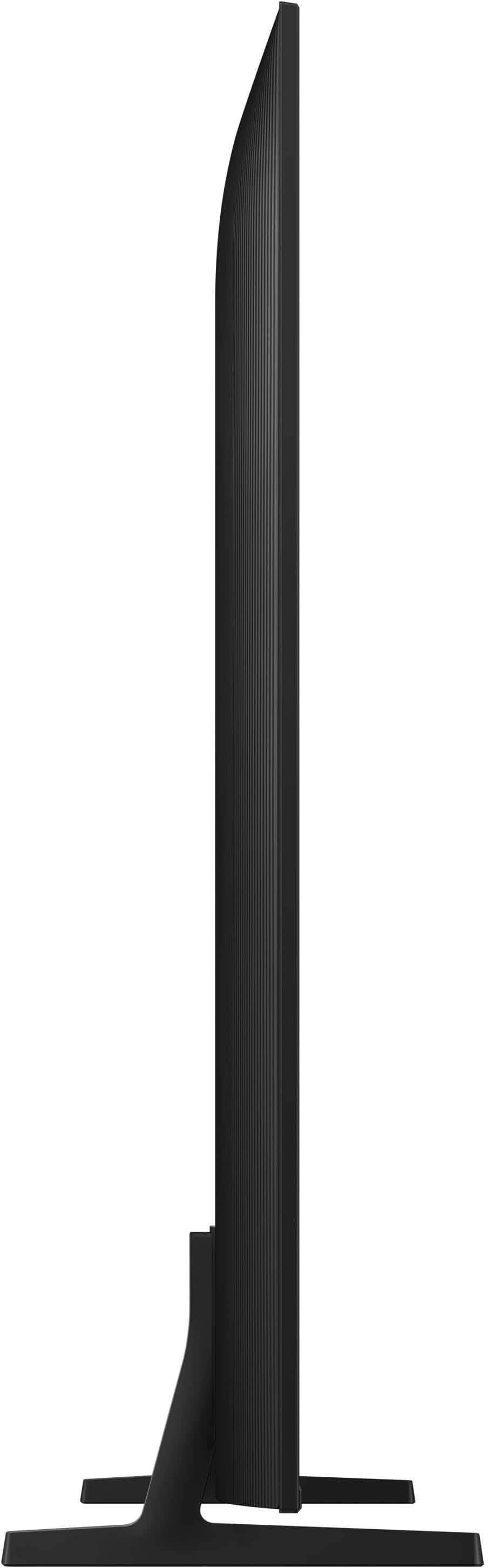
    This tv is a step down from last years. Its alot thicker and cheaply made.

    No, I would not recommend this to a friend
    • Brand response from Samsung
      Posted .

      Hi JamesKing,

      Thanks for sharing your review of Samsung’s Q7F TV. We appreciate your feedback on the design and will be sure to pass it along to the appropriate teams.

      If there’s anything we can assist with, please don’t hesitate to call us at 1-800-SAMSUNG, available daily from 8AM - 12AM EST. You can also visit the Samsung website and click on ‘Support’ for:
      • Live Chat
      • Manuals, Software, & Warranty Info

      ~ Samsung Specialist Samsung

  • Cons mentioned:
    Connectivity

    Rated 1 out of 5 stars

    Entry level

    |
    |
    Posted . Owned for less than 1 week when reviewed.
    This reviewer received promo considerations or sweepstakes entry for writing a review.

    It is a entry level TV , no optical audio, did not like it.

    No, I would not recommend this to a friend
    • Brand response from Samsung
      Posted .

      DanielC,

      Thanks for your review. If there's anything we can do to improve your experience, please reach Samsung Support at 1-800-SAMSUNG, available from 8AM - 12AM EST, seven days a week. You can also chat with one of our agents by clicking the ‘Support’ link on our website for:
      • Live Chat
      • Manuals, Software, & Warranty Info

      ~ Samsung Specialist Samsung

  • Rated 1 out of 5 stars

    Don’t recommend. Get 2024 model.

    |
    |
    Posted . Owned for 2 weeks when reviewed.
    This reviewer received promo considerations or sweepstakes entry for writing a review.

    Returned this TV after 2 weeks because the picture was terrible for sports and any movie where objects or people were moving quickly. Watching the NHL playoffs, the players were “fuzzy” and when grouped together or during a face off, there were no edge lines around the players and they blurred together. Additionally, watching any sports, the picture seemed to “drag” and it was as if the picture was trying to catch up with the camera. Also, I purchased this TV because I was told the Spectrum app only worked on Samsung TV’s. The app is. It available on this model. Do not recommend this first generation technology. I ended up getting the 2024 model for half the price and love it.

    No, I would not recommend this to a friend
    • Brand response from Samsung
      Posted .

      Hi Nick,

      We’re sorry to hear that Samsung’s Q7F TV didn’t meet your expectations for picture quality. Your feedback is appreciated and will be shared with our product team as we continue to refine our technology and user experience.

      Just to note: the Spectrum app became available on our 2025 TV lineup as of 4/25.

      Should you decide to try Samsung TVs again in the future, we’re here to help with any setup, settings, or picture adjustments to ensure the best performance. You can reach us at 1-800-SAMSUNG, available daily from 8AM - 12AM EST. You can also visit the Samsung website and click on ‘Support’ for:
      • Live Chat
      • Manuals, Software, & Warranty Info

      ~ Samsung Specialist Samsung

  • Rated 1 out of 5 stars

    They gave me the wrong size t. V.

    |
    |
    Posted . Owned for 3 weeks when reviewed.
    This reviewer received promo considerations or sweepstakes entry for writing a review.

    They gave me a 57 inch. Instead of a 65 inch, the box lied.

    No, I would not recommend this to a friend
    • Brand response from Samsung
      Posted .

      Chauntae,

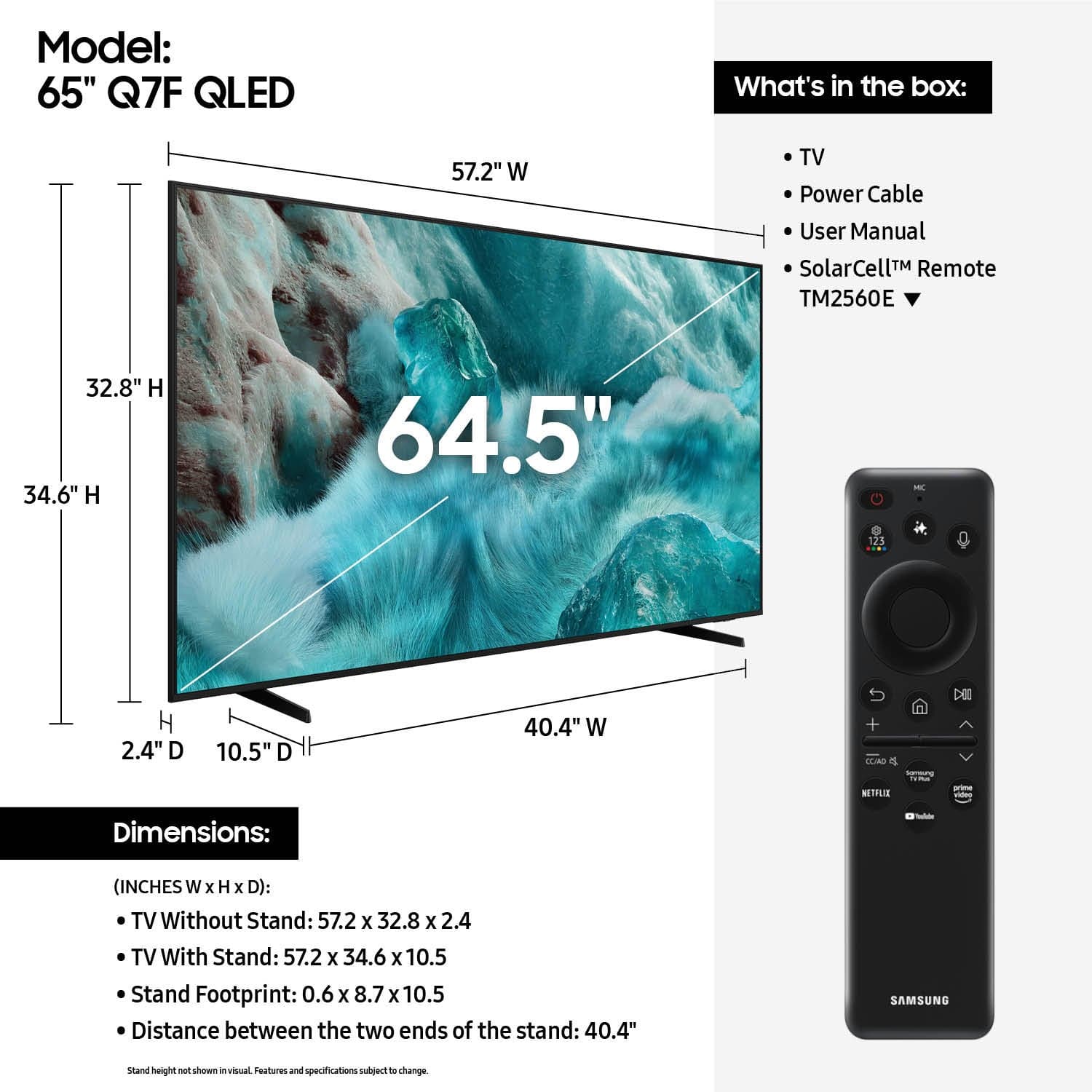
      Please know that the industry standard when measuring screen size refers to the measurement of the screen when measured diagonally. The measurements of your 65” model are 57.2" x 32.8" x 2.4" (W x H x D) when measured without the stand.

      Measurements can be found on the product page on Best Buy’s website by clicking on Specifications, then scrolling down to Dimensions.

      If you have any questions or need help, we’re always here. Call 1-800-SAMSUNG from 8AM - 12AM EST, seven days a week, or connect with a LiveChat agent anytime by selecting ‘Support’ on our website.

      ~ Samsung Specialist Samsung