Customer Ratings & Reviews





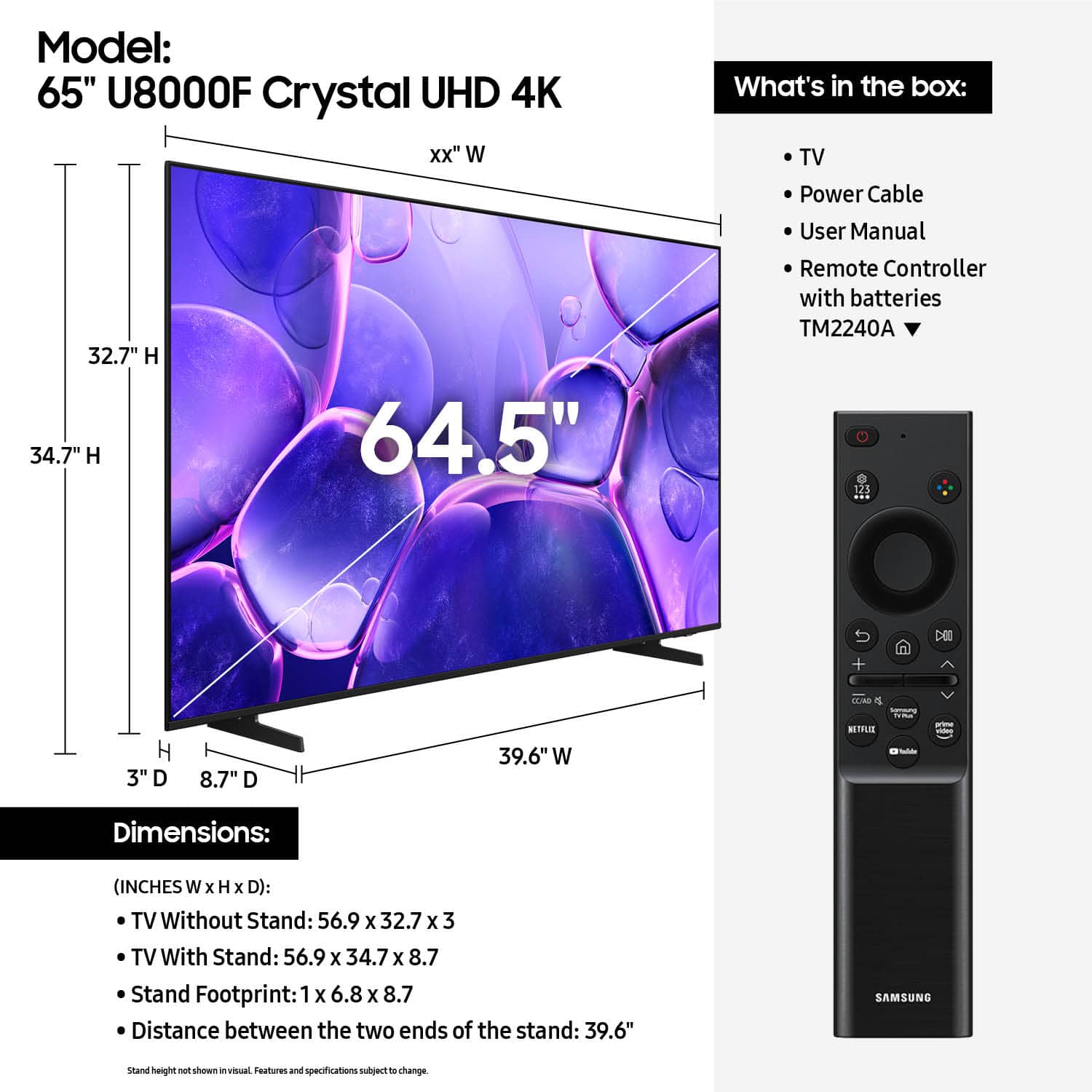












- Model:
- UN65U8000FFXZA
- SKU:
- 10187589
Rating by feature
- Picture Quality
Rating 4.8 out of 5 stars
- Sound Quality
Rating 4.6 out of 5 stars
- Brightness
Rating 4.7 out of 5 stars
to a friend
Go shopping
||Posted . Owned for 3 weeks when reviewed.This reviewer received promo considerations or sweepstakes entry for writing a review.Happy with my purchase €€$$$$$$$$$$€$$€$$$$$$$$$$$$
I would recommend this to a friendSamsung tv 2025
||Posted .This reviewer received promo considerations or sweepstakes entry for writing a review.Good tv good light lot aplicación fas wifi fast prosesador
I would recommend this to a friendLiking it.
||Posted . Owned for 3 weeks when reviewed.This reviewer received promo considerations or sweepstakes entry for writing a review.Good picture, sound and easy to navigate features.
I would recommend this to a friendLove my tv
||Posted . Owned for 3 weeks when reviewed.This reviewer received promo considerations or sweepstakes entry for writing a review.Works great, best tv ive owned l I would recommend this tv
I would recommend this to a friendGreat basic tv
||Posted .This reviewer received promo considerations or sweepstakes entry for writing a review.Great price for a tv. We aren’t looking for a ton of bells and whistles and this tv was perfect. Smart tv works well and pretty easy to use.
I would recommend this to a friendGood price for a good Tv
||Posted . Owned for 1 week when reviewed.This reviewer received promo considerations or sweepstakes entry for writing a review.its hard to find a tv up to standards that does not make you feel like its a overpriced piece of plastic with screws in it, This one to be honest might be my favorite one in pricing and specs overall, Good price for a good tv.
I would recommend this to a friend65” Samsung TV
||Posted . Owned for 1 month when reviewed.This reviewer received promo considerations or sweepstakes entry for writing a review.First time I picked up the tv the back of it was warped and the screen was popped out. Returned it the next day and got a new one. TV works great now. The plus of this TV is the short width tv stand to fit on a mantle.
I would recommend this to a friendDecent Bedroom TV
||Posted . Owned for 4 months when reviewed.This reviewer received promo considerations or sweepstakes entry for writing a review.Good bang for your buck, don't expect anything to amazing. I had a really good television from 7 years ago in my living room and the quality is better than this. Got it just as a size upgrade but didn't want to go too cheap.
I would recommend this to a friendSamsung TV
||Posted . Owned for 1 month when reviewed.This reviewer received promo considerations or sweepstakes entry for writing a review.Great price for a 65" TV. Great for streaming apps
I would recommend this to a friendEasy exchange process experience
||Posted . Owned for less than 1 week when reviewed.This reviewer received promo considerations or sweepstakes entry for writing a review.First one that I received had a broken screen, but it was an easy fix.As the gentleman who helped me with customer service set up a delivery to exchange a new for the damaged one.
I would recommend this to a friendAwesome best Buy Samsung Purchase!
||Posted . Owned for 2 weeks when reviewed.This reviewer received promo considerations or sweepstakes entry for writing a review.Great Value at Best Buy! We love this Samsung television and love the Best Buy price even more!
I would recommend this to a friendProfBuy
||Posted . Owned for 1 month when reviewed.This reviewer received promo considerations or sweepstakes entry for writing a review.EXCELLENT in all aspects -- presale, installation wait period, wait time communication, day of installation and installation staff was excellent.
I would recommend this to a friendHassel free and fast.
||Posted .This reviewer received promo considerations or sweepstakes entry for writing a review.Purchased a TV for my son in Flagstaff. I live 100 miles away. I needed for him to sign and pick up at the store. Easily done. Fast convenient service.
I would recommend this to a friendUnsure
||Posted . Owned for 1 month when reviewed.This reviewer received promo considerations or sweepstakes entry for writing a review.The tv itself is confusing. Not allowing me to switch to the xbox is becoming quite irritating. The picture and sound are great.
I would recommend this to a friendBrand response from Samsung
Posted .Hi DanielB,
We appreciate you sharing your user experience. To help you get the most from your TV, you can download the full e-Manual and more by visiting Samsung’s website then navigating to: Support > Manual & Software > TVs & Home Theater. From there, you can search for and select your U8000F TV model to view or download the available guides.
The e-Manual and Remote Control Guide are also conveniently built into your TV: Settings > Support > Tips and User Guides
If you need additional help, please contact Samsung Support at 1-800-SAMSUNG, 8AM – 12AM EST, 7 days a week. LiveChat agents are also available through the ‘Support’ link on our website.
~ Samsung Advisor
Nice Television/Delivery not so good
||Posted . Owned for 1 month when reviewed.This reviewer received promo considerations or sweepstakes entry for writing a review.The television is great but the delivery process was a nightmare. Had the delivery to the wrong address and changed the delivery date to the following week. James & Tyler save the rating.
I would recommend this to a friendBrand response from Samsung
Posted .Hi JanetK,
We appreciate your patience during the delivery process and are happy to hear you were able to resolve the delivery issues.
Please know we are available if you have any product questions or need help. You can reach us at 1-800-SAMSUNG (8AM – 12AM EST, 7 days a week), or connect with a LiveChat agent by selecting ‘Support’ on our website.
~ Samsung Advisor
Satisfaction
||Posted . Owned for 3 weeks when reviewed.This reviewer received promo considerations or sweepstakes entry for writing a review.10 This TV Is The Best The Brightness Is Very Amazing It Was Very Easy For My Husband To Mount On The Wall I Personally Think Samsung Products Are The Best I Had My 75 Inch Going On 8 Years
I would recommend this to a friendGreat TV.
||Posted . Owned for 1 month when reviewed.This reviewer received promo considerations or sweepstakes entry for writing a review.Excellent TV for the price. It has a great picture.
I would recommend this to a friendMuch needed upgrade!
||Posted . Owned for 3 weeks when reviewed.This reviewer received promo considerations or sweepstakes entry for writing a review.Looks beautiful! Easy to unpack and set up, cant wait to rock GTA 6 on this
I would recommend this to a friendWhere is everyone?
||Posted . Owned for 1 week when reviewed.This reviewer received promo considerations or sweepstakes entry for writing a review.The first TV was received broken and the return went fine. It took over 30 mins to get some help in store. Maybe its just better to shop online and pick up now.
I would recommend this to a friendWas really laggy but nice picture quality
||Posted . Owned for 1 month when reviewed.This reviewer received promo considerations or sweepstakes entry for writing a review.I loved the picture quality but the reason i returned it was because it was too laggy. It was 2 times slower then my old tv. Only difference was the size. The colors was really nice and my kids loved the games
No, I would not recommend this to a friendBrand response from Samsung
Posted .Hi MohammadK,
Thank you for your feedback. Should you ever decide to give Samsung TVs another try and have questions or need help with settings, setup, or features, please know we’re here to help. Call us at 1-800-SAMSUNG, 8AM - 12AM EST, 7 days a week.
LiveChat with an agent as well as manuals, software, and warranty info can be found at the ‘Support’ link on our Samsung website.
We hope to regain you as a customer in the future.
~ Samsung Advisor