Customer Ratings & Reviews





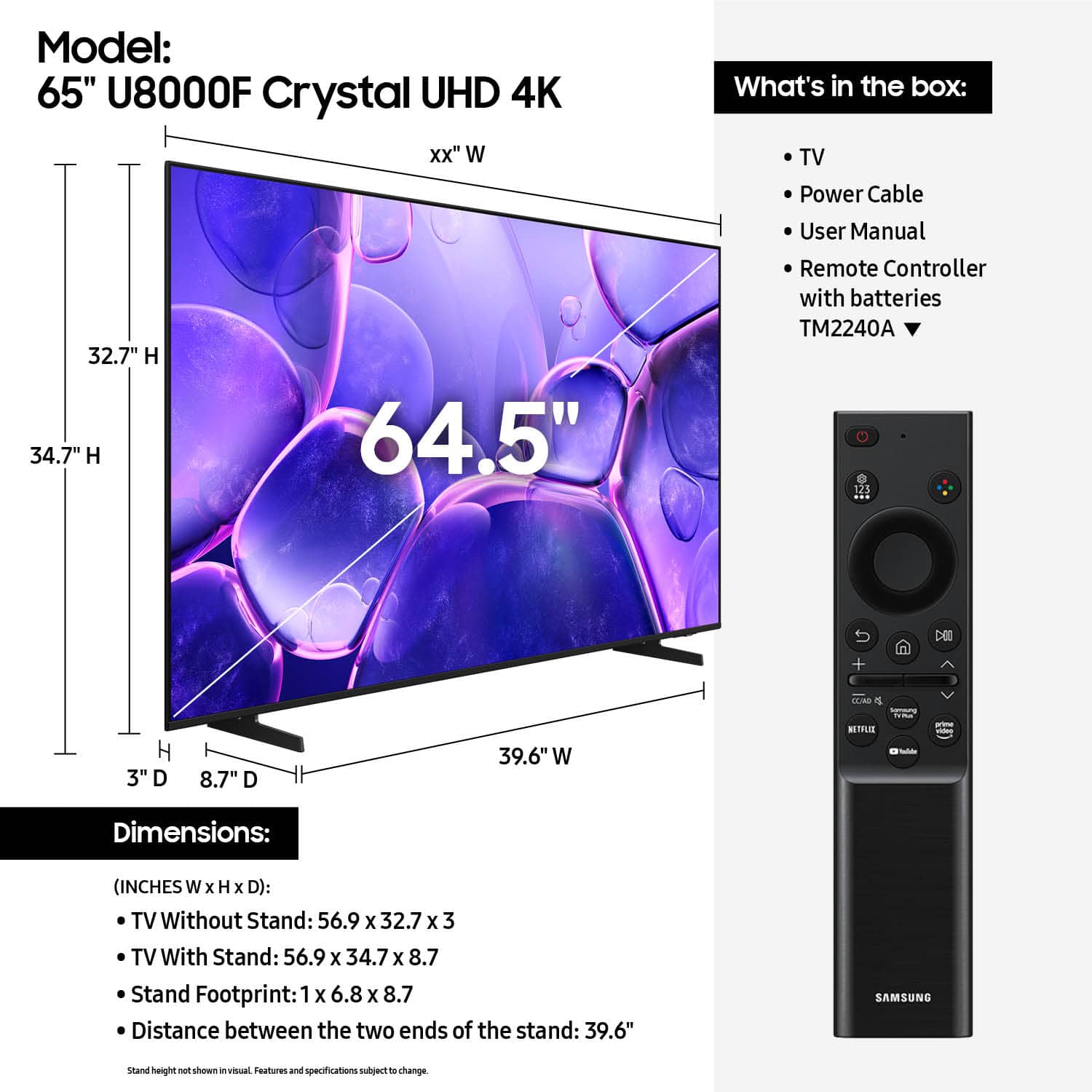












- Model:
- UN65U8000FFXZA
- SKU:
- 10187589
Rating by feature
- Picture Quality
Rating 4.8 out of 5 stars
- Sound Quality
Rating 4.6 out of 5 stars
- Brightness
Rating 4.7 out of 5 stars
to a friend
Amazing TV
||Posted . Owned for 1 week when reviewed.This reviewer received promo considerations or sweepstakes entry for writing a review.This is a Very good TV and the picture is Amazing.
I would recommend this to a friendSamsung K4
||Posted .This reviewer received promo considerations or sweepstakes entry for writing a review.I love my new TV, the resolution is very good and I like that I can handle it from my cell phone even if I'm not at home, I recommend it.
I would recommend this to a friendSamsung 65” TV
||Posted . Owned for 3 weeks when reviewed.This reviewer received promo considerations or sweepstakes entry for writing a review.Quality tv. Super price and super service. Delivery was excellent. Couldn’t ask for anything better! Will come back for more!!
I would recommend this to a friendTV review
||Posted . Owned for 1 month when reviewed.This reviewer received promo considerations or sweepstakes entry for writing a review.Great TV easy to set up mount to the wall well. Samsung app is easy to use. Remote is simple for things like that smart and Amazon prime.
I would recommend this to a friendDo NOT Recommend - Continuous Crackling Noise
||Posted . Owned for 1 month when reviewed.This reviewer received promo considerations or sweepstakes entry for writing a review.Disappointed that the tv has a continuous crackling noise. When I reached out to Samsung I was informed that they validated that these noises are completely normal. TVs use a combination of metal and plastic materials. These materials are subject to expansion and contraction due to temperature changes. Occasional creaking, popping, or cracking may be heard, even when they are not being used. Some recommendations we can share to reduce the expansion that can cause the noise are to ensure there is proper ventilation around the TV, and that there is no heating or air conditioning vent pointing in the TV direction. I am beyond disappointment because #1 I expect better quality from Samsung and #2 I bought this for my son and his wife that are just starting out and it appears that it was a low quality gift.
No, I would not recommend this to a friendBrand response from Samsung
Posted .Hi AnythonyM,
We appreciate you sharing your experience regarding an unusual sound coming from your TV. The cause may vary depending on where the sound is coming from and how your system is set up.
• If the sound is coming from your TV speakers, or if you're using an external audio device like a soundbar, please double-check that the audio cable is securely connected to the correct audio output on the external device.
• If you're using an antenna or cable connection, a weak signal may result in sound distortion. You can check your broadcast signal level by going to: Settings > Support > Device Care > Self Diagnosis > Broadcast Signal
• If the sound seems to come from the back of the TV, it may be the result of thermal expansion or contraction of the outer casing. This can cause a soft popping noise and is considered normal - it does not indicate a malfunction, and your TV remains safe to use.
We also recommend running a Sound Test to check for audio issues: Home > left directional key > Settings > Support > Device Care > Self Diagnosis > Sound Test
If the issue continues or you’d like assistance, feel free to contact Samsung Support at 1-800-SAMSUNG, 8AM – 12AM EST, 7 days a week. LiveChat and additional support resources are also available through the Support link on our website.
~ Samsung Advisor
Satified customer
||Posted . Owned for 1 month when reviewed.This reviewer received promo considerations or sweepstakes entry for writing a review.Great buy for a great price. Very pleased with my purchase and the help received in making it. The lnowledge and patience of my sales associate made the experience very palatable.
I would recommend this to a friendPoor service
||Posted . Owned for 3 weeks when reviewed.This reviewer received promo considerations or sweepstakes entry for writing a review.The product was fine. The store was horrible. I paid for it one day and went to pick it up at the store a few days later and they told me i had already picked it up. Sat at store for half hour while they sorted it out and tried to find video footage Accused me of picking it up earlier and trying to pick it up again. Which i obviosly didnt. After accusing me of 'shop lifting' I was a little upset. They were very dismissive and disrespectful considering it was their mistake. They finally admitted it was their mistake and gave me the tv. However, no apology for the accusations or my time lost waiting. I would not deal with this store again.
I would recommend this to a friendBrand response from Samsung
Posted .AllenW,
It appears your 1-star review for the Samsung U8000F TV is based on your experience with Best Buy, and we’re sorry to hear that. We recommend contacting the store directly to share your feedback.
If you need help with the TV itself, Samsung Support is available at 1-800-SAMSUNG, 8AM – 12AM EST, 7 days a week, or via LiveChat under the ‘Support’ section of our website.
~ Samsung Specialist
User friendly TV at a great price!
||Posted .This reviewer received promo considerations or sweepstakes entry for writing a review.Excellent TV. Excellent price and easy to use, even for a novice.
I would recommend this to a friendMuffled sound
||Posted .This reviewer received promo considerations or sweepstakes entry for writing a review.Muffled sound once it has been on for a few hours. Good picture, but the sound cancels out any of the good features. Thought it was the TV station, but compared it to our other TVs and the muffled sound does not happen on those.
No, I would not recommend this to a friendBrand response from Samsung
Posted .Hi TinaR,
Thank you for purchasing Samsung’s U8000F TV and for sharing your feedback regarding low volume. To start, we recommend making sure your TV is running the latest firmware, as updates can include improvements to sound performance: Home > left directional key > Settings > Support > Software Update.
If volume levels still seem too low, you can improve sound performance by adjusting a few key settings:
Sound Mode: Navigate to: Settings > All Settings > Sound > Sound Mode
• Standard: Balanced for everyday viewing
• Optimized: Enhances effects and creates a more spacious sound
• Amplify: Boosts mid and high tones, especially helpful if dialogue is difficult to hear
Auto Volume: This feature helps maintain consistent volume levels across content and input sources. Turn it on under: Settings > All Settings > Sound > Expert Settings > Auto Volume = On
You can also explore Expert Settings to fine-tune sound output with adjustments for Balance, Equalizer, and more.
For personalized support with these settings or selecting a soundbar to complement your setup, contact Samsung Support at 1-800-SAMSUNG (8AM – 12AM EST, 7 days a week) or use LiveChat via the ‘Support’ link on our website.
~Samsung Advisor
Crystal HD
||Posted . Owned for 2 weeks when reviewed.This reviewer received promo considerations or sweepstakes entry for writing a review.Looks great for the price! Wasnt heavy to mount & would recommend!!
I would recommend this to a friendVery Clear Picture
||Posted . Owned for 3 weeks when reviewed.This reviewer received promo considerations or sweepstakes entry for writing a review.Love this TV! Only wish it came with a printed manual as I am still learning symbols and buttons on the remote.
I would recommend this to a friendSamsung tv
Posted .This reviewer received promo considerations or sweepstakes entry for writing a review.I recently purchased a Samsung TV and it has exceeded my expectations in every way. The picture quality is outstanding with bright colors, deep blacks, and very sharp resolution. Watching movies and sports feels incredibly immersive, especially with the smooth motion and clear display. The smart TV features are easy to use and apps load quickly without any lag. Connecting to Wi-Fi and setting everything up only took a few minutes. The sound quality is also surprisingly good, making the overall viewing experience even better. I also love the sleek and modern design, which looks perfect in my living room. Overall, Samsung makes reliable and high-quality TVs that are definitely worth the investment. Highly recommended for anyone looking for a premium entertainment experience.
I would recommend this to a friendGood everything
||Posted . Owned for 2 weeks when reviewed.This reviewer received promo considerations or sweepstakes entry for writing a review.An excellent product, very good service, the store was very grateful and highly recommended to buy.
I would recommend this to a friendnew tv
||Posted .This reviewer received promo considerations or sweepstakes entry for writing a review.we hadd to get a new tv because the speaker on our other one was going bad....we are very pleased with our new tv
I would recommend this to a friendGood tv
||Posted .This reviewer received promo considerations or sweepstakes entry for writing a review.I had a 65 Hisense and this Samsung blows it away hi def is awesome spend the extra 100 and you won't be disappointed.
I would recommend this to a friendToo soon
||Posted . Owned for 1 month when reviewed.This reviewer received promo considerations or sweepstakes entry for writing a review.So far, the tv is good. Too soon to decide if i like it or not.
No, I would not recommend this to a friendBrand response from Samsung
Posted .Hi AverageJo,
Thank you for your purchase. If you have any questions or need help, we’re always here. Call 1-800-SAMSUNG from 8AM - 12AM EST, seven days a week, or connect with a LiveChat agent anytime by selecting ‘Support’ on our website.
~ Samsung Advisor
Great TV
||Posted .This reviewer received promo considerations or sweepstakes entry for writing a review.Excellent purchase! I’m very pleased with Nest Buy. Installation would have cost another $259.00, with Best Buy it was free.
I would recommend this to a friendSamsung
||Posted .This reviewer received promo considerations or sweepstakes entry for writing a review.Excellent tv great service really good delivery people
I would recommend this to a friendIncredible clarity
||Posted . Owned for 1 month when reviewed.This reviewer received promo considerations or sweepstakes entry for writing a review.Absolutely love this tv worth every penny, everyone now constantly comes in the room to watch tv, the clarity is incredible
I would recommend this to a friendBetter than expected.
||Posted . Owned for 1 month when reviewed.This reviewer received promo considerations or sweepstakes entry for writing a review.Better than expected quality. Only downside is that it is the basic model and you can't set a personal screensaver.
I would recommend this to a friend