Year-End SaleEnds 1/1/26. Limited quantities. No rainchecks.

Skip to content
Main Content

Customer Ratings & Reviews


Your price for this item is $731.31

Customer reviews

Rating 4.6 out of 5 stars with 602 reviews

Rating Filter

Rating by feature

  • Picture Quality

    Rating 4.7 out of 5 stars

  • Sound Quality

    Rating 4.5 out of 5 stars

  • Brightness

    Rating 4.7 out of 5 stars

92%
would recommend
to a friend
The vast majority of our reviews come from verified purchases. Reviews from customers may include My Best Buy members, employees, and Tech Insider Network members (as tagged). Select reviewers may receive discounted products, promotional considerations or entries into drawings for honest, helpful reviews.
Page 29 Showing 561-580 of 602 reviews
  • Rated 3 out of 5 stars

    Sound

    |
    |
    Posted .
    This reviewer received promo considerations or sweepstakes entry for writing a review.

    Would recommend getting a sound bar the sound is kinda low but other than that it’s a good tv with good graphics

    I would recommend this to a friend
    • Brand response from Samsung
      Posted .

      Hi Lewis,

      Thank you for your review. If the volume on your Samsung DU7200 TV seems too low, we recommend checking for firmware updates: Settings > Support > Software Update > Update Now

      Then, go to: Settings > All Settings > Sound > Sound Mode and try Amplify to boost dialogue and upper tones.

      To maintain consistent volume across channels and apps, enable Auto Volume under: Settings > All Settings > Sound > Expert Settings > Auto Volume = On

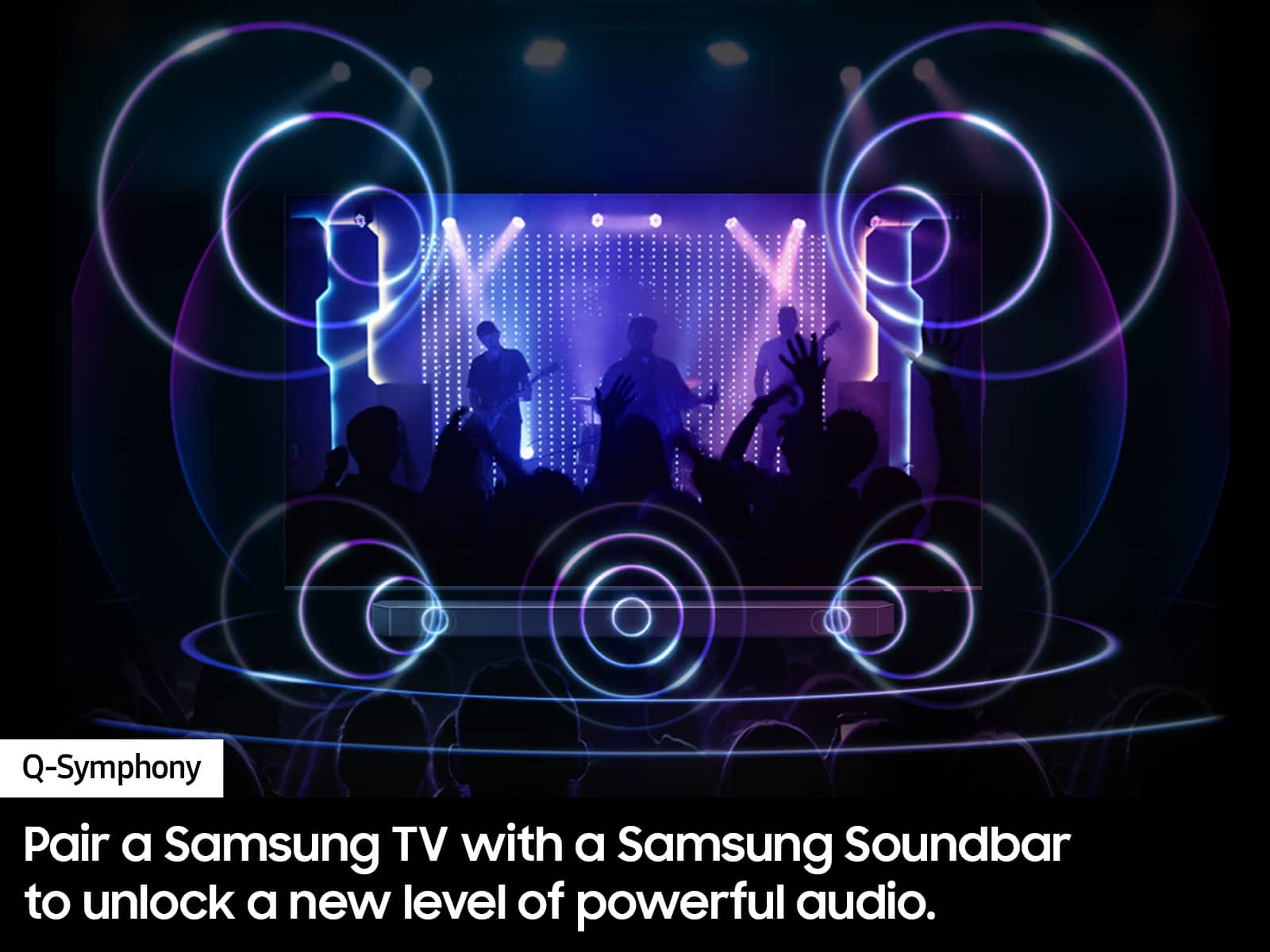
      Samsung Q- and S-Series Soundbars with Q-Symphony can also enhance your sound experience. For further help, please contact Samsung Support at 1-800-SAMSUNG (8AM – 12AM EST, 7 days a week) or use LiveChat via the ‘Support’ link on our website.

      ~ Samsung Advisor Samsung

  • Rated 4 out of 5 stars

    Loved it

    |
    |
    Posted . Owned for 1 month when reviewed.
    This reviewer received promo considerations or sweepstakes entry for writing a review.

    Very happy with my purchase got it on sale for the price and the function is pristine

    I would recommend this to a friend
  • Rated 5 out of 5 stars

    Best TV

    |
    |
    Posted . Owned for 3 weeks when reviewed.
    This reviewer received promo considerations or sweepstakes entry for writing a review.

    Best tv ever. i will buy 55 inch for my sister too

    I would recommend this to a friend
  • Rated 5 out of 5 stars

    Must have!

    |
    |
    Posted . Owned for 1 week when reviewed.
    This reviewer received promo considerations or sweepstakes entry for writing a review.

    Love it! Super thin and very bright! Nice resolution!

    I would recommend this to a friend
  • Rated 5 out of 5 stars

    Tv

    |
    |
    Posted . Owned for 3 weeks when reviewed.
    This reviewer received promo considerations or sweepstakes entry for writing a review.

    Great quality and great customer service from Best Buy

    I would recommend this to a friend
  • Rated 5 out of 5 stars

    Tv

    |
    |
    Posted . Owned for 1 week when reviewed.
    This reviewer received promo considerations or sweepstakes entry for writing a review.

    Me and my family love the tv everything about it is great

    I would recommend this to a friend
  • Rated 4 out of 5 stars

    Good option

    |
    |
    Posted . Owned for 1 month when reviewed.
    This reviewer received promo considerations or sweepstakes entry for writing a review.

    Good tv could be better picture quality. Nice entry level.

    I would recommend this to a friend
  • Rated 4 out of 5 stars

    Good but can be better

    |
    |
    Posted . Owned for 1 week when reviewed.
    This reviewer received promo considerations or sweepstakes entry for writing a review.

    Good tv, good quality control differences of cu8000 is can't start the tv with Google assistance or alexa

    I would recommend this to a friend
    • Brand response from Samsung
      Posted .

      Hi RichardG,

      Thank you for your purchase and for sharing your experience with the DU7200 with us! You are correct; the DU7000 does not have voice assistants built in. However, they do work with Alexa. You can connect them to your existing Alexa device to ask them to turn on your TV, change channels, control volume, and more.

      You can turn on your Samsung TV with your Alexa device but you need to follow these steps:

      1. Download the Smartthings App on your Android or Apple device and log in with the same account that you are signed into on your Samsung TV.
      2. On the app, you will need to add your TV as a device if you have not already done so.
      3. Using the Amazon Alexa app on your Android or Apple device, connect the app to Smartthings, which should be under Devices> Your Smart Home Skills. Follow the prompts to sign in to your Samsung Account and enable the device.
      4. Please ensure both devices are connected to the same Wi-fi.

      After following the prompts, you should be connected and can now control your Samsung TV with your Alexa device!

      I hope this helps! If you ever need help, please do not hesitate to contact us at 1-800-SAMSUNG, 8 AM—12 AM EST, seven days a week. Our LiveChat agents are also available by clicking on the ‘Support’ link on our website.

      ~ Samsung Advisor Samsung

  • Rated 5 out of 5 stars

    Samsung 75 “ television

    |
    |
    Posted . Owned for 1 month when reviewed.
    This reviewer received promo considerations or sweepstakes entry for writing a review.

    My tv is great it has all of everything downloaded

    I would recommend this to a friend
  • Rated 3 out of 5 stars

    Nit very bright

    |
    |
    Posted .
    This reviewer received promo considerations or sweepstakes entry for writing a review.

    Over all its dim but I bought it on sale and i think it was worth the sale price.

    No, I would not recommend this to a friend
    • Brand response from Samsung
      Posted .

      Hi sekai,

      We’re sorry to hear that the picture on your Samsung DU7200 TV appears too dark. If this isn’t meeting your expectations, there are several settings you can adjust to improve the overall brightness and clarity of your screen.

      First, try disabling certain energy-saving features that may be dimming the screen automatically. Go to: Settings > All Settings > General & Privacy > Power and Energy Saving, then turn off Brightness Optimization, Energy Saving Solution, Motion Lighting, and/or Contrast Enhancer.

      Next, adjust the Picture Mode to better match your viewing environment: Settings > All Settings > Picture > Picture Mode and choose from the following:
      • Dynamic – Brighter and clearer for well-lit rooms
      • Standard – Balanced for most environments
      • Movie – Ideal for watching in a dark room
      • Eco – Designed for energy savings
      • Filmmaker Mode – Preserves the creator’s original intent

      You can also manually adjust brightness by going to: Settings > All Settings > Picture > Expert Settings > Brightness. Use the slider to set a level that suits your preferences (0–50).

      Finally, we recommend making sure your TV has the latest software installed: Settings > Support > Software Update > Update Now

      We hope these tips help improve your viewing experience. If you need further assistance with setup or adjustments, feel free to contact Samsung Customer Support at 1-800-SAMSUNG, available daily from 8AM - 12AM EST. You can also visit the Samsung website and click on ‘Support’ for:
      • Live Chat
      • Manuals, Software, & Warranty Info

      ~ Samsung Advisor Samsung

  • Rated 3 out of 5 stars

    As expected!

    |
    |
    Posted . Owned for 1 month when reviewed.
    This reviewer received promo considerations or sweepstakes entry for writing a review.

    The screen was busted on the tv once i opened it at home. Regurned it back to store with no hassle.

    I would recommend this to a friend
    • Brand response from Samsung
      Posted .

      Hi 2blessed,

      Thank you for letting us know that you received a broken DU7200 TV upon delivery. We appreciate your patience in having to deal with the hassle of an exchange. If there’s anything we can ever help with, please call us at 1-800-SAMSUNG, 8 AM - 12 AM EST, seven days a week. Or visit us on the Samsung website and click on the ‘Support’ link for:
      1) LiveChat
      2) Manuals, Software, & Warranty Info

      ~ Samsung Advisor Samsung

  • Rated 1 out of 5 stars

    Poor Quality Tv

    |
    |
    Posted . Owned for 1 month when reviewed.
    This reviewer received promo considerations or sweepstakes entry for writing a review.

    Very disappointed with this series Samsung. Picture 'moved' in weird ways, and any show movement caused the picture to turn blurry. Did some research on it, and felt the poor quality was due to the refresh rate. Returned this tv in exchange for a better quality Samsung, and it was perfect. Recommend a 120 hz, not a 60 hz.

    No, I would not recommend this to a friend
    • Brand response from Samsung
      Posted .

      Hi DonnieS,

      Thank you for choosing Samsung and staying loyal to the brand. If there's ever anything we can do for you, please do not hesitate to reach out to us. Just call us at 1-800-SAMSUNG, 8 AM - 12 AM EST, seven days a week. Our LiveChat agents are also available by clicking on the ‘Support’ link on our website.

      ~ Samsung Advisor Samsung

  • Rated 3 out of 5 stars

    Samsung tv

    |
    |
    Posted .
    This reviewer received promo considerations or sweepstakes entry for writing a review.

    It's ok for the money sound could be better over all it's ok

    I would recommend this to a friend
    • Brand response from Samsung
      Posted .

      Hi EricM,

      Thank you for sharing your thoughts regarding the DU7200 TV’s sound quality. We recommend adjusting the Sound Settings to improve your experience. You can change the Sound Mode by going to Settings > All Settings> Sound > Sound Mode.

      You can also customize the sound with Expert Settings by going to Settings > All Settings> Sound > Expert Settings.

      To assist you with possible sound settings adjustments for a better audio experience or choosing a Samsung Soundbar to complement your viewing enjoyment, please reach out to us at 1-800-SAMSUNG, 8 AM - 12 AM EST, seven days a week. Our LiveChat agents are also available by clicking on the ‘Support’ link on our website.

      ~ Samsung Advisor Samsung

  • Rated 1 out of 5 stars

    Lied too open box DONT BUY Ever

    |
    |
    Posted . Owned for 1 month when reviewed.
    This reviewer received promo considerations or sweepstakes entry for writing a review.

    Didn’t come with tv legs, power cord, or remote after I was promised and opened the box in store. They send me a completely different TV then the one I bought in store and told me I needed to return it and it was my fault and I would be charged a Feee as they delivered the wrong tv to me. I ended up spending an extra $120 on a new remote, legs, and a power cord so I could use the thing. Best Buy never made this right and told me it was my fault basically. I will never be shopping here again and I would never buy anything open box from them

    No, I would not recommend this to a friend
    • Brand response from Samsung
      Posted .

      Hi DylanB,

      I'm sorry to hear about your open-box experience. Please reach out to Best Buy directly to assist you.

      If you ever have questions or need support, we’re here to help. Call us at 1-800-SAMSUNG, available from 8AM - 12AM EST, seven days a week. You can also connect with a LiveChat agent by clicking the ‘Support’ link on our website.

      ~ Samsung Advisor Samsung

  • Rated 3 out of 5 stars

    Ehhh..

    |
    |
    Posted . Owned for 1 month when reviewed.
    This reviewer received promo considerations or sweepstakes entry for writing a review.

    the sound goes in and out sometimes and have to go unplug and plug back into the wall and it works

    No, I would not recommend this to a friend
    • Brand response from Samsung
      Posted .

      Hi MattC,

      Thank you for reaching out to us. If you are experiencing sound issues, I recommend performing a Sound Test. To do so, go to Support > Self Diagnosis > Start Sound Test.

      Also, please ensure you are running the latest Firmware update. Go to Settings> Support> Software Update.

      If you need more help, Samsung is here for you! Please call us at 1-800-SAMSUNG, 8 AM - 12 AM EST, seven days a week. Our LiveChat agents are also available by clicking on the ‘Support’ link on our website.

      ~ Samsung Advisor Samsung

  • Rated 1 out of 5 stars

    Bad tv

    |
    |
    Posted . Owned for 9 months when reviewed.
    This reviewer received promo considerations or sweepstakes entry for writing a review.

    Geek squad protection plan sucks! We purchased this TV and image went bad. They blamed it on physical damage and refused to fix it. Image wasn’t that great.

    No, I would not recommend this to a friend
  • Rated 2 out of 5 stars

    Disappointing

    |
    |
    Posted . Owned for 4 months when reviewed.
    This reviewer received promo considerations or sweepstakes entry for writing a review.

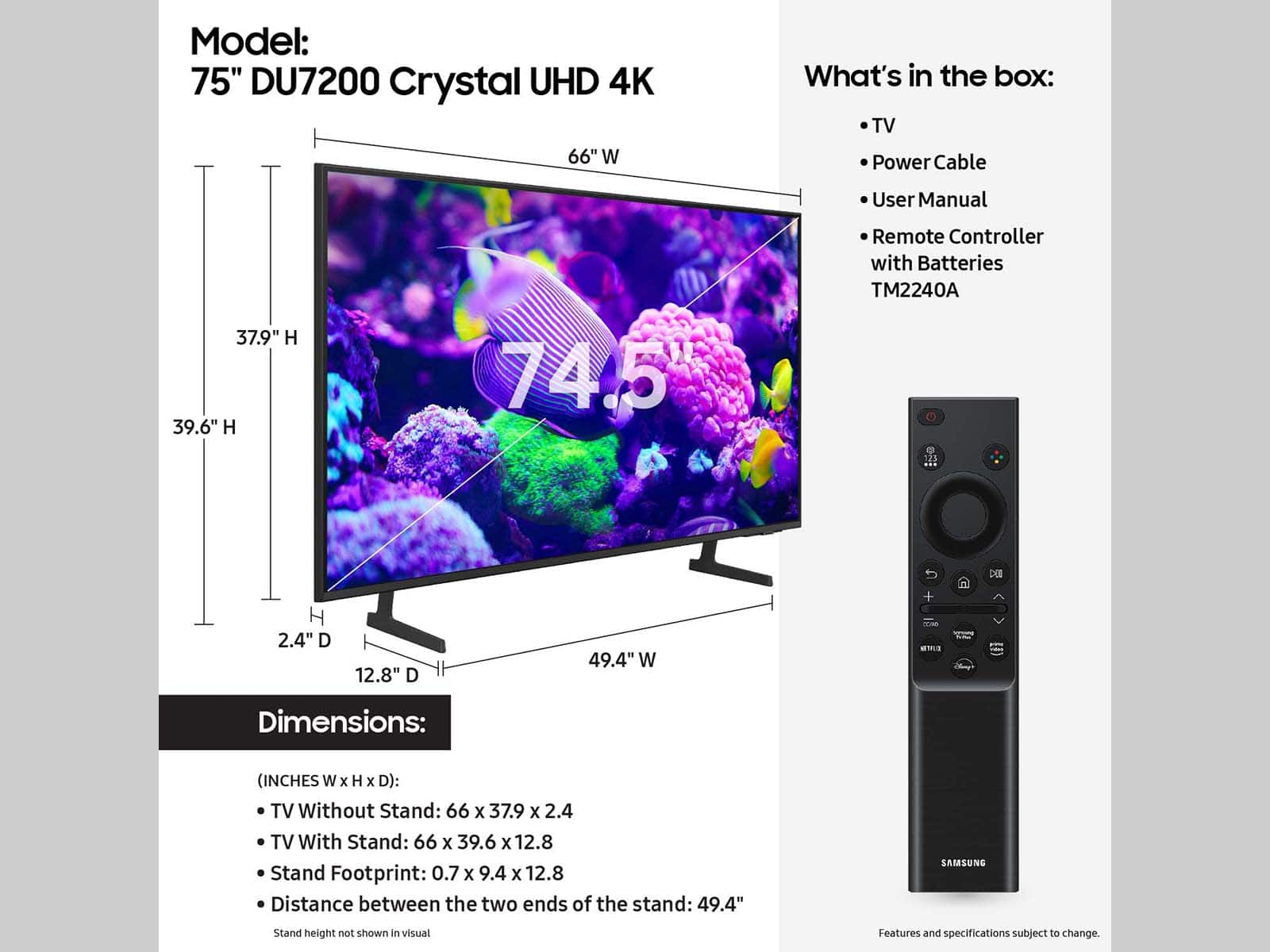
    For the price, this is a bare bones TV. Limited outputs. No optical, 2 HDMI. Wouldn't pair with Samsung speaker system

    No, I would not recommend this to a friend
    • Brand response from Samsung
      Posted .

      Hi MichaelC,

      I'm sorry you are not satisfied with your DU7200 TV. The DU72000F TV offers 3 HDMI ports and is Bluetooth and Wi-Fi capable, allowing a seamless connection across multiple devices at a time. If your external device requires an Optical port, we recommend utilizing an HDMI to Optical Converter. These can be found at your local electronics store. Please also keep in mind that an Optical port can be found on our DU8000F Series and above.

      If you need more help, Samsung is here for you! Please call us at 1-800-SAMSUNG, 8 AM - 12 AM EST, seven days a week. Our LiveChat agents are also available by clicking on the ‘Support’ link on our website.

      ~ Samsung Advisor Samsung

  • Rated 1 out of 5 stars

    Lots of issues

    |
    |
    Posted . Owned for 3 months when reviewed.
    This reviewer received promo considerations or sweepstakes entry for writing a review.

    Any tv is better than the Samsung this year. Pick something else.

    No, I would not recommend this to a friend
    • Brand response from Samsung
      Posted .

      Hi RachelL,

      Thank you for your feedback on the DU7200 TV. Please know we are always available and happy to assist you with any Settings adjustments or troubleshooting on your TV. Just call us at 1-800-SAMSUNG, 8 AM - 12 AM EST, seven days a week. Our LiveChat agents are also available by clicking on the ‘Support’ link on our website.

      ~ Samsung Advisor Samsung

  • Rated 1 out of 5 stars

    What happened to Samsung quality

    |
    |
    Posted . Owned for 1 month when reviewed.
    This reviewer received promo considerations or sweepstakes entry for writing a review.

    A dud,shows a good picture but freezes up.just when the movie is getting good.

    No, I would not recommend this to a friend
    • Brand response from Samsung
      Posted .

      Hi Rock,

      Thank you for letting us know about the issues you are having with your DU7200 TV freezing.

      For optimal performance, we ask that you please ensure you've got the latest firmware version installed on your TV. You can check this by going to Home > Menu > Settings > Support > Software Update.

      You may also want to further optimize performance with the self-diagnostic tool, which checks memory, frees up unused cached memory, and closes background apps. Go to: Home > Menu > Settings > Support > Device Care > Start Device Care.

      If you need more help, Samsung is here for you! Please call us at 1-800-SAMSUNG, 8 AM - 12 AM EST, seven days a week. Our LiveChat agents are also available by clicking on the ‘Support’ link on our website.

      ~ Samsung Advisor Samsung

  • Rated 1 out of 5 stars

    Bad streaming tv

    |
    |
    Posted . Owned for 6 months when reviewed.
    This reviewer received promo considerations or sweepstakes entry for writing a review.

    If you plan on streaming don’t buy this tv. Hulu has been glitching, Peacock is not supported so has no functionality during anything live. Have had terrible time with streaming experience.

    No, I would not recommend this to a friend
    • Brand response from Samsung
      Posted .

      Hi Dromens,

      Thank you for reaching out to us. Please know Peacock is supported on the DU7200 TV and I have a few troubleshooting steps for you to try and resolve any glitches you are experiencing while streaming through apps.

      1. Cold boot the TV by holding down the power button on your remote for 5+ seconds until the TV turns off and back on.
      2. Delete and reinstall the app to clear out any potential corrupted data.
      3. Reset Smart Hub to remove any app conflicts (Settings > Support > Device Care > Reset Smart Hub).

      Please also make sure your TV has the latest firmware installed: Settings > Support > Software Update > Update Now.

      If the issue continues, please reach Samsung Support at 1-800-SAMSUNG, 8AM – 12AM EST, 7 days a week. LiveChat and additional resources are available through the ‘Support’ link on our website.

      ~ Samsung Advisor Samsung