Customer Ratings & Reviews










- Model:
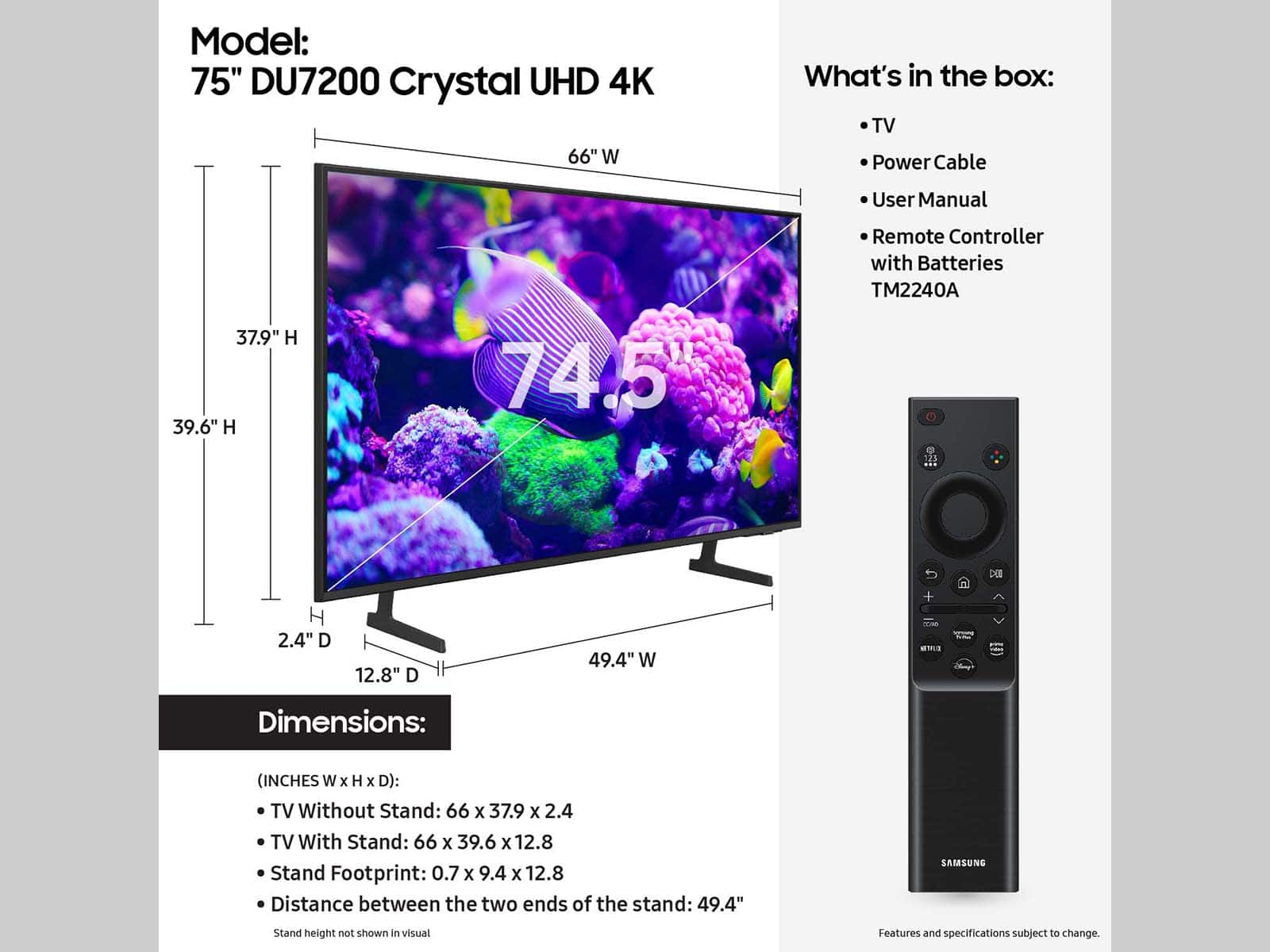
- UN75DU7200FXZA
- SKU:
- 10413043
Rating by feature
- Picture Quality
Rating 4.7 out of 5 stars
- Sound Quality
Rating 4.5 out of 5 stars
- Brightness
Rating 4.7 out of 5 stars
to a friend
Don’t buy this tv
||Posted . Owned for 3 weeks when reviewed.This reviewer received promo considerations or sweepstakes entry for writing a review.Not a good tv. Picture is bad. Very disappointed with this product
No, I would not recommend this to a friendBrand response from Samsung
Posted .Hi ChrisO,
It’s unfortunate to hear you’re not fully satisfied with your DU7200 TV’s image quality. Below are a few settings that I recommend adjusting:
Go to Home > Settings > All Settings > Picture > Picture Mode and select the mode that best fits your usage:
1) Standard: Default mode suitable for general viewing environments.
2) Natural: Reduces eye strain for a comfortable viewing experience.
3) Movie: Most suitable for watching TV or movies in a dark room.
4) Dynamic: Makes the picture brighter and clearer in bright viewing environments.
5) Filmmaker Mode: You can watch the source content (e.g., movie) as it is. If the image is defined as Filmmaker Mode, it will automatically switch to Filmmaker Mode while watching.
You can also go to Settings > All Settings> Picture > Expert Settings > to manually fine-tune your image.
If you need more help, Samsung is here for you. Call us at 1-800-SAMSUNG, 8 AM - 12 AM EST, seven days a week. Our LiveChat agents are also available by clicking on the ‘Support’ link on our website.
~ Samsung Advisor
N/A
||Posted . Owned for 2 weeks when reviewed.This reviewer received promo considerations or sweepstakes entry for writing a review.So cheap plastic not satisfied so return it please check before buy
No, I would not recommend this to a friendBrand response from Samsung
Posted .Hi there,
I'm very sorry to hear that you were not satisfied with the quality of the DU7200 TV. Your feedback is incredibly important to us and will be shared with our internal teams.
Should you ever decide to give Samsung TVs another try and have questions or need help with settings, setup, or features, we would be glad to help. Call us at 1-800-SAMSUNG, 8 AM – 12 AM EST, seven days a week. LiveChat with an agent, as well as manuals, software, and warranty info, can be found at the ‘Support’ link on our Samsung website.
~Samsung Advisor
Amazing tv!
Posted .This reviewer received promo considerations or sweepstakes entry for writing a review.Crystal clear quality and amazing frame rate. Excellent for everyday tv streaming but the quality looks to excel in sports and movies in my opinion. All around love the tv n would do it again for sure!
I would recommend this to a friendHD tv
Posted .This reviewer received promo considerations or sweepstakes entry for writing a review.Omg so the Hd so clear and surprisingly cheap. I would definitely buy this tv over and over
I would recommend this to a friend75 inch Samsung television
Posted .This reviewer received promo considerations or sweepstakes entry for writing a review.Its a great television. It has a very clear picture. The sound is a little low and it would probably need a sound bar. Other than that Its pretty good.
I would recommend this to a friendGood
Posted .This reviewer received promo considerations or sweepstakes entry for writing a review.Good Tv To Watch Any type of show So Go To Best Buy And Buy This TV
I would recommend this to a friendSamsung du7200
Posted .This reviewer received promo considerations or sweepstakes entry for writing a review.Great picture,great price. Easy setup. Two thumbs up.
I would recommend this to a friendNo digital optical out port! Really!?? .
Posted .This reviewer received promo considerations or sweepstakes entry for writing a review.Good luck hooking this up to any sound system older than 2009. You have to use the HDMI (Arc) converter box to hook up to any audio source that doesn't have special ARC-HDMI port, which didn't become available on receivers till 2009. Only 2 HDMI ports, and you have to use one of them to hook up external audio. Shame on you Samsung
No, I would not recommend this to a friendBrand response from Samsung
Posted .Hi Rad92,
Thank you for choosing the Samsung DU7200 TV and for taking the time to provide us with detailed feedback on your experience. Your opinion is important to us and will be shared with our internal product teams.
The DU72000F TV offers 3 HDMI ports and is Bluetooth and Wi-Fi capable, allowing a seamless connection across multiple devices at a time. Please also keep in mind that an Optical port can be found on our DU8000F Series and above.
If you have any questions or would like any support with your audio experience or choosing a Samsung Soundbar to complement your viewing enjoyment, please reach out to us at 1-800-SAMSUNG, 8 AM - 12 AM EST, seven days a week. Our LiveChat agents are also available by clicking on the ‘Support’ link on our website.
~Samsung Advisor
Samsung 75”
Posted .This reviewer received promo considerations or sweepstakes entry for writing a review.Remote is terrible. Picture quality is very decent. Sound does not really change between volumes 75-100. Please note that Samsung also does not have a deal with NBA, so as a sports fan you cannot get NBA league pass on this TV unless you purchase it through Amazon Prime
No, I would not recommend this to a friendBrand response from Samsung
Posted .Hi user123761,
Thank you for your feedback. I have a few recommendations that may improve your experience.
First, there are several volume features you can adjust, which may improve your audio experience.
1) Auto Volume automatically adjusts the sound to a certain level when changing channels or switching to another external input. Go to Settings > All Settings> Sound > Expert Settings > Auto Volume.
2) Adaptive Sound automatically adjusts to a specific volume level while watching TV. The TV analyzes your volume usage history by time period to automatically adjust the volume when you use an app or switch to an external input source. Go to Settings> All Settings> Sound> Sound Mode> Adaptive Sound.
3) Several Sound Modes are likewise available to meet your personal preferences: Home > Settings > All Settings> Sound > Sound Mode.
Next, If the colors on your TV are correct but just a little too dark or bright, you can try adjusting Picture Modes, Contrast, Brightness, or Sharpness settings.
For darker scenes, I recommend Dynamic Picture Mode, which makes pictures brighter and clearer in bright viewing environments. Go to Settings > All Settings> Picture > Picture Mode > Dynamic.
Or you can manually adjust the Brightness by pressing the HOME button on your remote, then navigating to Settings > All Settings> Picture > Expert Settings.
You may also want to disable Power Saving Mode, which automatically adjusts the brightness to reduce the TV’s power consumption. Go to Settings > All Settings> General > Eco Solution> Power Saving Mode.
I hope these tips help you enjoy your new product.
You can contact us for further help at 1-800-SAMSUNG, 8 AM - 12 AM EST, seven days a week. Our LiveChat agents are also available by clicking on the ‘Support’ link on our website.
~ Samsung Advisor
Tv
Posted .This reviewer received promo considerations or sweepstakes entry for writing a review.I like Samsung products, picture quality and price both are great
I would recommend this to a friendBest TV Ever!
Posted .This reviewer received promo considerations or sweepstakes entry for writing a review.This TV is awesome. I love the fact that it has the cloud gaming. I play Fortnite on the TV with no console. The graphics are amazing. I have it hardwired into the LAN and there is no latency. Great TV for the price.
I would recommend this to a friend5 star service
Posted .This reviewer received promo considerations or sweepstakes entry for writing a review.Absolutely the best service hands down. Product 5 star rating! If you're going to buy a tv you must buy it at Best Buy! Extremely happy.
I would recommend this to a friendGreat tv
Posted .This reviewer received promo considerations or sweepstakes entry for writing a review.Great tv but there’s problems with the backlight and the tv remote is unresponsive
No, I would not recommend this to a friendBrand response from Samsung
Posted .Hi Noone,
Thank you for sharing your thoughts on the picture quality of your DU7200 TV. To ensure you’ve got the latest image quality updates, please confirm that your TV is up to date with the latest firmware version. You can check by going to: Home > Menu > Settings > Support > Software Update.
If the picture you’re seeing is still not to your liking after updating firmware, there are several picture settings you may want to try adjusting.
Go to Home > left direction button > Settings > All Settings > Picture > Picture Mode and select the mode that best fits your usage:
Standard: Is the default mode suitable for general viewing environments
Dynamic: Makes the picture brighter and clearer in bright viewing environments
Eco: Provided to save energy
Movie: Suitable for watching TV or movies in a dark room
Filmmaker Mode: Provides source content just as the creators intended. If the image is defined as Filmmaker Mode, it’ll automatically switch to Filmmaker Mode while watching.
You can also fine-tune your picture with expert settings such as brightness, contrast, sharpness, and more (All Settings > Picture > Expert Settings).
For further assistance with settings adjustments, please contact Samsung Customer Support at 1-800-SAMSUNG, 8 AM - 12 AM EST, seven days a week. Our LiveChat agents are also available by clicking on the ‘Support’ link on our website.
~ Samsung Advisor
replacement
Posted .This reviewer received promo considerations or sweepstakes entry for writing a review.Not nearly as nice as my Q70D, but decent for the price.
I would recommend this to a friendBrand response from Samsung
Posted .Hi DeanW,
Thank you for being a loyal Samsung customer. Please know there are several Settings available that may improve your experience with the DU7200 TV.
First, let's ensure you are running the latest Firmware. Go to Settings> Support> Software Update.
Next, there are several picture and sound settings that you can adjust to best fit what you are watching. Go to Home > Settings > All Settings > Picture > Picture Mode and select the mode that best fits your usage:
1) Standard: Default mode suitable for general viewing environments.
2) Natural: Reduces eye strain for a comfortable viewing experience.
3) Movie: Most suitable for watching TV or movies in a dark room.
4) Dynamic: Makes the picture brighter and clearer in bright viewing environments.
5) Filmmaker Mode: You can watch the source content (e.g., movie) as it is. If the image is defined as Filmmaker Mode, it will automatically switch to Filmmaker Mode while watching.
You can also go to Settings > All Settings> Picture > Expert Settings > to manually fine-tune your image.
For sound adjustments, go to Settings> All Settings> Sound.
If you’d like more help with settings, we are always happy to help! Call us at 1-800-SAMSUNG, 8 AM - 12 AM EST, seven days a week. Or visit us on the Samsung website and click on the ‘Support’ link for:
1) LiveChat
2) Manuals, Software, & Warranty Info
~ Samsung Advisor
Samsung
Posted .This reviewer received promo considerations or sweepstakes entry for writing a review.Samsung system is confuse to navigate……………………………..
I would recommend this to a friendBrand response from Samsung
Posted .Hi Patru27,
Thank you for choosing Samsung and for your feedback on the DU7200 TV. We understand sometimes there is a learning curve when you get a new TV! This is why we created step-by-step guides, to make it easier for you. To learn about your TV go to https://www.samsung.com/us/support/answer/ANS00062199/.
We are also always available and happy to help you with any questions you may have. You can call us at 1-800-SAMSUNG, 8 AM - 12 AM EST, seven days a week. Our LiveChat agents are also available by clicking on the ‘Support’ link on our website.
~Samsung Advisor
not happy
Posted .This reviewer received promo considerations or sweepstakes entry for writing a review.It has a mind of its own. turning it on is a test sometimes its easy and sometimes it will not expand from the little box. I did not get a instruction book, so i am on my own.
No, I would not recommend this to a friendBrand response from Samsung
Posted .Hi GwyendellaW,
Thank you for reaching out to us. We understand sometimes there is a learning curve when you get a new TV! This is why we created step-by-step guides, to make it easier for you. To learn about your TV go to https://www.samsung.com/us/support/answer/ANS00062199/.
To download the manual and quick start guide, please follow this link: https://www.samsung.com/us/support/downloads/?model=N0060577&modelCode=UN75DU7200BXZA or by going to our website and clicking Support.
If you need more help, Samsung is here for you. Please call us at 1-800-SAMSUNG, 8 AM - 12 AM EST, seven days a week. Our LiveChat agents are also available by clicking on the ‘Support’ link on our website.
~Samsung Advisor