Customer Ratings & Reviews

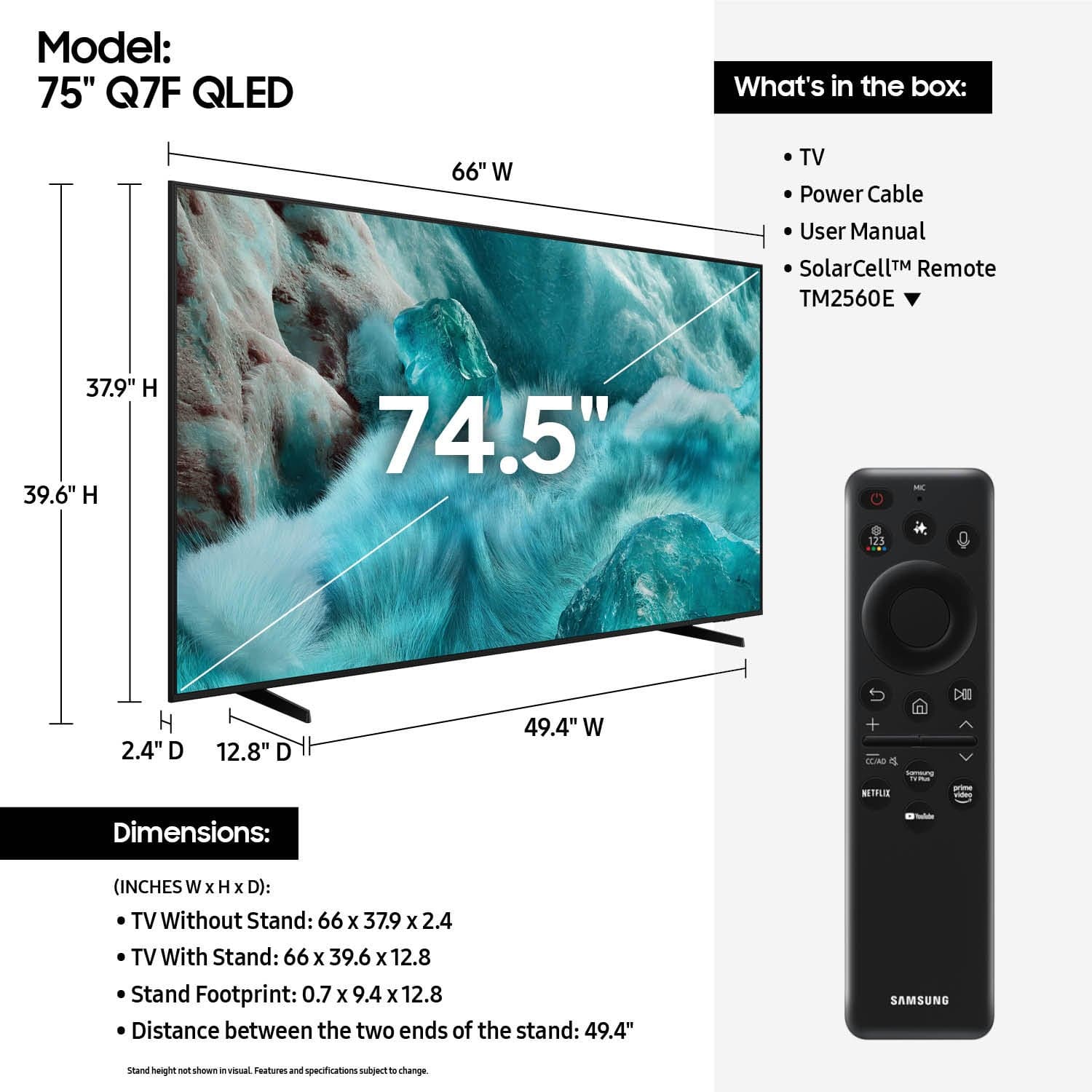











- Model:
- QN75Q7FAAFXZA
- SKU:
- 10187650
Rating by feature
- Picture Quality
Rating 4.8 out of 5 stars
- Sound Quality
Rating 4.6 out of 5 stars
- Brightness
Rating 4.8 out of 5 stars
Samsung 75 in
||Posted . Owned for 3 weeks when reviewed.This reviewer received promo considerations or sweepstakes entry for writing a review.So far we are very happy with this tv. The setup was not yo difficult and came with online assistance.
I would recommend this to a friendSad tv good customer service
||Posted . Owned for less than 1 week when reviewed.This reviewer received promo considerations or sweepstakes entry for writing a review.Tv screen went out with in 24 hours of setting it up best buy worked with me and got me a new tv
No, I would not recommend this to a friendBrand response from Samsung
Posted .CordellL,
Thank you for sharing your experience with Samsung's Q7F TV. Should you ever need assistance with your TV, Samsung is here for you. Reach out by calling 1-800-SAMSUNG between 8AM - 12AM EST, any day of the week. You can also chat with us online by visiting the ‘Support’ section of our website.
~ Samsung Specialist
T
||Posted . Owned for 1 month when reviewed.This reviewer received promo considerations or sweepstakes entry for writing a review.Thought it would have a better picture than it does
I would recommend this to a friend75” Ai TV
||Posted . Owned for 1 month when reviewed.This reviewer received promo considerations or sweepstakes entry for writing a review.Nice TV… Not as clean of a picture as I would have expected…. especially for the price! But I will try to make it work…
No, I would not recommend this to a friendPerfect size! Low sound.
||Posted . Owned for 3 weeks when reviewed.This reviewer received promo considerations or sweepstakes entry for writing a review.I like the size and that it’s full of apps and free channels. Makes me feel like I have free cable. However, the sound is very low. Even my kids complained of the low sound. I had to purchase a sound bar. It sounds much better with it. For the price, it should have a better audio system installed. I would return but don’t have time for the hassle.
No, I would not recommend this to a friendBrand response from Samsung
Posted .Hi Brandie,
We appreciate you taking the time to review your Q7F TV. Your feedback on sound quality is noted and will be shared with our internal teams.
If you have any questions or need help, we’re always here. Call 1-800-SAMSUNG from 8AM - 12AM EST, seven days a week, or connect with a LiveChat agent anytime by selecting ‘Support’ on our website.
~ Samsung Specialist
Crisp!
||Posted .This reviewer received promo considerations or sweepstakes entry for writing a review.Clarity in pretty amazing. Perfect fit for the space we had.
I would recommend this to a friendAwful Picture Quality
||Posted .This reviewer received promo considerations or sweepstakes entry for writing a review.For almost $1000 the picture on this TV is really bad. I owned a Samsung 65 curved and is why I purchased another Samsung. The picture is NOT sharp no matter how you adjust settings. And sports – forget it. This TV is not for watching live sports. I have a cheap &$120.00 Visio in my garage. The picture on this TV blows away the Samsung. I’m going to guess that I paid for the large 75-inch screen and not picture quality. Should have went into store to look at the actual picture. Ask store to change from DEMO mode to any sports with fast movement. Live sports if you can.
No, I would not recommend this to a friendBrand response from Samsung
Posted .JoeP,
We appreciate your feedback on the picture quality of Samsung’s Q7F TV. If the image doesn’t quite match your preferences, there are several adjustments you can make to better suit your viewing environment and content type.
First, please ensure your TV is running the latest firmware, as updates may include important picture quality enhancements. Go to: Home > Left directional button > Settings > Support > Software Update > Update Now
To explore picture mode options, navigate to: Home > Left directional button > Settings > All Settings > Picture > Picture Mode. Options include:
• Standard – Ideal for general viewing
• Dynamic – Brighter and more vibrant for well-lit spaces
• Eco – Optimized for energy efficiency
• Movie – Best for viewing in low light
• Filmmaker Mode – Preserves the content creator’s intent and disables motion smoothing for supported content
You can further customize your image by going to: Settings > All Settings > Picture > Expert Settings, where you can adjust Brightness, Contrast, Color Tone, Sharpness, Contrast Enhancer and more.
If you’d like help finding the best picture settings for your preferences, please don’t hesitate to contact Samsung Support at 1-800-SAMSUNG, available 8AM – 12AM EST, 7 days a week. You can also LiveChat with an agent or explore additional resources on our website by clicking the ‘Support’ link.
~ Samsung Specialist
Satisfied
||Posted .This reviewer received promo considerations or sweepstakes entry for writing a review.Picture is good but thought it would be clearer and sharper
I would recommend this to a friendSamsung 75" QLED
||Posted .This reviewer received promo considerations or sweepstakes entry for writing a review.Great TV ... the remote is ok but not a fan of it.
I would recommend this to a friend- Pros mentioned:Picture quality
Samsung
||Posted . Owned for 3 weeks when reviewed.This reviewer received promo considerations or sweepstakes entry for writing a review.The Samsung did not have the Toslink interface I needed for my hearing aids so I had to return it but the picture was great.
I would recommend this to a friendBrand response from Samsung
Posted .Hi TomG,
We are sorry to hear that you had to return your Q7F TV due to compatibility issues with your Toslink Interface. Should you give Samsung another look in the future, we’d be glad to assist with setup, settings, or features. You can contact us at 1-800-SAMSUNG, 8AM – 12AM EST daily, or LiveChat with a representative at the ‘Support’ link on our website.
~ Samsung Advisor
75 inch
||Posted . Owned for 1 week when reviewed.This reviewer received promo considerations or sweepstakes entry for writing a review.Not something special it okay. I would like to prefer different models
No, I would not recommend this to a friendBrand response from Samsung
Posted .ShyamsatyachandM,
Thanks for taking a moment to review Samsung’s Q7F TV. If you’re experiencing specific issues which caused you to give this a 3-star rating, please know Samsung Customer Support is here to help at 1-800-SAMSUNG between 8AM - 12AM EST, any day of the week. You can also reach our LiveChat team by selecting the ‘Support’ link on our website.
~ Samsung Specialist
Defective product
||Posted . Owned for 1 month when reviewed.This reviewer received promo considerations or sweepstakes entry for writing a review.The product was not properly attached at the bottom . Not sure if the clips where messed upbdueing delivery . I noticed that after opening the box , 15 days after the delivery. I went to the store and notified a staff , who said that were not able to make a change or for me to choose another TV to pay a different . I am disappointed!
No, I would not recommend this to a friendBrand response from Samsung
Posted .We appreciate you sharing your experience; however, we recommend contacting Best Buy directly for assistance in correcting this situation. We hope it’s resolved in a timely manner.
If you have any questions or need help with your TV once your issue is resolved, please contact Samsung Support at 1-800-SAMSUNG (8AM – 9PM EST Mon – Fri, 8AM – 6PM Sat – Sun). LiveChat agents are also available via the ‘Support’ link on our website.
~ Samsung Specialist
My rental
||Posted . Owned for 1 month when reviewed.This reviewer received promo considerations or sweepstakes entry for writing a review.I purchase 2 of them but can’t return! Not much options!! No audio output No HDMI out No Optical out
No, I would not recommend this to a friendBrand response from Samsung
Posted .Hi there Newhouse, We're sorry of this misunderstanding - your Q7F features 3x HDMI ports. If an Optical port is a crucial part of your setup needs, you’ll find that connection starting with our Q8F Series and above. For future purchases, we recommend double-checking the product specs on Best Buy’s site to ensure the model you choose has the ports you need. You’ll find the full list under the “Specifications” tab (just beneath the Highlights section): https://www.bestbuy.com/site/samsung-43-class-q7f-series-qled-4k-uhd-samsungvision-ai-smart-tizen-tv-2025/6619443.p?skuId=6619443 Should you ever need assistance with your TV, Samsung is here for you. Reach out by calling 1-800-SAMSUNG between 8AM - 12AM EST, any day of the week. You can also chat with us online by visiting the ‘Support’ section of our website. ~ Samsung Specialist
TV SAMSUNG
||Posted .This reviewer received promo considerations or sweepstakes entry for writing a review.ITS LIKE SAME AS BEFORE I PURCHASE 3 YERAS AGO NOT TOO MUCH CLEARITY
I would recommend this to a friendBrand response from Samsung
Posted .PinalP,
We appreciate your feedback on the picture quality of Samsung’s Q7F TV. If the image doesn’t quite match your preferences, there are several adjustments you can make to better suit your viewing environment and content type.
First, please ensure your TV is running the latest firmware, as updates may include important picture quality enhancements. Go to: Home > Left directional button > Settings > Support > Software Update > Update Now
To explore picture mode options, navigate to: Home > Left directional button > Settings > All Settings > Picture > Picture Mode. Options include:
• Standard – Ideal for general viewing
• Dynamic – Brighter and more vibrant for well-lit spaces
• Eco – Optimized for energy efficiency
• Movie – Best for viewing in low light
• Filmmaker Mode – Preserves the content creator’s intent and disables motion smoothing for supported content
You can further customize your image by going to: Settings > All Settings > Picture > Expert Settings, where you can adjust Brightness, Contrast, Color Tone, Sharpness, Contrast Enhancer and more.
If you’d like help finding the best picture settings for your preferences, please don’t hesitate to contact Samsung Support at 1-800-SAMSUNG, available 8AM – 12AM EST, 7 days a week. You can also LiveChat with an agent or explore additional resources on our website by clicking the ‘Support’ link.
~ Samsung Specialist
Not Remote happy for 1,000 tv
||Posted .This reviewer received promo considerations or sweepstakes entry for writing a review.The remote really stinks tv is fine but we really need a different remote any suggestions would be great.
I would recommend this to a friendBrand response from Samsung
Posted .MichaelS,
Thanks for sharing your review of Samsung’s Q7F TV. We appreciate your feedback on the included remote and will be sure to pass it along to the appropriate teams.
If there's anything else we can assist with, we're here to help. Call us at 1-800-SAMSUNG, available from 8AM - 12AM EST, seven days a week. Or visit the Samsung website and click on the ‘Support’ link for:
• LiveChat with an agent
• Manuals, Software, and Warranty Info
~ Samsung Specialist
Complaint Regarding Missed TV Delivery and Install
||Posted . Owned for 3 weeks when reviewed.This reviewer received promo considerations or sweepstakes entry for writing a review.Since there’s no other place to file a complaint here you go. I purchased this TV on July 5, 2025, and scheduled the delivery and installation for July 26. On the morning of the appointment, I received a phone call confirming that the delivery would arrive between 8:00 AM and 12:00 PM. After waiting the entire four hour window with no update or arrival, I made several attempts to contact customer service. My first call left me on hold for 26 minutes. I had to call again and was finally able to speak with someone, but unfortunately, they were unable to contact their team or provide any update on the status. By 5:00 PM, I had still not received a single call or text message to explain the delay or reschedule the service. What kind of service is this? I’m a Best Buy Total member, and I expect better communication and reliability especially for services I am paying extra for. I wasted my entire Saturday waiting for a team that never showed up, with no notice or follow up.
No, I would not recommend this to a friendBrand response from Samsung
Posted .BrandonInc,
It appears your 1-star review for the Samsung Q7F TV is based on your experience with Best Buy, and we’re sorry to hear that. We recommend contacting the store directly to share your feedback.
If you need help with the TV itself, Samsung Support is available at 1-800-SAMSUNG, 8AM – 12AM EST, 7 days a week, or via LiveChat under the ‘Support’ section of our website.
~ Samsung Specialist
Upset customer
||Posted .This reviewer received promo considerations or sweepstakes entry for writing a review.Most difficult and confusing remote control operation of any tv I have owned, getting the guide and switching channels is not easy, nothing like my previous Samsung tv
No, I would not recommend this to a friendBrand response from Samsung
Posted .Hi,
We appreciate you sharing your experience with the included remote. To help you get the most from your TV and remote functions, you can download the full e-Manual and more by visiting Samsung’s website then navigating to: Support > Manual & Software > TVs & Home Theater. From there, you can search for and select your Q7F TV model to view or download the available guides.
The e-Manual & Remote Control Guide are also conveniently built into your TV: Settings > Support > Tips and User Guides
Learn TV Remote is another feature designed to help users become familiar with the layout and function of each button on the Samsung remote. When enabled, pressing any button (except the Power button, which will still turn off the TV) will prompt the TV to announce the button’s name and its purpose – without affecting TV operation.
This teaching mode is especially useful for users who are visually impaired or new to Samsung remotes. To enable this feature, go to: Settings > All Settings > General & Privacy > Accessibility > Learn TV Remote. To exit, simply press the Return key twice.
If you’d like more assistance with this feature, please reach Samsung Support at 1-800-SAMSUNG, available 8AM – 12AM EST, 7 days a week. LiveChat agents are also available through the ‘Support’ link on our website.
~ Samsung Specialist
Bracket
||Posted . Owned for 2 months when reviewed.This reviewer received promo considerations or sweepstakes entry for writing a review.The tv bracket i have does not fit this tv, screws are to big. Had a 42 inch hanging on it before was fine this one isn’t. Either get same tv or replace bracket.
I would recommend this to a friendBrand response from Samsung
Posted .Hart,
We're sorry to hear of this misunderstanding, but just to clarify, the 75" Q7F isn't compatible with hardware designed for a 42" TV. Your new TV uses a 400x400mm VESA pattern and needs four M8 screws with a 1.25mm thread pitch. Screw length will depend on your wall mount bracket thickness and whether spacers are used.
If you’d like guidance on choosing the right wall mount, our Samsung Support team is here to help at 1-800-SAMSUNG (8AM – 12AM EST, 7 days a week), or connect with a LiveChat agent via the ‘Support’ link on our website.
~ Samsung Specialist
Not a very good product
||Posted . Owned for 1 month when reviewed.This reviewer received promo considerations or sweepstakes entry for writing a review.Software is slow, Not user friendly. Not better product then UHD Crystal.
No, I would not recommend this to a friendBrand response from Samsung
Posted .AshifI,
We appreciate your feedback regarding response time. For optimal performance, please ensure your TV is running the latest firmware. You can check this by going to: Home > left directional key > Settings > Support > Software Update
To further optimize performance, try running Device Care, which checks memory, clears unused cached data, and closes background apps: Home > left directional key > Settings > Support > Device Care > Start Device Care
If issues continue, please reach Samsung Support at 1-800-SAMSUNG, available 8AM – 12AM EST, 7 days a week.
LiveChat is also available via the ‘Support’ link on our website.
~ Samsung Specialist
Terrible Customer Service
||Posted . Owned for 1 month when reviewed.This reviewer received promo considerations or sweepstakes entry for writing a review.It took over a month to have product delivered and installed. My appointments were cancelled hours before the scheduled arrival time. I was told by a rep that all I could be offered for my time and the inconvenience was, “they’re sorry for the inconvenience.”
No, I would not recommend this to a friendBrand response from Samsung
Posted .DeAndre,
It appears your 1-star review for the Samsung Q7F TV is based on your experience with Best Buy, and we’re sorry to hear that. We recommend contacting the store directly to share your feedback.
If you need help with the TV itself, Samsung Support is available at 1-800-SAMSUNG, 8AM – 12AM EST, 7 days a week, or via LiveChat under the ‘Support’ section of our website.
~ Samsung Specialist