Customer Ratings & Reviews

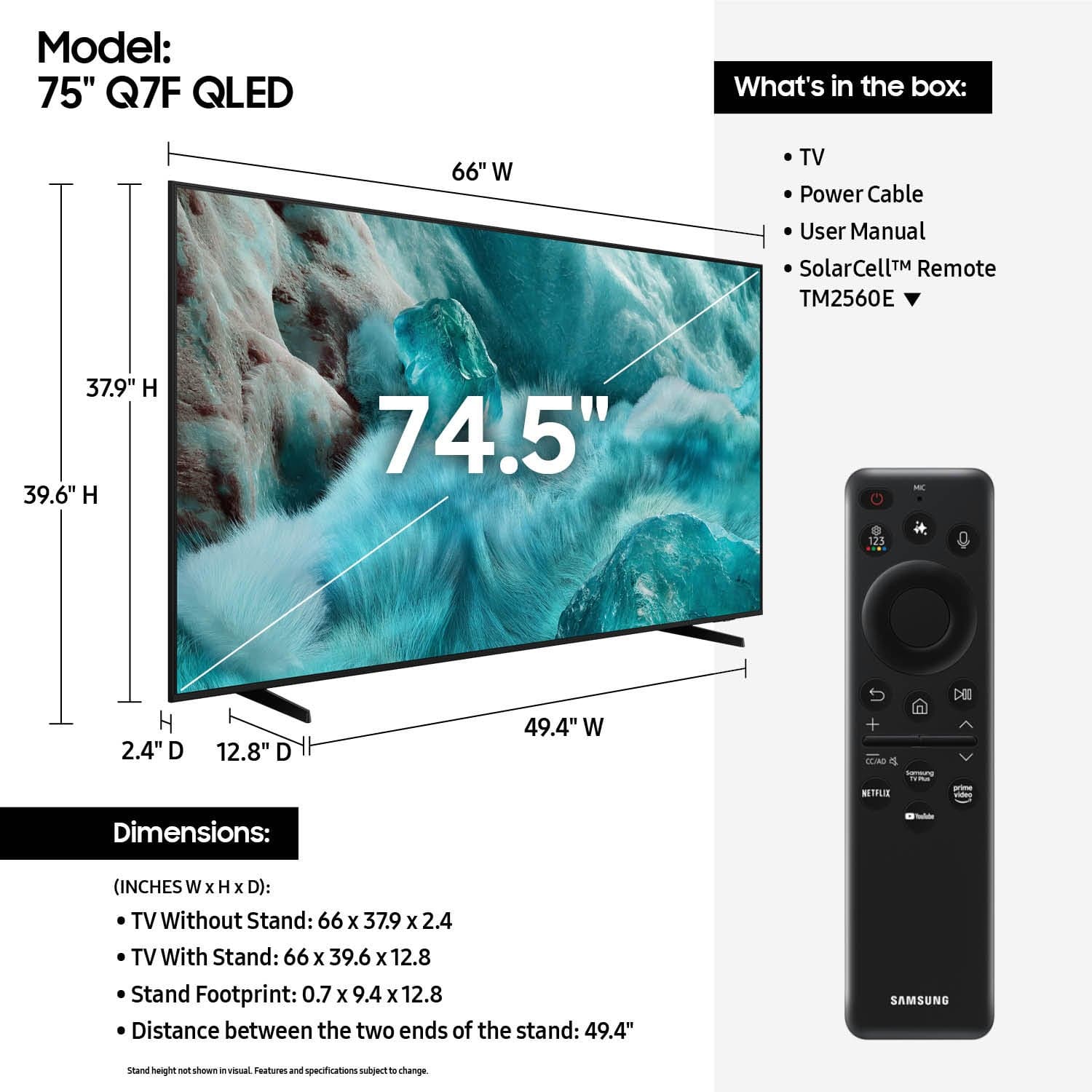











- Model:
- QN75Q7FAAFXZA
- SKU:
- 6619142
Rating by feature
- Picture Quality
Rating 4.8 out of 5 stars
- Sound Quality
Rating 4.6 out of 5 stars
- Brightness
Rating 4.8 out of 5 stars
Customers are saying
Customers are satisfied with the product's excellent picture quality, which is frequently highlighted. They also appreciate its ease of use, convenient setup, perfect size, brightness, and reliable connectivity, along with the simple remote control. However, a few customers have noted that its motion handling may not be ideal for watching live sports.
This summary was generated by AI based on customer reviews.
- Pros mentioned:Picture quality
TV and Delivery
||Posted .This reviewer received promo considerations or sweepstakes entry for writing a review.TV is amazing! Picture is amazing. Setup is super easy. Delivery was wonderful. Delivery man was so polite and helpful!
I would recommend this to a friend - Pros mentioned:Picture quality
Good tv
||Posted . Owned for 1 month when reviewed.This reviewer received promo considerations or sweepstakes entry for writing a review.Exellent its the televicion berry importan for my all familly
I would recommend this to a friend - Pros mentioned:Picture quality
huge TV
||Posted . Owned for 2 weeks when reviewed.This reviewer received promo considerations or sweepstakes entry for writing a review.I really like feeling like I'm right there!! great picture too!
I would recommend this to a friend - Pros mentioned:Picture quality
New 75inch Samsung
||Posted . Owned for 2 weeks when reviewed.This reviewer received promo considerations or sweepstakes entry for writing a review.We love our new TV❤️❤️ Great service from in store to getting it loaded!
I would recommend this to a friend - Pros mentioned:Picture quality
satisfacción
||Posted .This reviewer received promo considerations or sweepstakes entry for writing a review.The best investment this year is excellent image and sound.
I would recommend this to a friend - Pros mentioned:Ease of use
Samsung Q7F 75”
||Posted . Owned for 1 month when reviewed.This reviewer received promo considerations or sweepstakes entry for writing a review.A Great tv , very easy to use , would recommend 100%
I would recommend this to a friend - Pros mentioned:Picture quality
Owner
||Posted . Owned for 2 weeks when reviewed.This reviewer received promo considerations or sweepstakes entry for writing a review.The best tv. Works beautifully and easy to displayed on the wall mount.
I would recommend this to a friend - Pros mentioned:Picture quality
74 inch Samsung Tv
||Posted . Owned for 1 month when reviewed.This reviewer received promo considerations or sweepstakes entry for writing a review.I love my new 75 inch Samsung . Clear picture , easy to use instructions for set up . Reasonable pricing .
I would recommend this to a friend - Pros mentioned:Ease of use
Good and bad
||Posted . Owned for 3 weeks when reviewed.This reviewer received promo considerations or sweepstakes entry for writing a review.Great tv, easy to learn the controls. Of course that was with the help of you too videos. My own complaint is with the credit card issue. I got a 830 credit score and without being able to talk to an individual from the bank couldn’t get the special pricing that was offered by Best Buy.
I would recommend this to a friendBrand response from Samsung
Posted .Hello KurtG,
We appreciate you sharing your experience with your Q7F TV; however, we recommend contacting Best Buy directly for assistance in correcting this situation. We hope it’s resolved in a timely manner.
If you have any questions or need help with your TV once your issue is resolved, please contact Samsung Support at 1-800-SAMSUNG, 8AM – 12AM EST, 7 days a week. LiveChat agents are also available via the ‘Support’ link on our website.
~ Samsung Specialist
- Pros mentioned:Picture quality
Big Screen
||Posted .This reviewer received promo considerations or sweepstakes entry for writing a review.The Samsung TV we chose for this project made it perfect!! Beautiful picture and makes watching Football an experience!!
I would recommend this to a friend - Pros mentioned:Picture quality
Samsung 75 inch.
||Posted . Owned for 1 month when reviewed.This reviewer received promo considerations or sweepstakes entry for writing a review.Great tv we love it. Picture is great. Still learning features.
I would recommend this to a friend - Pros mentioned:Picture quality
Qled 75"
||Posted . Owned for 1 month when reviewed.This reviewer received promo considerations or sweepstakes entry for writing a review.Love it♥️ Excellent quality, sound and image. You will love it too!
I would recommend this to a friend - Pros mentioned:Picture quality
AMAZING FLAT SCREEN DISPLAY
||Posted . Owned for 1 month when reviewed.This reviewer received promo considerations or sweepstakes entry for writing a review.Fantastic tv, mounting was amazing and color is so vibrant. We love it.
I would recommend this to a friend Trusted Brand
||Posted .This reviewer received promo considerations or sweepstakes entry for writing a review.I am team Samsung: My TV is a Samsung, my washer and Dryer and Samsung, my fridge is Samsung, my cell phone is Samsung and everything communicates thru their Smart Things app. I can check and adjust my laundry and dryer time, check to see if fridge temp is cool enough, and fhe TV will diaplay messages frok appliances as well. Its better to stick with a trusted name brand
I would recommend this to a friend- Pros mentioned:Picture quality
Great Samsung TV QLED an Outstanding picture
||Posted .This reviewer received promo considerations or sweepstakes entry for writing a review.Great Samsung TV QLED the color in your picture is outstanding Love it and gaming on it is awesome as well.
I would recommend this to a friend - Pros mentioned:Picture quality
Awesome
||Posted .This reviewer received promo considerations or sweepstakes entry for writing a review.Excellent image,beautiful tv,I can’t be more happy with this purchase.
I would recommend this to a friend - Pros mentioned:Picture quality
TV install
||Posted . Owned for 3 weeks when reviewed.This reviewer received promo considerations or sweepstakes entry for writing a review.Picture perfect your guys did everything right I very satisfied
I would recommend this to a friend - Pros mentioned:Picture quality
What a tv
||Posted .This reviewer received promo considerations or sweepstakes entry for writing a review.This tv really makes my living room special. It is massive and beautiful.
I would recommend this to a friend - Pros mentioned:Picture quality
Exceptional quality for the money
||Posted . Owned for 1 week when reviewed.This reviewer received promo considerations or sweepstakes entry for writing a review.The TV picture & sound is exceptional. The price was great for a 75” screen.
I would recommend this to a friend - Pros mentioned:Picture quality
Samsung TV
||Posted . Owned for 3 weeks when reviewed.This reviewer received promo considerations or sweepstakes entry for writing a review.Excellent quality image. Useful interface. Great overall tv
I would recommend this to a friend