Customer Ratings & Reviews







- Model:
- QN75QN70FAFXZA
- SKU:
- 10517840
Rating by feature
- Picture Quality
Rating 4.8 out of 5 stars
- Sound Quality
Rating 4.7 out of 5 stars
- Brightness
Rating 4.9 out of 5 stars
Faint yellow streak in picture
||Posted .This reviewer received promo considerations or sweepstakes entry for writing a review.Tv developed a faint 2” wide yellow line after about 5 weeks. Called Samsung and it’s taken 3 weeks and 4 very frustrating calls to resolve. No service technician in our area and they are working to either replace or refund. Will never buy Samsung product again.
No, I would not recommend this to a friendBrand response from Samsung
Posted .EdwardM,
Thank you for bringing your concerns to our attention. We encourage you to reach out to us again so we can take a closer look, further diagnose the issue, and provide additional support.
At your earliest convenience, please call Samsung Support at 1-800-SAMSUNG, available 8AM – 12AM EST, 7 days a week. You can also reach us via LiveChat by visiting the ‘Support’ link on our website.
~ Samsung Specialist
Instead buy an OLED
||Posted . Owned for 1 month when reviewed.This reviewer received promo considerations or sweepstakes entry for writing a review.Performs poorly in dark rooms, white is too white on the screen. Please don’t buy edge lit LED. OS and user experience is decent, better than expected.
No, I would not recommend this to a friendBrand response from Samsung
Posted .Hi VARUN,
We’re sorry to hear that the picture on your Samsung QN70F TV appears too bright. If the image is harsher than expected –especially in darker rooms – there are several adjustments you can make to better suit your viewing environment.
Start by changing the Picture Mode: Settings > All Settings > Picture > Picture Mode. We recommend trying:
• Movie – Designed for dark room viewing with softer contrast and lower brightness
• Standard – Balanced for general use
• Filmmaker Mode – Offers a natural, accurate picture as intended by content creators
To further fine-tune, go to: Settings > All Settings > Picture > Expert Settings, where you can manually adjust Brightness, Contrast, Sharpness, and Contrast Enhancer (consider turning this off for a softer image)
You may also want to check if energy saving or AI settings are enabled. These can automatically adjust the brightness based on your room’s lighting, which some users find too aggressive.
• For energy settings, go to: Settings > All Settings > General & Privacy > Power and Energy Saving
• For AI settings, go to: Settings > All Settings > Advanced Features > AI Mode Settings
Lastly, make sure your TV is running the latest firmware, as updates may include improvements to picture handling:
Settings > Support > Software Update > Update Now
We hope these tips help create a more comfortable viewing experience. If you’d like help walking through these adjustments, Samsung Customer Support is always here for you at 1-800-SAMSUNG, 8AM – 12AM EST, 7 days a week. LiveChat is also available via the ‘Support’ link on our website.
~ Samsung Advisor
Canceled Order
||Posted . Owned for 3 weeks when reviewed.This reviewer received promo considerations or sweepstakes entry for writing a review.Canceled order. No customer care! If you call the store to speak with a sales rep, you are transferred out of country.
I would recommend this to a friendBrand response from Samsung
Posted .BEES,
Please know that you're leaving a review and 1-star rating for the QN70F TV, but we’re sorry to hear of your experience with Best Buy, nonetheless. You may want to consider providing your feedback directly to the Best Buy store where the purchase was made.
If you have questions about the TV itself, Samsung is here to help. You can reach us at 1-800-SAMSUNG, 8AM – 12AM EST, 7 days a week. LiveChat agents are also available by clicking the ‘Support’ link on our website.
~ Samsung Specialist
Do Not Buy!
||Posted . Owned for 3 weeks when reviewed.This reviewer received promo considerations or sweepstakes entry for writing a review.Do not buy. It’s been 12 days and sound stopped working. Went to Geek Squad. The gave me a number . The number connected to Samsung. I’d give it a 0 if I could
No, I would not recommend this to a friendBrand response from Samsung
Posted .Hi CindyD,
Thank you for your review and for sharing your experience with your QN70F TV. If you’re not hearing any sound, whether using TV speakers or an external audio device, here are several steps that can help get things working again.
1. Start with Basic Checks
• Make sure the TV isn’t muted and the volume is turned up.
• If using an external audio device, ensure it’s powered on, set to the correct source, and the volume is turned up there as well.
• Unplug your TV for 30 seconds, then plug it back in and power it on.
2. HDMI ARC / eARC Connection
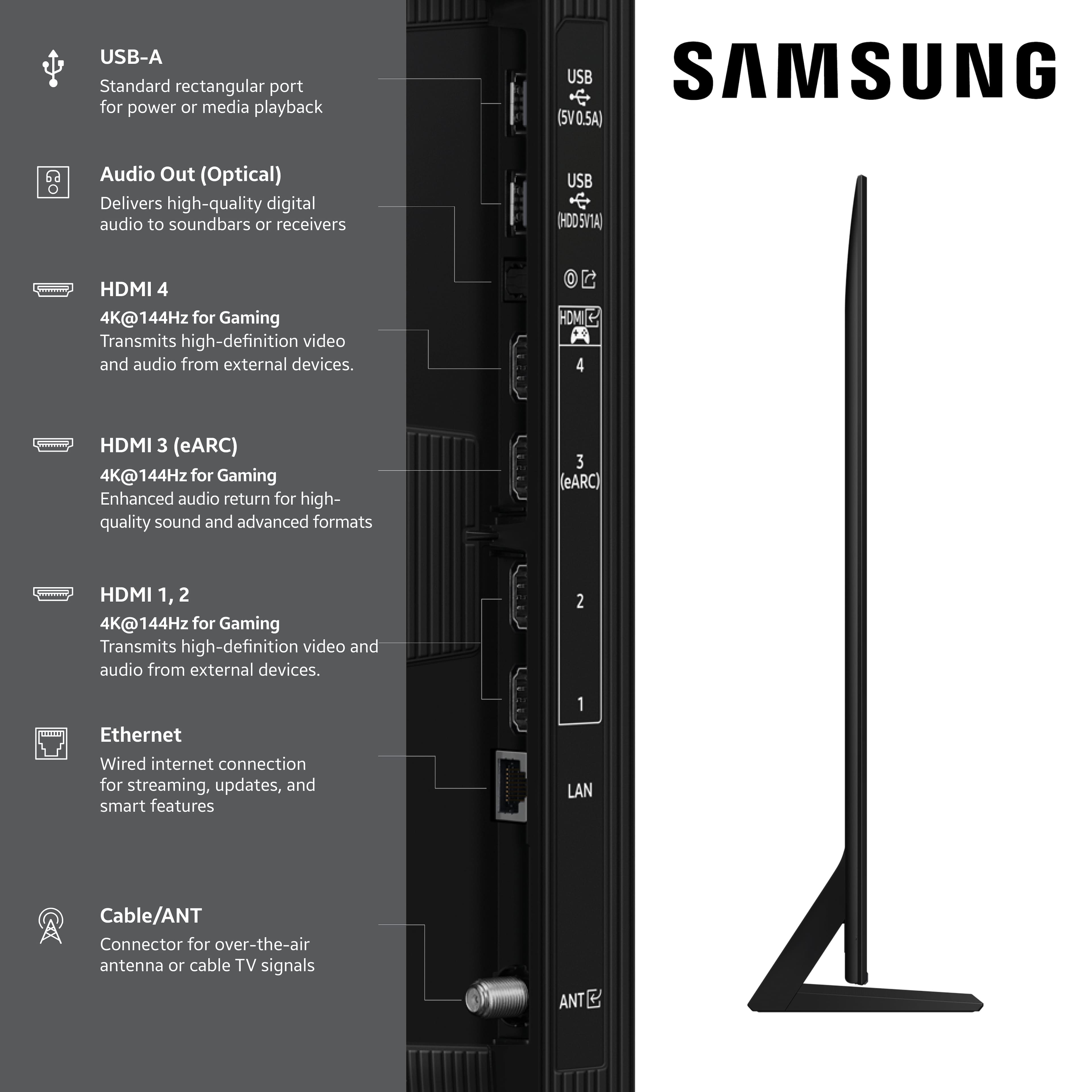
• Use a certified High-Speed HDMI cable with Ethernet. Connect it to the HDMI eARC ports on both the TV and the soundbar/receiver.
• Enable these settings:
o Settings > All Settings > Sound > Expert Settings > HDMI eARC Mode = Auto
o Settings > All Settings > General & Privacy > External Device Manager > Anynet+ (HDMI-CEC) = On
• Check the digital audio format: Settings > All Settings > Sound > Expert Settings > Digital Output Audio Format
o If you're not sure what your connected device supports, set it to Auto.
3. Optical Audio Connection
• Power on the soundbar/receiver before connecting the optical cable.
• Select the correct sound output: Settings > All Settings > Sound > Sound Output = Optical
• Try a different optical cable if no sound is coming through.
4. Bluetooth Audio Connection
• Pair your Bluetooth device: Settings > All Settings > Sound > Sound Output > Bluetooth Speaker List
• If your Bluetooth device doesn’t appear or won’t connect, move it closer to the TV, ensure it’s in pairing mode, and select Scan.
• If paired but no sound, unpair the device and try reconnecting.
5. Wi-Fi / Wireless Speakers
• Confirm the speakers and the TV are on the same Wi-Fi network. Use: Settings > All Settings > Sound > Sound Output > Wi-Fi Speaker Surround Setup
• Reboot both the TV and the Wi-Fi speakers, and check your router for connection strength.
6. Other Helpful Tips
• Run a Sound Test: Settings > Support > Device Care > Self Diagnosis > Sound Test
• Update TV firmware to rule out compatibility issues: Settings > Support > Software Update > Update Now
• If using a cable box or external streaming device, double-check that the device’s audio output settings are set to HDMI or the appropriate output.
If you still don’t hear sound after following these steps, please don’t hesitate to reach out so we can assist further. You can call Samsung Support at 1-800-SAMSUNG, 8AM – 12AM EST, 7 days a week. Our LiveChat agents are also available by clicking the ‘Support’ link at Samsung.com.
~ Samsung Advisor
- Pros mentioned:Picture quality
75" Samsung 4k
Posted .This reviewer received promo considerations or sweepstakes entry for writing a review.Great color and very smart features. This TV integrates very well into a smart household, and communicates very well with the other smart appliances.
I would recommend this to a friend - Pros mentioned:Picture quality
QN70F - 75”
Posted .This reviewer received promo considerations or sweepstakes entry for writing a review.Coming from an 11 year 70” Sharp this was quite an upgrade…Color, contrast and overall picture are excellent… Black levels are outstanding and better than some Oled models .. i have it wall mounted in a sunny room and no problem viewing.. picture setting is set to AI optimized and adjusts automatically to room lighting… it is edge lite but as good or better picture thanmany full array panels.. imo better picture compared to last years 75” QN80D ..Sound is good-have it in sync with my 900A soundbar and it sets a nice center channel and surround .. syncing does not affect atmos .. easy set up to my cable remote and atv 4k.. only con is the supplied infrared remote.. need to get a bullseye aim to operate cable and atv boxes but not enough of a down to lower the overall rating as i use both cable and atv supplied remotes.. i purchased at BB in Manalapan and the salesman, John, was very knowledgeable and helpful… i highly recommend this set.
I would recommend this to a friend - Pros mentioned:Picture quality
Excellent TV
Posted .This reviewer received promo considerations or sweepstakes entry for writing a review.Excellent television! The price was unbelievable. Mini LED 4K lives up to its hype. Great display and resolution. Connected to my sound bar made it even better. It was very easy to setup in less than an hour.
I would recommend this to a friend - Pros mentioned:Picture quality
Amazing quality, even better price
Posted .This reviewer received promo considerations or sweepstakes entry for writing a review.Superb picture quality. Took the plunge since my Sharp Aquos took a dive. Started streaming Disney+ and wasn’t impress at all. But once I started streaming Netflix I was blown away. Very happy with my purchase!
I would recommend this to a friend - Pros mentioned:Picture quality
Great TV for the price.
Posted .This reviewer received promo considerations or sweepstakes entry for writing a review.Great picture, I have no problems when I turn on the tv with my AppleTV remote, using ARC going through sound bar like I did with LG. The sound is consistent, no problems with that like I did with LG as well. The Phillips Hue apps is available and works flawlessly
I would recommend this to a friend - Pros mentioned:Picture quality
Great tv at a great price!
Posted .This reviewer received promo considerations or sweepstakes entry for writing a review.Great tv at a great price! Was able to upgrade due to Bestbuy having a sale on TVs. The picture is amazing and couldn't be happier with the purchase.
I would recommend this to a friend - Pros mentioned:Picture quality
Doc24crew
Posted .This reviewer received promo considerations or sweepstakes entry for writing a review.The TV is great! The picture is unbelievable. Super detailed with astonishing black levels. The install guy was amazing. This was by far my best experience with Best Buy.
I would recommend this to a friend - Pros mentioned:Picture quality
Samsung 75 " tv
Posted .This reviewer received promo considerations or sweepstakes entry for writing a review.Tv works very well. Had it hooked up to new Samsung sound bar and they did not like each other. Took sound bar off... tv works great
I would recommend this to a friend - Pros mentioned:Picture quality
SLOW START
Posted .This reviewer received promo considerations or sweepstakes entry for writing a review.You guys had to come out 4 times to get it right! BUT IT'S GREAT NOW, THANK YOU FOR BEING SO NICE!!!!!!
I would recommend this to a friend - Pros mentioned:Picture quality
Samsung &5" QN70F
Posted .This reviewer received promo considerations or sweepstakes entry for writing a review.Love this TV, great picture, very easy to set up. great picture
I would recommend this to a friend - Pros mentioned:Picture quality
I Love My TV
Posted .This reviewer received promo considerations or sweepstakes entry for writing a review.Love my new TV. The picture and sound quality are superb. The set up was simple. Would buy again.
I would recommend this to a friend Tv-tastic
Posted .This reviewer received promo considerations or sweepstakes entry for writing a review.This tv has elevated the viewing experience. With a game mode which includes a mini map enhancing option, target assist, and so much more!
I would recommend this to a friendGreat TV!
Posted .This reviewer received promo considerations or sweepstakes entry for writing a review.Great picture, sound, easy to navigate, overall a great buy!
I would recommend this to a friend- Pros mentioned:Picture quality
Great Tv!
Posted .This reviewer received promo considerations or sweepstakes entry for writing a review.Easy to set up, great picture, fast processing time
I would recommend this to a friend Great
Posted .This reviewer received promo considerations or sweepstakes entry for writing a review.Great tv, was actually surprised of the quality!!!! Especially at this piece point!!!
I would recommend this to a friend- Pros mentioned:Picture quality
Mostly Meh
Posted .This reviewer received promo considerations or sweepstakes entry for writing a review.Good picture on most streaming platforms. Gives broadcast news host weird unnatural complexions. Probably not much better overall than models at half the price.
No, I would not recommend this to a friendBrand response from Samsung
Posted .DeanH,
Thank you for sharing your thoughts on your Samsung QN70F TV’s image quality. Your TV is designed to upscale content to the best possible quality based on the resolution of the source. In general, the closer your content is to native 4K, the sharper and more detailed it will appear on screen.
Here are some tips to help improve picture clarity and overall upscaling performance:
1. Use HDMI cables for the best high-definition signal.
2. If you’re using an analog cable or satellite box, consider upgrading to a digital box for better signal quality.
3. Change the output resolution of connected devices (like a cable box, streaming device, or IPTV box) to UHD or HD, if supported.
4. Go to Settings > All Settings > Picture > Expert Settings to fine-tune options like Sharpness, Brightness, Contrast, and Color.
5. Select a Picture Mode that fits your environment: Settings > All Settings > Picture > Picture Mode – try Dynamic, Movie, or Filmmaker Mode.
6. Explore Picture Clarity Settings under Expert Settings for added detail enhancement. Use Auto or Custom to adjust Judder Reduction, LED Clear Motion, and Noise Reduction.
7. Enable AI Mode, which automatically analyzes the content and your environment to deliver optimized picture and sound. Go to: Settings > All Settings > Advanced Features > AI Mode Settings
8. Ensure your TV is running the latest firmware to benefit from performance improvements and the latest enhancements: Settings > Support > Software Update > Update Now
If you’d like personalized help fine-tuning these settings, please reach out to Samsung Support at 1-800-SAMSUNG, available 8AM – 12AM EST, 7 days a week. You can also LiveChat with an agent or find helpful guides by visiting the ‘Support’ section of our website.
~ Samsung Specialist