Customer Ratings & Reviews

- Model:
- HW-B650F/ZA
- SKU:
- 11445580
Rating by feature
- Value
Rating 4.7 out of 5 stars
- Quality
Rating 4.7 out of 5 stars
- Ease of Use
Rating 4.8 out of 5 stars
Still waiting for sound bar delivery
||Posted . Owned for 2 months when reviewed.This reviewer received promo considerations or sweepstakes entry for writing a review.I purchased my TV and soundbar on September 27 and it was supposed to be installed in early October. The sound bar was not delivered or installed. I scheduled for it to be installed two days later - same story. Then two days later again - same story. I then had to travel so scheduled its delivery for December 10 which I confirmed repeatedly. Now the website says it needs to be scheduled for delivery. Yikes! Not sure what is going on at all.
No, I would not recommend this to a friendBrand response from Samsung
Posted .Hello PeterS,
We appreciate you sharing your experience; however, we recommend you contact Best Buy directly for assistance in correcting this situation. We hope your issue is resolved in a timely manner.
You may also want to consider providing feedback directly to the Best Buy store where you made your purchase.
Should you have any questions or need help with your HW-B650F once your issue has been resolved, please reach Samsung Support at 1-800-SAMSUNG, 8AM - 12AM EST, 7 days a week. Our LiveChat agents are also available by clicking on the ‘Support’ link on our website.
~ Samsung Solutions
Get the one with the highest rating
||Posted . Owned for 1 month when reviewed.This reviewer received promo considerations or sweepstakes entry for writing a review.Not really a big fan, but the price it is not too bad
No, I would not recommend this to a friendBrand response from Samsung
Posted .Hi ReginaldM,
We appreciate you taking a moment to review the HW-B650F Soundbar.
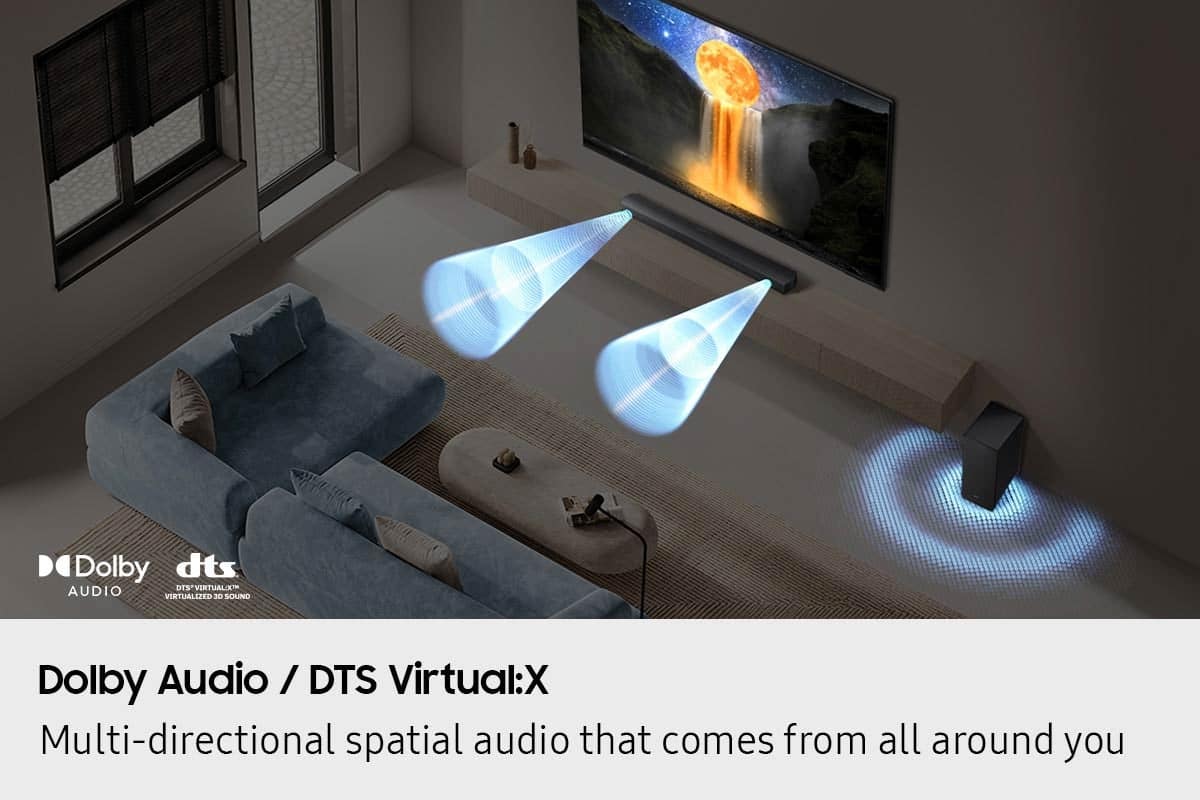
You can optimize your audio performance to your liking by pressing the SOUND MODE button on your soundbar remote, and then selecting the desired sound effect by choosing SURROUND SOUND, BASS BOOST, GAME, ADAPTIVE, DTS VIRTUAL:X, STANDARD.
By pressing the TONE CONTROL button, you can adjust the volume of the treble or bass sound. Press the button to select TREBLE or BASS and then adjust the volume between -6~+6 by using the Up/Down buttons.
Press and hold the SOUND CONTROL button for about 5 seconds to adjust the sound for each frequency band. 150Hz, 300Hz, 600Hz, 1.2kHz, 2.5kHz, 5kHz, and 10kHz are selectable using the Left/Right buttons and each can be adjusted to a setting between -6 to +6 using the Up/Down buttons. (Make sure the Sound mode is set to “STANDARD”.
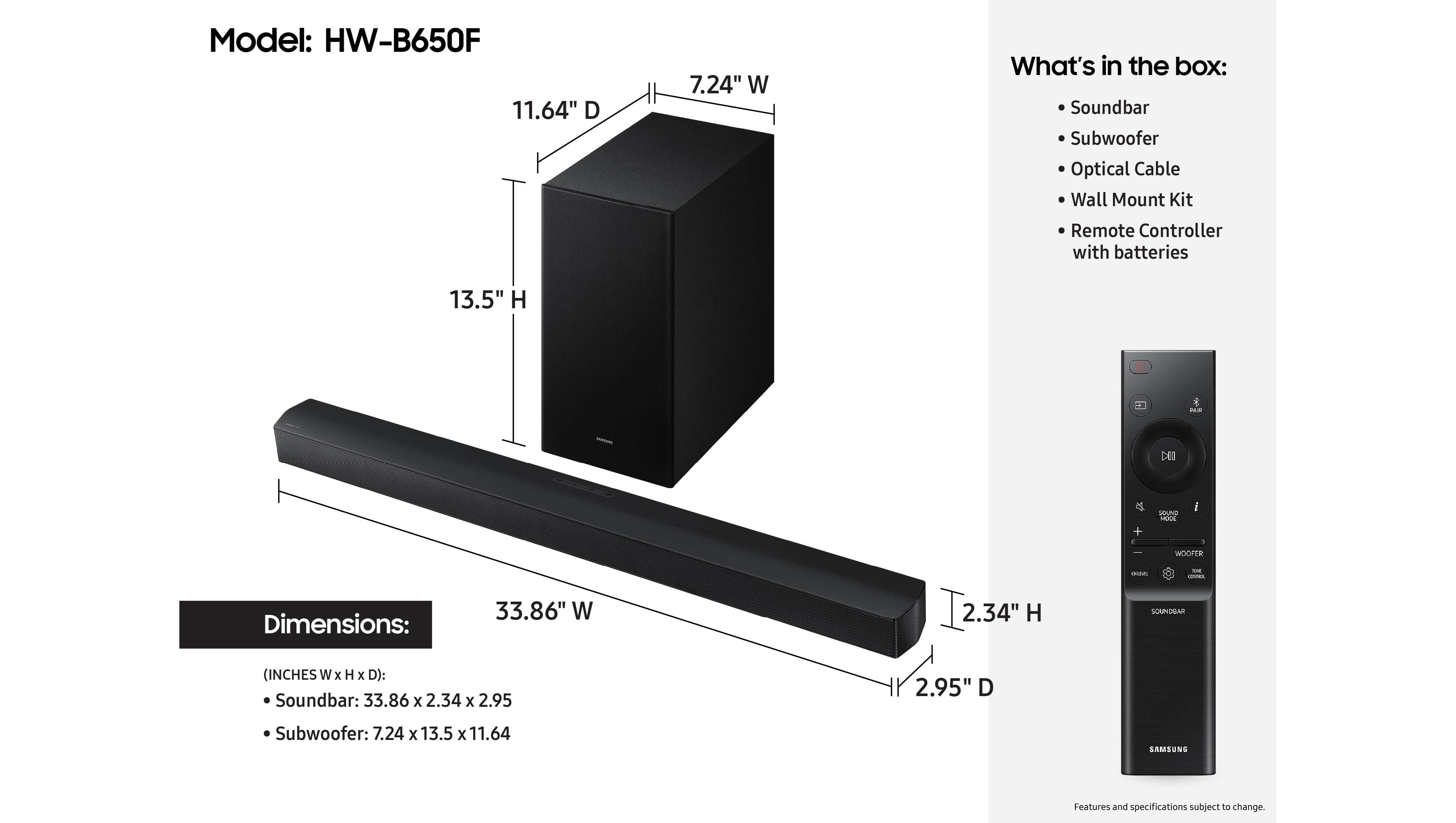
Additionally, using the WOOFER button on the remote, you can adjust the subwoofer’s volume between -6 to +6 by toggling the button up or down. To set the subwoofer volume level to 0, press the button down.
With the optional SWA-9250S Wireless Rear Speaker Kit connected you can adjust the volume by using the provided Soundbar remote. Press CH LEVEL and select REAR LEVEL, then use the Up/Down buttons to adjust the volume within a -6 to +6 range.
If you need more help, Samsung is here for you. Please call us at 1-800-SAMSUNG, 8AM - 12AM EST (Ask for Soundbars), 7 days a week. Our Live Chat agents are also available by clicking on the ‘Support’ link on our website.
~ Samsung Solutions
Sorry I bought it
||Posted . Owned for 1 month when reviewed.This reviewer received promo considerations or sweepstakes entry for writing a review.I had this soundbar for 28 days and the Bluetooth stopped working and Best Buy refuses to return it due to a 15 day return policy.
No, I would not recommend this to a friendBrand response from Samsung
Posted .Hello JamesB,
We appreciate your feedback regarding the issues you are experiencing with your HW-B650F Soundbar.
Samsung is committed to providing the best possible product experience, quality, and value. We back this Samsung Soundbar with a 1-year limited manufacturer's warranty, including authorized repair for manufacturer defects, if purchased brand-new directly from an authorized seller.
If you need more help, Samsung is here for you. Please call us at 1-800-SAMSUNG, 8AM - 12AM EST (Ask for Soundbars), 7 days a week. Live Chat with an agent as well as manuals, software, creating a service ticket, and warranty info can be found at the ‘Support’ link on our Samsung website.
~ Samsung Solutions
Went bad in two months!
||Posted . Owned for 2 months when reviewed.This reviewer received promo considerations or sweepstakes entry for writing a review.The eARC went out in 2 months!!! It worked great for 2 months, then all of a sudden it kept displaying TVARC all the time, then sound went out. DO NOT BUY!!!!
No, I would not recommend this to a friendBrand response from Samsung
Posted .Hello ThomasT,
We appreciate your feedback regarding the issues you are experiencing with your HW-B650F Soundbar.
Samsung is committed to providing the best possible product experience, quality, and value. We back this Samsung Soundbar with a 1-year limited manufacturer's warranty, including authorized repair for manufacturer defect, if purchased brand-new directly from an authorized seller.
Please give us the opportunity to assist you by contacting Samsung Customer Support. Call us at 1-800-SAMSUNG (Ask for Soundbars), 8AM - 12AM EST, 7 days a week. Or visit us on the Samsung website and click on the ‘Support’ link for:
• Live Chat
• Manuals, Software, & Warranty Info
• Creating a service ticket
~ Samsung Solutions
Disappointed
||Posted . Owned for 2 months when reviewed.This reviewer received promo considerations or sweepstakes entry for writing a review.We found the sound to be mediocre and returned it. It wasn't any better, maybe even worse than the built in speakers of our Samsung TV.
No, I would not recommend this to a friendBrand response from Samsung
Posted .Hi AGale,
Thank you for your review of the Samsung HW-B650F Soundbar and for sharing the issues that have caused you to return your unit. Your experience is very important to us and will be shared with our product team.
It is possible that your unit needed minor troubleshooting, a firmware update, or adjustments in settings.
For example, pressing the TONE CONTROL button, you can adjust the volume of the treble or bass sound. Press the button to select TREBLE or BASS and then adjust the volume between -6~+6 by using the Up/Down buttons.
Press and hold the SOUND CONTROL button for about 5 seconds to adjust the sound for each frequency band. 150Hz, 300Hz, 600Hz, 1.2kHz, 2.5kHz, 5kHz, and 10kHz are selectable using the Left/Right buttons and each can be adjusted to a setting between -6 to +6 using the Up/Down buttons. (Make sure the Sound mode is set to “STANDARD”.
Additionally, using the WOOFER button on the remote, you can adjust the subwoofer’s volume between -6 to +6 by toggling the button up or down. To set the subwoofer volume level to 0, press the button down.
With the optional SWA-9250S Wireless Rear Speaker Kit connected you can adjust the volume by using the provided Soundbar remote. Press CH LEVEL and select REAR LEVEL, then use the Up/Down buttons to adjust the volume within a -6 to +6 range.
Should you ever decide to give Samsung Soundbars another try and have questions or need assistance with settings, setup, or features, please know we are always here to help. Call us at 1-800-SAMSUNG (Ask for Soundbars), 8AM - 12AM EST, 7 days a week. Or visit us on the Samsung website and click on the ‘Support’ link for:
• Live Chat
• Manuals, Software, & Warranty Info
• Creating a service ticket
~ Samsung Solutions
Bad service
||Posted . Owned for 1 month when reviewed.This reviewer received promo considerations or sweepstakes entry for writing a review.Bad service from the store. The service was really terrible.
No, I would not recommend this to a friendBrand response from Samsung
Posted .Hi AdorI,
Please know you are leaving a review and a 1-star rating for the HW-B650F, but we are sorry to hear of your Best Buy experience, nonetheless. You may want to consider providing feedback directly to the Best Buy store where you made your purchase.
Should you have questions on the HW-B650F itself, Samsung is here for you. You can reach us at 1-800-SAMSUNG, 8AM - 12AM EST, 7 days a week. Our LiveChat agents are also available by clicking on the ‘Support’ link on our website.
~ Samsung Solutions
Discouraged for $400+
||Posted . Owned for 1 month when reviewed.This reviewer received promo considerations or sweepstakes entry for writing a review.It currently is not even working properly. I've tried to fix it to no avail. Hesitant to pay $100 for techs.
No, I would not recommend this to a friendBrand response from Samsung
Posted .Hello MarkD,
We appreciate you taking a moment to review the Samsung HW-B650F Soundbar.
You can optimize your audio performance to your liking by pressing the SOUND MODE button on your soundbar remote, and then selecting the desired sound effect by choosing SURROUND SOUND, BASS BOOST, GAME, ADAPTIVE, DTS VIRTUAL:X, STANDARD.
By pressing the TONE CONTROL button, you can adjust the volume of the treble or bass sound. Press the button to select TREBLE or BASS and then adjust the volume between -6~+6 by using the Up/Down buttons.
Press and hold the SOUND CONTROL button for about 5 seconds to adjust the sound for each frequency band. 150Hz, 300Hz, 600Hz, 1.2kHz, 2.5kHz, 5kHz, and 10kHz are selectable using the Left/Right buttons and each can be adjusted to a setting between -6 to +6 using the Up/Down buttons. (Make sure the Sound mode is set to “STANDARD”.
Additionally, using the WOOFER button on the remote, you can adjust the subwoofer’s volume between -6 to +6 by toggling the button up or down. To set the subwoofer volume level to 0, press the button down.
With the optional SWA-9250S Wireless Rear Speaker Kit connected you can adjust the volume by using the provided Soundbar remote. Press CH LEVEL and select REAR LEVEL, then use the Up/Down buttons to adjust the volume within a -6 to +6 range.
If you need more help, Samsung is here for you. Please call us at 1-800-SAMSUNG, 8AM - 12AM EST (Ask for Soundbars), 7 days a week. Our Live Chat agents are also available by clicking on the ‘Support’ link on our website.
~ Samsung Solutions
Great help!
||Posted . Owned for 2 weeks when reviewed.This reviewer received promo considerations or sweepstakes entry for writing a review.Was not compatible with my reciever & all. But everyone was great & all is good!
I would recommend this to a friendBrand response from Samsung
Posted .Hi CDJf,
We appreciate you taking a moment to review the Samsung HW-B650F Soundbar. We value your feedback and will share it with our teams.
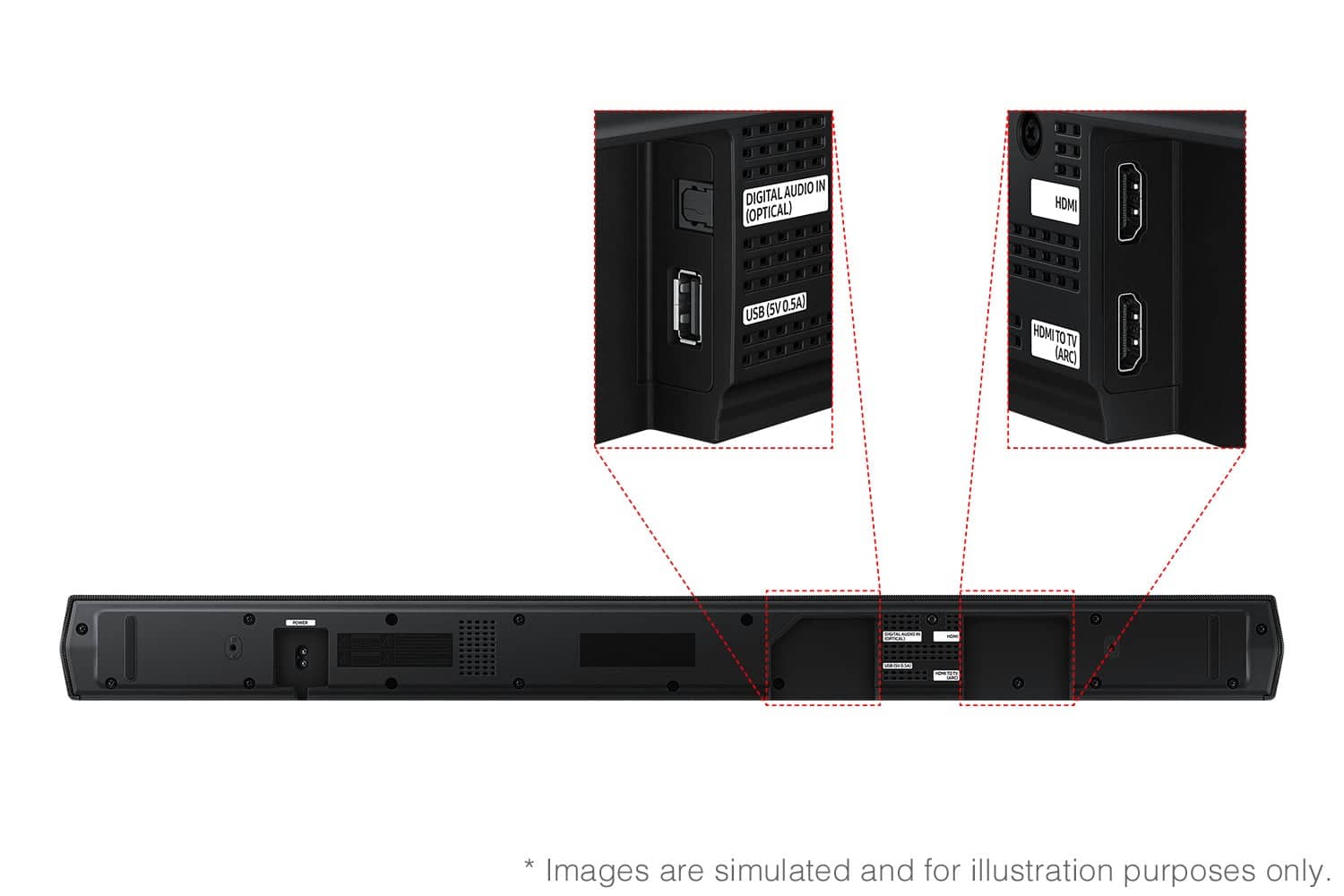
The HW-B650F Soundbar features three ways to connect to a TV; HDMI/ARC, digital optical audio, and Bluetooth wireless audio technology. If your TV is compatible with one of these three audio connections, you should have no issue connecting the soundbar to your TV. Follow the steps below to connect the soundbar to your TV via one of the three available connections:
HDMI ARC (Audio Return Channel) lets certain TVs and soundbars transfer audio back and forth using one HDMI cable. In other words, you can use the HDMI port as both an input and audio output. To set up HDMI ARC, power on your TV and soundbar.
1. Next, connect one end of an HDMI cable into the HDMI IN (ARC) port on your TV.
2. Connect the other end into the HDMI OUT (TV-ARC) port on your soundbar.
3. Next, change the source on your soundbar to the D.IN. setting.
4. After a few seconds, "TV ARC" will appear on the soundbar's display, and the TV will transfer audio through the soundbar.
An optical cable is another way to connect your soundbar to your TV. You can also connect your devices (cable boxes, video game systems, and Blu-ray players) to the TV, and have the sound output from the TV to the soundbar.
1. With the TV and soundbar turned on, connect one end of a digital optical cable to the OPTICAL OUT port on the TV.
2. Then, connect the other end to the DIGITAL AUDIO IN (OPTICAL) port on the soundbar.
3. Press Source on the remote or soundbar, and then set the soundbar to the D.IN. setting.
4. Finally, on the TV, you need to set the speaker output to external speakers.
The TV's sound will now play from the soundbar.
Your soundbar is also compatible with a Bluetooth connection to the TV. To connect the soundbar wirelessly, follow the steps below:
1) Press the PAIR button on the remote to enter BT PAIRING mode. You can also press the SOURCE button on the top panel and then select BT. “BT” changes to “BT PAIRING” in a few seconds automatically or changes to “BT READY” if there is a connect record. If BT READY appears, press and hold the SOURCE button on the top panel of the Soundbar for more than 5 seconds to display BT PAIRING.
2) Select the Bluetooth sound mode on your TV (See your TV's user manual for assistance)
3) Select “[AV] Samsung Soundbar B Series” from the list on the TV’s screen. An available Soundbar is indicated with “Need Pairing” or “Paired” on the TV’s Bluetooth device list. To connect the TV to the Soundbar, select the message, and then establish a connection.
When the TV is connected, [TV Name] → “BT” appears on the Soundbar’s front display. You should now hear TV sound from the Soundbar. Once you have connected your soundbar for the first time, use the “BT READY” mode to reconnect.
I hope these tips help with the setup of your new Samsung Soundbar.
You can always contact us for further help at 1-800-SAMSUNG (Ask for Soundbars), 8 AM – 12 AM EST, 7 days a week. Our Live Chat agents are also available by clicking on the ‘Support’ link on our website.
~ Samsung Solutions
cheepsound
||Posted . Owned for 1 month when reviewed.This reviewer received promo considerations or sweepstakes entry for writing a review.weeandonermanulk bass poor sound hard to set up badsetup
No, I would not recommend this to a friendBrand response from Samsung
Posted .Hello JamesB,
Thank you for taking a moment to review the HW-B650F Soundbar. Your feedback is very important to us as we continuously strive for best-in-class product and service.
By pressing the TONE CONTROL button, you can adjust the volume of the treble or bass sound. Press the button to select TREBLE or BASS and then adjust the volume between -6~+6 by using the Up/Down buttons.
Press and hold the SOUND CONTROL button for about 5 seconds to adjust the sound for each frequency band. 150Hz, 300Hz, 600Hz, 1.2kHz, 2.5kHz, 5kHz, and 10kHz are selectable using the Left/Right buttons and each can be adjusted to a setting between -6 to +6 using the Up/Down buttons. (Make sure the Sound mode is set to “STANDARD”.
Additionally, using the WOOFER button on the remote, you can adjust the subwoofer’s volume between -6 to +6 by toggling the button up or down. To set the subwoofer volume level to 0, press the button down.
I hope these tips help you enjoy your new product.
You can always contact us for further help at 1-800-SAMSUNG (Ask for Soundbars), 8 AM – 12 AM EST, 7 days a week. Our Live Chat agents are also available by clicking on the ‘Support’ link on our website.
~ Samsung Solutions
Problem with sound
||Posted .This reviewer received promo considerations or sweepstakes entry for writing a review.It lasted a week and then the sound started breaking up. Within another day no sound was coming from the sound bar. Connections were double checked but nothing was loose so I had to return to the store.
No, I would not recommend this to a friendBrand response from Samsung
Posted .Hello CarolM,
Thank you for your review of the Samsung HW-B650F Soundbar and for sharing the issues that have caused you to return your unit. Your experience is very important to us and will be shared with our product team.
It is possible that your unit needed minor troubleshooting, a firmware update, or adjustments in settings.
Troubleshooting like first, try doing a soft reset, unplug the soundbar from the outlet for roughly 30 seconds and then plug it back in.
If this still does not correct your issue, then do a hard reset. With the Soundbar on, press the + & - Volume buttons on the body of the soundbar at the same time for at least 5 seconds. INIT OK” appears on the display and then the Soundbar is reset.
While the Soundbar is On, press both the Vol+ and Vol- buttons on the unit simultaneously until the display shows "INIT", then release. If this doesn’t work, then try using the remote control: While the Soundbar is ON, press and hold the SOUND CONTROL ("Gear") button on the Soundbar remote for 10 seconds. You will see "150HZ" on the display. Keep pressing until you see "INIT" on the display, then release.
Should you ever decide to give Samsung Soundbars another try and have questions or need assistance with settings, setup, or features, please know we are always here to help. Call us at 1-800-SAMSUNG (Ask for Soundbars), 8 AM – 12 AM EST, 7 days a week. Live Chat with an agent as well as manuals, software, creating a service ticket, and warranty info can be found at the ‘Support’ link on our Samsung website.
~ Samsung Solutions
Low volume not loud enough
||Posted . Owned for 2 weeks when reviewed.This reviewer received promo considerations or sweepstakes entry for writing a review.Used it to watch sports outside value with very poor not loud enough
No, I would not recommend this to a friendBrand response from Samsung
Posted .Hi WilliamQ,
We appreciate you taking a moment to review the HW-B650F Samsung Soundbar. Please try a few troubleshooting steps, as this may improve your sound quality.
You can optimize your audio performance to your liking by pressing the SOUND MODE button on your soundbar remote, and then selecting the desired sound effect by choosing SURROUND SOUND, BASS BOOST, GAME, ADAPTIVE, DTS VIRTUAL:X, STANDARD.
By pressing the TONE CONTROL button, you can adjust the volume of the treble or bass sound. Press the button to select TREBLE or BASS and then adjust the volume between -6~+6 by using the Up/Down buttons.
Press and hold the SOUND CONTROL button for about 5 seconds to adjust the sound for each frequency band. 150Hz, 300Hz, 600Hz, 1.2kHz, 2.5kHz, 5kHz, and 10kHz are selectable using the Left/Right buttons and each can be adjusted to a setting between -6 to +6 using the Up/Down buttons. (Make sure the Sound mode is set to “STANDARD”.
Additionally, using the WOOFER button on the remote, you can adjust the subwoofer’s volume between -6 to +6 by toggling the button up or down. To set the subwoofer volume level to 0, press the button down.
With the optional SWA-9250S Wireless Rear Speaker Kit connected, you can adjust the volume by using the provided Soundbar remote. Press CH LEVEL and select REAR LEVEL, then use the Up/Down buttons to adjust the volume within a -6 to +6 range.
If you need more help, Samsung is here for you. Please call us at 1-800-SAMSUNG, 8AM - 12AM EST (Ask for Soundbars), 7 days a week. Our Live Chat agents are also available by clicking on the ‘Support’ link on our website.
~ Samsung Solutions
Terrible remote!!!
||Posted . Owned for 1 month when reviewed.This reviewer received promo considerations or sweepstakes entry for writing a review.Absolutely hate this teeny tiny horrible remote!!!
No, I would not recommend this to a friendBrand response from Samsung
Posted .Hello CarolineHodge,
Thank you for taking a moment to review the HW-B650F Samsung Soundbar. We value your feedback and will share it with our teams.
Did you know you can optimize your audio performance to your liking by pressing the SOUND MODE button on your soundbar remote, and then selecting the desired sound effect by choosing SURROUND SOUND, BASS BOOST, GAME, ADAPTIVE, DTS VIRTUAL:X, STANDARD.
By pressing the TONE CONTROL button, you can adjust the volume of the treble or bass sound. Press the button to select TREBLE or BASS and then adjust the volume between -6~+6 by using the Up/Down buttons.
Press and hold the SOUND CONTROL button for about 5 seconds to adjust the sound for each frequency band. 150Hz, 300Hz, 600Hz, 1.2kHz, 2.5kHz, 5kHz, and 10kHz are selectable using the Left/Right buttons and each can be adjusted to a setting between -6 to +6 using the Up/Down buttons. (Make sure the Sound mode is set to “STANDARD”.
Additionally, using the WOOFER button on the remote, you can adjust the subwoofer’s volume between -6 to +6 by toggling the button up or down. To set the subwoofer volume level to 0, press the button down.
With the optional SWA-9250S Wireless Rear Speaker Kit connected you can adjust the volume by using the provided Soundbar remote. Press CH LEVEL and select REAR LEVEL, then use the Up/Down buttons to adjust the volume within a -6 to +6 range.
I hope these tips help you enjoy your new product.
You can always contact us for further help at 1-800-SAMSUNG (Ask for Soundbars), 8 AM – 12 AM EST, 7 days a week. Our Live Chat agents are also available by clicking on the ‘Support’ link on our website.
~ Samsung Solutions
Horrible Experience
||Posted . Owned for 1 week when reviewed.This reviewer received promo considerations or sweepstakes entry for writing a review.Horrible, horrible horrible… We had a no-show geek squad… Then they talked to us on the phone awful… I will never do business with Best Buy again.
No, I would not recommend this to a friendBrand response from Samsung
Posted .Hello DebS,
Please know you are leaving a review and 1-star rating for the HW-B650F, but we are sorry to hear of your Best Buy experience, nonetheless. You may want to consider providing feedback directly to the Best Buy store where you made your purchase.
Should you have questions on the HW-B650F itself, Samsung is here for you. You can reach us at 1-800-SAMSUNG, 8AM - 12AM EST, 7 days a week. Our LiveChat agents are also available by clicking on the ‘Support’ link on our website.
~ Samsung Solutions
Do Not Buy!!
||Posted . Owned for 3 weeks when reviewed.This reviewer received promo considerations or sweepstakes entry for writing a review.Stopped working with TV after 12 days getting the run around
No, I would not recommend this to a friendBrand response from Samsung
Posted .Hello CindyD,
Thank you for taking a moment to review the Samsung HW-B650F Soundbar.
First, try doing a soft reset, unplug the soundbar from the outlet for roughly 30 seconds and then plug it back in.
If this still does not correct your issue, then do a hard reset. With the Soundbar on, press the + & - Volume buttons on the body of the soundbar at the same time for at least 5 seconds. INIT OK” appears on the display and then the Soundbar is reset.
While the Soundbar is On, press both the Vol+ and Vol- buttons on the unit simultaneously until the display shows "INIT", then release. If this doesn’t work, then try using the remote control: While the Soundbar is ON, press and hold the SOUND CONTROL ("Gear") button on the Soundbar remote for 10 seconds. You will see "150HZ" on the display. Keep pressing until you see "INIT" on the display, then release.
Samsung is committed to providing the best possible product experience, quality, and value. We back this Samsung Soundbar with a 1-year limited manufacturer's warranty, including authorized repair for manufacturer defect, if purchased brand-new directly from an authorized seller.
Please give us the opportunity to assist you by contacting Samsung Customer Support. Just give us a call at 1-800-SAMSUNG (Ask for Soundbars), 8AM - 12AM EST, 7 days a week. Our Live Chat agents are also available by clicking on the ‘Support’ link on our website.
~ Samsung Solutions
- Pros mentioned:Setup ease, Sound quality
Works great with Samsung TV. Good value.
Posted .This reviewer received promo considerations or sweepstakes entry for writing a review.Works great with my 75” Samsung TV. Did not need to set up anything, just plug in HDMI cable into HDMI ARC connection on both TV and Soundbar. Sounds great and automatically controls sound from the TV remote. Well worth the money with great sound and no hassle set up. Good value for 3.1 system.
I would recommend this to a friend - Pros mentioned:Connectivity, Sound quality
Great sound.
Posted .This reviewer received promo considerations or sweepstakes entry for writing a review.Sounds great. Sub is deep. Plenty of hook ups for the TV, console, PC.
I would recommend this to a friend - Pros mentioned:Connectivity, Sound quality
Exactly what I wanted
Posted .This reviewer received promo considerations or sweepstakes entry for writing a review.Bought today to enhance the sound on my Samsung tv. Has lots of connectivity options and I used an HDMI cable. Very easy to install. LOVE the enhanced sound. Exactly what I needed and was even on sale!
I would recommend this to a friend - Pros mentioned:Sound quality
Great product
Posted .This reviewer received promo considerations or sweepstakes entry for writing a review.Sound is amazing!! movie theater sound!! I will be purchasing another one for my basement
I would recommend this to a friend - Pros mentioned:Sound quality
Family Theatre
Posted .This reviewer received promo considerations or sweepstakes entry for writing a review.Just a little tricky to since with my TCL tv but sound is great!!!
I would recommend this to a friend - Pros mentioned:Sound quality
Great upgrade
Posted .This reviewer received promo considerations or sweepstakes entry for writing a review.Great addition to our Samsung tv. Sound is better, clearer and louder then tv speaker
I would recommend this to a friend