Customer Ratings & Reviews



- Model:
- SM-R510NZAAXAR
- SKU:
- 6510544
Rating by feature
- Sound Quality
Rating 4.8 out of 5 stars
- Battery Life
Rating 4.6 out of 5 stars
- Connectivity
Rating 4.8 out of 5 stars
Customers are saying
Customers consistently note the great sound quality, comfortable fit, and amazing battery life of the Galaxy Buds2 Pro. Many appreciate the rich bass and seamless connectivity. However, some find the price a bit high compared to competitors, and a few have concerns about the touch controls and maximum volume.
This summary was generated by AI based on customer reviews.
Samsung ear bud pro
||Posted . Owned for 4 months when reviewed.This reviewer received promo considerations or sweepstakes entry for writing a review.Only one of the ear buds work.. . . . . . . . . . . .
No, I would not recommend this to a friendBrand response from Samsung
Posted .Hi James... Thank you for reaching out about your Samsung Galaxy Buds2 Pro earbuds. There is a one-year manufacturer's warranty available on all Samsung products, so please reach out to Samsung's warranty department at 1(800) SAMSUNG/1 (800) 726-7864 if your buds fall into that time frame. Thank you for being the best part of Samsung. -Bethany

Garbage
||Posted . Owned for 9 months when reviewed.This reviewer received promo considerations or sweepstakes entry for writing a review.The worst. The left one stopped working within a week and it's more effort to fix than cost to buy new ones (jabra ones haven't broken 6 months later)
No, I would not recommend this to a friendBroke after four months
||Posted . Owned for 1 month when reviewed.This reviewer received promo considerations or sweepstakes entry for writing a review.Month four and these buds started sounding garbled to my callers. So back to buying cheap buds as I get the same deal buying cheap.
No, I would not recommend this to a friendSamsung Galaxy buds2 pro
||Posted . Owned for 1 week when reviewed.This reviewer received promo considerations or sweepstakes entry for writing a review.To big for my ears. Need to come with different kinds tips
I would recommend this to a friendLow battry life
||Posted . Owned for 3 weeks when reviewed.This reviewer received promo considerations or sweepstakes entry for writing a review.Low battery life, 2-4hrs max. Does not stay in ear comfortably and falls out easy. Drops connection randomly. Not worth $200.
No, I would not recommend this to a friendBrand response from Samsung
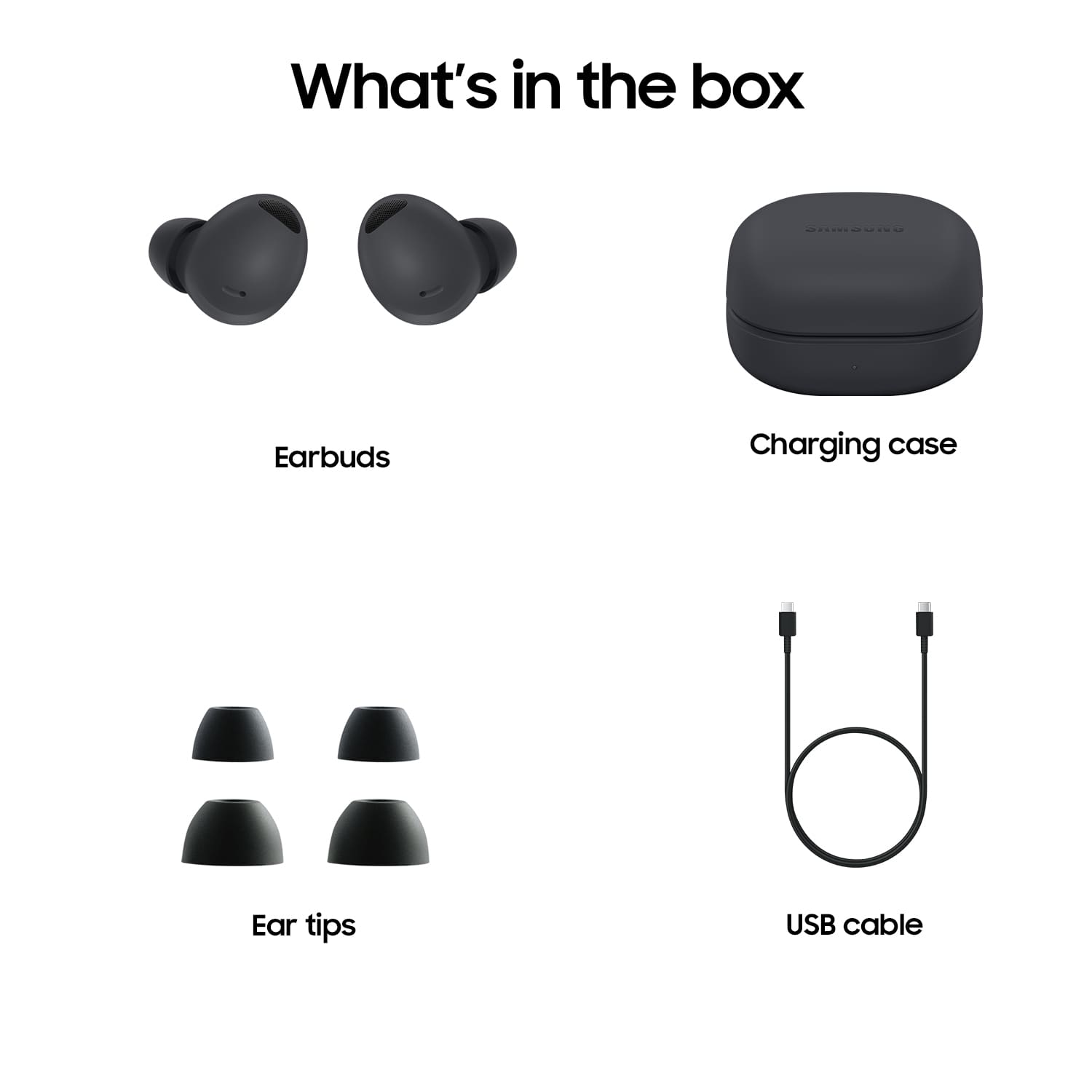
Posted .Hello KennethF, we appreciate you sharing your thoughts with us about your Samsung Galaxy Buds2 Pro. We would be happy to help you troubleshoot anything you are experiencing with your device that may be causing difficulty or frustration. With regards to the battery life, the ANC feature usage will use more battery consumption than using the ambient sound feature, and we have an article on our website titled "All about your Samsung earbuds’ battery life" to help you better understand and troubleshoot this matter. For the fit of your device, this device does come with additional ear tips in a larger and smaller size in your original packaging, we have a great article titled "How to wear your Samsung earbuds" and you can perform a fit test while wearing your earbuds and connected in the Samsung Wearables App to acheive the most secure fit possible. Lastly with the connection, if you are maintaining the range of bluetooth connection and experiencing these interruptions of your device we have another article to help you titled "Galaxy Buds disconnect from phone often". If you are still experiencing anything out of the ordinary with your earbuds, please reach out to the Samsung Support Team for additional assistance. Thank you for being a Samsung customer. -Elizabeth
K&S
||Posted . Owned for less than 1 week when reviewed.This reviewer received promo considerations or sweepstakes entry for writing a review.those my second pair. I lost the first ones. I like them
I would recommend this to a friendHappy.
||Posted . Owned for 1 month when reviewed.This reviewer received promo considerations or sweepstakes entry for writing a review.Very satisfied. Easy to use app and in store process.
I would recommend this to a friendGarbage
||Posted .This reviewer received promo considerations or sweepstakes entry for writing a review.The right side stopped charging … bought the extended warranty because this is the second time this has happened.. all they did was give me a store credit for what I paid for them.. apparently the warranty is a one time use.. not for the whole 2 yr period..
No, I would not recommend this to a friendMissing items
||Posted . Owned for 2 weeks when reviewed.This reviewer received promo considerations or sweepstakes entry for writing a review.Item was mussing charging cord and the squishys for the ear buds. When i called i aksed if i returned the item if i could get a replacment i was told no and i had to reorder.
No, I would not recommend this to a friendEar Bud Pro
||Posted . Owned for 3 weeks when reviewed.This reviewer received promo considerations or sweepstakes entry for writing a review.The sound quality was great; but they wouldn't stay in my ears. There was no way to keep them from working their way out. I was afraid of losing them all the time.
I would recommend this to a friendBrand response from Samsung
Posted .Hello HealthyProject, thank you for your feedback on your Samsung Galaxy Buds2 Pro. We would be happy to assist you in achieving the ideal fit of your device to ensure you can enjoy your buds uninterrupted. This device does come with additional ear tips in a larger and smaller size to help with the fit. We have an article on our website titled "How to wear your Samsung earbuds" to help ensure the optimal placement of the buds for the security of the fit. Lastly, you can perform a fit test while wearing the buds and connected in the Samsung Wearables App. If you do happen to have one of the buds fall out of your ear, you can also use the "Find My Buds" feature in the Samsung Wearables App to have the bud chirp to help you locate it immediately. Thank you for being a Samsung customer. -Elizabeth
Purpple buds
||Posted . Owned for 2 months when reviewed.This reviewer received promo considerations or sweepstakes entry for writing a review.I didn't really like the product. People couldn't hear me most times. I can hear them fine sound quality was not that great.
No, I would not recommend this to a friendBad within a year
||Posted . Owned for 1 year when reviewed.This reviewer received promo considerations or sweepstakes entry for writing a review.Lasted a year before technical problems. Right ear bud is stuck on indefinite charging and wont pair or connect. Tried to resync and it won't work.
No, I would not recommend this to a friendBrand response from Samsung
Posted .Hi there Bryan, we appreciate your feedback on your Samsung Galaxy Buds2 Pro. We'd be more than happy to help you troubleshoot this matter with your buds. We have some articles on our website to help you or you can reach out to the Samsung Support Team for one on one assistance with your device. Thank you for being a Samsung customer. -Elizabeth
Get extended warranty, you'll need it
||Posted . Owned for 4 months when reviewed.This reviewer received promo considerations or sweepstakes entry for writing a review.My left ear bud stopped working, refret paying this much money. Do get the extended warranty
No, I would not recommend this to a friendBrand response from Samsung
Posted .Thank you for reaching out to share your thoughts on the Galaxy Buds2 Pro, William. We greatly appreciate your feedback as we strive to make continuous improvements. The Buds2 Pro features intelligent active noise cancellation, enhanced 360 audio, and a secure, comfortable fit. If your phone cannot connect to your Galaxy Bud series earbuds (like the Galaxy Buds2 Pro) or Gear IconX earbuds, getting them to connect again will only take a couple of steps. Performing a restart on the earbuds, resetting the Bluetooth connection, or updating the Galaxy Wearable app will normally fix the issue. Check out our article "Connection issues with Samsung earbuds" for options to help troubleshoot this. Samsung offers a 12-month limited warranty for manufacturer defects. We also provide the option to add additional coverage with Samsung Care+ on eligible devices, which offers extended protection and additional support. If this persists, please do not hesitate to reach out to us at Support. -Kelvin
Design failure
||Posted . Owned for 3 weeks when reviewed.This reviewer received promo considerations or sweepstakes entry for writing a review.Earbuds constantly fall out. I tried medium and small replacement memory foam tips recommended in several ratings comments and they don’t help.
No, I would not recommend this to a friendit leaves much to be desired
||Posted . Owned for 4 months when reviewed.This reviewer received promo considerations or sweepstakes entry for writing a review.I really like the color, it's a shame that the material gets dirty quickly, it gets stained and doesn't come off even if you try to clean it quickly
No, I would not recommend this to a friendBrand response from Samsung
Posted .Hey there RosaC, thank you for your feedback on your Samsung Galaxy Buds2 Pro. We understand wanting to have the crisp clean look on your buds at all times. We have a great article on our website to help in this matter "How to clean your Samsung earbuds" to help determine what materials and methods are best in this matter. You can also work with the Samsung Support Team to answer any questions you may have about your device. Thank you for being a Samsung customer. -Elizabeth
Becareful of purchasing this item
||Posted . Owned for 3 weeks when reviewed.This reviewer received promo considerations or sweepstakes entry for writing a review.They contnue to fall out of my ear, so it was a waste of money because I can't use them for anything
No, I would not recommend this to a friendGalaxy earbuds
||Posted . Owned for 3 weeks when reviewed.This reviewer received promo considerations or sweepstakes entry for writing a review.I liked the fiture on them they were good overall but they kept falling down from my ears and i tried all three sizes they still kept falling down
No, I would not recommend this to a friendBrand response from Samsung
Posted .Hi there Bledarl, thank you for sharing your thoughts with us about your Samsung Galaxy Buds2 Pro. We understand how valuable the fit of the device is to you usage and enjoyment. If you are experiencing difficulty with your device, you can take a look at a great article on our website titled "How to wear your Samsung earbuds" to ensure the optimal placement of the device for a secure fit. You can also perform a fit test while wearing the buds and connected to the Samsung Wearables App. Thank you for being a Samsung customer. -Elizabeth
Bad quality
||Posted . Owned for 3 weeks when reviewed.This reviewer received promo considerations or sweepstakes entry for writing a review.These headphones were a gift for my wife. We dont like them at all. The sound quality when we are talking is bad. She likes her other headphones that she has had for about 3 years. We will not be keeping these.
No, I would not recommend this to a friendGood while it lasts, which is 2 months
||Posted . Owned for 1 month when reviewed.This reviewer received promo considerations or sweepstakes entry for writing a review.Last 2 months. Right earbud started being half as loud as the left, and then eventually stopped.
No, I would not recommend this to a friendBrand response from Samsung
Posted .Hello, thank you for finding the available time out of your lively day to share your sentiments with us about your Samsung Galaxy Buds2 Pro. Samsung provides a 12-month warranty on our products for manufacturing defects in materials and workmanship. If your Galaxy Buds Pro earbuds have no or low volume and poor sound quality on one or both buds, there may be a couple reasons why. You might be wearing the earbuds incorrectly, or the buds could have accumulated dust or debris. Additionally, the audio quality could be affected by outdated software, a low battery, and several other things. If one or both of your Galaxy earbuds are not charging or turning on, the issue may be with the earbuds themselves or the charging case. Using a charger that isn't approved by Samsung may cause charging malfunctions; it's also possible that the earbuds may be damaged. You can try fully charging the case, checking the earbuds for damage, or restarting the earbuds. Take a moment to review, "Samsung earbuds do not turn on or charge" and "No, low, or poor audio quality on Samsung earbuds" to conduct some troubleshooting steps that may help resolve what you have described to be experiencing with your Galaxy Buds2 Pro. Feel free to contact Samsung Support afterwards if you have any questions for us or if you would like any further assistance. Thank you for being a treasured Samsung customer. - Debra
Imrpove comfortable buds
||Posted . Owned for 1 month when reviewed.This reviewer received promo considerations or sweepstakes entry for writing a review.Great ear bud but, the design bulges out that hurts my ears. May jot be for everyone. Recommend to keep like galaxy buds 2
No, I would not recommend this to a friendBrand response from Samsung
Posted .Hi JosueR, we appreciate you sharing your thoughts with us about your Samsung Galaxy Buds2 Pro. We understand our customers have different shapes and sizes of ear. We do include additional tips for this device in a larger and smaler size to help with this. We also have an article available online titled "How to wear your Samsung earbuds" to help ensure the optimal placement of the device for security and comfort. Thank you for being a Samsung customer. -Elizabeth