Appliances Presidents’ Day SaleEnds 2/25. Limited quantities. No rainchecks.Shop now

Skip to contentGo to Product SearchGo to Footer
Gift Ideas
Main Content

Customer Ratings & Reviews
Your price for this item is $195.99
Clearance
The comparable value price is $229.99

Customer reviews

Rating 4.6 out of 5 stars with 5909 reviews

Rating Filter

Rating by feature

  • Sound Quality

    Rating 4.8 out of 5 stars

  • Battery Life

    Rating 4.6 out of 5 stars

  • Connectivity

    Rating 4.8 out of 5 stars

Pros mentioned filter

Cons mentioned filter

91%would recommend to a friend

Customers are saying

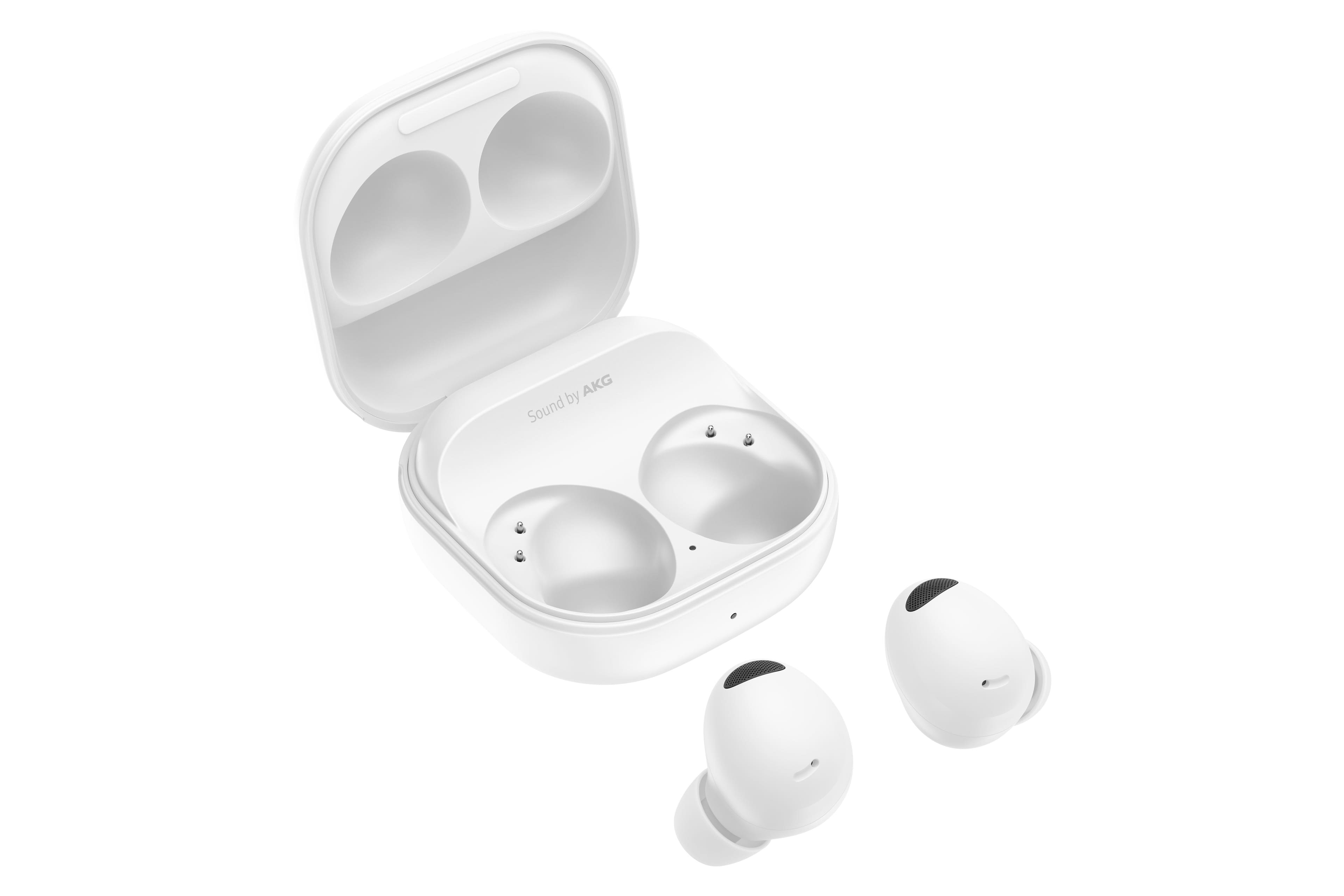
Customers consistently note the great sound quality, comfortable fit, and amazing battery life of the Galaxy Buds2 Pro. Many appreciate the rich bass and seamless connectivity. However, some find the price a bit high compared to competitors, and a few have concerns about the touch controls and maximum volume.

This summary was generated by AI based on customer reviews.

The vast majority of our reviews come from verified purchases. Reviews from customers may include My Best Buy members, employees, and Tech Insider Network members (as tagged). Select reviewers may receive discounted products, promotional considerations or entries into drawings for honest, helpful reviews.
Page 264 Showing 5,261-5,280 of 5,909 reviews
  • Rated 2 out of 5 stars

    Needs Improvement

    |
    |
    Posted . Owned for 3 weeks when reviewed.
    This reviewer received promo considerations or sweepstakes entry for writing a review.

    I purchased two pair for my husband and myself. Unfortunately, my husbands left ear bud has started crackling and he sounds muffled when trying to use them to talk. I am a disappointed and looking for a different type of ear bud. I would also like to have a longer battery life. I typically wear my earbuds during work hours and have to charge them often.

    No, I would not recommend this to a friend
  • Pros mentioned:
    Sound quality

    Rated 5 out of 5 stars

    Great sound quality

    |
    |
    Posted . Owned for 1 week when reviewed.
    This reviewer received promo considerations or sweepstakes entry for writing a review.

    These buds have a great sound balance with all the music i play. The noise cancelation is also a great feature. Sometimes i cant even hear my boss calling me....lol

    I would recommend this to a friend
  • Pros mentioned:
    Fit

    Rated 5 out of 5 stars

    They're Great!

    |
    |
    Posted . Owned for 1 month when reviewed.
    This reviewer received promo considerations or sweepstakes entry for writing a review.

    Better than the Galaxy Buds Pro in my opinion, a much better fit for ears that are smaller and overall a substantial improvement in both functionality and appearance

    I would recommend this to a friend
  • Pros mentioned:
    Sound quality

    Rated 2 out of 5 stars

    Disappointed they don't stay in my ears

    |
    |
    Posted . Owned for 3 months when reviewed.
    This reviewer received promo considerations or sweepstakes entry for writing a review.

    Great sound but they fall out of my ears with the smallest part on it. Disappointed that I have to wear a headband to keep them in.

    No, I would not recommend this to a friend
    • Brand response from Samsung
      Posted .

      Hello Denjse, we appreciate you sharing your thoughts with us about your Samsung Galaxy Buds2 Pro. We would be more than happy to assist you with the fit and security of your device. We have an article on our website "How to wear your Samsung earbuds" that will help you ensure the optimal placement with regards to the lip of the device and where that part should sit as well. You can also perform a fit test while wearing the device and connected in the Samsung Wearables App. Thank you for being a Samsung customer. -Elizabeth Samsung

  • Rated 4 out of 5 stars

    Review

    |
    |
    Posted . Owned for 3 weeks when reviewed.
    This reviewer received promo considerations or sweepstakes entry for writing a review.

    Ok, I'm reviewing this, so far so good. No complaints

    I would recommend this to a friend
  • Rated 3 out of 5 stars

    Nice sound. No battery life.

    |
    |
    Posted .
    This reviewer received promo considerations or sweepstakes entry for writing a review.

    Being a pro 2 series my expectation was high on at least maintaining the battery life of the previous version. I found myself disappointed, 1.75 to 2 hours talk time. Evaluating my purchase at this time.

    No, I would not recommend this to a friend
  • Rated 3 out of 5 stars

    Meh, not great. Keep looking.

    |
    |
    Posted . Owned for 3 weeks when reviewed.
    This reviewer received promo considerations or sweepstakes entry for writing a review.

    They have limited battery life and fall out all the time

    No, I would not recommend this to a friend
    • Brand response from Samsung
      Posted .

      Salutations JohnnyD, thanks for taking the opportunity to review your Samsung Galaxy Buds2 Pro. Your feedback allows us to remain committed to constant innovation as we strive to improve the design and functionality of our product line. Our goal is for our customers to feel like they are having the most marvelous experiences when using our products. Samsung provides a 12-month warranty on our products for manufacturing defects in materials and workmanship. From your early morning workout to a late night of studying, you want your earbuds' battery to last as long as you do. We'll give you the inside scoop on battery charging tips, steps to take to get the most out of your battery, and how to prevent damage to your earbuds. While all of Samsung's earbuds are built to last the entire day, the buds' battery life and charging times may differ depending on the model you have and how you use them. The Galaxy Buds2 Pro give you up to 8 hours of play time per charge, which can be extended to up to 30 hours with a fully charged case. Please take a moment to review, "All about your Samsung earbuds' battery life" for more helpful tips and tricks. In the past, you may have worn earbuds that either pinched your ears or were too loose. Both options are equally uncomfortable, whether you're out jogging or just listening to music. Thankfully, you'll never have those problems with your Samsung earbuds. If they don't fit right, you can simply swap the earbud tips and wingtips. If you wear your buds correctly, it will help ensure they remain comfortable while providing the best sound and call quality possible. With the Buds2 Pro, you can use the Earbud fit test to make sure you’re wearing them correctly. From the Galaxy Wearable app, tap Earbud settings, and then tap Earbud fit test. Put the earbuds in your ears and then tap Start to begin the test. If you have any questions for us or if you would like any further assistance, please let us know by contacting Support. Thank you for being a dedicated Samsung customer. - Debra Samsung

  • Pros mentioned:
    Sound quality

    Rated 2 out of 5 stars

    Smasung buds

    |
    |
    Posted . Owned for 1 month when reviewed.
    This reviewer received promo considerations or sweepstakes entry for writing a review.

    Excellent sound, but even after adjustments, can't get them to stay in my ear while walking. Should offer some other device to hold them in

    No, I would not recommend this to a friend
  • Rated 3 out of 5 stars

    Okay

    |
    |
    Posted . Owned for 1 month when reviewed.
    This reviewer received promo considerations or sweepstakes entry for writing a review.

    They sound ok. Great for their size. Waterproof but water does mess them up temporarily. The most annoying pair of headphones ive ever owned. They fall out easily, and theyre hard to find.

    No, I would not recommend this to a friend
  • Cons mentioned:
    Volume

    Rated 2 out of 5 stars

    Look else where for quantity

    |
    |
    Posted . Owned for 3 weeks when reviewed.
    This reviewer received promo considerations or sweepstakes entry for writing a review.

    Will blow out pretty easily, not very loud to beging with, i also get better audio quality from cheaper headphones.

    No, I would not recommend this to a friend
  • Rated 3 out of 5 stars

    Not great for the price.

    |
    |
    Posted . Owned for 1 month when reviewed.
    This reviewer received promo considerations or sweepstakes entry for writing a review.

    This is great if you have a Samsung phone in terms of connectivity and features but the audio quality is comparable to 50$ IEMs

    No, I would not recommend this to a friend
  • Rated 3 out of 5 stars

    Samsung Head phones

    |
    |
    Posted . Owned for 3 months when reviewed.
    This reviewer received promo considerations or sweepstakes entry for writing a review.

    Love this head phones but the only problem is that they get a little uncomfortable after some time and the rubber did couse a lot of itching on my ears that's the reason I not give 5 stars

    I would recommend this to a friend
  • Cons mentioned:
    Touch controls

    Rated 1 out of 5 stars

    Have to choose between volume and other touch cont

    |
    |
    Posted . Owned for 3 weeks when reviewed.
    This reviewer received promo considerations or sweepstakes entry for writing a review.

    You have to be really stupid--we're talking Samsung software engineers level stupid--to design earbuds where you have to choose between touch volume controls and touch calling and noise controls. But that's the case here. On top of that, Bixby truly sucks. It always has, so evidently it always will.

    No, I would not recommend this to a friend
  • Pros mentioned:
    Sound quality

    Rated 5 out of 5 stars

    Awesome

    |
    |
    Posted . Owned for 3 weeks when reviewed.
    This reviewer received promo considerations or sweepstakes entry for writing a review.

    These are some good samsung ear buds with good bass and sound,good noise cancelation.Thw case can also charge the earbuds which its great.

    I would recommend this to a friend
  • Rated 2 out of 5 stars

    Earbuds don't turn off when unused

    |
    |
    Posted . Owned for 7 months when reviewed.
    This reviewer received promo considerations or sweepstakes entry for writing a review.

    Earbuds will rub out of battery when not in use outside of the charger, so you're 100% going to lose them

    No, I would not recommend this to a friend
    • Brand response from Samsung
      Posted .

      Hi there James, thanks for taking the time to review your Samsung Galaxy Buds2 Pro. We appreciate your honesty as we strive to provide the best products with superior functionality on the market to our customers. Samsung provides a 12-month warranty on our products for manufacturing defects in materials and workmanship. Although the Galaxy Buds2 Pro do not have a manual power off button, they have been designed to utilize a low-power standby mode when they are not in use and outside of the case. Ultimately this design allows for your Galaxy Buds to quickly connect to your paired devices when they are needed. Feel free to check out, "All about your Samsung earbuds’ battery life" if you would like to learn more. If you misplace your Galaxy Buds2 Pro, you can usually locate them using the Galaxy Wearable app's "Find My Earbuds" feature. If you would like any further assistance or if you would like to share any other feedback with us, do not hesitate to contact Support. Thank you for being a loyal Samsung customer. - Debra Samsung

  • Rated 2 out of 5 stars

    Sounds great, but not comfortable.

    |
    |
    Posted . Owned for 1 month when reviewed.
    This reviewer received promo considerations or sweepstakes entry for writing a review.

    The sound is great but the right earbud hurts my ear so much I can not wear it for an extended period of time. I have tried the different fittings but it has something to do with the shape of the earbud. If I do manage to wear the right one for more than an hour, it actually hurts the inner cartilage of my ear when I remove it. I have found wearing it upside down works, but it’s prone to falling out. Most of the time I just wear the left one, which is no problem at all. It’s just me. Again, the sound quality is great but I preferred my original Galaxy Earbuds and really wish I hadn’t lost them.

    No, I would not recommend this to a friend
  • Pros mentioned:
    Fit, Sound quality
    Cons mentioned:
    Touch controls
    Tech Insider Network Member

    Rated 5 out of 5 stars

    Evolution of my favorite wireless earbud!

    |
    Tech Insider Network Member
    Posted .
    This reviewer received promo considerations or sweepstakes entry for writing a review.

    TLDR - This is a great evolution of my favorite wireless earbuds, the Galaxy Buds Pro. The sound and noise cancellation is improved, the buds fit much better than the previous generation and I love the new matte finish on the case and buds. My only complaint is the touch targets seem slightly smaller than the prior version, so I have to re-train my muscle memory. Get them if you're looking for a great wireless earbud, and have a Samsung device. iPhone and non-samsung devices, look elsewhere as the features you'll lose will not make this a great value compared to similar earbuds from Jabra or Apple. I have used the Galaxy Buds2 Pro (I'll refer to them as the Pro 2) for about a week. I also have a Galaxy Buds Pro ("Pro 1") and Galaxy Buds Live earbuds that I use interchangeably at both work and home, so I think I have a pretty good basis for comparison against those devices. Positives: Samsung really improved the comfort, sound quality and ANC in the Pro 2 vs. the Pro 1. The Pro 2s are much easier to fit in my ears (I use the medium size tips) because the shape is slightly smaller and oval compared to the rounder and thicker Pro 1. Fit and comfort is highly subjectiver however, since everyone's ears are different. The ANC and ambient noise quality and function are improved over the Pro 1. I use these and the Pro 1s in an office environment and the Pro 2 are definitely stronger ANC compared to the Pro 1. The ambient listening sound quality is slightly better on the Pro 2, but the feature itself works the same as the Pro 1. Negatives: The Pro 2s are slightly smaller than the Pro 1, so the touch targets are slightly smaller as well and have shifted slightly so I'm experiencing quite a few missed touches and wrong commands while my muscle memory is re-learned. The Pro 2s still don't have true multipoint capability, and the auto switch function between Samsung devices sometimes switched to my tablet when I didn't want it to. The IP67 rating carries forward from the Pro 1s without changes. I've used these in the shower a few times (same as the Pro 1) and they work fine, as long as you remember to turn off the touch controls to avoid accidental activation from water splashes. Since samsung didn't really add new features, the Pro 1s are still a great product and probably a better value now, assuming the price will drop to clear out remaining inventory. Overall, these are a great

    I would recommend this to a friend
  • Rated 3 out of 5 stars

    Indifferent

    |
    |
    Posted . Owned for 1 week when reviewed.
    This reviewer received promo considerations or sweepstakes entry for writing a review.

    I’m indifferent because I didn’t use the product long enough to give a robust review. I’m one of those with ears that EarPods like these don’t stay in.

    I would recommend this to a friend
  • Pros mentioned:
    Sound quality

    Rated 5 out of 5 stars

    Excellent overall

    |
    |
    Posted . Owned for 3 weeks when reviewed.
    This reviewer received promo considerations or sweepstakes entry for writing a review.

    Comfortable and incredibly easy to use. Noise cancellation is excellent and i really enjoy being and to customize the touch controls.

    I would recommend this to a friend
  • Rated 2 out of 5 stars

    Minimal operation available

    |
    |
    Posted . Owned for 1 year when reviewed.
    This reviewer received promo considerations or sweepstakes entry for writing a review.

    Okay performance. For the price, I expected to be able to increase/decrease the sound with the bud. No, I have to do it on my phone. I've owned better better buds for less. They do not stay in my ears. I reverted back to over the ear buds.

    No, I would not recommend this to a friend
    • Brand response from Samsung
      Posted .

      Salutations ElizabethS, thanks for taking the time out of your busy schedule to share your thoughts with us about your Samsung Galaxy Buds2 Pro. We appreciate your candor as we make every effort to improve the design and functionality of our product line. Our goal is for our customers to feel like they are having the most ideal experiences while using our products. Samsung provides a 12-month warranty on our products for manufacturing defects in materials and workmanship. You can activate a custom shortcut for your touch controls. The left and right earbuds can be assigned different shortcuts. Here's how: 1. From Galaxy Wearable, tap Touch controls > Touch and hold. 2. Tap an option to set the touch controls for each earbud: * Switch noise controls (default): Activate the noise canceling or ambient sound features. * Voice command: Say commands to change settings on your earbuds. * Volume up or Volume down: The right earbud is volume up, and the left is volume down. Once one has been set, the other will automatically update to the volume control option. In the past, you may have worn earbuds that either pinched your ears or were too loose. Both options are equally uncomfortable, whether you're out jogging or just listening to music. Thankfully, you'll never have those problems with your Samsung earbuds. If they don't fit right, you can simply swap the earbud tips and wingtips. If you wear your buds correctly, it will help ensure they remain comfortable while providing the best sound and call quality possible. With the Buds2 and Buds2 Pro, you can use the Earbud fit test to make sure you’re wearing them correctly. From the Galaxy Wearable app, tap Earbud settings, and then tap Earbud fit test. Put the earbuds in your ears and then tap Start to begin the test. If you would like any further assistance or if you would like any further assistance, feel free to contact Support. Thank you for being a faithful Samsung customer. - Debra Samsung