Customer Ratings & Reviews


- Model:
- SM-R630NZAAXAR
- SKU:
- 12558964
Rating by feature
- Sound Quality
Rating 4.8 out of 5 stars
- Battery Life
Rating 4.6 out of 5 stars
- Connectivity
Rating 4.8 out of 5 stars
Customers are saying
Customers regard the sound quality as the standout feature of this product, with many users also praising its comfortable fit and impressive battery life. While the design, connectivity, and overall feature set receive positive feedback, some users have expressed minor concerns regarding the sensitivity of the touch controls and the maximum volume levels. Overall, the product is highly regarded for its performance and user experience.
This summary was generated by AI based on customer reviews.
High level
||Posted . Owned for 3 months when reviewed.This reviewer received promo considerations or sweepstakes entry for writing a review.Bough few cheap before, the microphone was bad. These are absolutely another level.
I would recommend this to a friendBest
||Posted . Owned for 3 weeks when reviewed.This reviewer received promo considerations or sweepstakes entry for writing a review.Best earphones in my opinion love them so far and no problem here
I would recommend this to a friendCharge
||Posted . Owned for 1 month when reviewed.This reviewer received promo considerations or sweepstakes entry for writing a review.For some reason my ear buds are not charging. I have to wiggle the earphones inside the box to get them to connect. These are the second set that have the same issue.
No, I would not recommend this to a friendBrand response from Samsung
Posted .Aloha Betty, thank you for taking the time to share your experience with using the Samsung Galaxy Buds3 Pro. We appreciate your feedback as we improve the design and functionality of our product line. Samsung provides a 12-month warranty for manufacturing defects in materials and workmanship. If your Galaxy Buds3 Pro are not charging properly, I have included a few steps that may help resolve what you may be experiencing with your charging. 1. Use the included charging cable and connect to a USB charger, 2. Check to be sure the case is charging correctly, 3. Verify there is no debris in the charging cradle pin connectors., 4. Check to be sure there is no debris in the charging connect on the Galaxy Buds. 5. Check the Wear app to determine if one bud is not charging and check the bud is fully inside the charging case. If you would like any further assistance afterward, please feel free to reach out to Support. We're always happy to help! Thanks for being a steadfast Samsung customer. - Debra

Recommend
||Posted . Owned for 3 weeks when reviewed.This reviewer received promo considerations or sweepstakes entry for writing a review.Item works great and best price around. Highly recommend
I would recommend this to a friendGreat item
||Posted .This reviewer received promo considerations or sweepstakes entry for writing a review.Great item, connection is hit and miss with some devices.
I would recommend this to a friendNice ear bud
||Posted .This reviewer received promo considerations or sweepstakes entry for writing a review.10/10 star rating, i hihlghly recommend this product
I would recommend this to a friendSamsung
||Posted . Owned for 5 months when reviewed.This reviewer received promo considerations or sweepstakes entry for writing a review.Bought these for my boyfriend and he loves them uses them everyday!!
I would recommend this to a friendEar pods
||Posted .This reviewer received promo considerations or sweepstakes entry for writing a review.Best ear pods I have ever owned! I highly recommend them
I would recommend this to a friendAmazing
||Posted . Owned for 3 weeks when reviewed.This reviewer received promo considerations or sweepstakes entry for writing a review.These are an absolute great purchase. Couldn't have picked a better pair. Definitely recommend
I would recommend this to a friendDamage eaay
||Posted . Owned for 1 year when reviewed.This reviewer received promo considerations or sweepstakes entry for writing a review.Good work out earphone but it does fall out your ear damnge easy
I would recommend this to a friendBrand response from Samsung
Posted .Hey there TroyH, thank you for taking the time to share your experience with using the Samsung Galaxy Buds3 Pro. Wearing your earbuds properly is important for many reasons. You'll get better sound quality from them, they'll fit more comfortably, and they'll stay in your ears. Wearing them improperly can cause discomfort, sound leaks, and makes them more likely to fall out. The Galaxy Buds3 Pro come with different sized ear tips. The first thing you want to do is make sure they have the right size tips for your ears. You want them to fit so that there isn't a gap between your ear and the ear tip. This helps to avoid sound leaks and ensure optimal audio. Once you have the right tips on your buds: 1. Check the bottom of the earbuds for directional marks. You will see an L and an R. 2. Insert the R bud into your right ear with the R facing you. 3. Insert the L bud into your left ear with the L facing you. 4. Angle the blade slightly so that the microphone on the bottom is pointing towards your mouth rather than straight down. 5. You can adjust the buds by rotating them forwards and backwards until the fit feels right. You can also run an earbud fit test in the Galaxy Wearable app to ensure you have the proper fit. To run an Earbud fit test, 1. Open the Galaxy Wearable app on your connected phone. 2. From the Buds3 Pro screen, tap Sound quality and effects. 3. Tap Earbud fit test. 4. The screen will display either In ear or Not in ear. Make sure both buds are in your ears, and then tap Start. 5. The buds will chime for a few seconds, and then the app will display your results. It may say Poor fit or Good fit. If the fit is poor, make small adjustments and then tap Try again. 6. Continue running the fit test and making adjustments until you get a good fit result for both buds. If you would like more information regarding achieving the perfect fit, feel free to review "How to wear your Samsung Galaxy Buds3 and 3 Pro." Please feel free to reach out to Support if you have any questions or if you would like further assistance. Thank you for being a loyal Samsung customer. - Debra
Galaxy buds
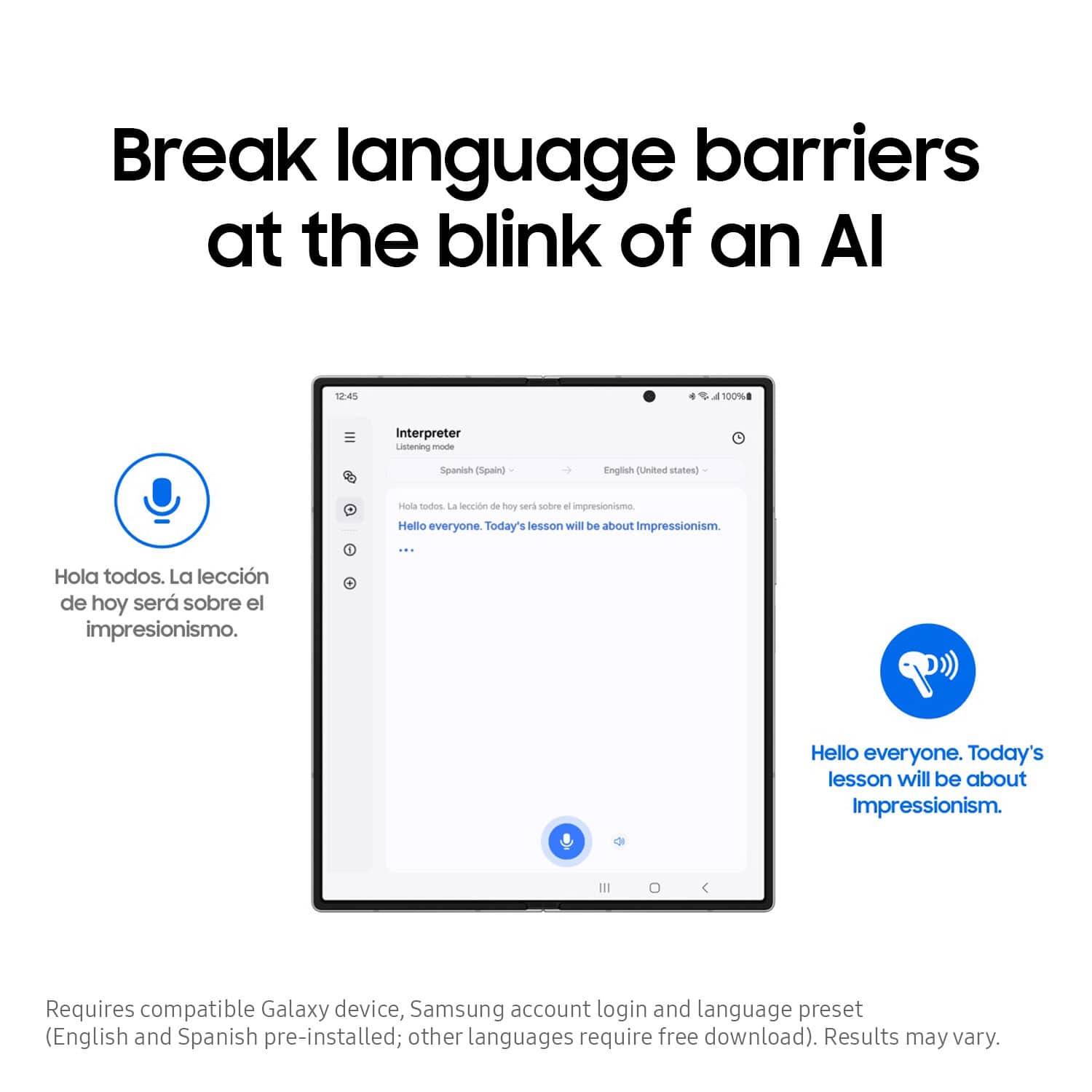
||Posted .This reviewer received promo considerations or sweepstakes entry for writing a review.Long time samsung costumer bed ear buds so far best feature is the translation capability
I would recommend this to a friendGreat Purchase
||Posted . Owned for 1 month when reviewed.This reviewer received promo considerations or sweepstakes entry for writing a review.Best Buy had the best black friday in stock. Happy customer with my purchase. Recommend product!
I would recommend this to a friendGreat noise cancel features
||Posted . Owned for 1 month when reviewed.This reviewer received promo considerations or sweepstakes entry for writing a review.Great so far. Better than last years model. Yayyy
I would recommend this to a friendBest quality
||Posted . Owned for 4 months when reviewed.This reviewer received promo considerations or sweepstakes entry for writing a review.Best ever thank you Best buy!! They are perfect best I ever had
I would recommend this to a friendBuds
||Posted .This reviewer received promo considerations or sweepstakes entry for writing a review.Accidentally washed them already,no apperant damage. Thumbs up.
I would recommend this to a friendPerfection
||Posted . Owned for 2 months when reviewed.This reviewer received promo considerations or sweepstakes entry for writing a review.I love these. They are the best most universal headphones ive purchased definitely worth every cent.
I would recommend this to a friend
Not terrible
|Posted . Owned for 1 month when reviewed.This reviewer received promo considerations or sweepstakes entry for writing a review.[Employee of bestbuy] Weird sounding bad noise cancelling and overall bad headphones
No, I would not recommend this to a friendEasy fall of the ears
||Posted . Owned for 3 weeks when reviewed.This reviewer received promo considerations or sweepstakes entry for writing a review.Buds looks nice, but bluethoot connection is laking and they fall off easy from the ears, i return them and buy to buds pro 4
No, I would not recommend this to a friendBrand response from Samsung
Posted .Greetings Omayra72, thank you for taking the opportunity to reach out and share your sentiments with us about your experience using the Samsung Galaxy Buds3 Pro. We appreciate your feedback as we strive in providing the best products with superior functionality on the market for our customers. Wearing your earbuds properly is important for many reasons. You'll get better sound quality from them, they'll fit more comfortably, and they'll stay in your ears. Wearing them improperly can cause discomfort, sound leaks, and makes them more likely to fall out. As you know, the Galaxy Buds3 Pro come with different sized ear tips. The first thing you want to do is make sure they have the right size tips for your ears. You want them to fit so that there isn't a gap between your ear and the ear tip. This helps to avoid sound leaks and ensure optimal audio. Once you have the right tips on your buds: 1. Check the bottom of the earbuds for directional marks. You will see an L and an R. 2. Insert the R bud into your right ear with the R facing you. 3. Insert the L bud into your left ear with the L facing you. 4. Angle the blade slightly so that the microphone on the bottom is pointing towards your mouth rather than straight down. 5. You can adjust the buds by rotating them forwards and backwards until the fit feels right. You can also run an earbud fit test in the Galaxy Wearable app to ensure you have the proper fit. To run an Earbud fit test, 1. Open the Galaxy Wearable app on your connected phone. 2. From the Buds3 Pro screen, tap Sound quality and effects. 3. Tap Earbud fit test. 4. The screen will display either In ear or Not in ear. Make sure both buds are in your ears, and then tap Start. 5. The buds will chime for a few seconds, and then the app will display your results. It may say Poor fit or Good fit. If the fit is poor, make small adjustments and then tap Try again. 6. Continue running the fit test and making adjustments until you get a good fit result for both buds. If you would like more information regarding fit, feel free to check out "How to wear your Samsung Galaxy Buds3 and 3 Pro. If you would like any further assistance afterward, feel free to contact Support. Thank you for being a staunch Samsung customer. - Debra
Excellent
||Posted . Owned for 1 month when reviewed.This reviewer received promo considerations or sweepstakes entry for writing a review.Love all rhe features such as being able to talk /make commands through them
I would recommend this to a friendToo big
||Posted . Owned for 3 months when reviewed.This reviewer received promo considerations or sweepstakes entry for writing a review.They worked great but were too big for my ears. Even after i changed the size of the plastic thingies.
I would recommend this to a friendBrand response from Samsung
Posted .Howdy SheyR, thank you for taking the opportunity to share your thoughts with us about your experience using the Samsung Galaxy Buds3 Pro. We value your feedback as we continue to make improvements on the design and functionality of our product line. It's important to wear your earbuds properly for many reasons. You'll get better sound quality from them, they'll fit more comfortably, and they'll stay in your ears. Wearing them improperly can cause discomfort, sound leaks, and makes them more likely to fall out. The Galaxy Buds3 Pro come with different sized ear tips. The first thing you want to do is make sure they have the right size tips for your ears. You want them to fit so that there isn't a gap between your ear and the ear tip. This helps to avoid sound leaks and ensure optimal audio. Once you have the right tips on your buds: 1. Check the bottom of the earbuds for directional marks. You will see an L and an R. 2. Insert the R bud into your right ear with the R facing you. 3. Insert the L bud into your left ear with the L facing you. 4. Angle the blade slightly so that the microphone on the bottom is pointing towards your mouth rather than straight down. 5. You can adjust the buds by rotating them forwards and backwards until the fit feels right. You can also run an earbud fit test in the Galaxy Wearable app to ensure you have the proper fit. To run an Earbud fit test, 1. Open the Galaxy Wearable app on your connected phone. 2. From the Buds3 Pro screen, tap Sound quality and effects. 3. Tap Earbud fit test. 4. The screen will display either In ear or Not in ear. Make sure both buds are in your ears, and then tap Start. 5. The buds will chime for a few seconds, and then the app will display your results. It may say Poor fit or Good fit. If the fit is poor, make small adjustments and then tap Try again. 6. Continue running the fit test and making adjustments until you get a good fit result for both buds. If you would like more information regarding achieving the perfect fit, feel free to review "How to wear your Samsung Galaxy Buds3 and 3 Pro." If you would like any further assistance afterward, please do not hesitate to reach out to Support at your earliest convenience. Thanks for being an unwavering Samsung customer. - Debra