Customer Ratings & Reviews


- Model:
- SM-R630NZAAXAR
- SKU:
- 12558964
Rating by feature
- Sound Quality
Rating 4.8 out of 5 stars
- Battery Life
Rating 4.6 out of 5 stars
- Connectivity
Rating 4.8 out of 5 stars
Customers are saying
Customers regard the sound quality as the standout feature of this product, with many users also praising its comfortable fit and impressive battery life. While the design, connectivity, and overall feature set receive positive feedback, some users have expressed minor concerns regarding the sensitivity of the touch controls and the maximum volume levels. Overall, the product is highly regarded for its performance and user experience.
This summary was generated by AI based on customer reviews.
Amazing
||Posted . Owned for 1 week when reviewed.This reviewer received promo considerations or sweepstakes entry for writing a review.My husband absolutely loves them. He is so happy to have the lastest and greatest!
I would recommend this to a friendWill buy again
||Posted . Owned for 1 week when reviewed.This reviewer received promo considerations or sweepstakes entry for writing a review.Pre ordered this for my husband. He uses them for everything and has no complaints.
I would recommend this to a friendSatisfied Customer
||Posted . Owned for 3 weeks when reviewed.This reviewer received promo considerations or sweepstakes entry for writing a review.Great customer service and money saving deals.....
I would recommend this to a friendDelivered to Wrong Address
||Posted . Owned for 1 month when reviewed.This reviewer received promo considerations or sweepstakes entry for writing a review.My problem is not with the product itself, because the earbuds work great. It is with their method of shipping and BestBuy's lack of trying to make sure the customer was satisfied. They shipped through USPS which delivered my product to the wrong address, they have no photo proof to show where they delivered to so it is was impossible to track, but because they said they delivered them they closed my claim. If my neighbor 1 block over (same house number different street) was not honest, they would have has a nice pair of earbuds and I would have been left with nothing but the bill.
I would recommend this to a friendNot a good experience
||Posted .This reviewer received promo considerations or sweepstakes entry for writing a review.I feel the earbuds are little bit overrated like sound qualityz and anc is not that great. I can also feel pain if i use it for more than 30 mins, I will try the Pixel and see else would return this. Also it can only connect to registered samsung devices and cannot switch to mac or window machines automatically
No, I would not recommend this to a friendBrand response from Samsung
Posted .Howdy MinhaazM, thanks for taking the time out of your hectic day to share your thoughts with us about your Samsung Galaxy Buds3 Pro. We appreciate your feedback as we strive in providing the best products with superior functionality on the market for our customers. Samsung provides a 12-month warranty on our products for manufacturing defects in materials and workmanship. Please take a moment to review, "No, low, or poor audio quality on Samsung earbuds" to help resolve what you have described to be experiencing with your audio quality. It's important to wear your earbuds properly for many reasons. You'll get better sound quality from them, they'll fit more comfortably, and they'll stay in your ears. Wearing them improperly can cause discomfort, sound leaks, and makes them more likely to fall out. As you know, the Galaxy Buds3 Pro come with different sized ear tips. The first thing you want to do is make sure they have the right size tips for your ears. You want them to fit so that there isn't a gap between your ear and the ear tip. This helps to avoid sound leaks and ensure optimal audio. Once you have the right tips on your buds: 1. Check the bottom of the earbuds for directional marks. You will see an L and an R. 2. Insert the R bud into your right ear with the R facing you. 3. Insert the L bud into your left ear with the L facing you. 4. Angle the blade slightly so that the microphone on the bottom is pointing towards your mouth rather than straight down. 5. You can adjust the buds by rotating them forwards and backwards until the fit feels right. You can also run an earbud fit test in the Galaxy Wearable app to ensure you have the proper fit. To run an Earbud fit test, 1. Open the Galaxy Wearable app on your connected phone. 2. From the Buds3 Pro screen, tap Sound quality and effects. 3. Tap Earbud fit test. 4. The screen will display either In ear or Not in ear. Make sure both buds are in your ears, and then tap Start. 5. The buds will chime for a few seconds, and then the app will display your results. It may say Poor fit or Good fit. If the fit is poor, make small adjustments and then tap Try again. 6. Continue running the fit test and making adjustments until you get a good fit result for both buds. If you would like more information regarding fit, feel free to check out "How to wear your Samsung Galaxy Buds3 and 3 Pro." If you would like any further assistance afterward, feel free to contact Support. Thank you for being a devoted Samsung customer. - Debra

Buds3
||Posted . Owned for 3 weeks when reviewed.This reviewer received promo considerations or sweepstakes entry for writing a review.Great bud. Enjoying them more than the review rating
I would recommend this to a friendsamsung
||Posted . Owned for less than 1 week when reviewed.This reviewer received promo considerations or sweepstakes entry for writing a review.Excellent product quality price, I have been using it and I have no complaints.
I would recommend this to a friendFair
||Posted . Owned for 2 months when reviewed.This reviewer received promo considerations or sweepstakes entry for writing a review.Doesnt seal well around ears the active noise canceling doesnt work with just one earbud has to be both would be great for people who use earbuds for an hour or so after that your ears burn red and hurt from the uncomfortable fit almkst as if the bud doesnt sit well on the outside
No, I would not recommend this to a friendBrand response from Samsung
Posted .Aloha MatthewW, thanks for taking the time out of your busy day to share your thoughts with us about your Samsung Galaxy Buds3 Pro. As we strive to be innovative and make improvements on the design and functionality of our product line, your feedback is invaluable. The Galaxy Buds3 Pro come with different sized ear tips. The first thing you want to do is make sure they have the right size tips for your ears. You want them to fit so that there isn't a gap between your ear and the ear tip. This helps to avoid sound leaks and ensure optimal audio. Once you have the right tips on your buds: 1. Check the bottom of the earbuds for directional marks. You will see an L and an R. 2. Insert the R bud into your right ear with the R facing you. 3. Insert the L bud into your left ear with the L facing you. 4. Angle the blade slightly so that the microphone on the bottom is pointing towards your mouth rather than straight down. 5. You can adjust the buds by rotating them forwards and backwards until the fit feels right. You can also run an earbud fit test in the Galaxy Wearable app to ensure you have the proper fit. To run an Earbud fit test, 1. Open the Galaxy Wearable app on your connected phone. 2. From the Buds3 Pro screen, tap Sound quality and effects. 3. Tap Earbud fit test. 4. The screen will display either In ear or Not in ear. Make sure both buds are in your ears, and then tap Start. 5. The buds will chime for a few seconds, and then the app will display your results. It may say Poor fit or Good fit. If the fit is poor, make small adjustments and then tap Try again. 6. Continue running the fit test and making adjustments until you get a good fit result for both buds. If you would like more information regarding fit, feel free to check out "How to wear your Samsung Galaxy Buds3 and 3 Pro." Feel free to reach out to Samsung Support after reviewing the resource shared if you would like any further assistance. Thank you for being a steadfast Samsung customer. - Debra
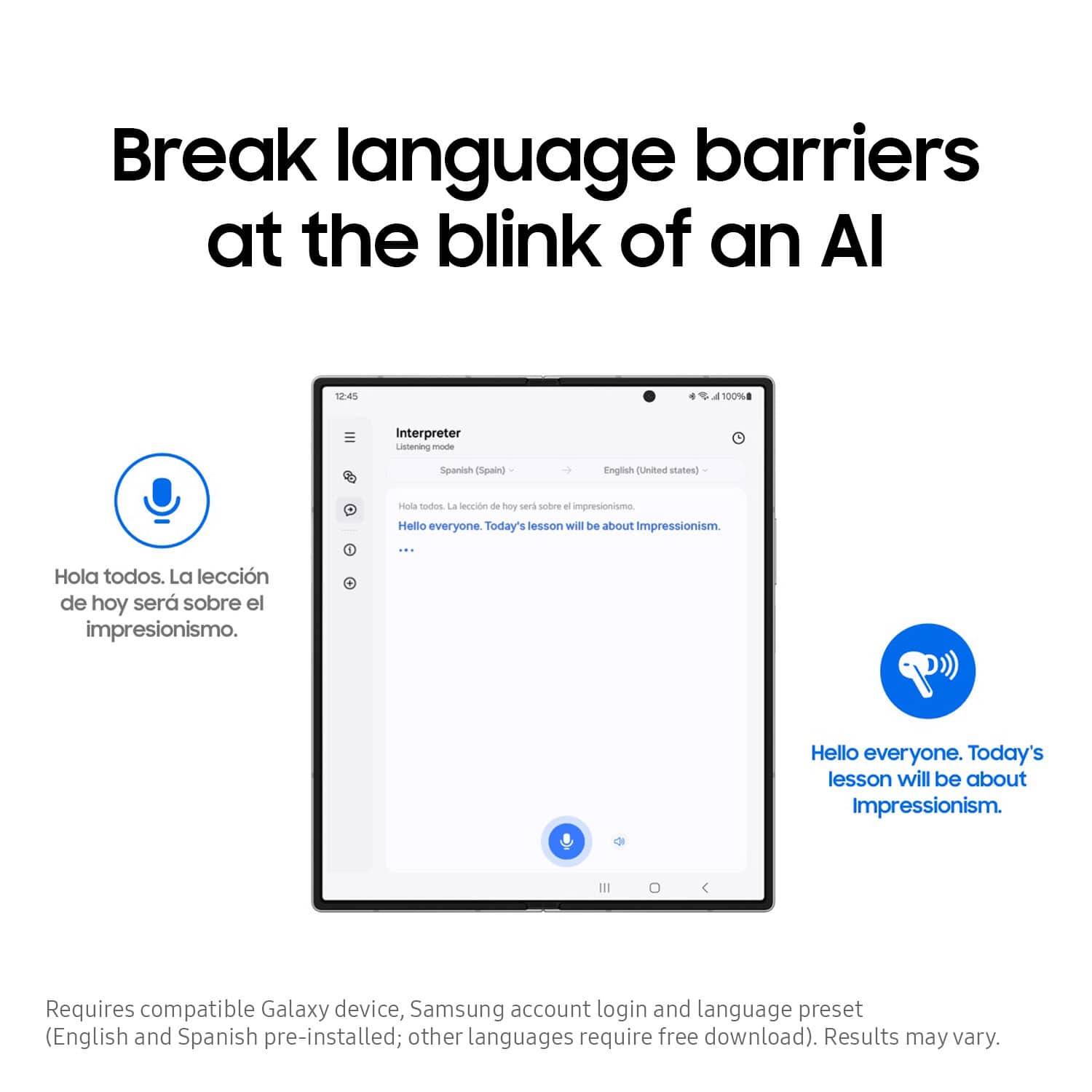
I want real time translate
||Posted . Owned for 1 month when reviewed.This reviewer received promo considerations or sweepstakes entry for writing a review.They aren't adxactly what I bought them for as translator and they don't work for working with Spanish the way I want
No, I would not recommend this to a friendBrand response from Samsung
Posted .Greetings DonS, thank you for finding the time out of your day to share your sentiments with us about your experience using the Samsung Galaxy Buds3 Pro. Your feedback is appreciated as we strive to be innovative and improve the performance and functionality of our products. Samsung provides a 12-month warranty on our products for manufacturing defects in materials and workmanship. The translation feature offered relies on your connected Samsung phone's Galaxy AI. The earbuds act as the audio interface, while the phone handles the processing. Without having more information available regarding what you may be experiencing with your feature and without being able to ask you any follow up questions to probe further, I recommend contacting Support for further assistance with troubleshooting your device. Thank you for being a dedicated Samsung customer. - Debra
- Cons mentioned:Volume
Not apple friendly
||Posted . Owned for less than 1 week when reviewed.This reviewer received promo considerations or sweepstakes entry for writing a review.Not nearly as loud as I expected in the app doesn’t work with Apple products
No, I would not recommend this to a friendBrand response from Samsung
Posted .Hello TylerJ, thank you for finding the time to share your sentiments with us about your experience using the Samsung Galaxy Buds3 Pro. We appreciate your feedback as it allows us to improve the design and functionality of our product line while we remain committed to constant innovation. Samsung provides a 12-month warranty on our products for manufacturing defects in materials and workmanship. To adjust the Galaxy Buds 3 Pro volume, please visit the Galaxy Wearable app and adjust the Galaxy Buds3 Pro in the Galaxy Wearable app by setting the touchpad to control the volume, increasing it to max, and then changing it back to your preferred setting. Additionally, clean the earbuds, ensure a proper fit, check for software updates, and adjust the EQ settings within the app. Hope it helps! If you would like to share any other feedback with us or if you would like any further assistance, please feel free to reach out to Support. Thank you for being a treasured Samsung customer. - Debra
Samsung Buds Pro 3
||Posted . Owned for 2 months when reviewed.This reviewer received promo considerations or sweepstakes entry for writing a review.Samsung Buds Pro 3 are excellent. Work superbly with my Samsung S23 Ultra.
I would recommend this to a friendIm excited
||Posted . Owned for 3 weeks when reviewed.This reviewer received promo considerations or sweepstakes entry for writing a review.I like them are so incredible i gonna get 2 more for my family
I would recommend this to a friendGood item
||Posted . Owned for 4 months when reviewed.This reviewer received promo considerations or sweepstakes entry for writing a review.Im only giving bad reviews becuse of me buying it off Samsung and they eventually just kept chargening me when i didnt recive. Then best buy just immediately gave it to me after purchasing and i accidentally put it in the washing machine :(
I would recommend this to a friend- Pros mentioned:Sound quality
When they work ...
||Posted . Owned for 1 month when reviewed.This reviewer received promo considerations or sweepstakes entry for writing a review.constantly lose connection, just like the buds2 ... across any device, including my zfold 5, 6, and samsung galaxy book 4 edge ... sigh that said, when they work and are not disconnected, they sound amazing ...
No, I would not recommend this to a friendBrand response from Samsung
Posted .Good day KennyS, thank you for finding the time out of your busy day to share your thoughts with us about your Samsung Galaxy Buds3 Pro. We value your honesty as we improve the design and functionality of our product line while we stay committed to constant innovation. Samsung provides a 12-month warranty on our products for manufacturing defects in materials and workmanship. If your phone cannot connect to your Galaxy Bud series earbuds, getting them to connect again will only take a couple of steps. Performing a restart on the earbuds, resetting the Bluetooth connection, or updating the Galaxy Wearable app will normally fix the issue. Please take the time to review, "Connection issues with Samsung earbuds" to help resolve what you may be experiencing with your Buds3 Pro. If you would like any further assistance afterward or if you have any questions for us, let us know by reaching back out at your earliest convenience. Thank you for being an unwavering Samsung customer. - Debra
Galaxy buds 3 pro
||Posted . Owned for 2 months when reviewed.This reviewer received promo considerations or sweepstakes entry for writing a review.The pods are nice looking but the sound is not the best. The base is not deep and its kind of rattly. Maybe if I can get some foam memory ear tips it might improve the sound. Battery life is also not the best. To be completely honest, I paid $250 for these and I am a bit disappointed.
No, I would not recommend this to a friendBrand response from Samsung
Posted .Hello there Rick, thank you for finding the available time out of your lively day to share your sentiments with us about your Samsung GalaxyBuds3 Pro. We value your feedback as it allows us the opportunity to improve the functionality and design of our products as we strive to be innovative. Our goal is for our customers to feel like they are having the most unforgettable experiences while using our products. Samsung provides a 12-month warranty on our products for manufacturing defects in materials and workmanship. If your earbuds have no or low volume and poor sound quality on one or both buds, there may be a couple reasons why. You might be wearing the earbuds incorrectly, or the buds could have accumulated dust or debris. Additionally, the audio quality could be affected by outdated software, a low battery, and several other things. Please take a moment to review, "No, low, or poor audio quality on Samsung earbuds" to help resolve what you have described to be experiencing with your Buds3 Pro. If you have any questions for us afterward or if you would like any further assistance, do not hesitate to reach out to Samsung Support at your earliest convenience. Thank you for being a steadfast Samsung customer. - Debra
Yes
||Posted . Owned for 2 weeks when reviewed.This reviewer received promo considerations or sweepstakes entry for writing a review.No complaints from me. If you have an Android, I highly suggest these.
I would recommend this to a friendJones
||Posted .This reviewer received promo considerations or sweepstakes entry for writing a review.Slip out the ear easily bought hooks to go on then
I would recommend this to a friendBrand response from Samsung
Posted .Howdy RosalynJ, thank you for sharing your sentiments with us about your experience using the Samsung Galaxy Buds3 Pro. We value your feedback as we continue to make improvements on the design and functionality of our product line. It's important to wear your earbuds properly for many reasons. You'll get better sound quality from them, they'll fit more comfortably, and they'll stay in your ears. Wearing them improperly can cause discomfort, sound leaks, and makes them more likely to fall out. The Galaxy Buds3 Pro come with different sized ear tips. The first thing you want to do is make sure they have the right size tips for your ears. You want them to fit so that there isn't a gap between your ear and the ear tip. This helps to avoid sound leaks and ensure optimal audio. Once you have the right tips on your buds: 1. Check the bottom of the earbuds for directional marks. You will see an L and an R. 2. Insert the R bud into your right ear with the R facing you. 3. Insert the L bud into your left ear with the L facing you. 4. Angle the blade slightly so that the microphone on the bottom is pointing towards your mouth rather than straight down. 5. You can adjust the buds by rotating them forwards and backwards until the fit feels right. You can also run an earbud fit test in the Galaxy Wearable app to ensure you have the proper fit. To run an Earbud fit test, 1. Open the Galaxy Wearable app on your connected phone. 2. From the Buds3 Pro screen, tap Sound quality and effects. 3. Tap Earbud fit test. 4. The screen will display either In ear or Not in ear. Make sure both buds are in your ears, and then tap Start. 5. The buds will chime for a few seconds, and then the app will display your results. It may say Poor fit or Good fit. If the fit is poor, make small adjustments and then tap Try again. 6. Continue running the fit test and making adjustments until you get a good fit result for both buds. If you would like more information regarding achieving the perfect fit, feel free to check out "How to wear your Samsung Galaxy Buds3 and 3 Pro." If you would like any further assistance afterward or if you have any questions for us, please do not hesitate to reach out to Support at your leisure. Thanks for being a faithful Samsung customer. - Debra
Best buds ever
||Posted . Owned for 1 month when reviewed.This reviewer received promo considerations or sweepstakes entry for writing a review.Best ear buds ever!!!!!!!!!!!!!!!!!!!!!!!!!!!!!!!°°
I would recommend this to a friendGood customer
||Posted . Owned for 3 months when reviewed.This reviewer received promo considerations or sweepstakes entry for writing a review.Samsung, this one is very good condition very good
I would recommend this to a friendGood stor
||Posted . Owned for 1 month when reviewed.This reviewer received promo considerations or sweepstakes entry for writing a review.Fast and efficient delivery veryyyyyy goood the best
I would recommend this to a friend